Step 2 of a two-step TIA Portal GRAPH sequencer on a CPU 1515-2 PN has been active for 4 minutes 12 seconds by its own S2.T, the transition below it has been satisfied for the last 40 of those seconds, and the sequencer is still sitting on step 2. The heater that step 2 drives went off at 0:47 when somebody lifted the lid, came back on at 1:34 when they closed it, and the temperature reached 80.0 °C at 3:32. Nothing is broken and nothing is moving, and the reason is written into the definition of a supervision: a step whose supervision condition is satisfied does not advance, and a supervision built on CMP>T_MAX stays satisfied for as long as the step stays active.
A step stops advancing for one of three reasons. Its transition is false, a supervision fault is pending on it, or the sequencer is not in automatic mode. The interlock is not on that list.
This was written against chapter 16 and section 22.2.10 of the STEP 7 Professional V14 SP1 system manual, which is where the GRAPH editor for the S7-1500 is documented. What the editor shows and what the sequencer does below are the manual’s descriptions; the batch tank is a worked example built from them, not a machine watched from a chair. GRAPH is an S7-1500 language: the programming guideline’s language table gives it to the 1500 and not to the S7-1200, so a 1214C cannot run any of this.
A TIA Portal GRAPH sequencer: three blocks, two steps, one jump
A sequential control system in GRAPH is never one block. The manual says at least three: the GRAPH function block, its instance DB, and a code block that calls it, and the GRAPH FB is always called as a single instance, never as a multi-instance inside another FB. Its cycle is the calling block’s cycle. In each of those cycles the permanent pre-instructions run first, then the actions of whichever steps are active, then the permanent post-instructions, and the pre- and post-instructions run every cycle whether or not any step is active at all.
Three blocks, and the calling block sets the cycle for all of them.
The sequencer itself is built in the sequence view. Add a GRAPH FB, open it, and the structure elements on the task card are Step and transition, Step, Transition, Simultaneous branch, Alternative branch, Close branch, Jump to step and Sequence end. Two steps and a loop is four clicks: S1 Fill with T1 under it, S2 Heat with T2 under it, and a jump from T2 back to S1. Mark S1 as the initial step, which frames it in the view, and it is the step that goes active on a rising edge at INIT_SQ; every other step is deactivated on that same edge. One rule from the manual that matters even at this size: do not jump from a transition to the step directly before it. T2 back to S2 would be exactly that, and the manual’s answer is an empty step with an empty transition in between, because an empty step advances in the same cycle and costs nothing.
Two steps, two transitions, one jump back, and one rule about where it lands.
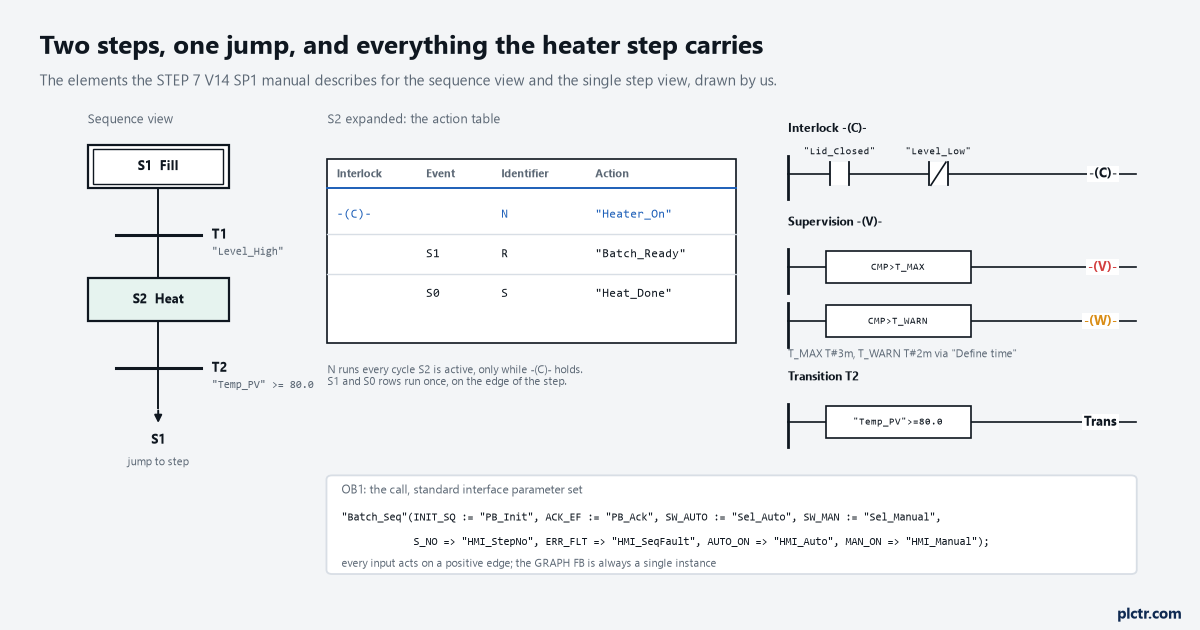
Our own drawing of the elements the editor shows, not a screenshot. The action table has four columns, and the first one is the interlock link that most people leave blank.
The single step view is where a step gets its content, and a step has exactly three kinds: interlock, supervision, and actions, with the transition below. An action is a row in a table with four columns. Interlock, which is either blank or -(C)-. Event, which is blank for a standard action or one of S1, S0, V1, V0, L1, L0, A1, R1. Identifier, which is the instruction: N for set while the step is active, S for set and leave set, R for reset and leave reset, D for set after a delay, L for set for a limited time, ON and OFF to activate or deactivate another step, CALL for a block. And the action itself, the operand or the call. Actions run top to bottom every cycle the step is active, and D and L cannot be tied to an event. For the heater step that is three rows:
| Interlock | Event | Identifier | Action |
|---|---|---|---|
| -(C)- | N | “Heater_On” | |
| S1 | R | “Batch_Ready” | |
| S0 | S | “Heat_Done” |
The heater is driven as long as the step is active and the interlock holds. Batch_Ready is reset once, in the cycle the step goes active, and Heat_Done is set once, in the cycle it goes inactive.
Four columns per row, and the first is the one that gets left blank.
A transition is written the same way as an interlock or a supervision, as a LAD or FBD network of up to 32 instructions and 32 operands. T1 is a contact on “Level_High”. T2 is a comparator, “Temp_PV” greater than or equal to 80.0. The interlock on S2 is “Lid_Closed” AND NOT “Level_Low” into the -(C)- coil. The supervision on S2 is CMP>T_MAX into the -(V)- coil, with CMP>T_WARN into a -(W)- coil on a second rung so the warning arrives before the fault. T_MAX and T_WARN start as the defaults under PLC programming, GRAPH, Default for time monitoring, and are set for this step with Define time on the supervision network; this tank gets T#3m and T#2m.
The call in OB1 is ordinary. With the standard interface parameter set, which is what a new GRAPH FB gets unless the setting says otherwise, it looks like this in SCL:
"Batch_Seq"(INIT_SQ := "PB_Init",
            ACK_EF  := "PB_Ack",
            SW_AUTO := "Sel_Auto",
            SW_MAN  := "Sel_Manual",
            S_NO    => "HMI_StepNo",
            S_ACTIVE => "HMI_StepActive",
            ERR_FLT => "HMI_SeqFault",
            AUTO_ON => "HMI_Auto",
            MAN_ON  => "HMI_Manual");
Every input reacts to a positive edge, so a selector switch held on SW_AUTO does nothing after its first scan, and the outputs ERR_FLT and S_NO are the two an HMI cannot do without. On a 1500 the instance DB always carries the full parameter set behind those pins; the migration chapter says the minimised memory model was dropped for the S7-1500 and optimised block access is always on for a GRAPH block and cannot be turned off.
S_NO and ERR_FLT on the HMI, and the step that hangs names itself.
What the interlock does, and what it does not
An interlock is a condition on the actions, not on the step.
The manual’s wording is exact and worth reading twice. Actions of a step that are linked with the interlock are only executed when the interlock condition is satisfied; if it is not, a fault exists, an alarm can be raised for it, and the fault does not affect the advancement to the next step. So when the lid comes up at 0:47 the -(C)- network goes false, Heater_On drops in that cycle, the L1 event fires, the interlock alarm comes in if alarms are enabled, and step 2 stays active with its timer running. The two rows without a -(C)- in the interlock column, the S1 and S0 actions, are untouched by it. If Temp_PV had reached 80.0 with the lid open, T2 would have been satisfied and the sequencer would have advanced to S1 with the interlock fault still standing, because the manual says the interlock is cancelled automatically when the step is deactivated. That is the design intent: the interlock protects the actuator, not the recipe. Two things follow. First, an action with a blank interlock column is not interlocked, and the editor does not warn you; N “Heater_On” with nothing in the first column runs with the lid open. Second, an interlock network with no conditions in it is legal and always satisfied, so a step that has -(C)- in every action row and nothing in the -(C)- network is interlocked against nothing. Both are visible in the single step view and invisible in the sequence view until the step is expanded.
An interlock stops the heater. It has never once stopped a step.
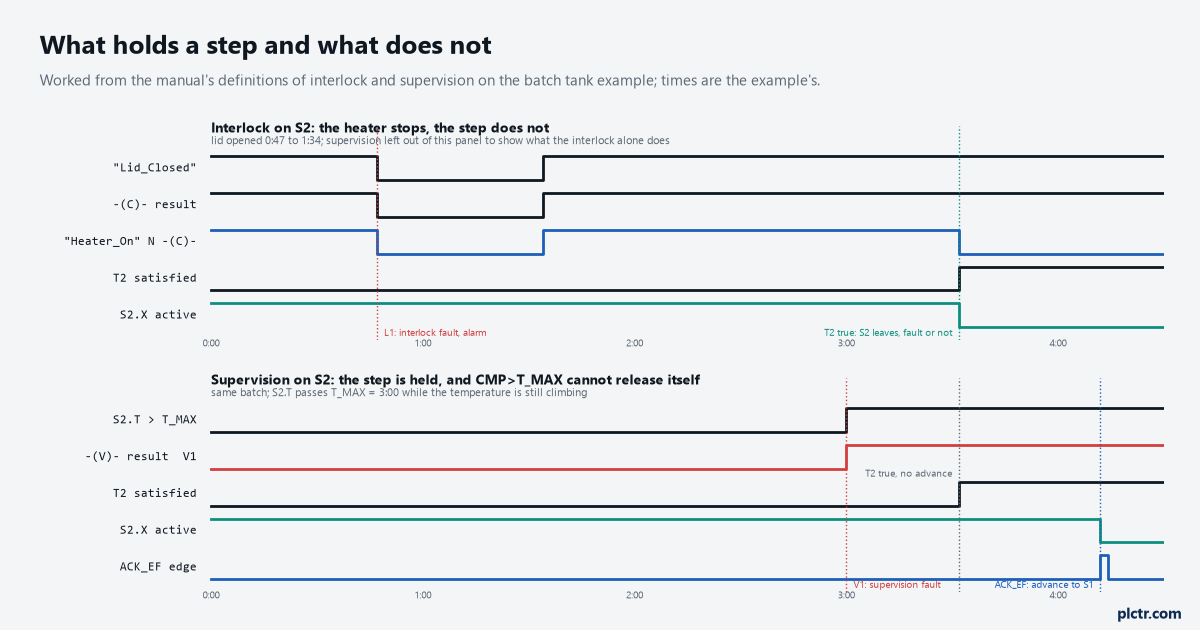
The interlock acts on the action row it is linked to. The supervision acts on the step. Only one of them can hold a satisfied transition.
What the supervision does, and why this one latches
A supervision is a condition on the step, and its logic is inverted relative to everything else on the page: when the supervision condition is satisfied, a fault exists. The manual’s sentence for what follows is the whole article: the step remains active, the sequencer does not advance to the next step but stays in the active step until the fault has been eliminated. The processing order in each cycle makes it precise. Once the actions have run, the sequencer first checks for a supervision error; only if there is none and the transition is satisfied does the next step go active. Now put CMP>T_MAX in that network. The instruction is true when the step’s activation time S2.T exceeds S2.T_MAX, and S2.T is the total time the step has been active, which keeps growing for as long as the step is active. On this tank the lid was open for 47 seconds, the heater was off for them, and the temperature took until 3:32 instead of 2:45 to reach 80.0 °C; at 3:00 the step passed T#3m, the -(V)- coil went true, the V1 event fired and the supervision alarm came in. At 3:32 T2 became satisfied. The step did not advance, because a supervision error was pending, and the error cannot clear by itself, because the only way for S2.T to drop below T_MAX is for the step to be deactivated, which is the thing the pending error prevents. The manual does not spell that circle out; it follows from the two definitions, and it is the reason a time supervision on a 1500 is always paired with something that can release it.
A time supervision cannot clear itself. Only an acknowledge can, or a deactivation.
That something is ACK_EF, which the interface table describes as acknowledge a fault, force advance to next step. A rising edge on it, from the Ack push button in the call above or from Acknowledge -(V)- in the Sequence control pallet of the Testing task card while you are online, is what moved this sequencer to S1 at 4:12. Whether an acknowledgement is required at all is a block setting, Acknowledge supervision alarms under the sequence properties, and there is a second setting with almost the same name under the alarm properties that only decides whether the alarm has to be acknowledged to close; the first one is the one that holds the sequencer.
T_MAX and T_WARN do not have to be typed. On a 1500 with the GRAPH block at version 2.0 or later the times can be learned: EN_LMODE on the maximum interface parameter set, or the learning mode in the Testing task card, measures each step’s activation time while the program runs and writes T_MAX and T_WARN into the instance DB as the measured time plus the percentage in RT_DATA.TRESHOLD_SUP and TRESHOLD_WARN. The manual’s caution is that the interface route saves the values only in the online DB and cannot reset them, while the test-card route can.
The step that never advances, and the three places to look
The single step view online, with program status on, colours the elements of the interlock network, the supervision network and the transition network, and Track active step in the test settings follows the sequencer as it moves. When it stops moving, the instance DB has already named the cause, and the maximum parameter set puts it on the block’s pins. Three cases, in the order they are worth checking.
Pins first, process second. The DB knows why before you do.
The transition is false. T2.TV is true, meaning the transition is valid because its step is active, and T2.TT, transition satisfied, is false. On a block at version 4.0 or later the manual lists T_CRIT, and per transition the CRIT double word, as the state of up to 32 LAD/FBD elements in the transition network, one bit per element, which is how the false contact is named without a watch table; below version 4.0 it is the coloured network in the single step view. The fix is the process, or the comparator’s constant.
A supervision fault is pending. ERR_FLT is true on the standard set, FAULT on the maximum set, S2.VA, pending supervision, is true, and S2.T is past S2.T_MAX. T2.TT may well be true, as it was here. Either the condition has to clear or ACK_EF has to see an edge, and with Acknowledge supervision alarms set the edge is needed even after the condition clears.
The sequencer is not in automatic. AUTO_ON is false and one of MAN_ON, TAP_ON or TOP_ON is true. In semi-automatic mode the manual says the sequencer advances only on a satisfied transition together with a rising edge at T_PUSH, or a manual step in the Testing task card, so a satisfied T2 on its own does nothing; in manual mode it advances on the Next button and nothing else. A rising edge at SW_AUTO returns it. Two relatives of this case: SQ_HALTED true after an edge on HALT_SQ, and the Stop sequence test setting, which the manual says stops the sequencer even if the next transition is fulfilled, and which is easy to leave ticked from an earlier session.
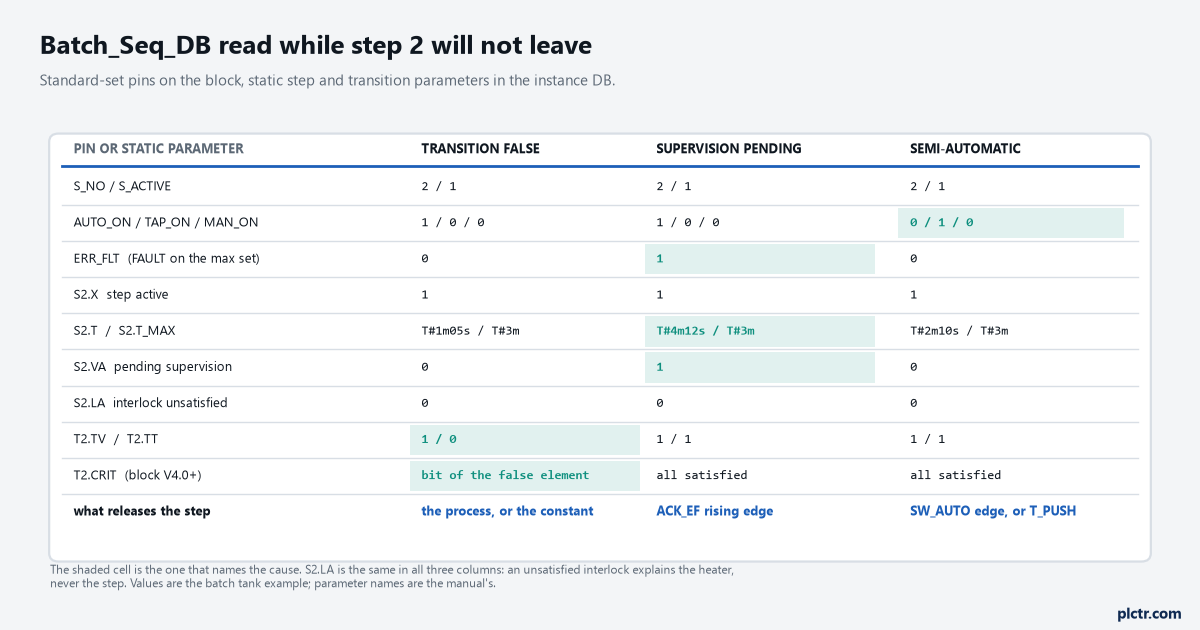
Read the pins before the process. S2.T against S2.T_MAX and T2.TT between them answer the question in one glance, and the mode outputs answer the one nobody asks.
The one that is not on the list is the interlock, and it is the one people go to first because the visible symptom, the heater off, is the interlock’s work. S2.LA, interlock unsatisfied, being true tells you why the actuator stopped. It says nothing about why the step did.
Two settings that change what a two-step sequencer does
Skip steps, under the sequence properties, tells the sequencer not to activate a step whose following transition is already satisfied at the moment the step would go active. With a tank already at 80.0 °C that means S2 is never entered, its S1 and S0 actions never run, and Heat_Done is never set. Whether that is right depends on whether the actions are recording or acting; for a step whose only job is to drive the heater it is fine, and for one that stamps a batch record it is a step that silently never happened.
Skip steps skips the actions too, not only the wait.
And the permanent instructions. They run every cycle, ahead of the steps and again after them, whether any step is active or not. The manual’s own use for them is conditions and block calls that do not belong to a step, and the assignment they end in, including S and R memory functions, can be read in any transition, interlock or supervision network. An OFF_SQ edge, which deactivates every step, does not stop them. Anything that must be true regardless of where the sequencer is, the general fault that drops the heater contactor for example, belongs there and not in an action row, because an action row only exists while its step is active.
Next step
Before the first download, open the GRAPH page under Options > Settings > PLC programming and read the sequence properties once: Skip steps, Acknowledge supervision alarms, Lock operating mode selection, and the two default times. Then go online with program status on the GRAPH block, put the Testing task card where you can see the Sequence control pallet, and leave it in automatic. The first time a step holds, read S_NO with ERR_FLT and AUTO_ON, then the step’s T against its T_MAX, from the instance DB in a watch table before you touch anything, and pair every CMP>T_MAX with an acknowledge path the operator can actually reach. If this is your first sequencer of any kind, the vendor-neutral shape of a sequential function chart is worth reading for the branch and jump rules that GRAPH shares with everyone else; the Rockwell reader will recognise the same holds and releases in SQO and SQI, without the supervision. And if the sequencer you have to look after was written in S7-GRAPH on a 315, it comes across in the same migration as the rest of the program, with its minimised DB expanded to the full parameter set on the way.