A project built for a CPU 1214C DC/DC/DC, no CPU in the building until Thursday, and an S7-1200 PLCSIM instance one toolbar button away. Press it, pick PLCSIM in the PG/PC interface dropdown instead of the wired NIC, and the download that would have gone to 192.168.0.1 over the bench cable goes to a powered-up instance in S7-PLCSIM instead, and the program runs. It runs with the timers counting, the SCL blocks executing and the watch tables monitoring, and it runs without the high-speed counters, the PID loops, the motion objects, the memory card, or a cycle time that means anything.
That last list is the article, and it is shorter than it looks.
S7-PLCSIM will take any program that compiles, and the manual is unusually direct about which parts of a physical S7-1200 it does not simulate. Read that list before the first download and the simulator is the most useful tool on the laptop; read it after the machine behaves differently on Thursday and it is the tool that wasted Tuesday. Everything below about what PLCSIM does is from the S7-PLCSIM V21 online help, which is the manual; where a behaviour is one I see rather than one it documents, the sentence says so.
The download path with PLCSIM in place of the interface
Nothing in the project changes. Select the PLC in the project tree, click Start simulation, and the manual’s procedure takes over: if S7-PLCSIM is not running it starts with a new workspace named after the STEP 7 project and one simulated instance in it, and if it is already running the instance is added to the current workspace. Then the same dialogs as a real download, with two prompts a bench CPU never produces. The first is the PG/PC interface, where the entry is PLCSIM when the communication mode is Softbus, which is the only mode a Standard instance runs in; the manual says an S7-1200 is only supported as a Standard instance, and that in the TCP/IP modes Standard instances cannot be powered on at all. The second is a prompt to enable simulation support, which is the project property under Protection, Support simulation during block compilation, and which the manual says you also need for know-how protected blocks and for any download error that mentions blocks that cannot be simulated. Then trust the device, Start search, Load, Finish. Download hardware and software the first time; later downloads carry changes only. Where the download lands is a rule worth knowing verbatim in shape: on the first download STEP 7 loads to the unconfigured instance at the default IP address that was powered on first, and on later downloads to the powered-on instance whose IP address matches the PLC in the project, or, if none does, to another unconfigured one. If Start simulation is pressed twice for the same PLC, the manual notes, you get two instances of it, and the second download goes wherever the IP rule sends it, which is how a morning gets lost watching the wrong instance. The PG/PC interface dropdown and the empty search list behave exactly as they do with a real CPU, and the same fix applies: check which interface is selected before checking anything else.
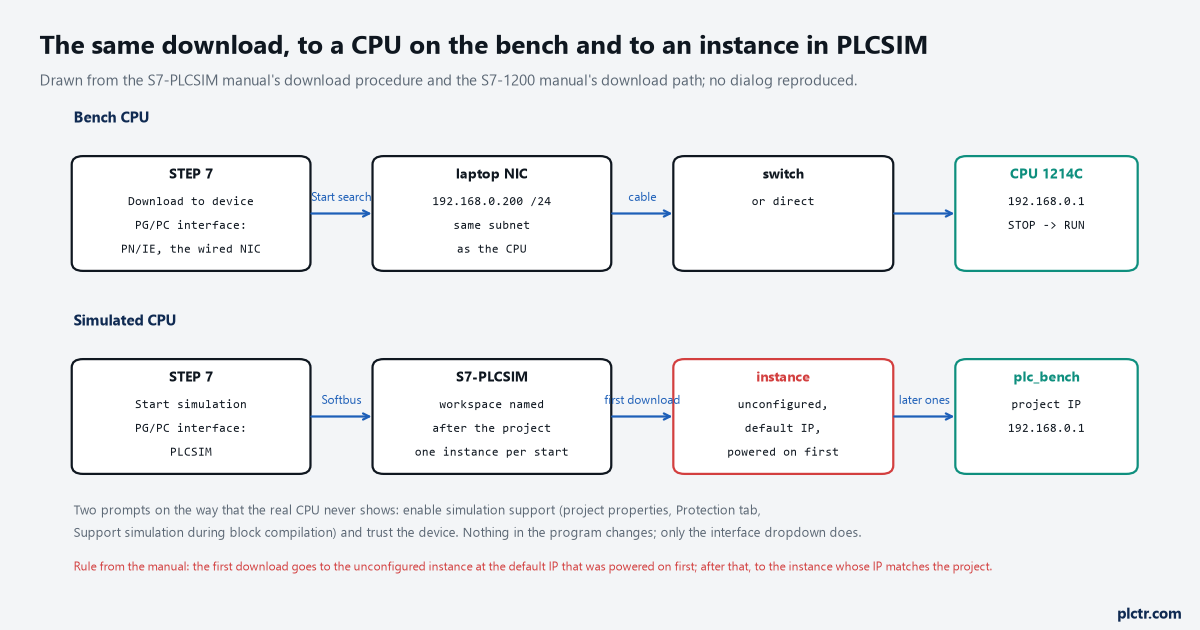
From the manual’s download procedure and the S7-1200 manual’s download path. The program is identical in both lanes; only the interface dropdown differs.
Two powered instances, maximum, and the manual warns that performance drops with each one.
The simulated CPU and the SIM table that stands in for the wiring
The instance in the workspace is the CPU. It has a power button, a mode of RUN or STOP, an MRES button that the manual defines as clearing all working memory and copying load memory to working memory, a properties tab with the X1 interface showing the default IP or the project’s, and a cycle time setting with three choices: use the downloaded maximum cycle time, disable scan cycle monitoring, or specify one in milliseconds. Beside it are the SIM tables, which do the job of the wiring. Enter a tag or an address, type a value in the Monitor/Modify column, press Enter, and the manual says the value is modified for the current scan cycle; tick Consistent Modify on several rows and modify them together. Two rules from the manual decide what you can see there. Tags that are not marked Accessible from HMI in STEP 7, which is the default but which people switch off on large arrays, are not available in the SIM table at all, and unsupported data types have to be watched from a STEP 7 watch table instead. And forced values from STEP 7 supersede anything the SIM table does, so a force left over from a session on the bench CPU will override the simulation without a message. For anything more than a single button there are sequences, which the manual describes as a way to simulate the behaviour of external devices on the running program: a scripted series of value changes with a time interval, saved with the workspace, replayable. A conveyor with a photo-eye that has to go dark 300 ms after the motor starts is one sequence, and replaying it ten times is the closest a laptop gets to the interlock in the first SCL block being exercised by a real belt. Sequences run on Standard instances only, which on a 1214C is the only kind you have.
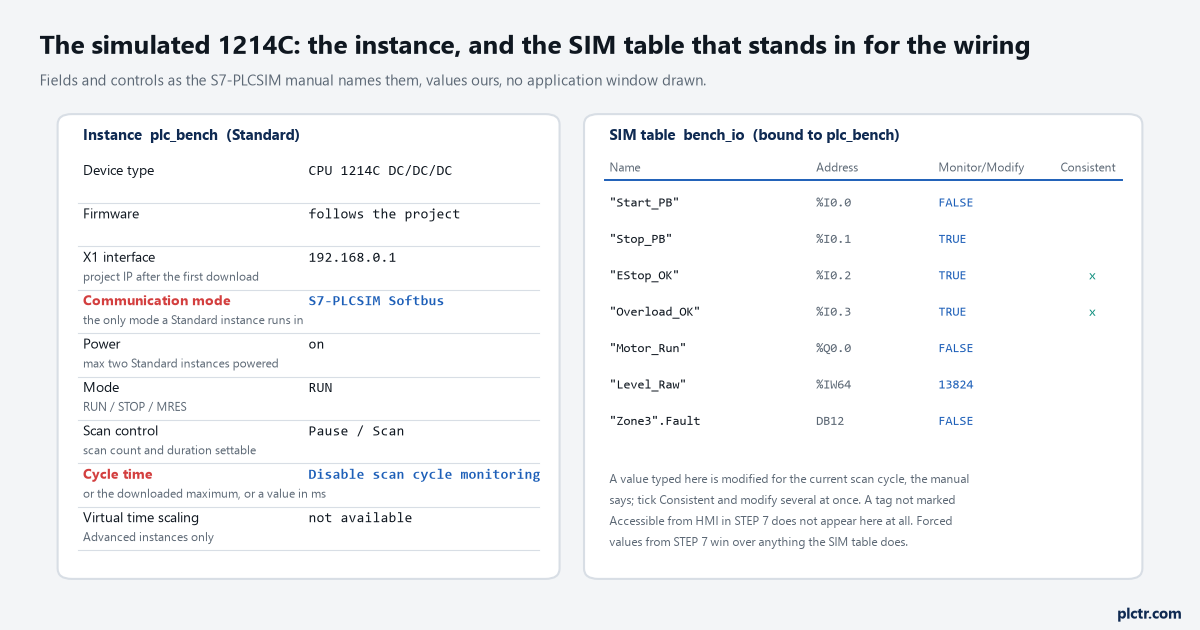
Fields and controls as the manual names them, values ours, no application window drawn. The communication mode and the cycle time setting are the two that matter on a 1214C.
The SIM table is the wiring; a force left from the bench overrides it silently.
What S7-1200 PLCSIM does not reproduce
The manual’s chapter on differences between a simulated PLC and a physical PLC is short and every line of it costs somebody a day eventually. The first and largest for an S7-1200: S7-PLCSIM does not simulate counting, measurement and position detection, PID control, or motion control on an S7-1200. The high-speed counter, the PID_Compact loop and the axis are simply not there; the technology object exists in the project, the blocks compile, the download succeeds, and the values never move. The same manual lists those three as supported on the S7-1200 G2, the S7-1500, the ET 200SP and the Software Controller, so a project that leans on them can be simulated by temporarily targeting one of those, but the 1214C itself cannot. Then timing. Because S7-PLCSIM is software running on a programming device under Windows, the scan cycle time and the exact time of actions are not the same as if PLC firmware performed them, and the manual’s advice is not to evaluate a time-dependent program on the simulation’s timing alone. A TON still counts seconds; how many scans fit into a second is a laptop number. Then the diagnostics buffer, where not all error messages are supported, though most program errors are; access protection and copy protection, not simulated; LEDs, which nothing can flash; every function that needs a memory card, data logging and recipes named; the web server, on Advanced instances in a TCP/IP mode only; PROFIBUS elements, which are ignored while the rest of the project runs; and an F-CPU, whose F-monitoring time has to be raised from the default 150 ms before it will run at all, by trial.
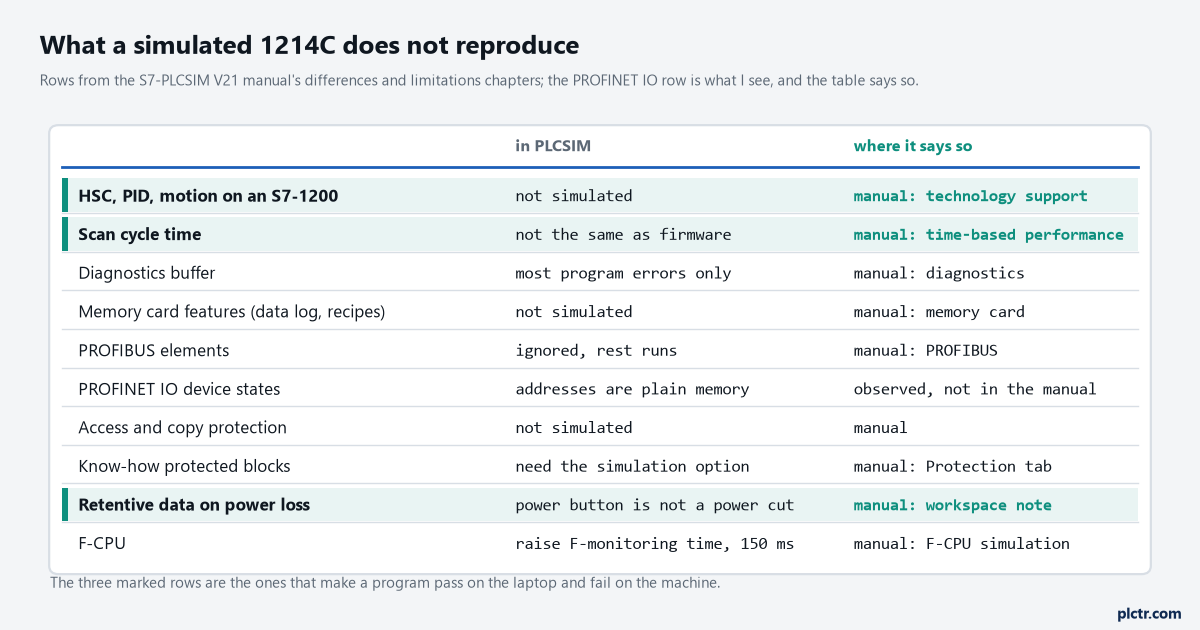
Rows from the manual’s differences and limitations chapters. The PROFINET IO row is observation, and the table says so.
PROFINET IO devices are not in that chapter for the S7-1200, and what I see is that their addresses behave as plain memory: an ET 200SP’s inputs sit at whatever the SIM table last wrote, no device is ever missing, and no station failure OB ever fires. The retentive question is the subtle one. On a real 1214C the system manual describes retentive memory as saved at power loss, so a retentive DB comes back on the next power-up. In PLCSIM the power button on the instance is not a power failure, and the manual’s own note on the subject is that retentive DB values for an S7-1500 might not be saved unless the instance is powered off before the workspace is saved, with the line that S7-1200 projects do not experience this behaviour. That is a note about saving workspaces, not about simulating a brown-out, and there is no setting that reproduces one.
Station failures and retentive logic get tested on Thursday, on the CPU, not before.
Cycle time, and the overflow that is not your program
A program with a cyclic interrupt OB at 1 ms will, on a slow enough laptop, produce a scan cycle overflow in the simulation that would never occur on the CPU, and the manual names the cause: the S7-PLCSIM cyclic event queue can overflow when the simulation contains cyclic interrupts, because of the speed of S7-PLCSIM in relation to actual hardware. Its remedy is in the instance properties: select Disable scan cycle monitoring, or Specify maximum cycle time and raise it; and if a cyclic OB itself overflows, lengthen its cycle in STEP 7 and download again. The scan control on a Standard instance is the other half of this, and it is the feature a physical CPU does not have: Pause stops the scan with the instance still in RUN, Scan runs it for a scan count and duration you set while paused, and stepping a sequence through twenty scans at a time is how a state machine gets watched one transition at a time.
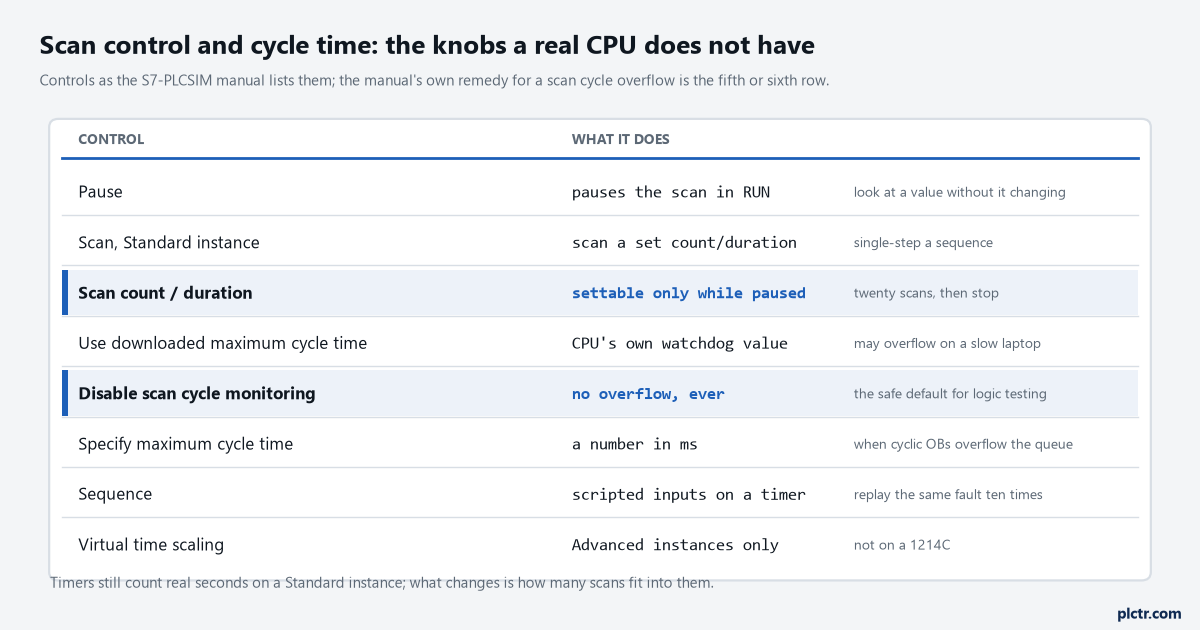
Controls from the manual; its own remedy for the overflow is the fifth and sixth rows.
Disable the monitoring for logic testing; put it back before you believe a cycle time.
The things that stop the download before it starts
Four of the manual’s limitations show up as a download that fails or an instance that will not go to RUN, and none of them is the program. Time synchronisation via NTP enabled in the CPU’s device configuration: you cannot download to a simulated instance until it is disabled. IP address from DHCP server selected in the device configuration: not supported on Standard instances. An isochronous OB set to run with the send clock of the central I/O: the instance cannot be set to RUN until the OB’s cycle time is changed to cyclic. And access control, which depends on the CPU version: on an S7-1200 V4.6 and earlier, Full access or Read access under Access control; on V4.7, the users and roles under Security settings, with the Anonymous user given the access you want the simulator to have. One more that catches people who have just uploaded a program from a CPU nobody documented: a download to PLCSIM can fail with a message that the program was not compiled, on programs uploaded from a physical PLC or pasted between projects, because of automatically generated blocks; the manual’s fix is to delete the generated blocks and run Compile, Software (rebuild all blocks). The dead end here is the firmware: when the download will not go, people open the device catalogue and start changing the CPU’s firmware version, because that is the fix for a mismatch on a real 1214C, and it is the one thing the simulator does not care about. Check NTP, DHCP and access control first, and the version last.
A simulated instance takes whatever version the project gives it and has no opinion.
When it passes on the laptop
Save the workspace with the instance powered off or in STOP, which the manual asks for to avoid an instance that will not power on again after frequent writes to its virtual SD card. Then write down, from the differences list, what the simulation did not test on this project: usually the HSC on the encoder input, the PID loop, and every timing that matters. Those are Thursday’s list, with the CPU on the bench and the watch table and program status doing on hardware what the SIM table did on the laptop. And if the CPU on Thursday is not the one in the project, the order number and firmware in the device view are where that gets fixed, not in the simulator.