MOV, MVM and CLR: Moving a Word, and Moving Only Some of Its Bits
MOV a DINT holding 123456 into an INT tag and the INT reads -7616. No fault light, no message, the rung stays exactly as green as it was, and the only record that anything was lost is S:V, which nobody has on a watch window.
Here is the whole distinction, before the reasoning.
The three instructions differ in exactly one thing: how much of the destination they own. MOV writes all of it. MVM writes only the bits its mask passes and leaves every other bit of the destination precisely as it found it. CLR writes zero to all of it. So the question that picks the instruction is not what you want to write — it is who else writes that word. If the answer is anything other than nobody, MOV is the wrong choice and the failure will show up on somebody else’s bits.
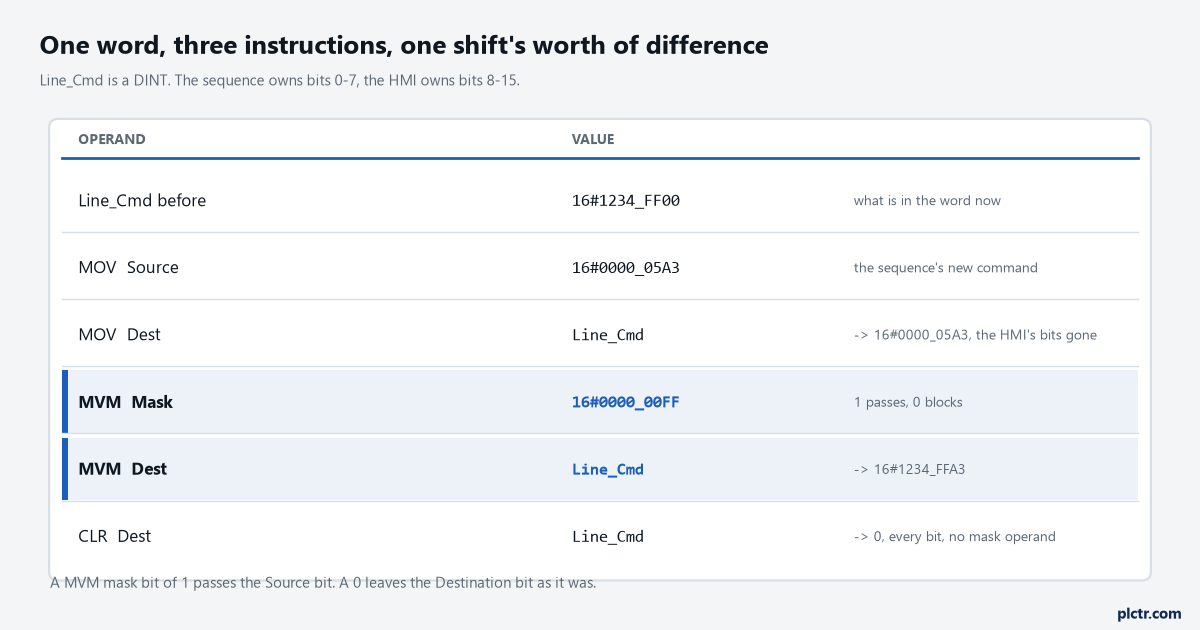
The same source value through three instructions. Only the MVM row leaves 16#1234 in the top half of the word, which is where the HMI’s bits live.
Pick by asking who else owns bits in that word
A drive command word is the usual place this bites, because two pieces of code legitimately write it.
The sequence sets run and direction. The HMI sets the jog and the fault reset. Both are writing one DINT, and if the sequence does its half with a MOV then every HMI bit goes to zero eight times a second, silently, because MOV does not know the word has co-owners. Splitting the word into two tags is the better design and is not always available to you — a PowerFlex 525 command word arriving from a ControlLogix is one word because the drive says it is one word. MVM exists for exactly that case: one instruction, one mask, one owner per bit.
Two routines, one DINT, and only one of them knows the word is shared.
CLR is the blunt one and it has no mask operand at all.
Two administrative details before the examples, both of which will confuse somebody reading an older printout. In Logix Designer version 36 the mnemonic for MOV changed to MOVE, and the mnemonic for LIM changed to LIMIT, which 1756-RM018A prints as a note on page 531. And all three of these are ladder instructions only. MOV, MVM and CLR are each listed as not available in function block and not available in structured text; in ST you write dest := source; for a move and dest := 0; for a clear, and the masked move becomes MVMT, a function block instruction with a Target input that gets copied into the destination first. If you are moving between the two languages regularly, the six structured text constructs a ladder programmer actually needs covers the assignment side of that.
Which way does the mask run?
A 1 in the mask passes the source bit through. A 0 blocks it and reports nothing.
That is the sentence to memorise, because the other reading — mask means protect, so a 1 protects the destination — is just as plausible and is wrong. The manual’s wording on page 523 is “a ‘1’ in the mask means the data bit is passed; a ‘0’ in the mask means the data bit is blocked”, and the execution table adds the half that matters more: unmasked bits in the destination remain unchanged. Unchanged, not zeroed. So a MVM into a destination that already holds rubbish leaves the rubbish sitting in every bit the mask blocked, and the instruction has done nothing wrong.
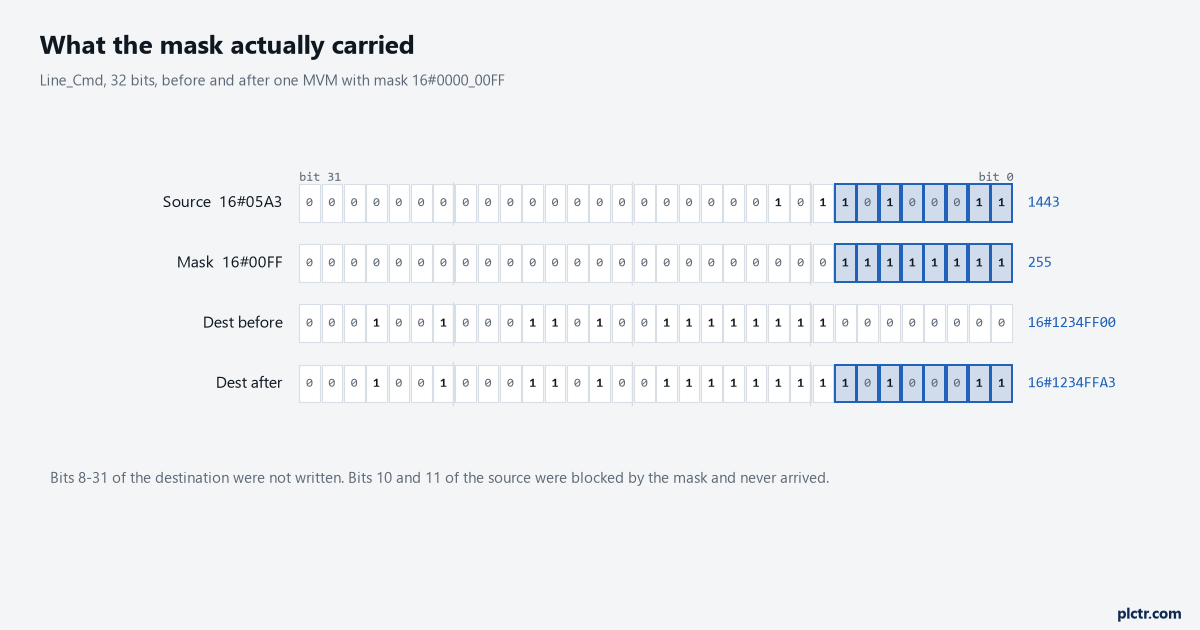
Bits 8 and 10 of the source are set and never arrive: the mask blocked them. Bits 8 to 31 of the destination were not touched, which is the point of the instruction and also the thing that hides a stale value.
Work one through by hand once and you will not need to again. Source 16#0000_05A3, mask 16#0000_00FF, destination sitting at 16#1234_FF00. The mask passes bits 0 to 7, so the low byte of the destination becomes the low byte of the source, 16#A3. Everything above bit 7 keeps what it had, so the answer is 16#1234_FFA3. The two set bits of the source that live at bit 8 and bit 10 are simply discarded — not carried, not reported, not flagged.
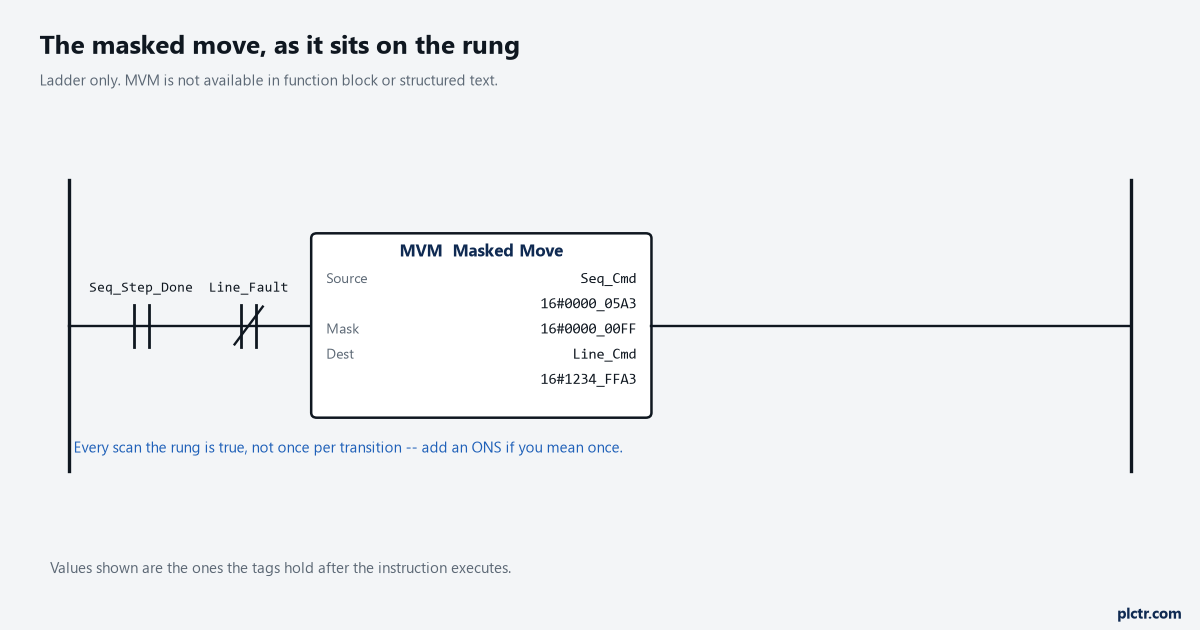
The instruction executes on every scan the rung is true, not once per transition. If the intent is one write per event, the ONS goes in front of it.
Nothing on the rung shows that two source bits were dropped on the way.
Now the trap that sits in the mask entry field itself.
The programming software defaults the mask to decimal. To enter it any other way you prefix it: 16# for hex, 8# for octal, 2# for binary, and those three prefixes are printed in the MVM operand section. Type 11111111 into that field meaning eight binary ones and you have asked for eleven million, one hundred and eleven thousand, one hundred and eleven, which is 16#00A9_8AC7 and passes a scattered handful of bits across the bottom three bytes of the word. The rung compiles. The instruction runs every scan.
The immediate value that is not the number you typed
There is a second, quieter version of the same problem, and it is documented in the common attributes chapter rather than on any instruction page.
Enter an immediate in decimal and the controller stores it in 32 bits, sign and all: -1 is stored as 16#FFFF_FFFF. Enter it in hex, binary or octal without writing all 32 bits and the controller zero-fills the rest. The table on page 869 is blunt about the consequence — enter 16#ffff intending -1 and what you get is 16#0000_ffff, which is 65535. For a mask that is usually harmless because you wanted the bottom sixteen bits anyway. For a comparison or a move it is a different number entirely.
The promotion rule splits along the same line, and which side an instruction falls on is not obvious from its name.
A SINT or INT source being promoted to DINT gets sign-extended for most instructions and zero-filled for the logical ones, and page 871 states it in one line: logical instructions use zero fill, all other instructions use sign-extension. MVM’s own page repeats the zero-fill rule for itself, saying the instruction fills the upper bits of the smaller integer types with 0s. MOVE’s page does not restate the rule either way, so an INT holding -1 moved into a DINT lands as -1, while the same INT used as a MVM source is treated as 65535 with zeros above it. Mixing an INT tag with a 32-bit immediate in one instruction is the case to avoid entirely; the manual’s own advice is to create a tag of the matching type and move the constant into it first.
The move that arrives smaller than it left
Back to the -7616 at the top, because it is the most common MOV fault and it does not announce itself.
The transmitter gets blamed long before anybody looks at the destination data type.
123456 does not fit in an INT. The controller stores what will fit — the bottom sixteen bits, 16#E240 — and as a signed INT that reads -7616. What you get is a plausible-looking negative number rather than an obviously broken one, which is why this survives commissioning: -7616 on a screen looks like a sensor reading the wrong way round, and two people will check the transmitter wiring before anybody checks the data type of the destination tag.
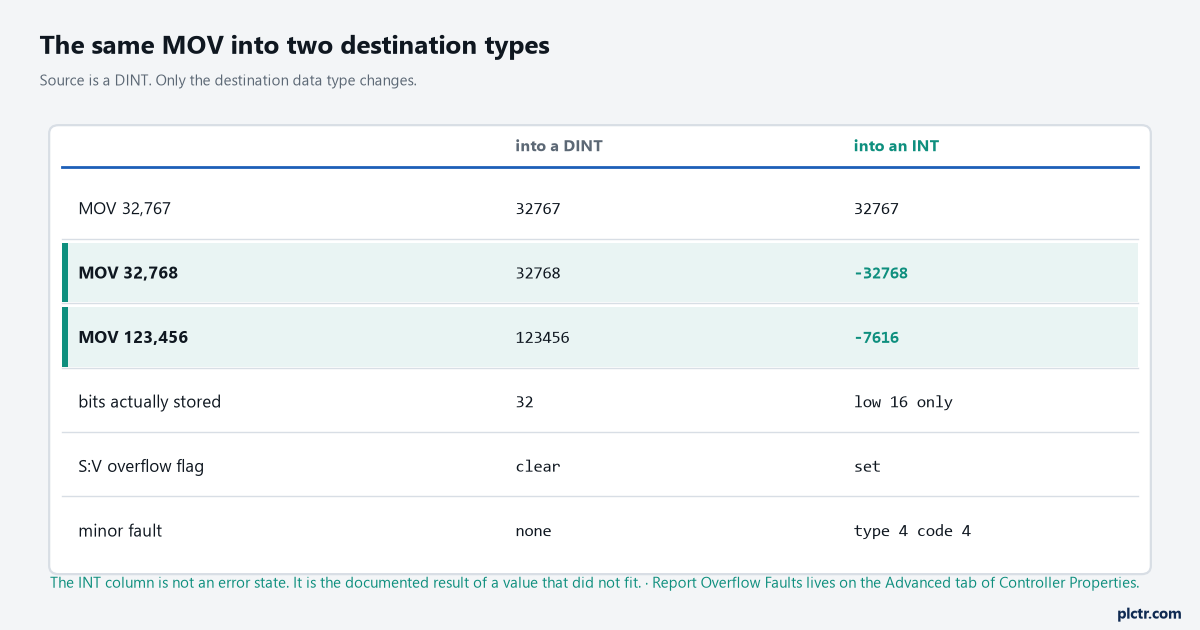
The overflow flag is set in every case the value did not fit. Whether that also produces a minor fault is a checkbox in Controller Properties, not a property of the instruction.
The controller does tell you, in two places that are easy to miss. S:V, the overflow flag, is set when the destination tag is too small to hold the value, and the manual’s own example for that flag is storing 123456 into a SINT or an INT. Whether a minor fault is generated alongside it depends on Report Overflow Faults, on the Advanced tab of Controller Properties, and MOVE’s fault table gives that minor fault as type 4, code 4. There is one more restriction on the flags themselves that catches people migrating logic: math status flags are only updated in ladder diagram routines. Move the same logic into structured text and the flag you were relying on is not written at all.
If you are chasing a minor fault rather than a value, the four places a controller records what broke are covered in reading a CompactLogix fault.
One more MOVE detail worth knowing, because it only exists on half the catalogue. On a CompactLogix 5380, ControlLogix 5580 or ControlLogix 5590 the MOVE instruction accepts string types, and the execution table says what happens when the string does not fit: if Source.LEN is greater than SIZE(Dest.DATA) the string is truncated to what fits and S:V is set. On a 5370 or a 5570 the string operand is not offered at all.
What CLR will not clear
CLR takes one operand. There is nowhere to tell it which bits you meant.
It clears all the bits of the destination, and the operand list says elementary data types.
That last phrase is the whole section. A DINT, an INT, a REAL — fine, and a REAL cleared this way is genuinely 0.0, because all thirty-two bits zero is what IEEE-754 calls positive zero rather than some denormal surprise. A timer, a counter or a CONTROL structure is not an elementary type and CLR will not take it; that is what RES is for, and RES clears the accumulator and the status bits together. An array is not an elementary type either. Clearing one means FLL with a source of 0, or a COP from a zeroed array of the same type, and the element-versus-byte arithmetic that goes with it is worked through in moving a recipe into the PLC with UDTs, arrays and the copy that breaks. One last asymmetry between the controller families, since it decides whether a CLR can disturb anything downstream of it: on a CompactLogix 5380, ControlLogix 5580 and ControlLogix 5590 the CLR instruction does affect the math status flags, conditionally, while on a 5370 or a 5570 the answer in the same table is simply yes.
What to check next
One writer is safe. Two writers with overlapping bits is a bug that has not surfaced yet.
Before you change any of these three instructions, cross-reference the destination tag and count the writers. Then decide the ownership on paper, bit by bit, and write the masks from that rather than from what the rung happens to need this week. Cross-referencing a tag in Studio 5000 to find every rung that writes it is a two-minute job and it settles the argument with evidence rather than opinion. Then put S:V on the watch window next to the destination for a shift; if it ever sets, something in the project is moving a value into a tag that cannot hold it, and now you know which shift it happens on.