The CIP Generic MSG on a Logix Controller: Service Code, Class, Instance, Attribute
Four boxes on the Configuration tab of the Message Configuration dialog, and the manual that tells you what to type in them is a different manual for every device you point the message at. Service Code 4B, Class 342, Instance 0, Attribute 0 creates a socket on a 1756-EN2T. Service Code 3, Class 304, Instance 1, Attribute 0 reads back how many unconnected buffers a 1756-L73 has left. The four fields are not settings; they are an address and a verb, and once you can read one you can read all of them.
Service code is the verb. Class is what kind of thing. Instance is which one of them. Attribute is which field of it.
Reading the four fields as a sentence
Every CIP Generic message is one sentence with the same grammar, and writing it out in words before typing it into the dialog catches most of the mistakes.
Take the message the socket manual prints for switching the socket object off, because every field in it is filled and it reads as a sentence: Service Code 10, Class 342, Instance 0, Attribute 9, with a one-byte SINT source holding zero. Set attribute 9 of the socket object class to 0. Service Code 10 hexadecimal is Set Attributes Single, and its opposite number, Get Attributes Single, is what you reach for whenever a manual describes a value as an attribute rather than as a setting. The Class names an object type the target device implements — 16#342 is the socket object in an EtherNet/IP module, 16#304 is where a Logix controller keeps its unconnected buffer count. The Instance picks one member of that class, counting from 1, with instance 0 addressing the class itself rather than any member of it; Socket Create is called against instance 0 for the same reason, because the socket you are asking for does not exist yet. The Attribute names one field inside whatever the instance resolved to. And the socket manual adds the rule that saves an afternoon: enter an attribute value only when getting or setting an attribute, and not when using any other service. A stale attribute number left in the box from the last edit is a live parameter on the next execution.
“Set attribute 9 of the class itself” is a sentence. Type it out that way before typing it in.
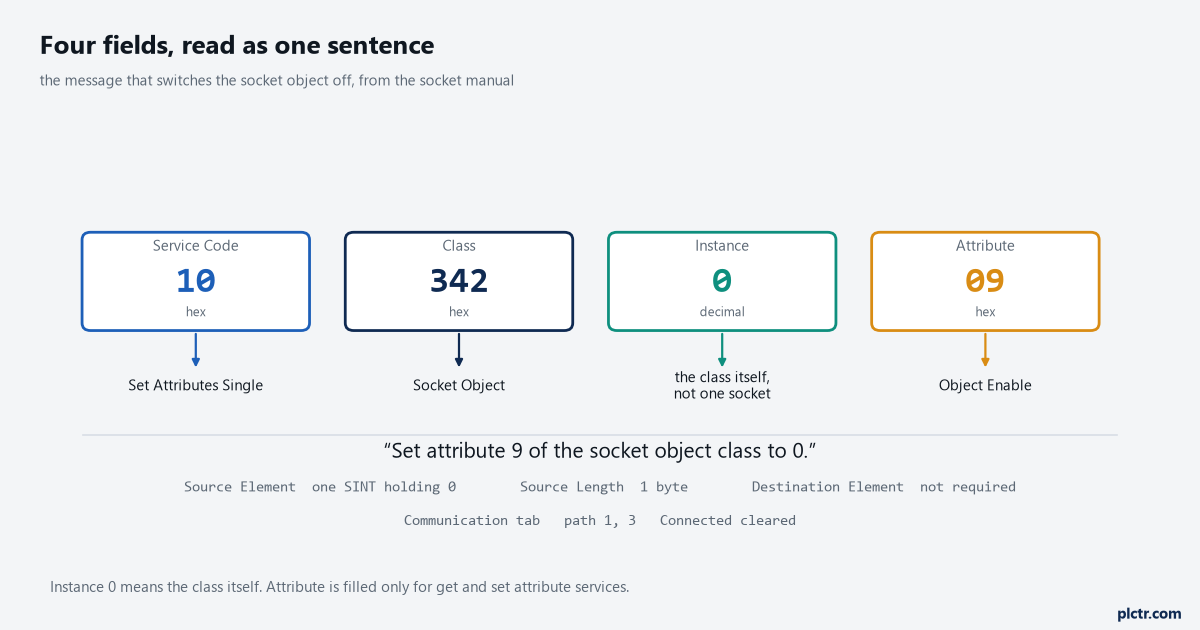
The same four fields, read left to right, are a verb and a three-part address. Instance 0 is the exception worth memorising: it means the class, not a member.
Three worked examples, from the manuals rather than from a forum
The fastest way to stop guessing is to type in a message that a Rockwell publication prints in full and watch it work.
The first is in the Logix 5000 Controller Messages programming manual and costs nothing to run: Message Type CIP Generic, Service Type Custom, Service Code 3, Class 304, Instance 1, Attribute 0, a source element of SINT[4] holding 1, 0, 17, 0 with a source length of 4 bytes, a destination of SINT[10] left at zero, and a path of THIS. Element 6 of the destination comes back holding the current number of unconnected buffers. Service Code 4 with an eight-byte source sets it, with the number you want in element 4 of the source array, and the manual’s own example writes 12 there. The range is 10 to 40, the default is 10, each buffer costs 1.2 KB of controller memory, and the note that matters is that this applies to CompactLogix 5370, ControlLogix 5570 and their GuardLogix equivalents, not to the 5380 and 5580 families. The second example is the socket object: Service Code 4B, Class 342, Instance 0, twelve bytes of source, path 1, 3
ControlLogix I/O modules have services of their own, and the Service Type dropdown lists them by name.
Pulse Test on a digital output module. Reset Electronic Fuse, with a DINT source that is a bit mask of the points to reset. Reset Latched Diagnostics, separately for input and output modules. Unlatch Analog High Alarm on an analog input module, where the general instructions reference gives the Instance field a meaning you would never guess from the dialog: it holds the channel number of the alarm to unlatch. The software fills in the Service Code and the Class for all of these once the Service Type is chosen, which is why the dropdown is worth reading through once even if you never pick anything from it.
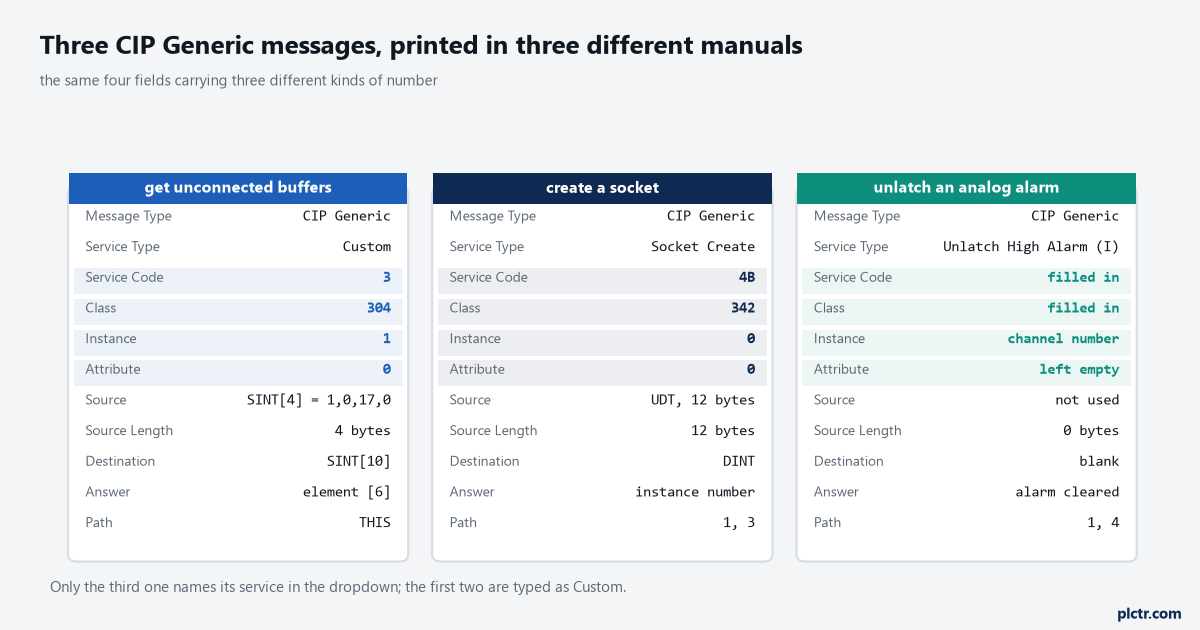
Three messages from three different manuals, side by side. The Instance column carries a different kind of number in each one, and only the third makes that obvious from the dialog.
Connected, cached, or neither
The Communication tab decides how much of the controller a message costs, and the recommendation in both manuals points the same way for this message type.
CIP Generic messages can be connected or unconnected, and for most applications the messages programming manual recommends leaving them unconnected unless you want the Large Connection option. Large Connection only becomes selectable when Connected is checked and CIP Generic is the message type, it is for messages over 480 bytes, and it carries up to 3980 bytes on Logix Designer version 21.00.00 and later. Caching is separate from connecting: a cached connection stays open after the instruction finishes, which removes the open-and-close cost from every execution, and the controller will cache up to 32 connections from firmware revision 12 onwards. The guidance in the September 2025 revision of the messages manual is worth quoting the shape of — for messages that execute at a high frequency to the same device, configure them connected and cached. Everything else in a normal project is better off unconnected and out of the cache list, because an unconnected message borrows an unconnected buffer for the duration and gives it straight back.
There are 10 unconnected buffers by default. Ten simultaneous uncached messages is the ceiling, and the eleventh errors rather than waits.
The throttle in front of the queue holds 16 messages and the queue behind it holds 48, so a rung that enables twenty messages on one scan does not fail — four of them simply sit with .EN set and .EW clear until a position opens. That is not a fault and it does not log anything, which is why a message that “sometimes takes two seconds” is usually a queueing problem rather than a network one.
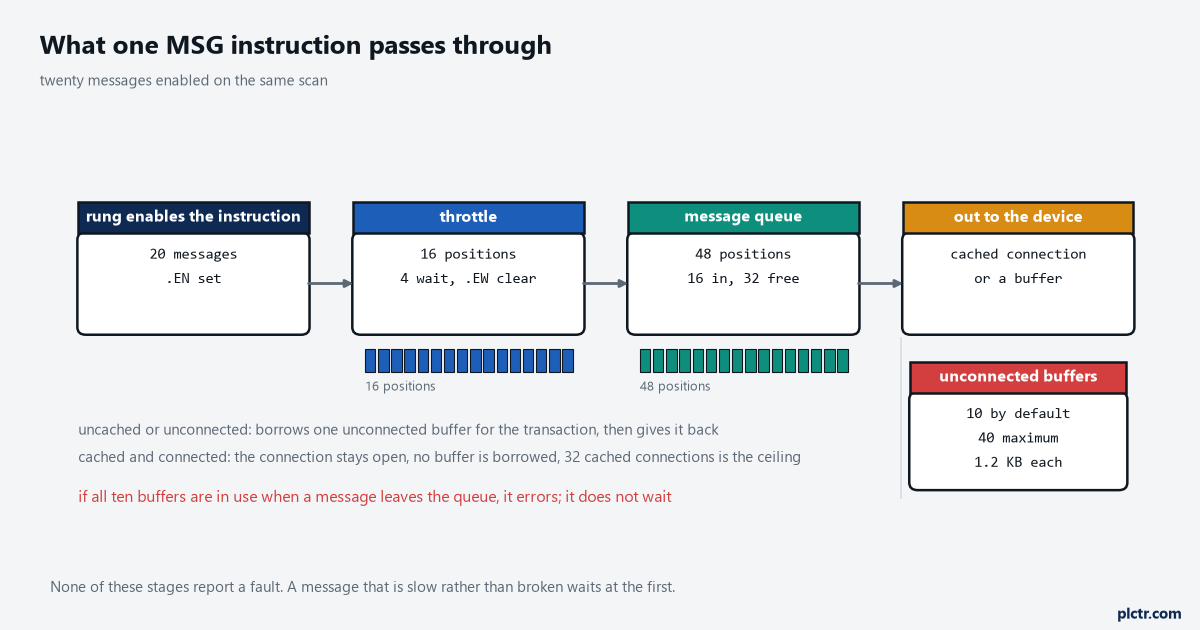
Four stages, three of them with a hard limit. A message that is slow rather than broken is usually waiting at the first one.
The errors, and which field produced them
A CIP Generic message that fails tells you which of the four fields is wrong, if you read the code rather than the text.
16#0005 is destination unknown, class unsupported or instance undefined — the class or the instance does not exist on that device, which on a first attempt usually means the number went in decimal where the dialog wanted hexadecimal. 16#0008 is service unsupported: the class and the instance are right and that object does not implement that verb. 16#0014 is attribute not supported and 16#000E is attribute cannot be set, which separates “there is no such field” from “there is, and it is read-only”. 16#0013 is insufficient command data, which is a source length shorter than the service needs, and 16#0011 is a reply that will not fit the destination tag. And 16#0010, device state conflict, is the one that is not about your fields at all: the object exists, the service exists, and the module’s present mode refuses to perform it.
Check the field the code names before checking the path. The path produces 16#0001 with an extended code, not these.
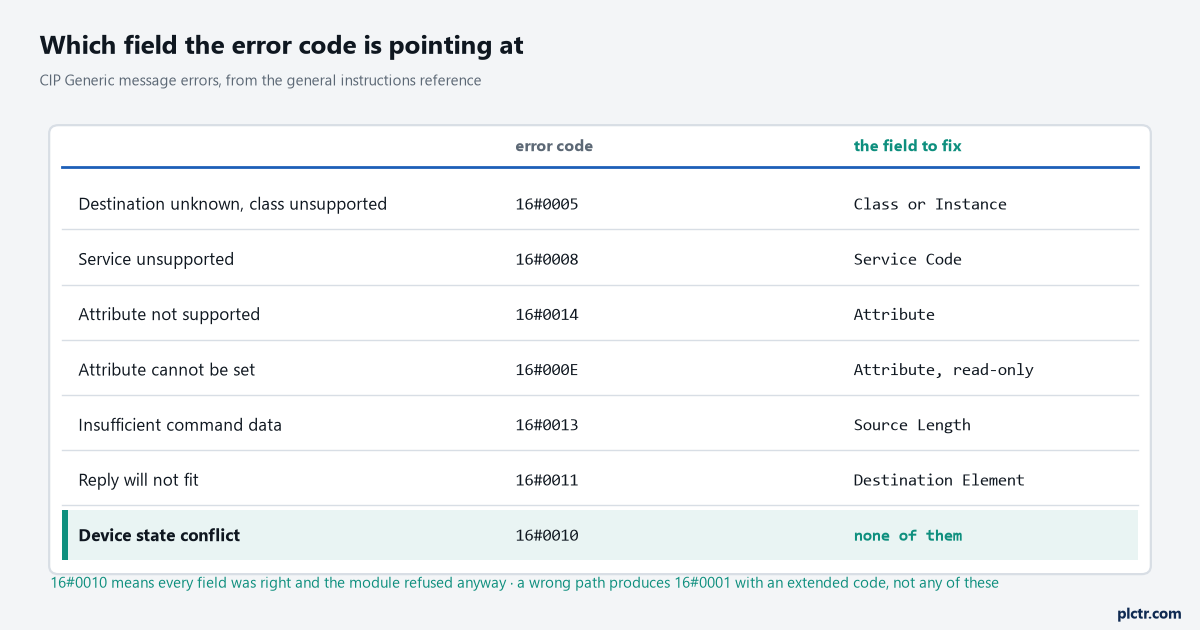
Each code points at one column of the dialog. The last row is the exception and the reason it gets misdiagnosed: nothing you typed is wrong.
Housekeeping that stops messages breaking later
Give every MSG instruction its own control tag of type MESSAGE at controller scope, and keep it out of arrays and out of user-defined types — the messages manual states all three as requirements, not preferences. Put an XIO of the instruction’s own .EN bit in series ahead of the rung, which the general instructions reference recommends for every MSG rung and which stops a level-triggered condition from re-enabling an instruction that has not finished. Prefer a read message in the controller that wants the data over a write message from the controller that has it, for the reason the September 2025 manual gives: a read is visible where the data lands, and a write changes a value in another controller where nothing explains where it came from.
What to do next
Open a project that is already online, add one MSG with a MESSAGE tag, and run the unconnected-buffer read against THIS. It touches nothing, it needs no target device, and when element 6 of the destination array comes back holding 10 you have a working CIP Generic message to copy for everything else. From there the useful next step depends on the target: for an I/O module, the Service Type dropdown already holds what you need, and Allen-Bradley I/O faults and their causes covers what the module reports back. For a drive, add it to the tree first — adding a PowerFlex drive to a Studio 5000 project — because the path in the Communication tab is built from the I/O tree and nowhere else. And if the message is going to another controller rather than to a device, CIP Data Table Read is the message type to pick instead, which the EtherNet/IP communication article sets up.