Axis Faults on a Logix Motion Axis: What AxisFault, MotionFault and the Attributes Are Telling You
On a 1756-L83E, Axis_01.AxisFault reads 1, Axis_01.MotionFault reads 0, and the 2198-D032-ERS3 in the panel is showing FLT S54 – POSN ERROR. Somebody will now spend twenty minutes looking for a motion fault that does not exist, because the two tag names sound like the same thing and are not.
They are two different attributes with two different owners.
AxisFault is a roll-up word: nine defined bits, each one standing for a whole class of fault, and bit 0 — PhysicalAxisFault — is the only one that means the drive reported something. MotionFault is a separate attribute belonging to the motion planner, and it has exactly two bits defined in the whole word, both of them soft travel limits. An AxisFault of 1 is bit 0 set on its own. The drive faulted, nothing else did, and the code is on the drive’s own display.
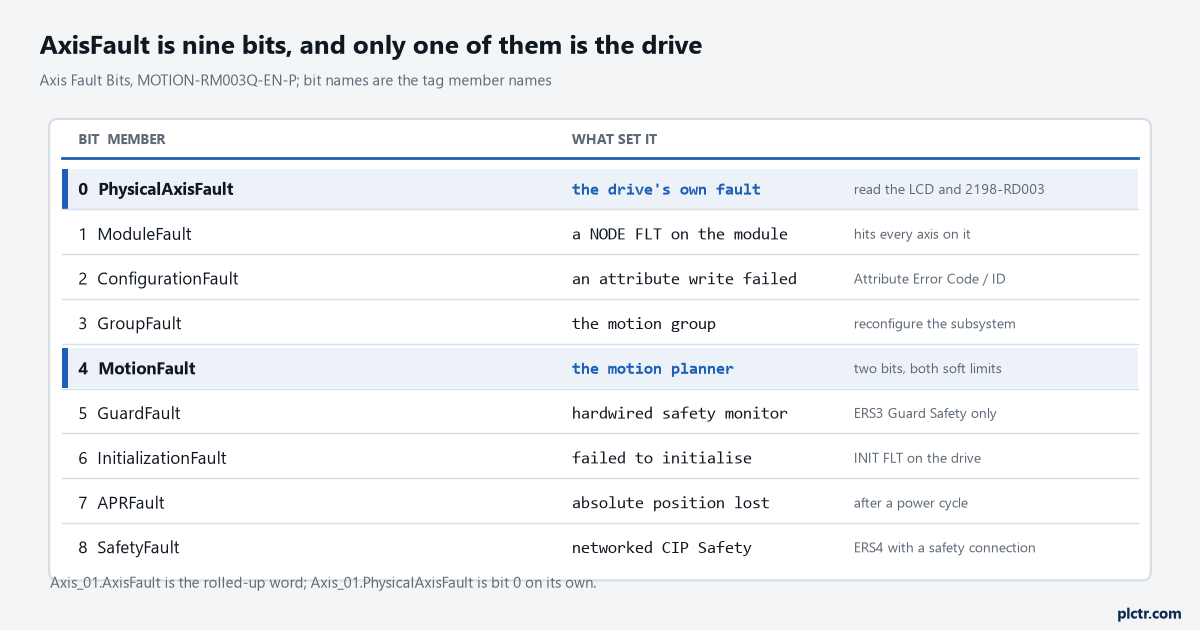
Nine bits, nine different places to go next. The bit names double as tag member names, so Axis_01.PhysicalAxisFault reads bit 0 on its own without any masking.
AxisFault is a roll-up, not a code
Every bit in the word is a category, and one or more faults of that category sets the associated bit. Bit 0, PhysicalAxisFault, means the physical axis reported a fault condition, and on a CIP drive axis those map straight onto the standard or manufacturer-specific CIP axis fault attributes — in plain terms, the FLT Sxx and FLT Mxx codes on the drive. Bit 1, ModuleFault, is a fault on the motion module rather than the axis, which generally takes down every axis on that module and needs the module reconfigured to recover; on a Kinetix 5700 this is where the NODE FLT 01 to NODE FLT 09 codes land. Bit 2, ConfigurationFault, means an attribute write aimed at the axis failed, and the detail sits in the Attribute Error Code and Attribute Error ID rather than in any fault log. Bit 3 is the motion group. Bit 6, InitializationFault, can only ever be set during the initializing state, which is a useful thing to know at three in the morning: if it is set, the trouble happened before the drive was ever enabled, so stop looking at the move. Bits 5 and 8 are the two safety families and they do not overlap — GuardFault belongs to the hardwired safety monitor inside an ERS3, SafetyFault to a networked CIP Safety connection on an ERS4.
Bit 7, APRFault, means absolute position was not recovered during configuration.
That one usually arrives after a weekend, and the machine needs rehoming before anything else is true.
MotionFault is two bits, and both of them are soft limits
The whole attribute is bit 1, SoftTravelLimitPositiveFault, bit 2, SoftTravelLimitNegativeFault, and thirty reserved bits that nothing sets. That is the entire definition in MOTION-RM003, the integrated motion reference manual. So on an AXIS_CIP_DRIVE axis the diagnosis is finished the moment you read the tag: a non-zero MotionFault means the axis was commanded past a configured soft travel limit while soft travel checking was on, and there is no second possibility to eliminate. It is worth knowing the recovery rule too, because it looks wrong the first time. A soft travel fault can be cleared with a fault reset while the axis is still sitting outside the limit, specifically so you can jog it back inside; as long as you do not command it further out, no new fault is raised.
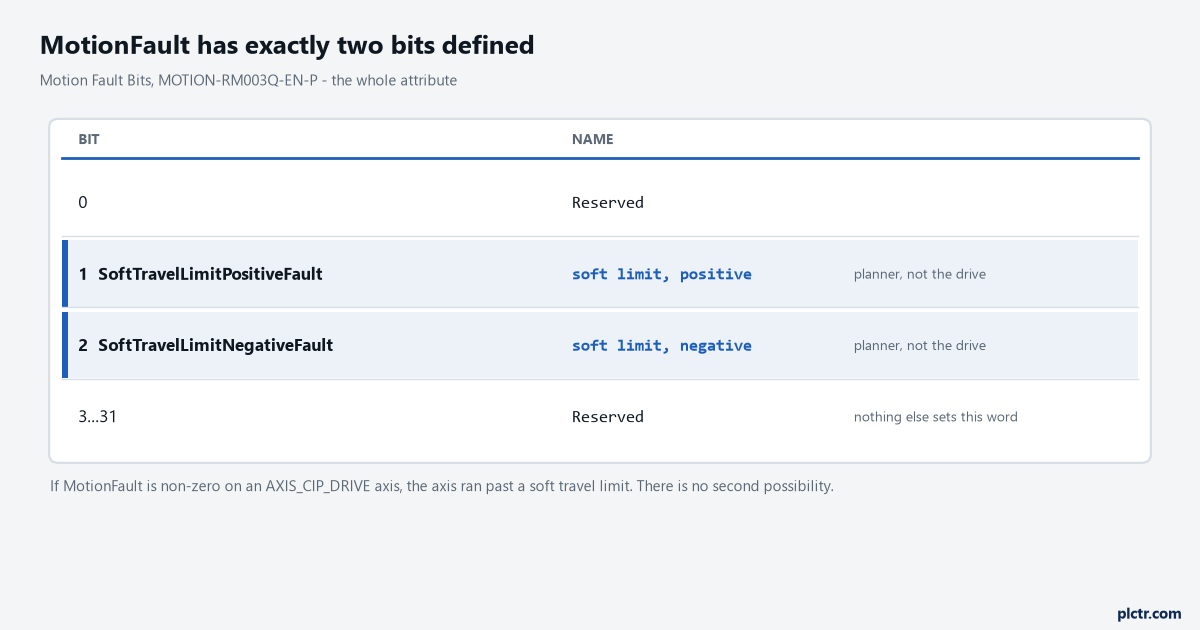
The whole attribute fits on four lines. A word this empty is worth remembering, because it turns a vague fault into a finished answer.
The one tag worth trusting is AxisState
AxisState
AxisFault is a timing detail the Kinetix 5700 manual spells out and almost nobody reads. When a fault reset service goes to the drive, the drive clears the fault text from its display; if the condition is still present the fault is posted again, but there can be a delay before that happens. During the delay AxisFault on the drive axis has already been cleared, while the condition has not gone anywhere. AxisState continues to read faulted the whole way through. The manual’s own instruction is a single sentence and worth quoting in your own head as you write the rung: use the AxisState tag on the axis object to determine whether an axis is faulted.Interlock on AxisState, not on AxisFault, and the race stops happening.
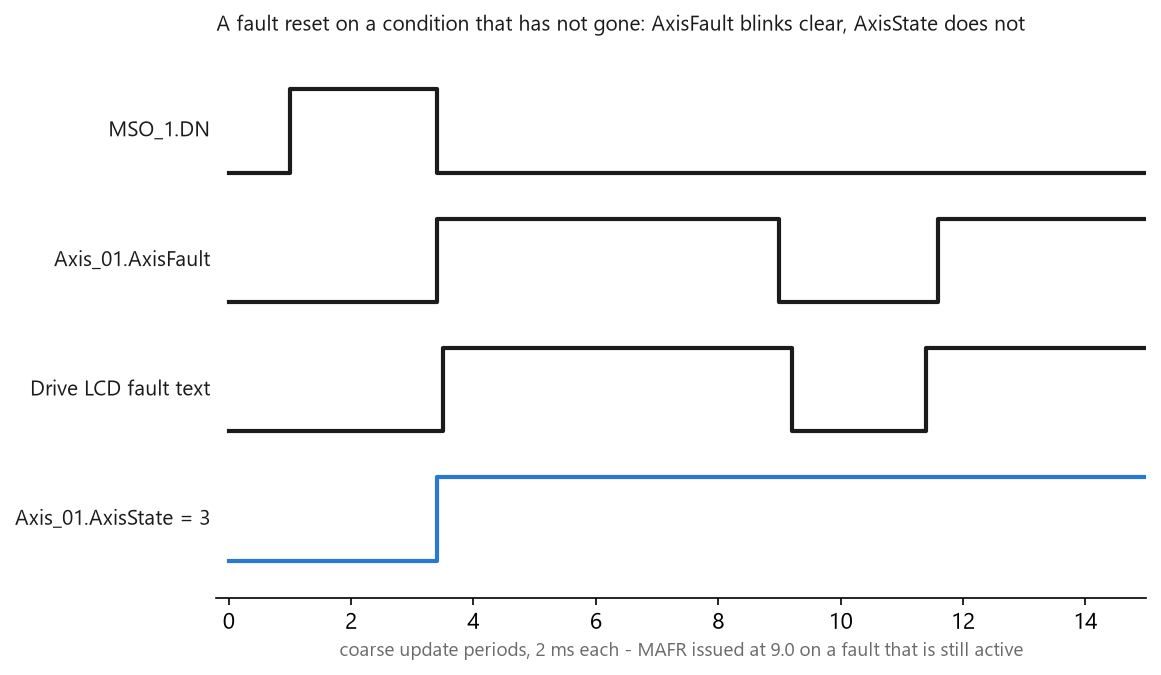
A fault reset issued against a condition that has not been fixed. Two coarse updates of the machine looking healthy is long enough for a start rung to fire.
Major and minor stop meaning anything at the controller
The drive keeps the distinction. A major fault puts the axis into a stopped or shutdown state with the fault present, while a minor fault lets the drive keep operating and does not change the axis state inside the device at all. The controller does not keep the distinction. Both major and minor faults reported by the drive put the axis into the faulted state as far as Logix is concerned, and the reference manual says so directly: in the controller it is not generally true that a faulted axis is a stopped axis. When the drive reports only a minor fault, or when the controller spots something the drive cannot see, it is the controller’s job to bring the axis to a stop — through a state change request, through a motion planner stop, or through logic you wrote. Until that happens, the axis state inside the drive can be something else entirely, and running is one of the options.
A faulted axis in Logix can still be turning. Plan the rung for that.
What a GSV gets you that the tag does not
Most of the useful attributes are direct tag members, which is why Axis_01.ModuleFault works without ceremony. The fault log is not one of them. The CIP Axis Fault Log is a structure of 25 records, and each record carries a fault type, a fault code, a fault sub code, the stopping action the drive chose, the state it targeted, and a timestamp in system time microseconds. The fault type is an enumeration — 1 and 2 are initialization faults, 3 and 4 are axis faults standard and manufacturer-specific, 5 is a motion fault, 6 a module fault, 7 a group fault, 8 a configuration fault, 11 and 12 the safety families — and the fault code is the bit number of the fault within that type’s word. Those two numbers are worth memorising as a pair, because the Kinetix 5700 fault-code spreadsheet, publication 2198-RD003, is keyed on exactly them: its first two columns are headed with the Motion Device Axis Object attribute numbers 665 and 664. Fault type 3 with fault code 45 is FLT S45 – FDBK COMM FL, and it resolves the same way whether you read it off the drive’s display or out of the controller.
Twenty-five records in the controller. 128 in a Kinetix 5700 inverter, and those survive a power cycle.
Which is why a serious fault hunt starts at the drive, and reading a Kinetix 5700 fault at the drive covers that half: the display, the log and the diagnostics screens. This article is the other half, and the two views of one event line up on the type-and-code pair above.
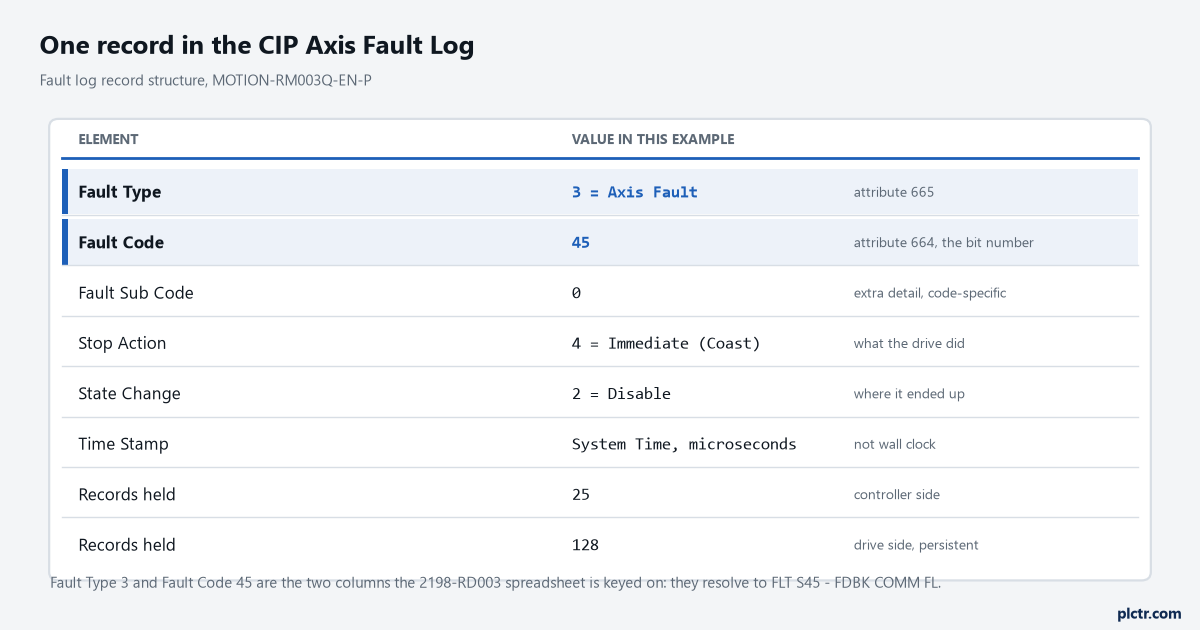
One record. The stop action and state change elements are the part people forget exist: they tell you what the drive actually did to the load, not just what it complained about.
The exception action is why two identical faults behaved differently
The same exception on two axes can coast one and ramp the other, and the setting lives in Axis Properties rather than in any fault code. On the controller side the choices are ignore, alarm, fault status only, stop planner, disable, and shutdown, and they escalate in that order. Alarm sets a bit in the motion alarm word and clears itself when the condition goes; fault status only sets a bit in the motion fault word and needs an explicit fault reset even after the condition has cleared; stop planner brings planned motion down at the configured maximum deceleration. Disable is the one with history — it was called StopDrive up to Logix Designer version 31 and was renamed in version 32, where it also became the default action. Under disable the axis stops using the stopping action the drive defines for that particular exception, and there is no controller-side setting that changes it. Shutdown does the same and then disables the power structure, and it needs a shutdown reset, not a fault reset, to come back.
Two axes, one fault code, two different stops. Check the Actions tab before you blame the drive.
What everybody writes first, and why it misfires
The first attempt is almost always a rung that watches AxisFault for anything non-zero and latches an alarm. It works until the day a module fault takes four axes down at once and produces four alarms describing nothing, or until a fault reset on a live condition drops AxisFault for two coarse updates — 4 ms on a group running a 2 ms period — and the alarm clears itself. The second attempt is usually to put the axis fault into the controller fault routine, and that one fails differently — a motion axis fault is not a controller major fault, the processor never faults, and the routine never runs. If you want the pattern for the faults that genuinely do get there, create a controller fault routine and the ControlLogix major fault codes are the right reading, but a faulted servo axis is not on that list.
Watch AxisState for the state, read the individual bit members for the category, and keep the codes at the drive.
Next time an axis faults, read three things in this order and write them down: AxisState, then the nine bit members of AxisFault one at a time, then the drive’s display string. If bit 0 is the only one set you are going to the panel; if bit 1 is set you are going to the network; if MotionFault is non-zero you already have the answer and the machine needs jogging back inside its soft limits. The setup side of all of this, including where the limits and the exception actions are configured, is in Kinetix 5700 and Logix MAM moves.