Divide by good parts. kWh per part, Nm3 of air per part and litres of water per part are the numbers that move when something actually improves, while total kWh only follows the production count and a 22 kW extraction fan left running all weekend hides inside it. Four instruments on one cell will tell you more than the plant report does. What follows is which four streams to meter, the Structured Text that stages the cell down after 5 minutes of idle, then 20, then 60, a restart order that does not set a fresh demand peak, and how to report a saving that survives an audit.
The example is a machining and assembly cell running two shifts, idle overnight and at weekends.
Step 1: Meter the four streams that cost you
| Stream | Instrument | Into the PLC as |
|---|---|---|
| Electricity | Power meter at the cell supply | kW and kWh over EtherNet/IP or Modbus TCP |
| Compressed air | Thermal mass flow meter in the cell drop | Nm3/h, 4 to 20 mA |
| Water | Magnetic flow meter with pulse output | Pulses into a high speed counter input |
| Scrap | Reject gate sensor plus the reason from the station that failed the part | Counter array by reason code |
Four instruments, one cell, and you know more than the plant report does. The one thing that makes them useful is the denominator. Total kWh goes up when production goes up, which tells you nothing. kWh per part, Nm3 per part and litres per part are the numbers that show whether anything actually improved. Divide by good parts, not total parts, or scrap will make your efficiency look better.
The electrical side of this, from CT ratios to demand peaks, is covered in using PLC for energy management and conservation.
Step 2: Count scrap with a reason attached
A single scrap counter tells you that something is wrong. An array of counters indexed by reason code tells you what.
Put the counter increment where the decision is made, not at the end of the line. When station 6 fails a torque check and the part is routed to reject, station 6 increments Scrap[REASON_TORQUE] at that moment and writes the reason into the part’s tracking record. The reject gate at the end increments the total. If the two disagree at the end of the shift, you have a tracking problem worth finding.
Keep the codes in a table on the HMI rather than as strings in the controller. Quality will want to add reason 23 next month, and that should not need a download.
Scrap is also the quality term in OEE, and it is the one people manipulate. Count a part reworked and passed as scrap for the material and energy calculation even when it eventually ships, because you paid for that cycle twice. Counter mechanics, if you need them, are in timer and counter instructions.
Step 3: Detect idle properly before you switch anything off
Idle is not “no part at the sensor”. A machine waiting 40 seconds for the operator to come back from a tool crib is not idle. Build the condition from several things and give it a long enough timer.
(* UtilityTask, 500 ms periodic, routine IdleMode, Structured Text *)

Cell_Working := Part_At_Infeed
                OR Spindle_Running
                OR Robot_Busy
                OR Operator_Input_Recent
                OR Cleaning_Mode
                OR Hot_Part_On_Belt;          (* never shut down over hot product *)

Idle_Tmr.PRE := 300000;                        (* 5 minutes, level 1 *)
Idle_Tmr.TimerEnable := NOT Cell_Working;
TONR(Idle_Tmr);
IF Cell_Working THEN
    Idle_Tmr.ACC := 0;
END_IF;

Idle_L1 := Idle_Tmr.DN;                        (* conveyors, vacuum generator *)
Idle_L2 := Idle_Tmr.ACC > 1200000;             (* 20 min: extraction, task lights *)
Idle_L3 := Idle_Tmr.ACC > 3600000;             (* 60 min: hydraulic unit, chiller *)

(* shut down in this order, restart in reverse *)
Conveyor_Run  := NOT Idle_L1 AND Cell_Enabled;
Vac_Gen_On    := NOT Idle_L1 AND Cell_Enabled;
Extract_Fan   := NOT Idle_L2 AND Cell_Enabled;
Task_Lights   := NOT Idle_L2;
HPU_Run       := NOT Idle_L3 AND Cell_Enabled;

(* tell the operator what is about to happen *)
Idle_Countdown_s := (Idle_Tmr.PRE - Idle_Tmr.ACC) / 1000;
Three levels rather than one switch. The 5 minute items cost nothing to restart. The hydraulic power unit at 60 minutes needs to warm up again, so it waits for real confidence that the cell is done.
Hot_Part_On_Belt is there because of a specific bad afternoon. Keep an equivalent for your process.
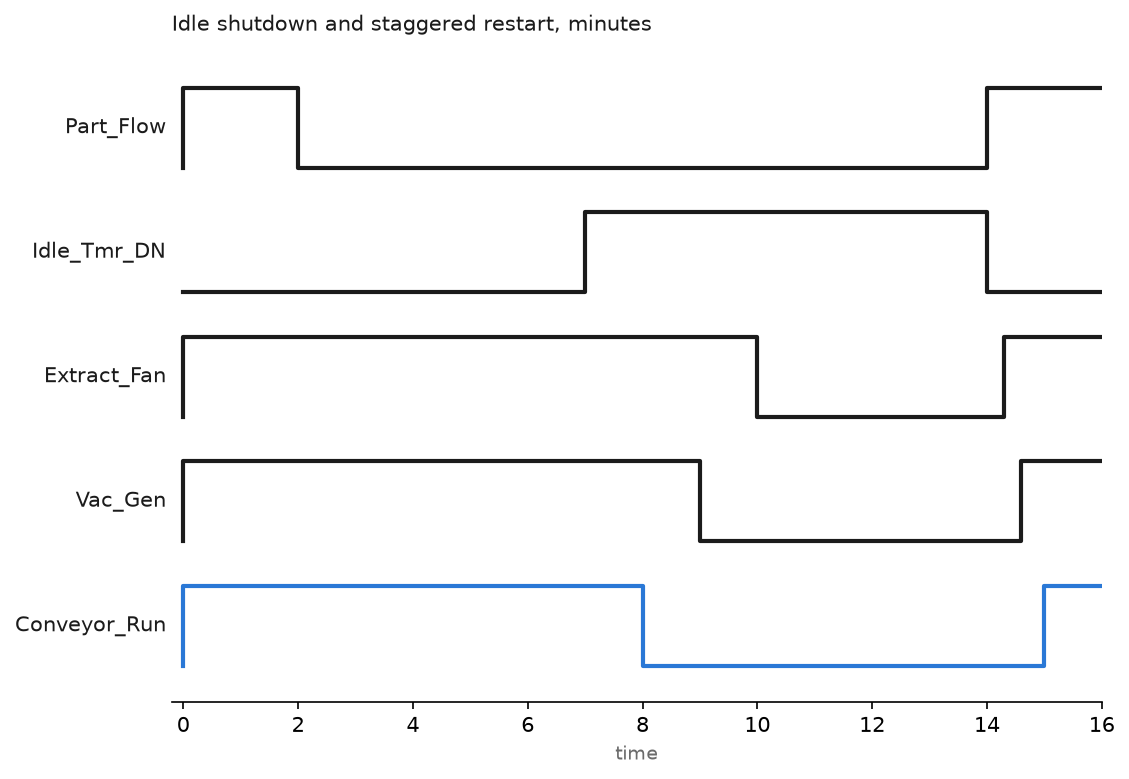
Step 4: Restart in a sequence, and stagger it across the plant
Shutting down is easy. The restart is where projects get reversed.
- Reverse order. Extraction and safety-related services first, then pressure and vacuum, then motion. Nothing that moves starts before the thing that makes it safe.
- Stagger by machine. Add a delay based on the machine number, a few seconds apart. Twenty cells restarting together at 05:55 sets a fresh demand peak and gives back a month of savings in one quarter hour.
- Warn first. A horn or a beacon for two seconds before motion restarts, because someone will be leaning on a guard.
- Give the operator an override. A “keep running” button on the HMI with the countdown next to it. Without it the first person who gets caught by a shutdown will find the disconnect switch and disable the whole feature.
- Respect motor starts per hour. A large direct-on-line motor has a limit, and rapid idle cycling will eat it. If the load cycles often, it belongs on a drive.
Step 5: Retrofit drives only where the load is centrifugal
Fans, blowers and centrifugal pumps follow the affinity laws, so shaft power goes with the cube of speed. Taking a 22 kW extraction fan from a damper at full speed down to 70 percent speed on a drive takes it to roughly a third of its power. Over 6000 hours that is real money, and the payback is usually under two years.
Positive displacement pumps, conveyors and hydraulic power units do not work that way. Half speed is about half the power, sometimes worse, and on a hydraulic unit you may just move the loss into a relief valve. Check the load type first, then the duty cycle, and only then the drive catalogue. The commissioning detail is in PLC motor control and drive systems, and the fan and pump control side in implementing PLC in HVAC control systems.
Step 6: Report per part, and keep the raw data
Push five numbers per shift per cell into the historian: good parts, kWh, Nm3 of air, litres of water, scrap by reason. Everything else can be derived later. Keep the raw series too, because the first question any auditor or any sceptical plant manager asks is what the baseline was before the change.
Two rules that keep the report credible. Normalise by good parts, and state the period. And when you claim a saving, show the before and after on the same product mix. A quiet July always looks like an improvement.
For the operator view and the shift trend, PLC trend page usage, tag history and monitoring covers the display side.
Field notes
The air dump that dropped a part. The first idle version closed a single shutoff valve for the whole cell, including the clamp manifold. A part released and fell into the machine. Clamping, safety and anything that holds a load must be on a separate manifold that never gets dumped, and the restart needs a soft start valve so the cell repressurises over a couple of seconds instead of slamming.
The cooling conveyor that stopped with hot parts on it. Machining finished, the sensor saw no new parts, five minutes later the belt stopped with eleven hot housings sitting on it. They went out of tolerance overnight. That is where Hot_Part_On_Belt came from, and it is now the first thing I look for in any shutdown condition.
Water pulses that went missing. The magnetic flow meter’s pulse output went to a standard input on a 100 ms task. At high flow it sent pulses faster than the scan and the consumption reading came out about 30 percent low, which looked like a very good result. Pulse counting belongs on a high speed counter input or a dedicated module, and the sanity check is the utility’s own meter over a month.
Twenty cells, one restart time. The idle logic was copied to every cell with the same timer values, and every cell came back at the same moment on Monday morning. The site set a new demand peak on the first Monday and the energy bill went up. A delay derived from the cell number fixed it, and cost one line of code.
Frequently asked questions
What idle timeout should I start with?
Ten minutes for anything that costs nothing to restart, and look at your own data after two weeks. Count how often the timer nearly expired and then reset; if that happens twenty times a shift the timer is too short and the operators are already annoyed.
Does stopping and starting motors this often damage them?
It can, if the motor is large and started direct on line. Check the nameplate or the manufacturer’s starts per hour figure, and put frequently cycled loads on a drive with a ramp.
How do I stop operators from disabling the whole thing?
Show the countdown, give them a hold button, and never let a shutdown interrupt a cycle in progress. The feature survives if it is predictable.
Do I need new sensors, or can I infer the numbers?
You can infer a lot from motor current and run hours, and that is a reasonable start. Anything you want to put in a public report needs a real instrument on the stream.
What is the quickest win in a plant that has measured nothing?
Overnight and weekend base load. Machines left running with nobody in the building are the cheapest thing to fix, and the trend makes the case on its own.
Next step
The same instruments that count energy and air also tell you when equipment is drifting, which is the maintenance side of the same data: PLC condition monitoring and predictive maintenance. To get the shift totals out of the controller and into a system that reports them, start at integrating PLC with MES.