An Edge Gateway That Buffers: Six Hours Offline, and Then What
Six hours of the carton transfer at its real change rates is 2.12 MB. Four machines on the same gateway is 8.49 MB. The same four machines with every tag published every second and no deadband on anything is 31.66 MB, and that is the number that decides whether a 64 MB partition is a buffer or a decision to lose data at hour twelve.
Every one of those figures was encoded rather than estimated, and the arithmetic behind them takes four inputs.
The tag count, the rate at which each tag actually changes, the bytes one changed value costs on the wire, and the length of the outage you are willing to survive. Multiply and you have the size of the edge gateway buffer, and the answer is almost always smaller than people fear and larger than the default they were given.
Two more questions then decide whether the buffer was worth having: how fast the backlog clears, and whether the far end accepts a six-hour-old row.
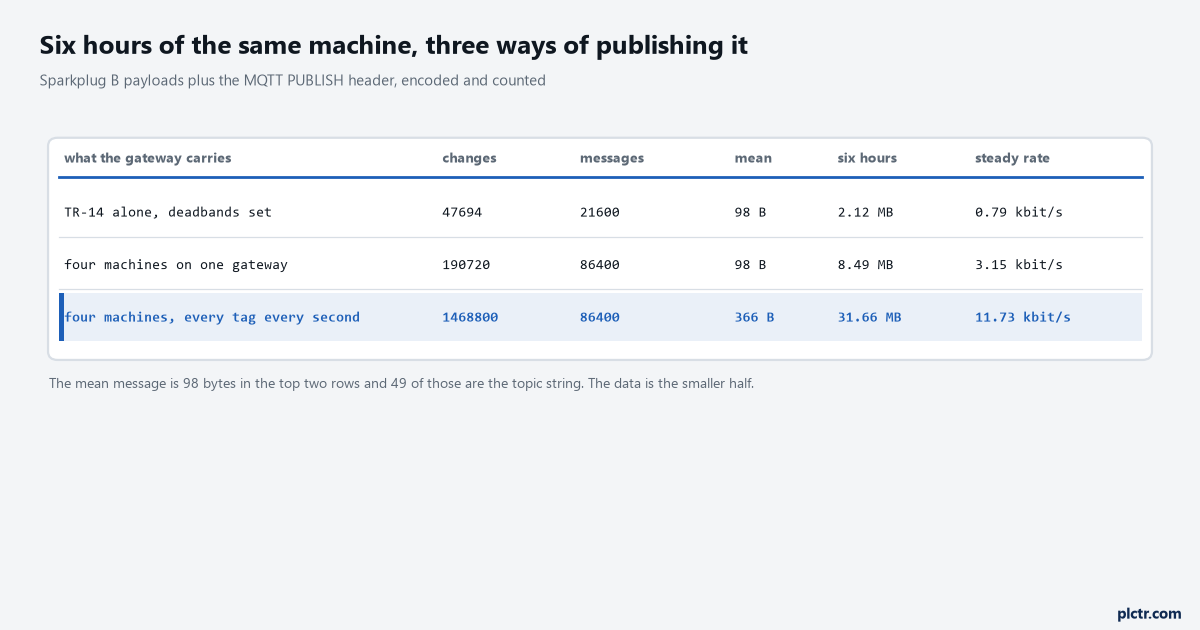
Look at the mean column before the megabytes. Ninety-eight bytes a message, of which 49 are the topic string, which means half the buffer is addressing rather than data until the messages get bigger.
Doing the arithmetic
Start with what actually changes, not with the tag list. The carton transfer publishes 17 metrics, and their change rates are not remotely alike: the end-of-line eye goes high and low 76 times a minute at 38 cartons a minute, the count follows it at 38, the two motor currents cross their deadbands about 12 times a minute each, the belt speeds four times each, the run-seconds counters once a minute, and the state and fault codes perhaps once in twenty minutes. Adding those up gives roughly 132 metric changes a minute rather than the 1,020 you would get by publishing all 17 every second, and that factor of eight is the single biggest lever in the whole calculation. The gateway groups everything that changed inside one publish window into one message, which is what the Sparkplug specification recommends and what any sensible implementation does, so 21,600 windows over six hours produce 21,600 messages carrying 47,694 metric changes between them.
One message, 98 bytes, 2.12 MB over six hours. That is a machine.
Four machines on one gateway is four times the message count rather than four times the message size, because each device publishes its own DDATA on its own topic. So 8.49 MB, and the mean message stays at 98 bytes. Turn the deadbands off and the picture changes shape rather than scale: the message count stays at 86,400 because the publish window did not change, but every message now carries all 17 metrics instead of an average of two, and the mean goes from 98 bytes to 366. Thirty-one and a half megabytes. The interesting part is that the topic-string overhead, which was half the traffic, has become an eighth of it, so the no-deadband version is less wasteful per byte and four times more expensive overall. That is worth understanding before somebody proposes fixing a bandwidth problem by batching harder.
Deadbands beat batching. Batching beats compression. Compression beats a bigger SIM plan.
tags per machine                     17
mean changes per minute             132
machines on the gateway               4
publish window                     1000 ms
messages per hour                14,400 per machine
mean message                         98 bytes
                                 --------
per machine per hour               0.35 MB
four machines, six hours           8.49 MB
The drain is the part nobody sizes
The buffer fills at a rate you chose. It empties at a rate the uplink chose, minus whatever the live stream is still taking.
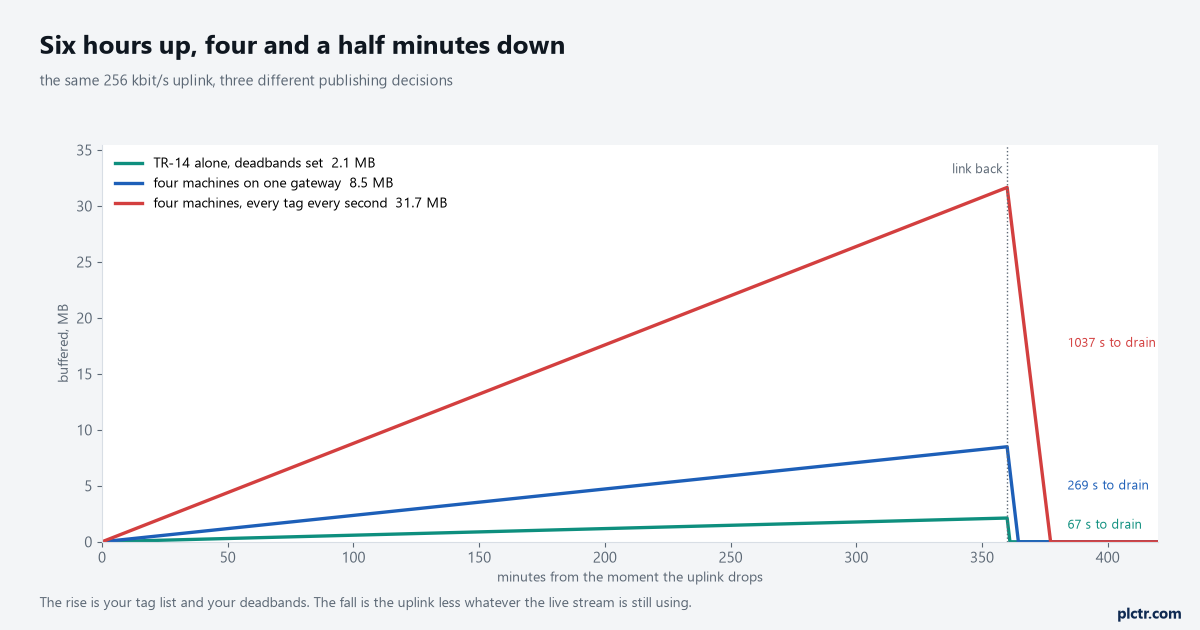
The vertical drops are the whole argument for buffering. Six hours of accumulation clears in between one and seventeen minutes, because a plant link is thousands of times faster than a plant produces data.
On a 256 kbit/s uplink, which is a deliberately pessimistic figure for a cellular router, the four-machine backlog of 8.49 MB clears in 269 seconds and the no-deadband backlog of 31.66 MB clears in 1,037 seconds. Those are ratios of 80 to 1 and 21 to 1 against the outage that produced them, and the ratio is the number to defend in a meeting rather than the absolute time. What makes it comfortable is that the steady-state traffic is tiny: 3.15 kbit/s for four machines with deadbands set, against 256 kbit/s available, so 98.8 percent of the link is free to drain with. Halve the uplink and the drain doubles. Fill the uplink with something else, a camera stream or a remote desktop session, and the drain time goes to whatever is left, which is the failure mode on a shared plant connection and the reason the gateway should have its own rate limit rather than trusting there to be room.
Aim for a drain at least ten times faster than the outage. Anything slower and somebody starts calling it broken.
There is a detail in the reconnect that costs more than it looks. A gateway coming back has lost its MQTT session, because every Sparkplug client sets clean start true with a session expiry of zero, so it must connect with a new bdSeq, publish a complete NBIRTH and one DBIRTH per device, and only then start moving data. On the four-machine gateway that is five birth messages totalling a little under 3 kB before the first buffered value leaves the box. Three kilobytes is nothing against 8.49 MB, but the ordering matters more than the size: a host that receives backfilled data before the births would have no aliases to resolve it against, which is why the specification forbids it and why an implementation that gets it wrong produces a reconnect where the first ten seconds of history vanish silently.
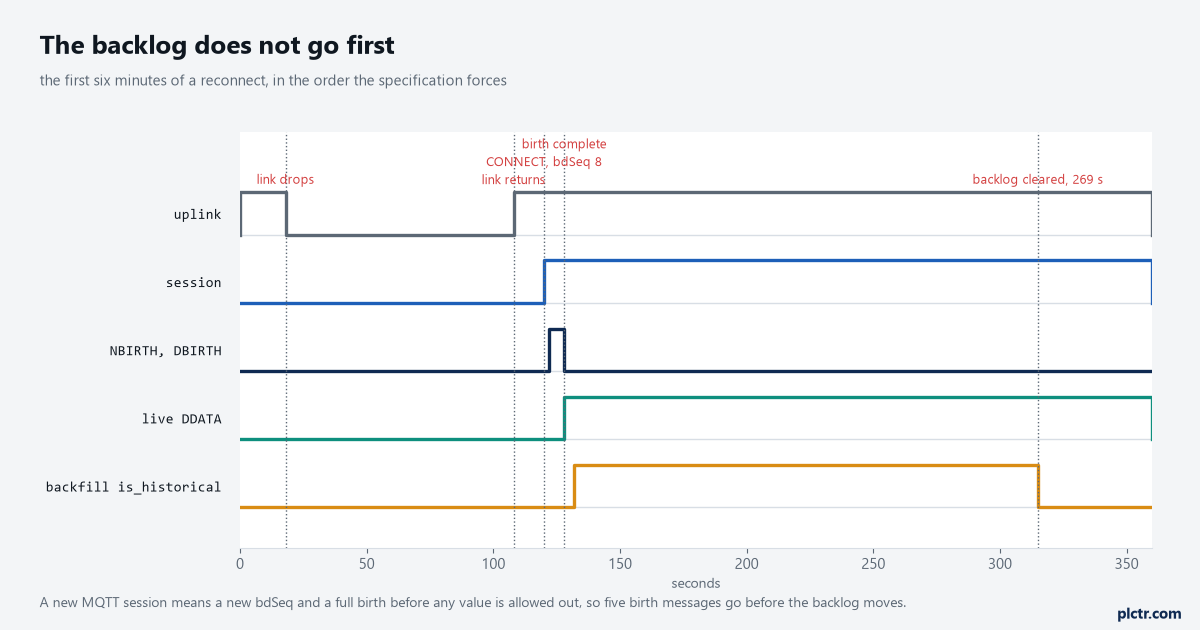
The orange trace runs alongside the green one rather than before it. Live values and backfilled values travel together, and the flag on each metric is what keeps them apart.
The flag that decides whether the backfill helps or hurts
Each Sparkplug metric carries a boolean called is_historical, and the schema comment against it says what it is for: this tells consuming clients not to store this as a live tag. Set it on every metric in the backlog and a host application files each value into history at its own timestamp without touching the tag that operators are watching. Leave it false and the host treats a six-hour-old speed reading as the speed right now.
For the 269 seconds the backfill takes on four machines, the dashboard replays the whole outage in fast forward.
That is the flicker people describe as the dashboard going mad after a reconnect.
There is a second, quieter consequence in section 5.16 that explains why the flag exists at all rather than being an optional nicety. The specification requires that metric values in a data message be in chronological order, and then exempts every metric where is_historical is true from that requirement. Without the exemption a gateway could not interleave backfill with live data at all: it would have to choose between sending the backlog first, during which the dashboard shows nothing current, or sending live data first, after which the backlog is out of order and non-compliant. The flag is what makes the two streams able to share one session. Set it, and the gateway can publish the machine’s current state within four seconds of reconnecting while quietly filing six hours of history behind it over the next four and a half minutes. That behaviour is also what the primary host mechanism is designed around: an edge node configured with a primary host waits for that host’s STATE topic to say online before publishing anything, stores data at the edge while it waits, and flushes the stored history once the host is there.
An edge node with no primary host configured publishes into an empty room and calls it delivered.
Will the historian take it
A row arrives at the far end with a timestamp six hours in the past. Everything upstream of that point has been about getting it there; this is the part that decides whether getting it there was worth the effort.
Nobody asks this question until the first backfill, which is a shame, because it is cheap to answer beforehand.
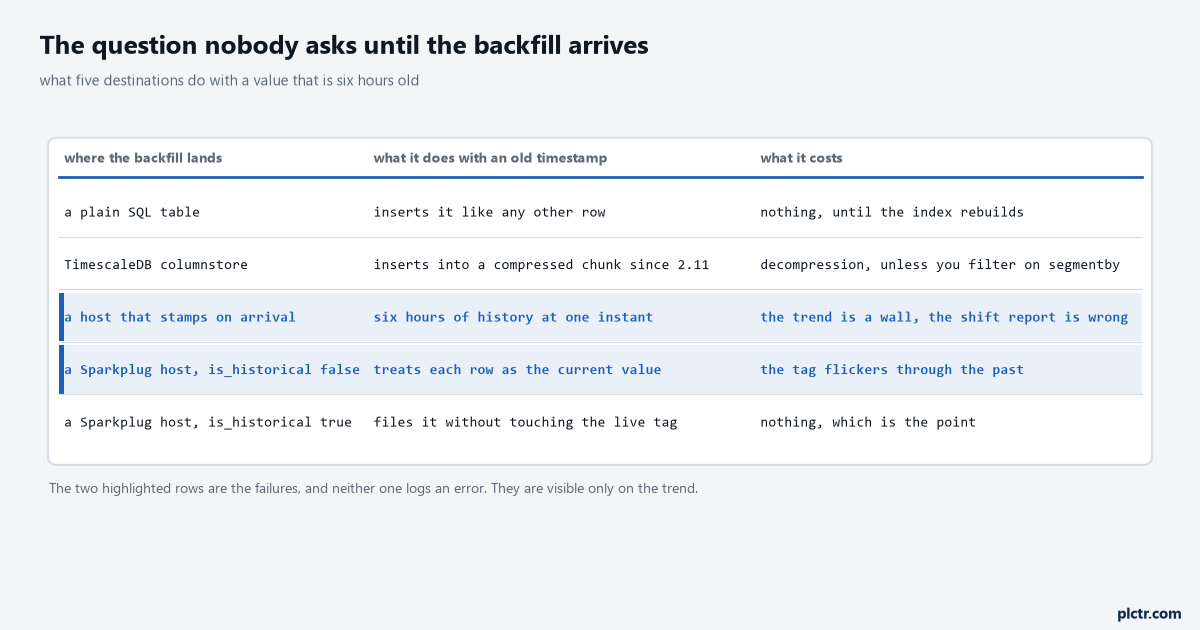
The two highlighted rows are the ones that produce wrong reports rather than error messages, which is why they survive commissioning and turn up in a production meeting.
A plain SQL table does not care. A timestamp is a column, an insert is an insert, and the only cost is whatever the index does when rows arrive out of order, which on a B-tree over a time column means more page splits and a slower insert rate during the backfill than during normal running. A time-series database is where it gets specific, and TimescaleDB is the one whose behaviour is documented plainly enough to rely on: since version 2.11 you can insert into a compressed chunk, the engine decompresses only what it must, and the advice in the documentation is to filter on the segmentby and orderby columns so that the decompression stays small. In practice a six-hour backfill into a hypertable that compresses after seven days never touches a compressed chunk at all, and the problem is theoretical. A backfill after a three-week outage is a different conversation and worth testing before you need it.
Neither of the two failures that actually happen here is a database failure at all.
The first is a collector that stamps rows on arrival instead of carrying the timestamp the gateway put on the value. Every backfilled row then lands at the same instant, the trend draws a flat line followed by a vertical wall, and the shift report attributes six hours of production to one minute. That is the same failure the Raspberry Pi queue article works through at the row level, and the fix is identical: the time the value was true is data, the time it arrived is diagnostics, and both belong in the record as separate columns. The second failure is the is_historical flag left clear, which does not corrupt history at all but makes the live view lie for the length of the backfill. Neither one raises an error anywhere. Both are visible only by looking at a trend across the reconnect, which is exactly the test to run on the bench.
A wrong report that nobody flags is worse than an outage that everybody saw.
Sizing it for the outage you will actually have
Six hours is a convenient number and it is rarely the one that matters. The outages that hurt are the ones nobody is watching: a broker certificate that expired on a Friday, a password rotation that took the gateway’s credential with it, a router firmware update over a shutdown weekend. Those are measured in days.
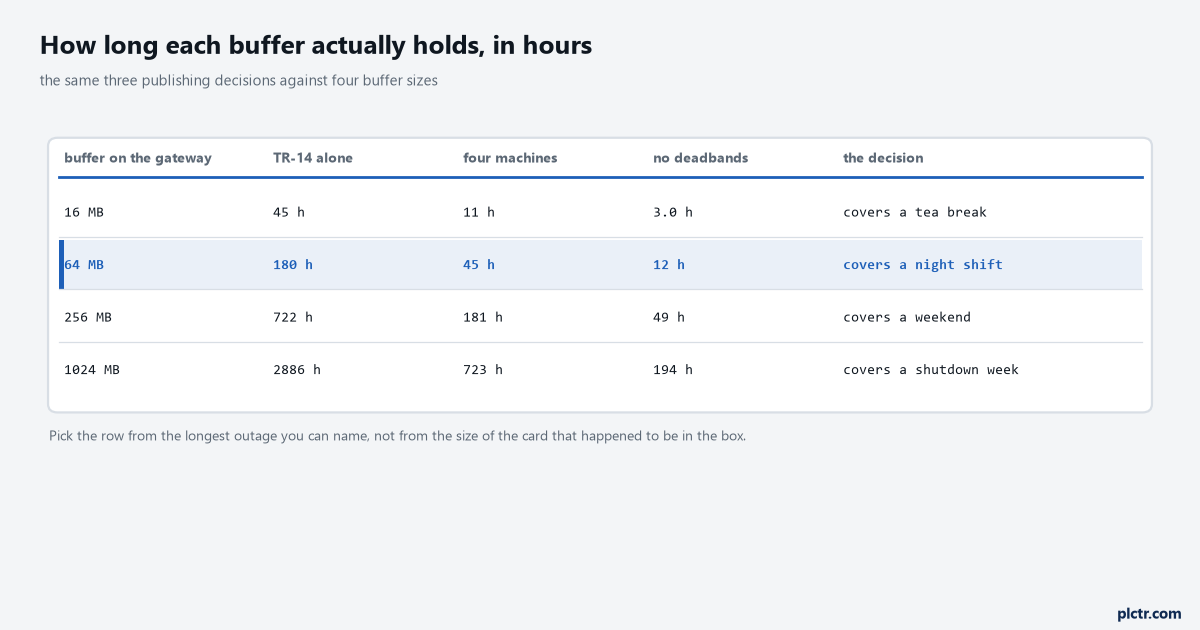
Read the third column, which is the pessimistic one. A 16 MB buffer with no deadbands set is three hours, and three hours is a long lunch rather than an outage.
The table turns the arithmetic into a decision. With deadbands set and four machines, 64 MB holds 45 hours and 256 MB holds a week and a half, and on any modern gateway both of those are free: the disk is already there. With no deadbands the same 64 MB holds 12 hours, which covers a night but not a bank holiday. That is the whole trade, and it is worth writing into the design document as a sentence somebody can be held to.
The alternative is the usual one: the buffer is whatever the product shipped with, and nobody ever calculated it.
Whatever number you pick, decide what happens when it is full.
The gateway will either drop the oldest data or stop accepting new data, and the two are very different failures. Dropping the oldest keeps the recent history that somebody is most likely to want and loses the start of the outage, which is usually where the cause is. Stopping keeps the cause and loses everything after it. Most products drop the oldest and most people would rather that, but the decision should be made deliberately and logged loudly when it happens, with the count of what was discarded, because a buffer that silently wraps is a buffer that reports success while losing a shift. The logging and remote monitoring practices that sit around this are where the alarm on buffer depth belongs, and buffer depth rather than link state is the number to alarm on, because the link goes down twice a day for four seconds and nobody needs to know.
Next step
Do the arithmetic for your own machine before you touch a configuration screen. Count the tags, watch them for ten minutes and count how many actually change, take one message off the wire with a packet capture and measure it rather than guessing, and multiply by the longest outage you can name out loud. Then set the buffer to three times that and move on, because the calculation is now defensible and the setting is now cheap. After that, run the test that matters: disconnect the gateway for ten minutes at full production rate, reconnect it, and look at a trend that spans the gap. If the history fills in at the right times and the live tag does not run backwards through the outage, the buffer and the flag are both right. The layer underneath all of this, the broker and its own much smaller queue, is in the IIoT gateway and broker article, and the reason the gateway has to carry the buffer itself rather than leaning on the broker is settled there. If the data is going into a database at the end of the path, reading CompactLogix tags with pycomm3 is where the row gets its source timestamp in the first place, and the clock that produced that timestamp is worth checking before the first long outage.