OPC UA Certificates: Trust, Rejection, and Why the First Handshake Fails
BadSecurityChecksFailed, status 0x80130000, is the answer an OPC UA server gives when it has decided not to talk to you and is not permitted to say why. Part 6 of the specification is explicit about it: the Reason string in an abort message “shall not return any security related information”, and it names Bad_SecurityChecksFailed specifically as the thing whose cause must not be disclosed. The unhelpful error is not a bad implementation. It is the implementation being correct.
The diagnosis is on the other machine, and it is a file. When a server refuses a certificate it writes that certificate into a folder called rejected, and that file is the server telling you exactly what it would not accept — common name, application URI, key size, thumbprint. Look there first, before you regenerate anything, because four of the five common failures are not fixed by a new certificate and two of them are made worse by one.
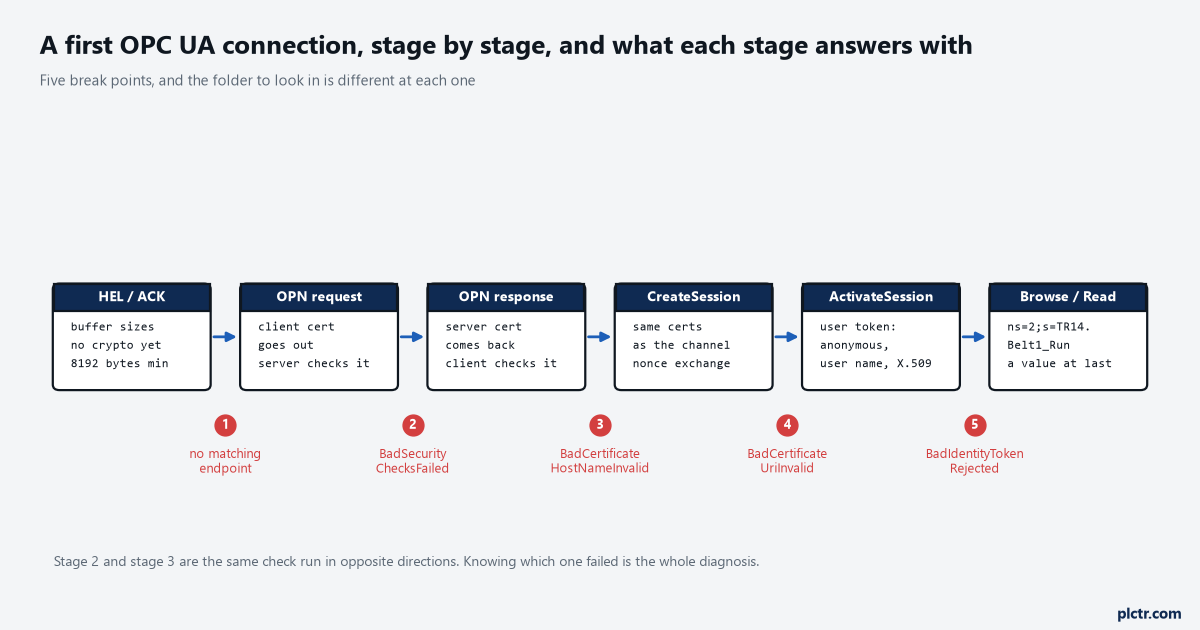
Break 2 and break 3 are the same check run in opposite directions, and they report differently. That asymmetry is what tells you which machine to walk to.
Four stores, and only one of them is an instrument
Every OPC UA application, client or server, keeps four certificate stores. They have the same four names almost everywhere because the SDKs copied each other.
own holds this application’s own certificate and its private key, and the private key never leaves the machine. trusted holds the certificates of peers this application will talk to, plus their revocation lists. issuers holds certificate authorities needed to build a chain but not themselves trusted as peers, and on a plant that uses self-signed certificates it stays empty for years. rejected holds a copy of every certificate that was offered and refused. Unified Automation’s own SDK documentation says why the fourth one exists, and it is worth reading twice: rejected certificates are stored there “so that self-signed certificates of clients can be easily trusted without the need of copying them manually to the server”. The folder is not a log. It is the inbox.
That changes the procedure. You do not carry a file to the server; you let the client fail once, then promote the file it left behind.
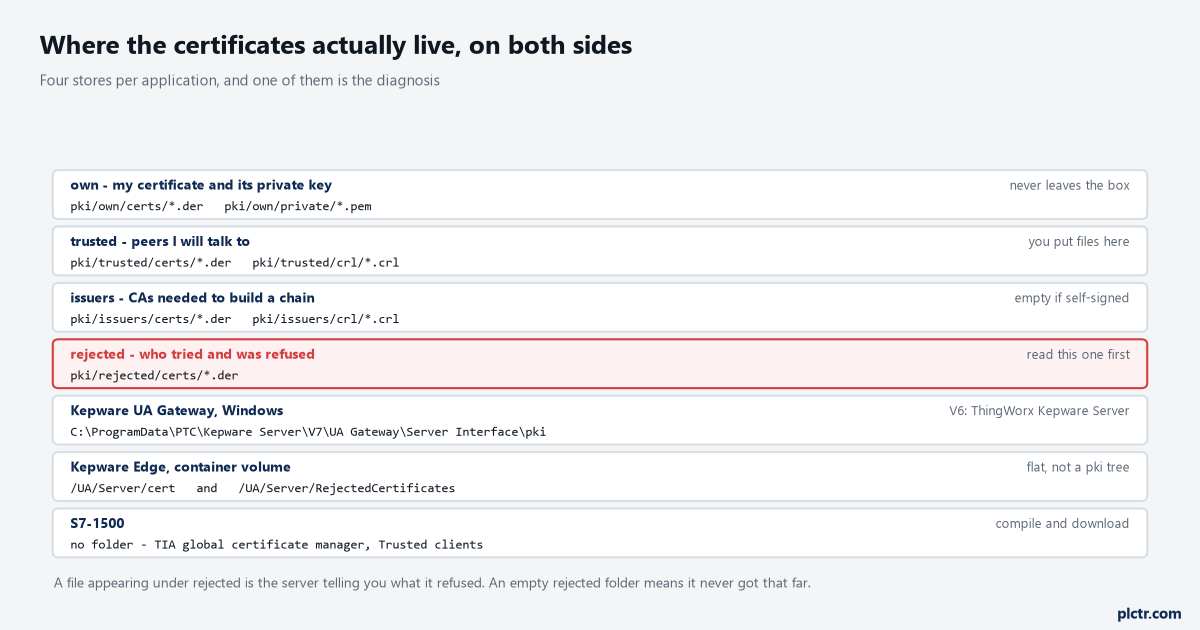
Three products, three shapes, one idea. The S7-1500 row is the exception that proves it: no folder, so the equivalent evidence is a compile and a download away.
Where the folders actually sit depends on who wrote the server. A Windows Kepware installation puts its application data under C:\ProgramData by default and the UA Gateway’s stores under ...\PTC\Kepware Server\V7\UA Gateway\Server Interface\pki, with V6 installations reading ThingWorx Kepware Server in place of Kepware Server; the same tree carries rejectedUser\certs and trustedUser\certs for X.509 user certificates, which are a separate store from the application ones and catch people out. Kepware Edge, being a container, flattens it: trusted certificates go in UA/Server/cert and refused ones land in /UA/Server/RejectedCertificates, and ./edge_admin manage-truststore --list uaserver prints what is in there with thumbprints. A UaExpert installation on Windows keeps its own tree under the user’s roaming profile, and the server end of an Unified Automation SDK server keeps one wherever settings.conf says. An S7-1500 has no folder you can browse at all: the trust list is inside the project, reached through the global certificate manager and the Trusted clients list under OPC UA security, and changing it costs a compile and a download rather than a file move.
Learn your two paths once. You will type them for the next ten years.
What a successful first handshake actually looks like
Six stages, and only three of them involve certificates at all.
A connection opens with a Hello and an Acknowledge. These are plain, unencrypted, and they negotiate nothing but buffer sizes — at least 8192 bytes each way — and they are sent exactly once per socket; a second Hello on the same connection is an error. A server that receives no Hello at all closes the socket after a configurable period that the specification caps at two minutes by default, which is why a client pointed at a port that something else is listening on appears to hang rather than fail. Then the OpenSecureChannel request goes out carrying the client’s certificate, and the server runs it through the validation described below. If it passes, the response comes back carrying the server’s certificate, and now the client runs the same validation in the opposite direction. Then CreateSession, in which both ends check that the certificates are the same ones used to build the channel and exchange nonces to prove possession of the private keys; then ActivateSession, which carries the user identity token and is the first point at which anything about who you are rather than what software you are is considered; then, at last, a Browse or a Read that returns a value.
In a log that is six lines and about forty milliseconds. In a log where it went wrong, it is two lines and one status code.
The thing worth holding on to is that stages two and three are the same algorithm run by different machines about different certificates, and they do not report the same way. That is not an accident either.
The eleven checks, and the rule about who is allowed to explain
Part 4 lists the validation as an ordered table of eleven steps, and says processing halts at the first failure that has not been suppressed.
Structure, chain, signature, policy, trust list, validity period, host name, URI, usage, find the revocation list, check the revocation list. Each has its own status code. Some may be suppressed by an administrator with the privilege to do so and some may not — the trust list check, the URI check and the signature check may not, while the validity period, the host name and the revocation checks may. And then the sentence that repeats through nearly every row of that table: if this check fails on the Server side, the error Bad_SecurityChecksFailed shall be reported back to the Client. Structure failure, chain failure, signature failure, policy failure, trust failure, revocation failure — all of them, from a server, arrive at your client as one generic code. The specific codes exist, and you will see them, but you see them when your application is the one doing the rejecting.
So here is the one rule worth memorising, and it is worth memorising because it halves the search:
A specific certificate error means your own end refused their certificate. A generic BadSecurityChecksFailed means their end refused yours.
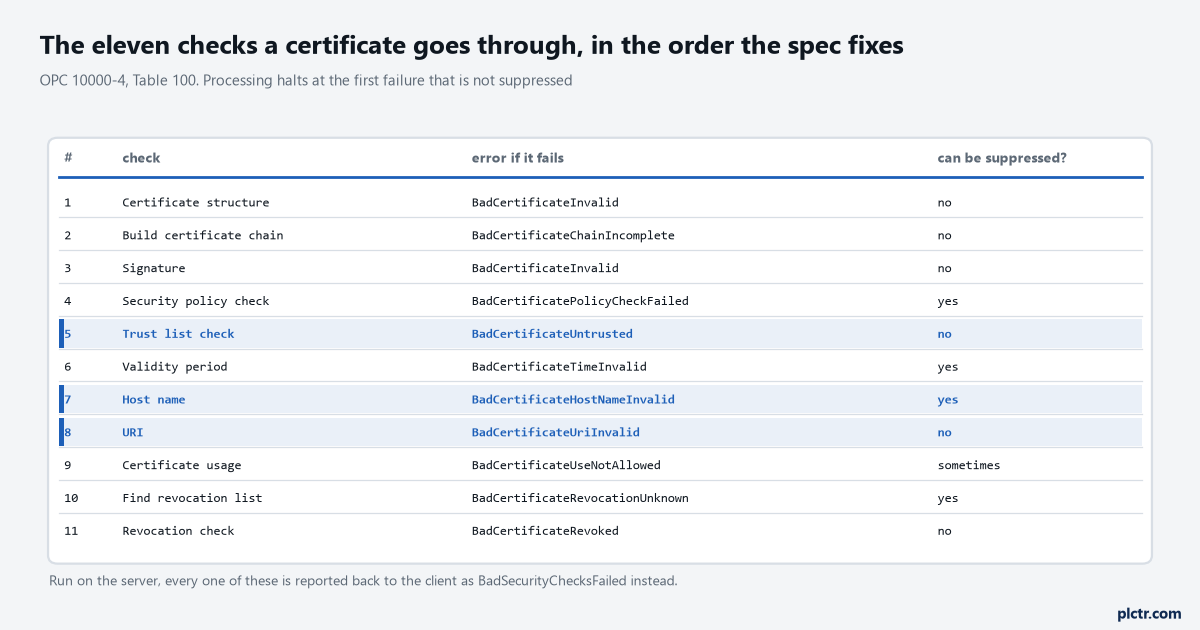
Read the third column downwards. The codes in it are the ones you will only ever see when your own client is the fussy one.
Telling the five failures apart
Five things go wrong on a first connection and they are distinguishable, which almost nothing written about this says.
The server does not trust your client. The channel is refused at OpenSecureChannel, your client prints BadSecurityChecksFailed, and a new file appears in the server’s rejected folder carrying your client’s common name and application URI. This is the common case and it is the only one of the five where moving a file fixes it. On an Unified Automation server ./uacertmgr list rejected prints seven columns – index, SHA-1 id, certificate id, common name, application URI, key type and key size, so a 2048-bit RSA client shows as RSA Public Key 2048 – and ./uacertmgr trust <sha1> promotes it. On a Kepware server the OPC UA Configuration Manager has a Trusted Clients tab with the refused certificate sitting in it and a Trust button. On Kepware Edge you move the file from /UA/Server/RejectedCertificates to UA/Server/cert. On an S7-1500 you import the DER into the global certificate manager, add it to Trusted clients, compile and download. Whatever the mechanism, compare the thumbprint before you click — the SHA-1 id uacertmgr prints is forty hex characters, and it is the same forty characters Windows shows in the Thumbprint field on the Details tab of a certificate and the same value sha1sum gives on Linux, and comparing it is the only thing that distinguishes your client from somebody else’s client that happened to connect first.
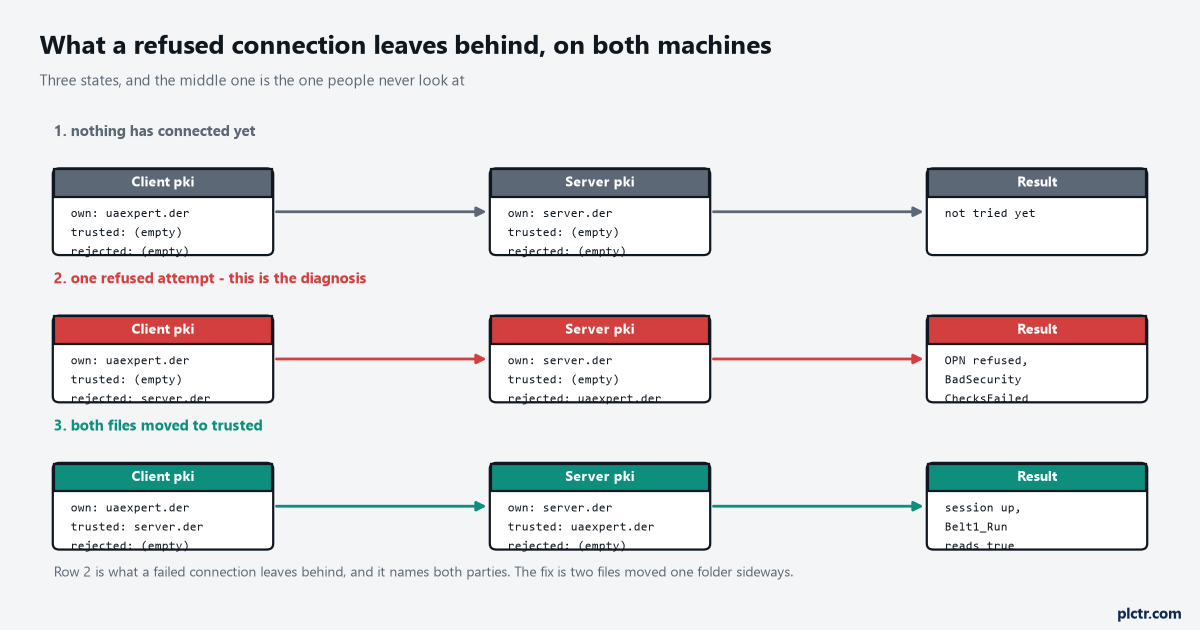
The middle lane is the state almost nobody inspects, and it is the only one that names both parties. Getting from it to the bottom lane is two files moved one folder sideways.
Your client does not trust the server. A new file appears in your rejected folder instead, and a graphical client usually shows a dialog rather than an error: UaExpert’s is titled Check Server Certificate and offers Trust Server Certificate, which writes it to the trust list permanently, or a checkbox to accept the server certificate temporarily for this session. Accept it temporarily on a commissioning laptop and you will be accepting it again every morning.
The name you typed is not in the certificate. BadCertificateHostNameInvalid, 0x80160000, and it comes from your client because the host name check is applied only to server certificates and skipped for client ones. Part 6 tells server implementers to put a partial or fully qualified dNSName or a static IP address in the certificate, and to add every name the machine answers to; what usually turns up is a certificate generated with the short host name only and an operator who connects to opc.tcp://192.168.10.40:4840 because that is what was on the drawing. Nothing appears in any rejected folder. The fix is to connect by the name that is in the certificate, or to reissue the server certificate with the address in it.
The URIs do not match. BadCertificateUriInvalid, 0x80170000. The certificate carries exactly one URI in its subject alternative name and it must equal the applicationUri the application announces about itself, and this check may not be suppressed by anybody. It shows up when a certificate is generated by hand with openssl — which adds no URI at all unless told to — or when somebody edits a client’s application URI in a configuration file after the certificate was made. Again, nothing lands in a rejected folder, because the certificate was structurally fine and the mismatch was found during validation of a field.
Neither end got as far as certificates. BadSecurityPolicyRejected, 0x80550000, or a client-side message about no matching endpoints. The client asked for a policy or a message security mode the server does not publish, and the two never exchanged anything to reject. Both rejected folders stay empty, and that emptiness is the diagnosis.
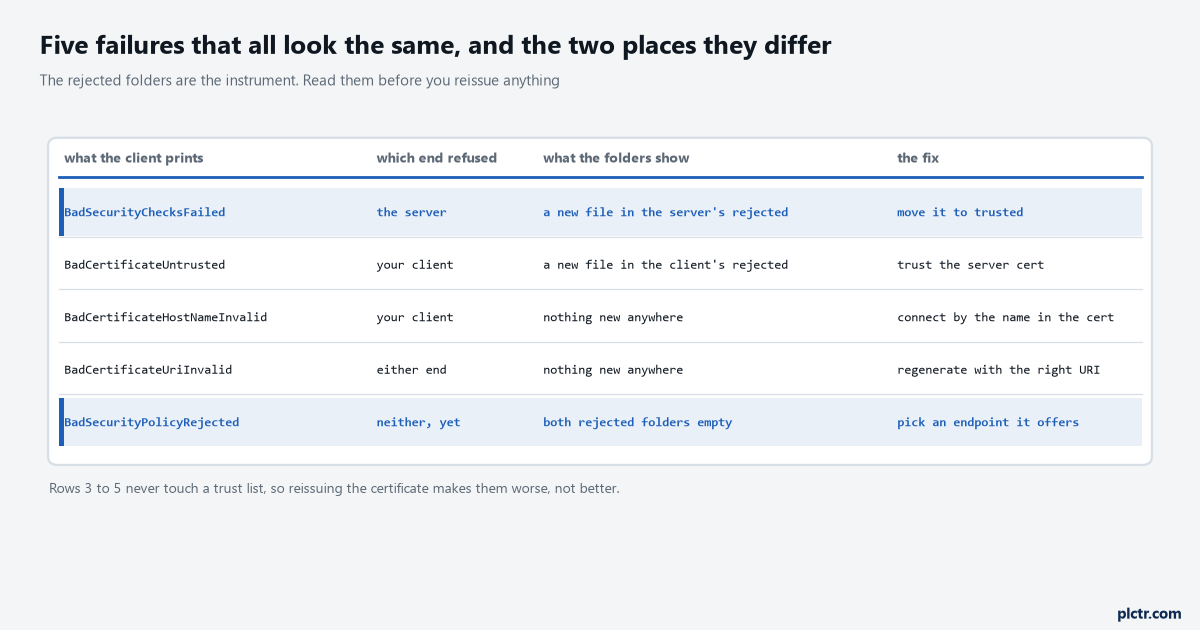
Two columns do the work: which end refused, and whether a file appeared. Rows three to five never touch a trust list at all.
Two more that look like the first one
Expiry and key usage, and they both arrive wearing the trust failure’s clothes.
BadCertificateTimeInvalid, 0x80140000, is a certificate outside its validity window, and the case that wastes an evening is not an expired certificate but a wrong clock. A panel or an embedded server whose real-time clock battery died reads a date in 2016, at which point a certificate issued last week is not yet valid and the error says the same thing either way. Check the clock on both machines before you look at the dates in the certificate. Key usage is the other one: for an RSA certificate the specification requires all four of digitalSignature, nonRepudiation, keyEncipherment and dataEncipherment in the keyUsage extension, plus clientAuth in the extended key usage for a client and serverAuth for a server, and a self-signed certificate must additionally carry keyCertSign. A certificate someone generated with a web-server recipe carries two of those four, and the answer is BadCertificateUseNotAllowed, 0x80180000, which a careless reading turns into “the certificate is wrong somehow” and a regeneration with the same recipe.
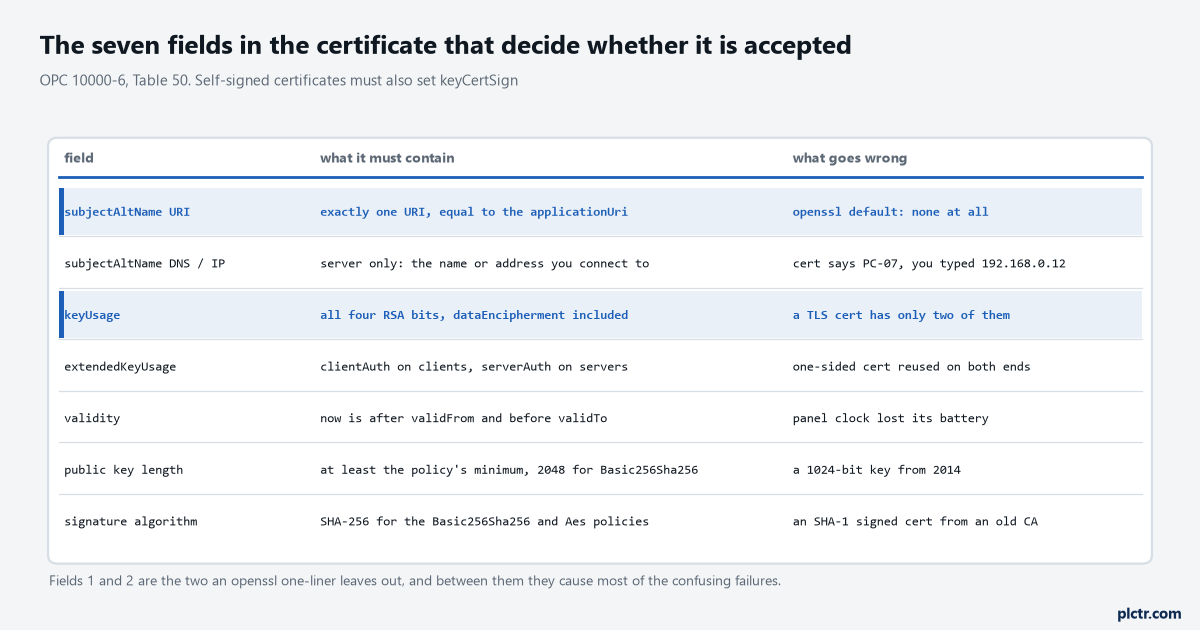
Row one and row three are the two an openssl one-liner leaves out. Between them they account for most of the failures that survive a second attempt.
The dead end, and it is always the same one
Before any of this, somebody will check the firewall, and it will be fine.
A refused certificate produces a completed TCP connection, a Hello, an Acknowledge, an OpenSecureChannel request that leaves the client and a service fault that comes back. nc -zv 192.168.10.40 4840 says open. A packet capture shows bytes in both directions. Every one of those observations is consistent with a server that is reachable, listening and deliberately refusing you, and none of them is evidence about the certificate. If the port were shut you would get no status code at all — you would get a connection refused from the operating system, which reads completely differently. The status code is the diagnosis, and the capture only confirms that the cabling and the switch and VLAN configuration are not the problem.
The second-favourite dead end is regenerating the client certificate. It leaves the old one sitting in the server’s rejected folder, so now there are two files in there with the same common name and different thumbprints, and the next person to trust one has a fifty per cent chance.
Doing it in the order that works
Seven steps, and the point of the order is that the first connection succeeds instead of teaching you this article.
- On the server, decide the endpoint before anything else: turn off the None endpoint, leave exactly one policy and mode enabled, and note the exact endpoint URL the server publishes. Most first failures that are not certificate failures are a client asking for something not on that list.
- On the client, set the application URI to something you chose —
urn:ops-lt-07:plctr:uaexpertrather than a library default — and generate the certificate after setting it, so the URI in the certificate and the URI the client announces are the same string. - Export the client’s certificate from
own/certsas DER and put it in the server’s trusted store by whatever mechanism that server has. Compare the thumbprint against what the client reports before you commit. - Export the server’s certificate and put it in the client’s trusted store. This half gets skipped constantly, because most clients will offer to accept the server certificate at connect time and people click the button.
- Connect. If it works, you are finished and you have learned nothing, which is the goal.
- If it does not, read the status code once and decide from it which machine to walk to: a specific certificate error means stay where you are, a generic one means go to the server.
- Look in the rejected folder on that machine. Something is there or nothing is, and those are different diagnoses.
Step 4 is the one worth arguing about with yourself. A client that accepts whatever certificate an endpoint offers has authenticated nothing, and on a network somebody else administers that is the whole of the rogue-server problem — which Part 2 lists by name as a threat and Part 4 answers by telling clients to verify the server certificate in the endpoint description before calling CreateSession.
Next step
Prove the trust is doing something, because a configuration that accepts everything and a configuration that accepts one certificate look identical while they both work. Delete the server’s certificate from the client’s trusted store, generate a fresh one on the server, and try to connect: the client must refuse. If it connects anyway, your client is accepting whatever it is handed and step 4 above never took effect. Then do the same in the other direction — remove the client from the server’s trust list and confirm the server refuses — and you have tested both halves of a mechanism that most sites never test at all.
After that, the settings you were trusting those certificates in order to use: the policy and the mode, and the user identity on top of them. The Siemens and Python end of this, with the four refusals in the order a script meets them, is in connecting a Python OPC UA client to an S7-1500; the same exchange with a gateway and a SCADA client that has a dialog for each step is in OPC UA PLC integration from a PLC tag to a SCADA client; and what the client does with the values once the session is up is connecting Ignition to a ControlLogix.