TCP 44818 for explicit messaging, UDP 2222 for the cyclic I/O, UDP 44818 for the ListIdentity broadcast that lets RSLinx find a stranger: those are the numbers IT will ask for, and they are the easy part of PLC networking. The decisions that stop a rack of remote I/O dropping are made before anything is plugged in: which switch, which addresses, which VLAN, whether the cell is a ring or a star. This walkthrough covers the switch features that matter, an address plan you can hand to a contractor, DLR rings on EtherNet/IP, PROFINET RT against IRT, and those port numbers in full.
Hardware referenced is a Stratix 5700 with 1756-EN2T scanners and 1783-ETAP taps, plus a Scalance X200 on the PROFINET side.
What you need
| Item | Notes |
|---|---|
| Managed switch | Stratix 5700 or 5410 for EtherNet/IP, Scalance X200 or X300 for PROFINET. Unmanaged switches are for offices |
| Scanner and adapters | 1756-EN2T, 5069-AEN2TR, PowerFlex drives, whatever the cell actually holds |
| Ring taps | 1783-ETAP or 1783-ETAP1F to bring non-DLR devices onto a ring |
| Address plan | One document, agreed before the panel shop starts. This is the real deliverable |
| Cable tester | A certifier that reports wire map, length and return loss. Not a continuity buzzer |
| RSLinx or FactoryTalk Linx | For browsing. Setup is in RSLinx configuration and connect to PLC |
Choose a switch by feature, not by port count
Four features decide whether the switch will cause you problems.
IGMP snooping with an active querier. Multicast I/O connections go to every port on a switch that cannot snoop, including the port feeding the HMI PC. With snooping on and a querier present, multicast goes only where a device asked for it. One querier per VLAN, usually the switch itself. Snooping without a querier is worse than no snooping, because group memberships time out and traffic starts flooding again a few minutes later.
QoS. CIP Sync and PROFINET IRT carry time-critical packets that must not queue behind a backup job. Trust DSCP on the control ports and give the motion and time synchronisation traffic the priority queue. Default settings on most managed switches are close enough, but verify rather than assume.
Ring protocol support. DLR for EtherNet/IP, MRP for PROFINET. Both need the switch to participate, and DLR needs every device in the ring to be DLR-capable.
Port mirroring. The day you need to capture traffic, you will need a mirror port. Configure one now and label it.
Spanning tree deserves a note. Leave it enabled on uplinks, because it is the only thing standing between you and a broadcast storm when somebody patches two ports together. Use PortFast or its equivalent on device ports so an I/O adapter is not waiting thirty seconds for the port to come up after a power cycle.
The four decisions look like this on a Stratix 5700 command line. Ports carrying I/O get the same three lines every time:
! control VLAN with an IGMP querier, one per VLAN
ip igmp snooping
ip igmp snooping vlan 110 querier
ip igmp snooping vlan 110 querier address 192.168.110.1

! a device port: access VLAN, fast link-up, no spanning tree renegotiation
interface GigabitEthernet1/5
 description Rack3 5069-AEN2TR
 switchport mode access
 switchport access vlan 110
 spanning-tree portfast
 no shutdown

! an uplink keeps spanning tree and carries tagged traffic
interface GigabitEthernet1/1
 description Uplink to core, fibre
 switchport mode trunk
 switchport trunk allowed vlan 110,120,10

! mirror port for the day you need a capture
monitor session 1 source interface Gi1/5
monitor session 1 destination interface Gi1/8
Write the address plan before anyone pulls cable
One subnet per cell, one VLAN per cell, and a fixed range for each class of device. The plan below has survived several plants.
| Range | Purpose |
|---|---|
| x.x.x.1 | Switch management address |
| x.x.x.10 to .19 | Controllers and communication modules |
| x.x.x.20 to .49 | Remote I/O adapters |
| x.x.x.50 to .79 | Drives |
| x.x.x.80 to .99 | Vision, scanners, safety devices |
| x.x.x.100 to .119 | HMIs and panel PCs |
| x.x.x.200 to .219 | Engineering laptops, static, never DHCP |
Set device addresses statically and turn BOOTP and DHCP off after commissioning, using the tool described in BootP DHCP EtherNet/IP tool. For controllers, setting the address from the software is covered in assign an IP address within the Studio 5000 environment.
A worked topology for a four-cell line:
| Cell | VLAN | Subnet | Topology | Devices | Uplink |
|---|---|---|---|---|---|
| Infeed | 110 | 192.168.110.0/24 | DLR ring, 8 nodes | 1 controller, 3 I/O adapters, 2 drives, 1 HMI | Stratix 5700 to core, fibre |
| Filler | 120 | 192.168.120.0/24 | DLR ring, 14 nodes | 1 controller, 6 I/O adapters, 5 drives, 2 HMI | Stratix 5700 to core, fibre |
| Capper | 130 | 192.168.130.0/24 | Star | 1 controller, 4 I/O adapters, 1 HMI | Stratix 5700 to core, copper |
| Palletiser | 140 | 192.168.140.0/24 | Star, robot on a NAT device | Robot controller, 2 I/O adapters | 1783-NATR to core |
| Plant SCADA | 10 | 10.20.10.0/24 | Star | Historian, SCADA servers | Routed, firewalled to cells |
I/O traffic never crosses the router. The SCADA VLAN reaches the cells through a firewall with explicit rules, and only for explicit messaging. That split is the first thing an auditor asks about, and it is the same boundary discussed in implementing cybersecurity measures for PLC systems.
Build a DLR ring that recovers before the controller notices
Device Level Ring runs a single closed loop of DLR-capable devices with no switch in the middle. One node is the active ring supervisor and blocks one of its two ports so the ring behaves as a line. When a cable breaks, the supervisor unblocks that port and the traffic reverses direction.
- Confirm every device in the ring has embedded two-port switching with DLR support. The 5069-AEN2TR and most current PowerFlex drives do. A device that does not gets a 1783-ETAP, which sits in the ring and hangs the device off a third port.
- Pick the supervisor. A 1783-ETAP or the cell switch is a better choice than an I/O adapter, because it is less likely to be powered down for maintenance.
- Configure a backup supervisor with a lower precedence value, so the ring still has a supervisor when the primary is out.
- Leave the beacon interval and timeout at their defaults unless you have a reason. Defaults are in the hundreds of microseconds for the beacon and a few milliseconds for the timeout, which is what gives sub-3 ms recovery.
- Keep rings under about fifty nodes. Recovery time grows with node count and the number nobody can defend is the one that bites you.
- Close the ring last, after every device has its address. Closing a ring with a duplicate address in it produces symptoms that make no sense.
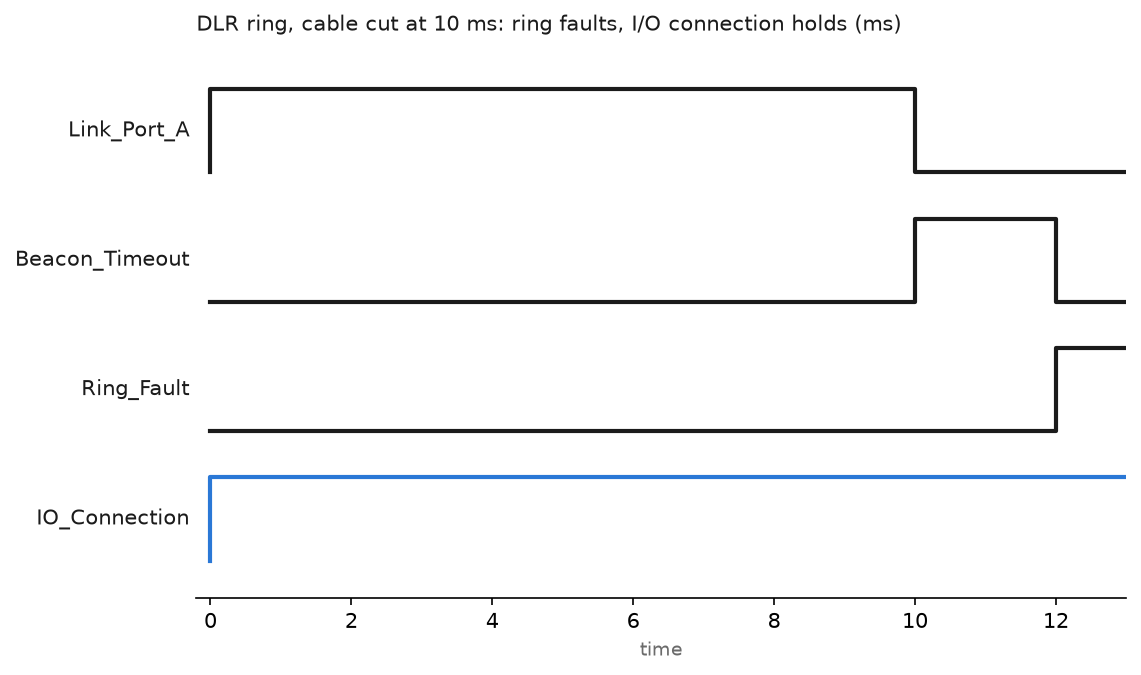
That is the point of the ring. The cable breaks, the supervisor sees beacons stop, the ring reconfigures, and the CIP I/O connection never reaches its timeout multiplier so the controller never faults the module. What you do get is a ring fault status you should alarm on, because a ring running broken is a single cable away from a line stop and nobody can see it from the outside.
Know which protocol needs what
| Protocol | Transport | Notes |
|---|---|---|
| EtherNet/IP explicit | TCP 44818 | MSG instructions, HMI reads, browsing, firmware flash |
| EtherNet/IP implicit I/O | UDP 2222 | Cyclic I/O at the RPI, unicast or multicast |
| EtherNet/IP discovery | UDP 44818 | ListIdentity broadcast, how RSLinx finds strangers |
| PROFINET DCP | Ethertype 0x8892, layer 2 | Device naming and discovery. Does not cross a router |
| PROFINET context manager | UDP 34962 to 34964 | Connection establishment |
| Modbus TCP | TCP 502 | Register based, no discovery, no cyclic guarantee |
| OPC UA | TCP 4840 | Server to client, the usual path to the IT side |
| PTP for CIP Sync | UDP 319 and 320 | Time synchronisation for motion and sequence of events |
PROFINET RT sends real time frames as tagged Ethernet frames with a VLAN priority, no IP layer, typical cycle times from 1 to 8 ms, enough for I/O and normal drives. IRT reserves a scheduled slice of every cycle for critical traffic and needs IRT-capable switch hardware in every device along the path, plus a topology the engineering tool can schedule against. Use it for synchronised motion. Protocol comparisons across the wider set are in PLC communication protocols for SCADA.
Handle machine builders who reuse the same addresses
Every OEM skid arrives on 192.168.1.x. Four skids on one line means four identical subnets. A 1783-NATR sits between the machine and the plant network and translates each machine address to a unique plant address, so the machine keeps its internal addressing and the plant sees something routable.
Two things to know before you commit. The translation table is finite, so count devices before you buy, and the NAT device is a boundary for anything that relies on broadcast or multicast discovery. Explicit messaging and I/O connections work through it with the right entries. Browsing the machine network from the plant side usually does not.
Field notes: what actually goes wrong
The loop that took out a line. A technician patched two ports on the same Stratix together while chasing a dead drop. Spanning tree had been disabled on that switch during a previous commissioning and never re-enabled. The broadcast storm took out four cells in under a second. Every switch light in the panel was solid. Leave spanning tree on, and put a label on the patch panel.
Multicast flooding a panel PC. Three scanners, unmanaged switch, multicast I/O connections. The HMI PC froze for ten seconds at a time because its network card was receiving every I/O packet on the network. Managed switch with IGMP snooping and a querier, plus unicast connections in the module profiles, fixed it permanently. Background on the connection settings is in EtherNet/IP PLC communication.
Duplicate address from the spares cabinet. A replacement Ethernet module carried the address of a machine on another line, and the two lines shared a flat network. Both modules went to solid red network status and reported duplicate IP with the other module’s MAC. Park spares on an address range nothing uses and label them.
Ring running broken for six weeks. A DLR ring lost one cable during a mechanical job. Nothing stopped, because that is what a ring does. Nobody alarmed the ring status, so it stayed broken until a second cable was disturbed and the cell went down. Map the ring fault bit to an HMI banner and a maintenance notification.
Frequently asked questions
Can I run I/O traffic through a router?
Technically for unicast EtherNet/IP, practically no. Latency and jitter across a routed hop are not what an RPI assumes, and PROFINET RT does not route at all.
How many devices can I put on one subnet?
A /24 gives 254 usable addresses, but packet load decides the real limit long before that. Count connections and packets per second against the scanner’s budget.
Do I need fibre between panels?
Use it for runs over about 90 metres, between buildings, or near big drives and long parallel cable trays. It also breaks the ground path, which solves problems that look like network problems and are not.
What does a duplicate IP look like before anyone notices?
Intermittent connection faults on both devices, browse lists that change between refreshes, and pings that answer from the wrong MAC.
Is a managed switch worth it on a three-device cell?
Yes, for the diagnostics alone. Port counters showing CRC errors have found more bad cables for me than any tester.
Next step
Once the topology is settled, tune what runs on it. Connection settings, RPI choice and the fault codes that come with them are in EtherNet/IP PLC communication, and the fault handling that turns a lost rack into a clean stop is in create a controller fault routine.