Power up the cell and the 1734-AENT on Fa1/5 sits in module fault for about thirty seconds, every single time, then clears itself and runs all week without a hiccup. The adapter is fine, the drop cable is fine and the RPI is fine. That port spends its first 30 s after link-up walking through spanning tree’s listening and learning states, and the I/O connection behind it quits after four intervals of the RPI.
The fix is one setting on one port. Give the port a Smartport role that enables PortFast, or type spanning-tree portfast on the interface, and the next power-up brings the adapter in with the rest of them.
The part worth understanding is why the port was slow at all. The switch is running MSTP, which is built on RSTP and is supposed to converge in a fraction of a second, and it still took half a minute. Everything below is a Stratix 5700 with ten ports in a single cell: a 5069-L320ER, a 1734-AENT with eight 1734-IB8 points behind it, a PowerFlex 525, a PanelView Plus and a trunk uplink to the plant switch.
Where the thirty seconds actually come from
Two states, fifteen seconds each, and nothing you can shorten without breaking something else.
Spanning tree will not let a port forward a frame until it has listened for BPDUs long enough to be sure it is not about to close a loop, and then learned the MAC addresses it can reach. Both waits are the same timer, forward delay, and the default is fifteen seconds. Listening is fifteen, learning is fifteen, so a port that goes through the full sequence is thirty seconds from link-up to its first forwarded frame, and the CPwE design guide prints those defaults along with hello time at two seconds and MaxAge at twenty. You cannot usefully turn forward delay down: MaxAge is what limits how many switches deep the topology can be, roughly twenty at the default, and dropping the timers to make one panel boot faster shrinks the diameter the whole plant network is allowed to have. Cisco and Rockwell both say to leave the diameter unset for exactly that reason. So the thirty seconds stay, and the only question is whether this particular port has to serve them.
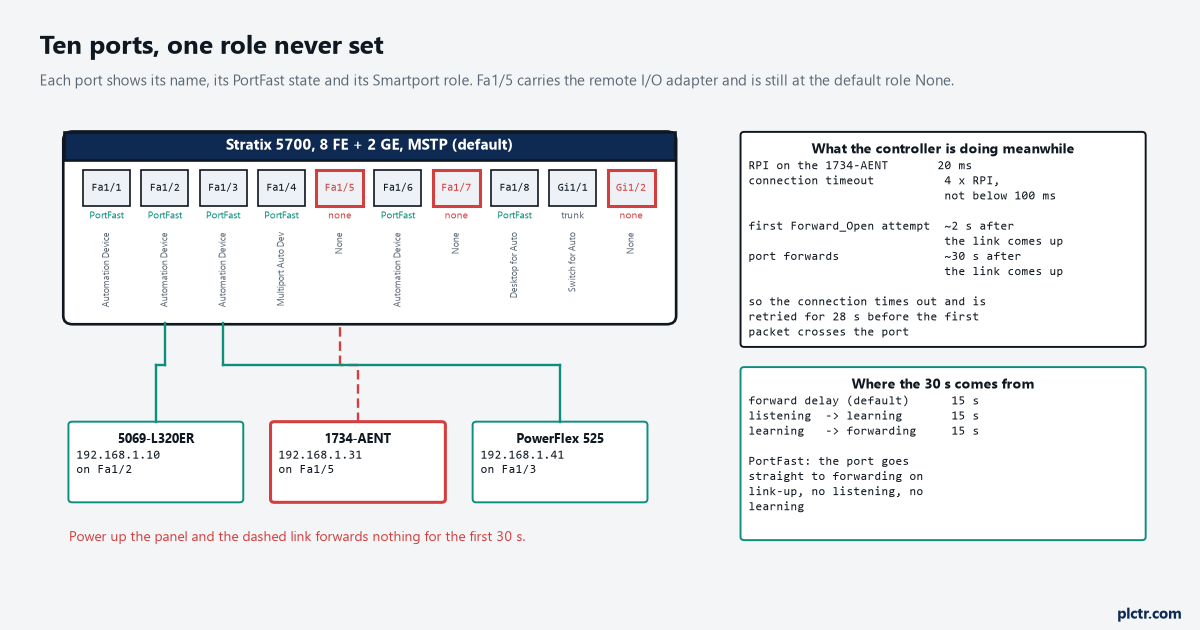
Nine of the ten ports have a role on them. The tenth is the one carrying remote I/O, and its role is still the one it shipped with.
What the I/O connection is willing to wait
A hundred milliseconds. That is the whole budget.
The CPwE guide’s table of application requirements puts time-critical discrete and process I/O at a 20 ms RPI with a connection timeout of four intervals of RPI, floored so it is never shorter than 100 ms. Four times twenty is eighty, the floor lifts it to a hundred, and that is what the controller is prepared to wait before it decides the connection is gone. Thirty seconds is three hundred of those. There is no RPI you can choose that covers the gap either: take the adapter out to a 250 ms RPI, which is already too slow to be useful for an interlock, and the timeout becomes a full second, leaving twenty-nine seconds of the port’s silence still uncovered. This is worth saying plainly because the RPI is the first thing people reach for when an EtherNet/IP connection is unreliable, and here it is the one knob that cannot help.
The RPI and connection basics are the same on any EtherNet/IP adapter, which is why the arithmetic transfers.
What everybody checks first, and why it is almost never that
The cable gets swapped. Then the adapter gets swapped. Then somebody blames port security.
Port security is the plausible one and it is worth knocking down properly, because the Automation Device role does limit the port to a single MAC ID and it does learn that address dynamically from whatever plugs in first. The worry is reasonable: put a spare 1734-AENT on the port and the switch should reject a MAC it has never seen. It does not. The manual is explicit that when the link becomes inactive the switch dynamically relearns the MAC ID to be secured, so a power-down, a cable pull or a module swap all clear it. The version that really does block a replacement is static secure MAC, where you type the addresses in yourself and they become part of the saved configuration; replace a device on one of those ports and you must go and edit the list. If nobody typed a MAC address into that switch, port security is not your fault.
The symptom also does not look like a cable. A marginal cable gives you intermittent drops under vibration, not a fault that lasts thirty seconds and then behaves perfectly. Timing that repeatable comes from a timer, and the only thirty-second timer in the path is spanning tree’s.
MSTP is the default, so why isn’t this fast?
Because rapid convergence is for links spanning tree understands, and an unclassified access port is not one of them.
MSTP is what a Stratix ships with, the manual says so, and MSTP runs on top of RSTP, which converges quickly by dropping the forward delay for root and designated ports on point-to-point links. The word that matters is point-to-point. RSTP gives a port the fast transition when it can be sure of what is on the other end, which means either a full-duplex link to another bridge it is negotiating with, or a port explicitly declared as an edge port — a port with an end device on it and no possibility of a loop. PortFast is how you declare that edge. Without it the switch has no basis for assuming the 1734-AENT is not secretly a bridge, so it does the safe thing and walks the port through listening and learning like an 802.1D switch would. The manual states the effect without hedging: PortFast immediately transitions the port into STP Forwarding mode upon connection, and it exists precisely because ports that connect to workstations and servers can be allowed an immediate connection. Plain 802.1D, for comparison, takes under sixty seconds to recover from a topology change, which the CPwE guide describes flatly as too slow to use in these networks. And if one switch in a ring is running 802.1D, the whole ring falls back to it and everybody loses RSTP’s advantage, which is a separate way to end up with thirty-second gaps on ports that looked correctly configured.
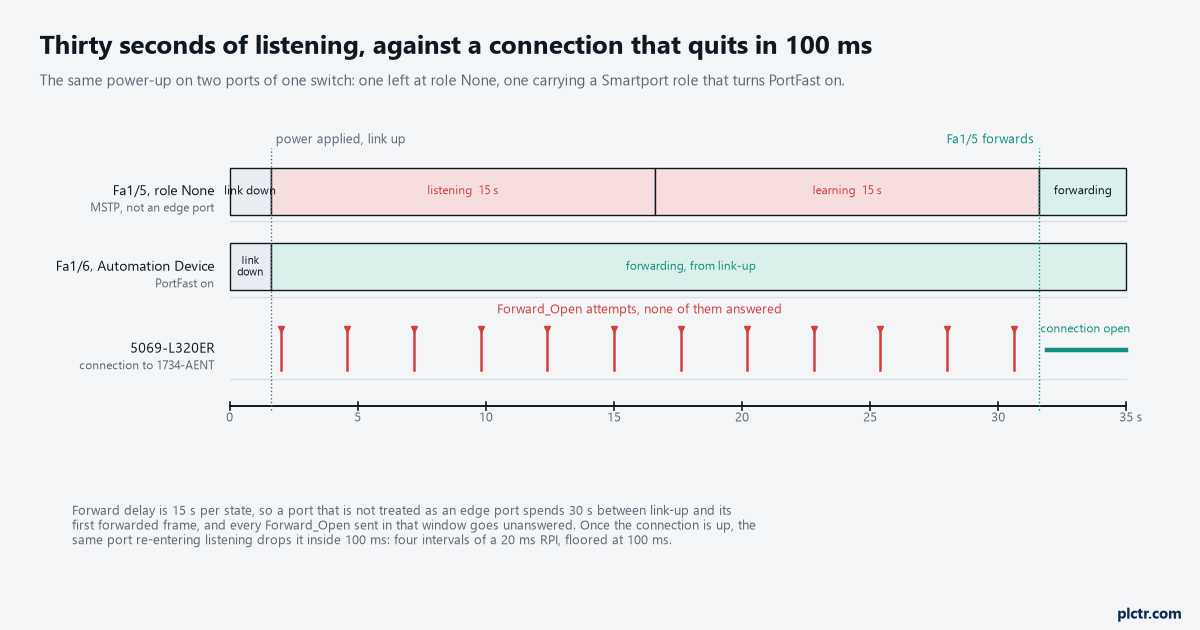
Same switch, same power-up, same firmware. The only difference between the two lanes is which Smartport role was applied.
The six roles that turn PortFast on, and the one that ships
Every port on a new Stratix is set to the role None, and None does not enable PortFast.
That single sentence explains most of these calls. A commissioning engineer sets roles on the ports he is actively using that week, the I/O goes in three months later on a spare port, and nobody goes back to the Smartports page. The roles that turn PortFast on when applied are Automation Device, Multiport Automation Device, Desktop for Automation, Virtual Desktop for Automation, Router for Automation and Phone for Automation — six of them, and the manual lists them as a set on the PortFast page rather than in the role table, which is part of why the detail gets missed. Switch for Automation is deliberately not on that list: it puts the port into trunk mode for a link to another switch running spanning tree, and that is the one place you genuinely want the full listening and learning sequence. For a port carrying an EtherNet/IP adapter, a drive or a controller, Automation Device is the role, and it also sets the port to access mode and optimises queue management for CIP traffic while it is there.
If you would rather not use a role at all, the PortFast tab does it per port. Access ports get Enable Port Fast; trunk and dynamic-auto ports get Enable PortFast Trunk, which is a different checkbox and catches people out.
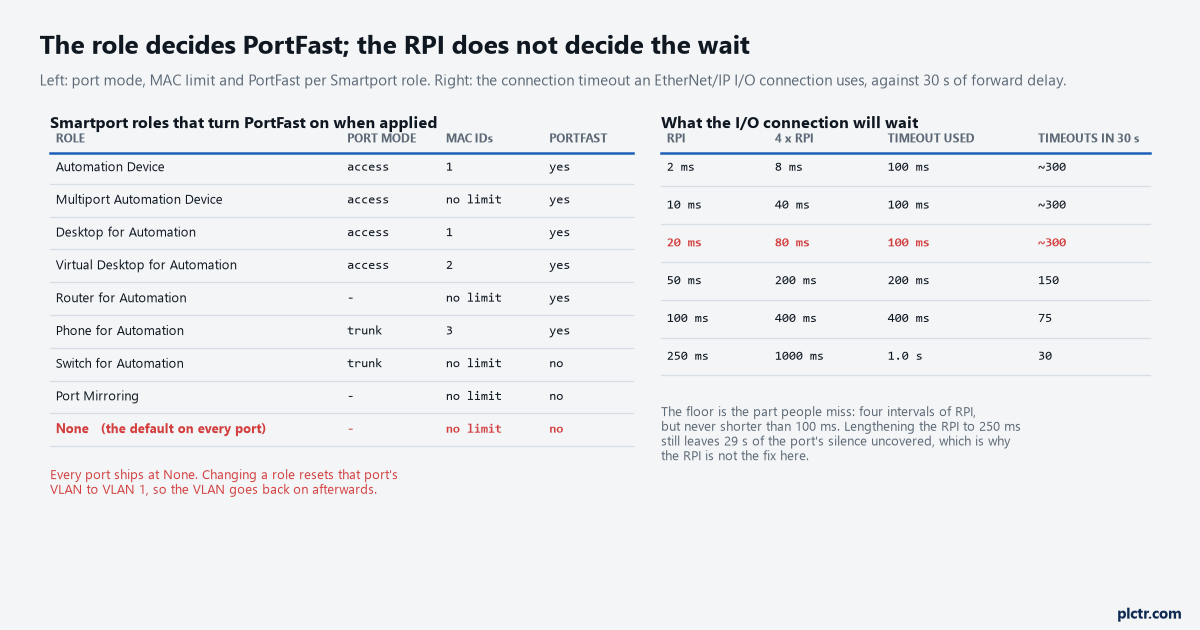
The left table answers “will this port forward immediately”. The right table answers “would a slower RPI have saved me”, and it would not.
Where PortFast bites back
Put PortFast on a port that has a switch behind it and you have built a loop that nothing will break.
That is the reason the feature is not on by default, and the reason the manual keeps saying these features are typically enabled only on access ports. The two guards are worth knowing apart. BPDU Guard shuts the port down the moment it receives a BPDU, which is what you want on a PortFast access port: if somebody hangs an unmanaged five-port switch off the machine so they can plug a laptop in, the port dies instead of the plant. BPDU Filtering is the dangerous one — it blocks BPDUs in both directions, which effectively disables spanning tree on those ports and can produce loops, and the manual says so in as many words. It does have a safety net: if a BPDU is received anyway, PortFast is disabled on the port and the global STP settings take over. Enable both and BPDU Guard never fires, because filtering stops the BPDU from arriving in the first place.
The thing that resets when you change the role
Changing a Smartport role on a port sets that port’s VLAN back to VLAN 1.
So the sequence is not “apply the role and walk away”. Apply the role, then go back and put the access VLAN where it belongs, then save. On a flat cell where everything is on VLAN 1 anyway you will never notice; on a segmented one you will fix a thirty-second boot delay and create a device that cannot talk to its controller at all, which is a worse Monday. The VLAN and switch layout is the thing to check before you touch a role, not after.
What to do with this on the next boot
Go to Configure, then Smartports, and read the Role column for every port that has a cable in it. Anything carrying an adapter, a drive, a controller or an HMI and showing None is a candidate. Set it to Automation Device, put the VLAN back, save, then pull power on the panel and watch the module tree: the adapter should come in with everything else instead of thirty seconds behind it. If a port still lags after that, the next place to look is the uplink — a trunk running the full sequence delays everything behind it, and that one is supposed to. And if the fault is not clean thirty seconds every time, it is not this; go back to reading the I/O fault the controller actually logged before changing anything on the switch.