Module Fault 16#0010: Mode or State of Module Does Not Allow the Object to Perform the Service
The Connection tab of the module properties reads Module Fault 16#0010, and the sentence beside it says the mode or state of the module does not allow the object to perform the requested service. The general instructions reference prints that string verbatim and explains it in nine words: the state of the device prevents a service request from being handled. Which means the packet arrived. The module received it, parsed it, understood exactly what was being asked, and answered with a refusal — so the cable, the switch, the IP address and the subnet mask are all working, and all four are what get checked first.
A module that says 16#0010 is talking to you. Start from what it is doing, not from how it is wired.
The two codes that read the same and mean different things
Two module faults in the same table describe a mode or state problem, and telling them apart is most of the diagnosis.
16#000C is “Service Request Error: Invalid mode/state for service request”, and the reference gives it a specific shortlist: verify first that the module is not faulted, then look for a module with limited communication but a major fault of its own, or a firmware update that needs to be completed or is currently being completed, and refer to the Module Info tab to find out which. 16#0010 carries no such list. It is the general refusal — the object exists, the service exists, the module is present and answering, and right now it will not do it. That difference matters because 16#000C sends you to the module’s own health and 16#0010 sends you to the request. A module halfway through a firmware update reports 16#000C. A module being asked to unlatch an alarm on a channel that has no alarm latched, or to accept a configuration write while it is holding a connection from somebody else, is the shape of 16#0010.
Read the Module Info tab for 16#000C. Read the message or the connection request for 16#0010.
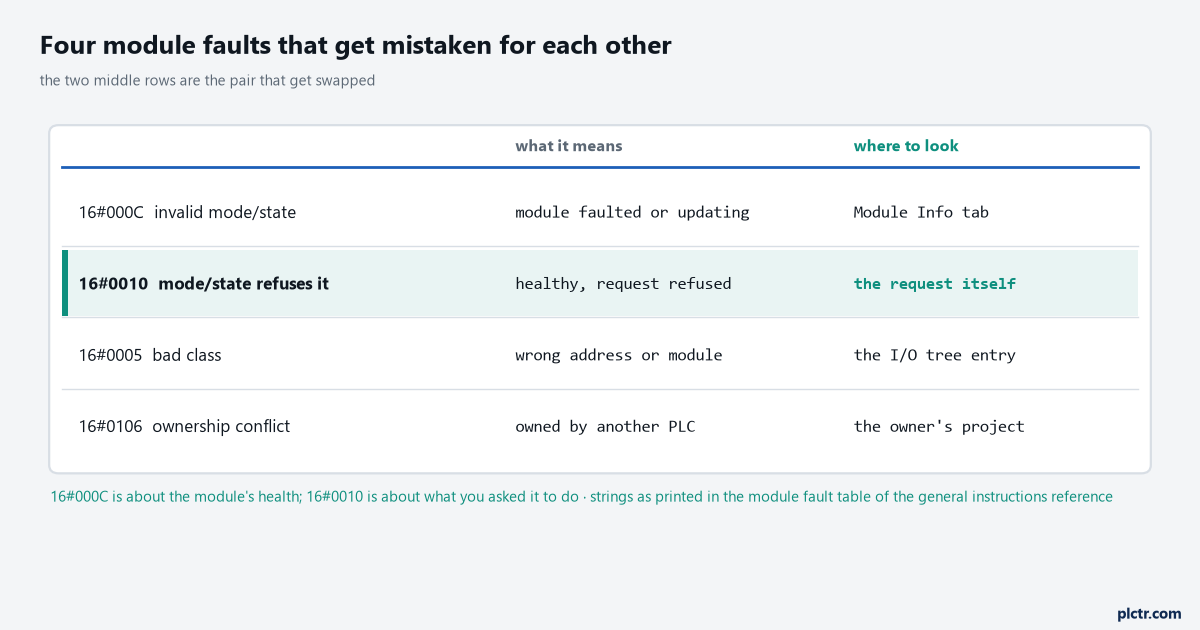
Four codes, four different places to look. The two middle rows are the pair that get swapped, and the column that separates them is the last one.
Where the same code appears as a message error
16#0010 has a second life on the MSG instruction, under a shorter name.
The message error code table in the same reference lists 0010 as “Device state conflict”, and the ControlLogix user manual’s I/O fault messages table uses the same three words. That is one CIP status with two renderings, and it behaves identically in both places: the target accepted the request and its present mode refused to execute it. On a MSG the code lands in the instruction’s .ERR word with the .ER
Always read-only is 000E. Read-only at this moment is 0010. The fix is different and so is the conversation with the vendor.
Finding the state that caused it
Nothing in the fault string tells you which state, so the diagnosis is a sequence of three questions asked in order.
First, is the module actually healthy? Open Module Info and read the major and minor fault status there; if the module has a fault of its own the code is nearly always 16#000C rather than 16#0010, and a module reporting neither is a module telling you the problem is your request. Second, what service was being requested at that instant? For an I/O connection it is the connection open itself, which carries the configuration data from the module’s Configuration tab, so a configuration the module will not accept in its current state looks exactly like this. For a message it is the four fields on the Configuration tab of the Message Configuration dialog, and the fastest test is to send a harmless Get where the failing one was a Set — if the Get returns and the Set refuses, the state is real and the module is enforcing it. Third, who else is connected? A module already owned by another controller, or in the middle of being reconfigured by one, is in a state that will not accept a second configuring connection, and that case has its own code, 16#0106, worth ruling out before spending time here.
The sequence is Module Info, then the request, then the other controllers. Three checks, in that order, and one of them ends it.
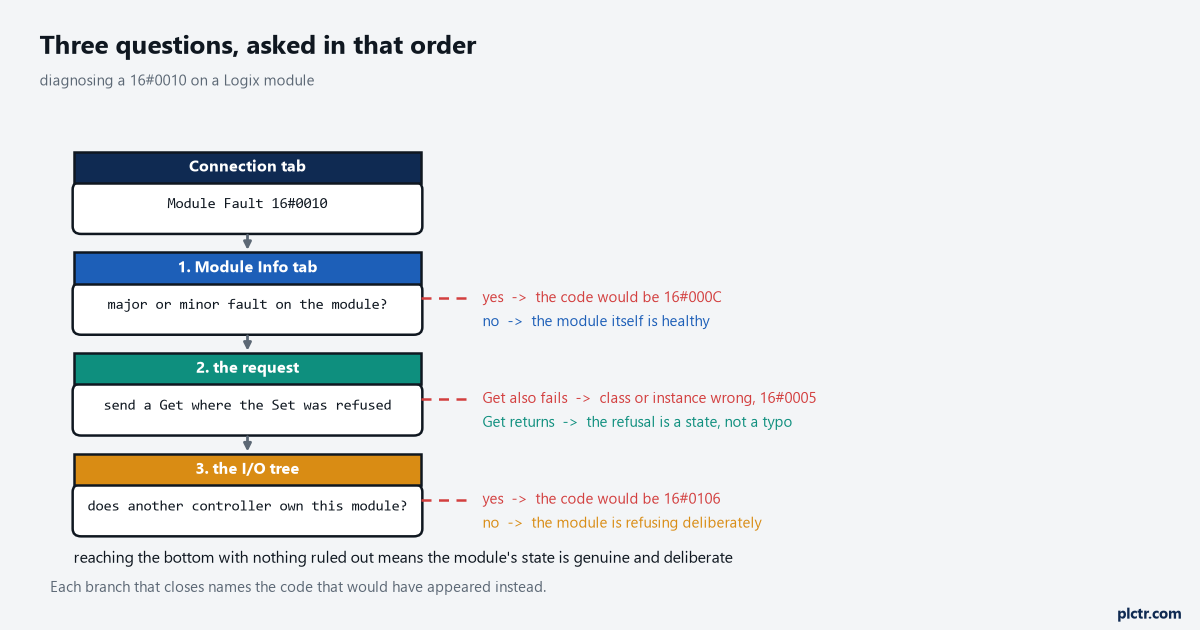
Each branch that closes names the code that would have appeared instead. A path that reaches the end with nothing ruled out means the module’s state is genuine and deliberate.
Where the fault codes are printed now, which is not where they were
Anyone who learned these codes from a printed manual will spend twenty minutes looking for a table that has been moved.
The Major, Minor, and I/O Faults programming manual no longer prints the I/O fault code list at all. Its I/O Fault Codes chapter now runs to a few paragraphs saying where the codes appear and then refers the reader to the Logix 5000 Controller Fault Codes spreadsheet, with a note that you may be asked to log in to a Rockwell Automation web account and that no support contract is needed to reach it. The general instructions reference does the same for major and minor fault codes. But it still prints the module fault tables — 16#0000 through 16#00ff, and 16#0100 through 16#01ff — inside its Input/Output Instructions chapter, which is where the wording quoted at the top of this article comes from and the most complete source still available as a PDF. The other detail from the faults manual that saves confusion: the code appears either as a full hexadecimal number such as 16#000A or as the last characters alone, #000A, depending on where you are reading it, so the same fault looks like two different things on the controller status display and in the software.
The module fault tables live in the general instructions reference. Not in the faults manual, where the title says they should be.
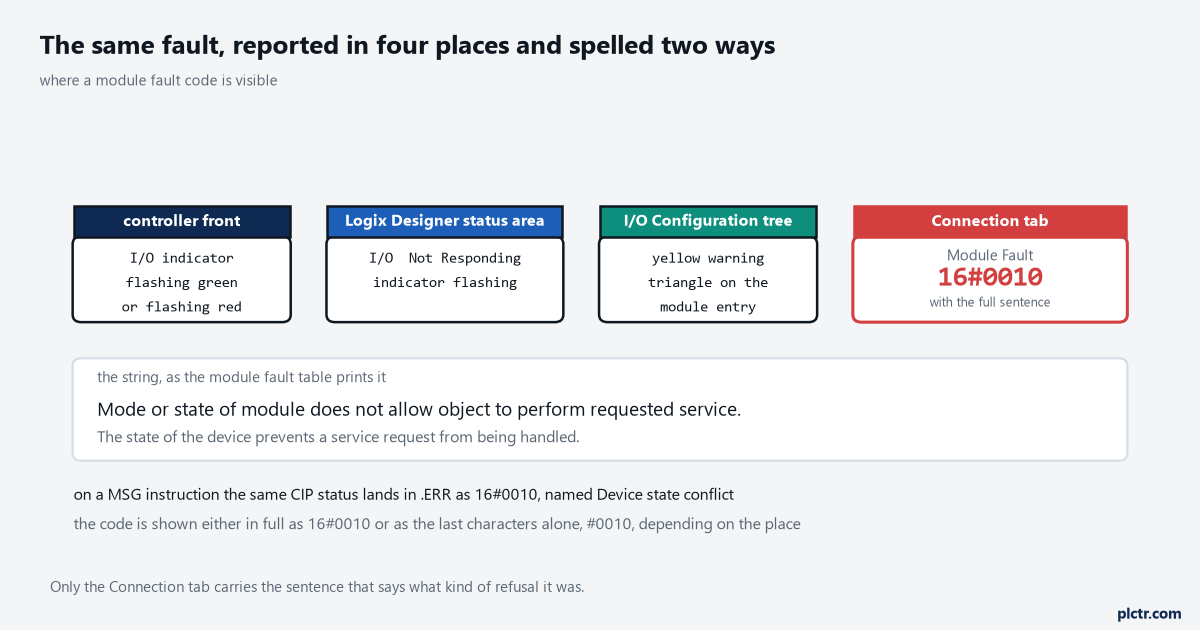
The same fault is reported in four places and spelled two ways. Only the Connection tab carries the sentence that tells you what kind of refusal it was.
What to do next
Latch the code. Put a rung in the controller that copies the failing MSG’s .ERR and .EXERR words into retentive tags on the rising edge of .ER, with a timestamp from the wall clock, because a state fault by definition depends on what the module was doing at that moment and the dialog will be clean by the time anyone opens it. Then reproduce it deliberately: run the same service while the module is doing the thing you suspect, and again while it is idle. If the module is mid-firmware-update the code will have been 16#000C all along and upgrading controller firmware is the sequence to follow instead. If another controller turns out to own it, Allen-Bradley I/O faults and their causes covers the ownership codes that appear alongside this one. And if the refusal is coming from a message rather than an I/O connection, the connection and RPI settings behind it are worth re-reading in EtherNet/IP setup, RPI and faults before assuming the module is at fault. For the controller-level faults that this one is sometimes mistaken for, ControlLogix major faults and fault codes is the separate list.