An optimized block on an S7-1500, or on an S7-1200 at V4.x, is created with a 100 byte memory reserve, which is room for 25 Reals of new Statics before a download in RUN has to reinitialise the instance DB. Whether an S7-1500 interface change makes the load preview put “reinitialize” against the block is decided by three things, and the change you are about to make is only one of them: the kind of change, whether the reserve was switched on and downloaded before you edited the block, and whether the values you care about are retentive.
The order below keeps the values, with the CPU in RUN and an operator watching the screen the whole time.
The mechanism behind the reserve, and what to do on a machine where the values have already gone, is in download without reinitialization in TIA Portal. This is the procedure that stops you needing that page.
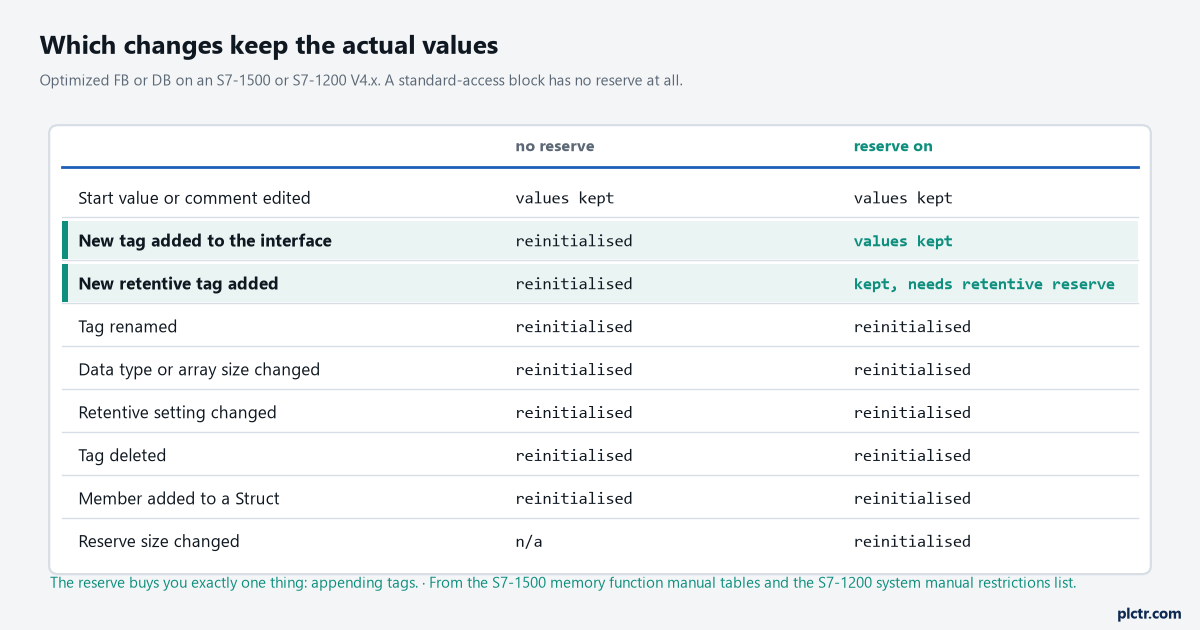
Two columns, nine kinds of change. The reserve turns exactly one row green, and it is the row that covers most of what people actually do to a block that is already running.
First, which kind of S7-1500 interface change it is
The memory function manual for the S7-1500 prints two lists. For a DB with the reserve active, a change of start value, a change of comment and the addition of new tags load without reinitialising the actual values; a name change, a data type change, a retentivity change, the deletion of a tag and any change to the reserve settings all need the reserve toggle off, and the next load reinitialises everything in the block. Without a reserve the first list shrinks to start values and comments. The S7-1200 manual adds the line that catches people who thought they were safe: adding new members to a Struct, changing tag names, array sizes, data types or retentive status all require that you reinitialise the block if you download it in RUN. A new member inside #recipe.limits is not “adding a tag” as far as the layout is concerned. It is changing the size of an existing one. Append the new Real at the end of the Static section instead, and it lands in the reserve. Treat a PLC data type the same way. It is a Struct with a name, used by every block that declares it, and the manual’s Struct sentence is the only one you should plan around until the load preview tells you otherwise.
Then, in this order
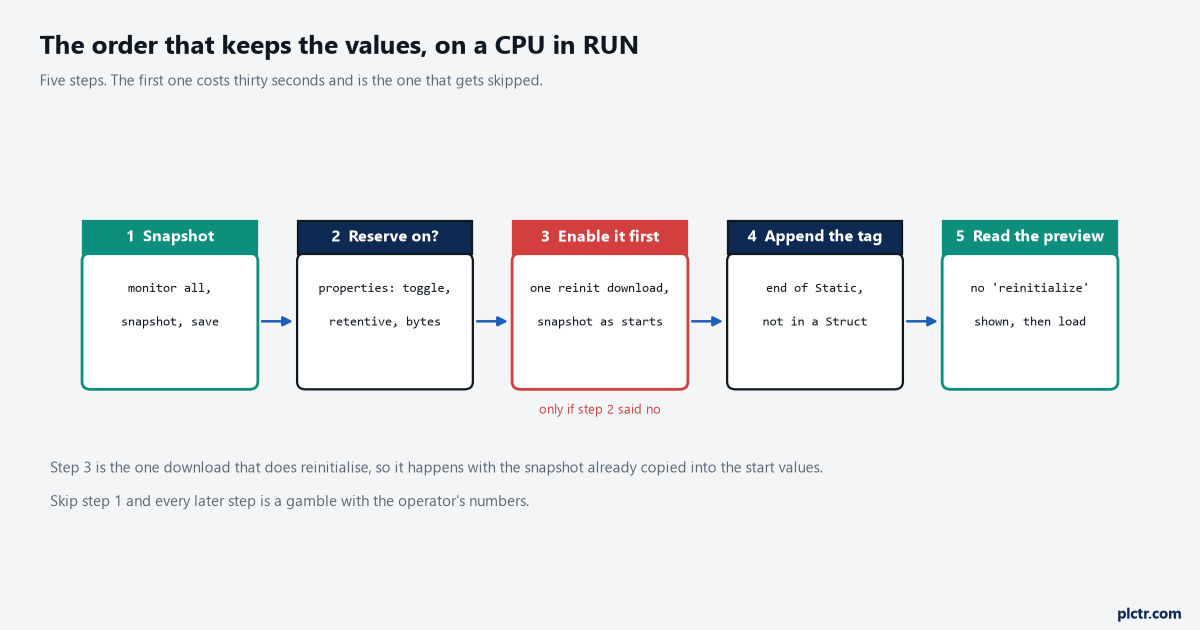
Step 3 only exists on a block that never had the reserve switched on. It is the one download in the sequence that does reinitialise, so it goes out with the snapshot already in the start values.
1. Snapshot, before you touch the editor. Open the DB, click “Monitor all tags”, then click the snapshot button, and the Snapshot column fills with the actual values as of that moment. The S7-1200 manual states the prerequisite plainly: the block has to be identical online and offline for the snapshot to be taken, which is why this is step one and not step four. Once the interface has been edited, the offline block is no longer the online block, and the button is no use to you. Save the project. Thirty seconds, and it is the step that gets skipped.
2. Look at the block, not the settings. Right-click the FB or the DB in the project tree, Properties, and find the “Download without reinitialization” node. What you want to see is the toggle on, a memory reserve with bytes left in it and, if any Static in the block is retentive, the retentive box ticked with its own reserve. The default 100 bytes lives under Options, Settings, PLC programming, General, and changing it there affects new blocks only, which is why the block you inherited from last year has whatever it was born with.
3. If the reserve is off, switch it on and download once. This is the step that surprises everybody. Enabling the reserve, or changing its size, is itself a change to the block layout, and the memory manual lists “changes to the memory reserve settings” among the edits that reinitialise. So the sequence on a block that never had it is: copy the snapshot into the start values with the button beside the snapshot one, compile, enable the reserve, download, and let the reinitialisation write your real numbers back because they have just become the start values. The CPU can stay in RUN throughout; what you are protecting against is not a STOP but a DB full of zeros.
4. Make the change, at the end of the section. Append; do not insert into a Struct, do not rename, do not retype. The toggle blocks some of this for you — the S7-1200 manual says you cannot delete existing entries or modify the memory reserve while the function is enabled — but it does not stop you adding a member inside a Struct, and it does not stop you resizing an array.
5. Read the load preview before you click Load. The dialog names the action per block. If the reserve can take the change, there is no reinitialise action against the block and the load goes through in RUN with the actual values intact. If it says reinitialize, stop. Either the reserve is full, the retentive box was never ticked for a retentive tag, or the change is one of the kinds in the table. That sentence in the dialog is the last warning you get, and clicking through it is the whole story of most “the setpoints are gone” calls.
Then open a watch table on three values you know and check they are what they were.
The reserve that people forget is a second reserve
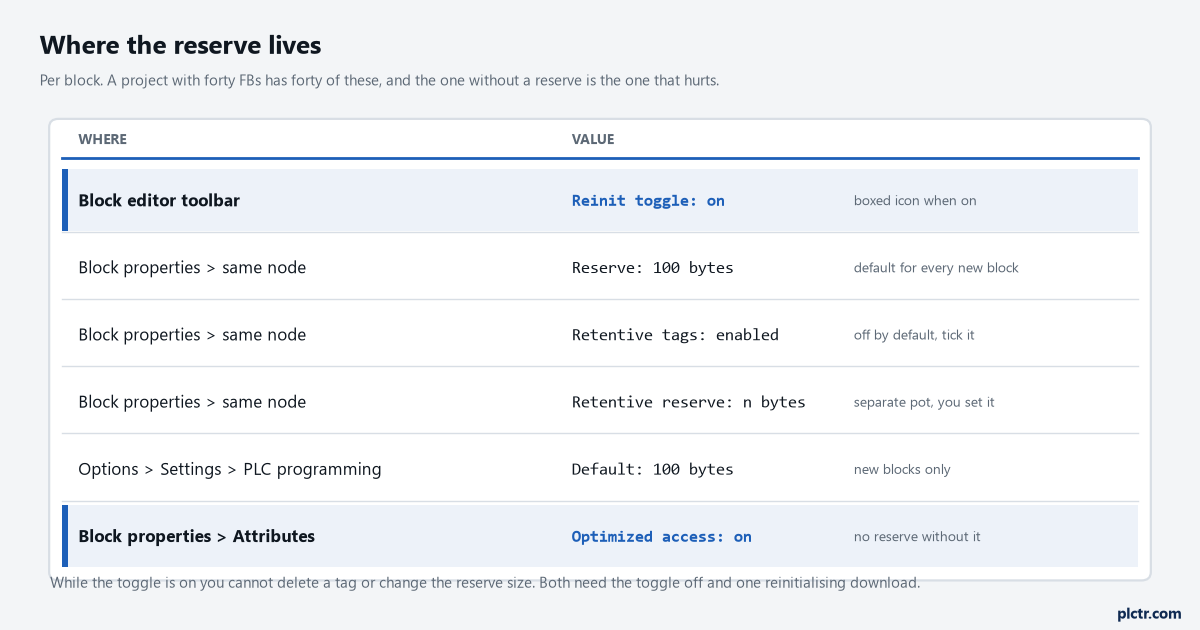
Two reserves, not one. A retentive Static added to a block whose retentive box is clear reinitialises the DB even though the ordinary reserve had 90 bytes to spare.
Retentive tags come out of a separate pot. The S7-1200 manual’s procedure for it is its own list: block properties, the “Download without reinitialization” node, tick “Enable download without reinitialization for retentive tags”, enter the number of bytes, and only then add retentive tags and download in RUN. Add more retentive bytes than that reserve holds and STEP 7 refuses the RUN download.
On a recipe FB every setpoint is retentive, which makes this the reserve that matters and the one that is off by default.
When you do step 2, look at both numbers, not the first one.
What the reserve cannot do for you
A standard-access DB has no reserve. The programming guideline says it once and the S7-1200 manual repeats it: downloading without reinitialisation is only available for optimized blocks. Every DB you have unticked “Optimized block access” on — the ones behind a PUT or GET, the ones an old panel reads by absolute address — reinitialises on any interface change at all. For those the snapshot-to-start-values route in step 3 is the whole procedure, every time, and the better answer is to keep those blocks small and stable and put nothing in them that an operator types. Multi-instances move the problem up one level. The guideline describes them as memory areas within the instance DB of the calling block, so a Static added to FB_Valve called as a multi-instance in FB_Station is a change to FB_Station‘s instance DB, and it is FB_Station‘s reserve that has to absorb it. If you are used to giving reserves to the small reusable blocks and not the big ones that call them, this is the case that gets you. And there is the dead end. Retain does not protect the values. Retentive marking decides what survives a power failure or a warm restart, and a new block layout is neither of those; the reinitialisation writes the retentive copy from the start values like everything else. The comparison table in what survives a power cycle on Logix and on S7 is about the wrong event for this problem.
Four ways back, and which one is free
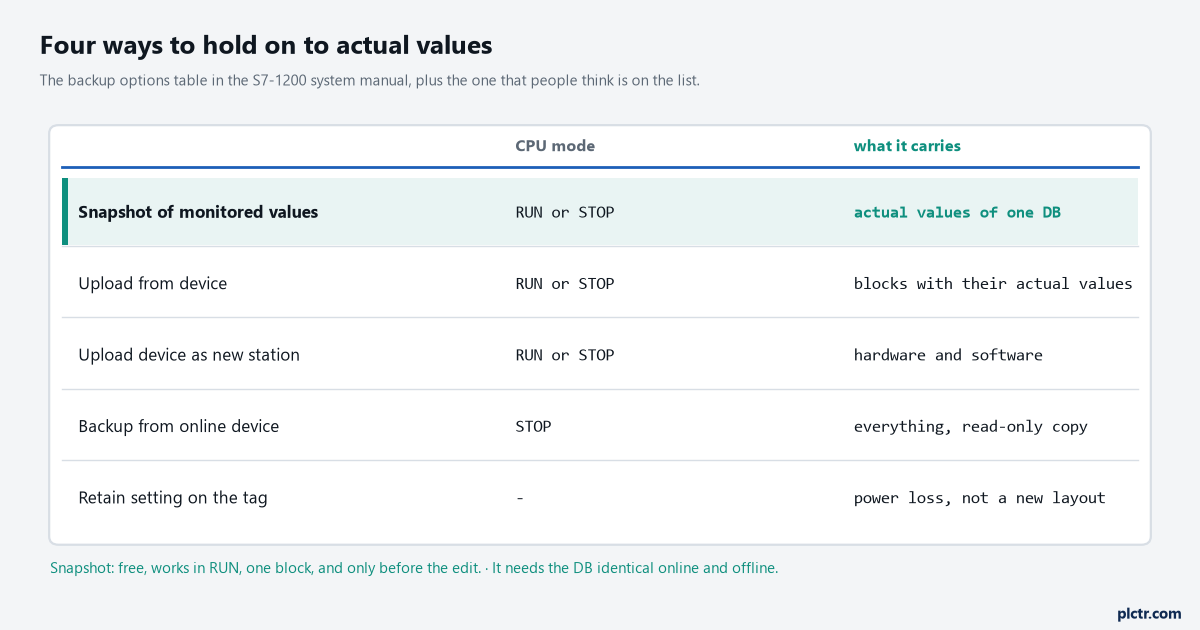
The snapshot is the only one that works in RUN, on one block, in the editor you already have open. It is also the only one that needs to happen before the change rather than after.
The S7-1200 manual’s backup table lists what each option carries. A snapshot of the monitored values takes the actual values of one DB, in RUN or STOP, into the project. Upload from device brings blocks back from the CPU with their actual values, in RUN or STOP. Upload device as new station brings hardware and software. Backup from online device needs STOP and produces a consistent copy that cannot be opened or edited, which is what makes it a restore point rather than a working copy. Two of those give you a way to put values back after the damage. The snapshot column has a second button that copies the snapshot values into the actual values of the online CPU, and the manual says it loads them in a consistent download, with the warning that a snapshot holding timer values or calculated state restores those as of the moment it was taken. Upload from device before the change gives you a project copy of the DB with real values in it, which you can open, compare and download later.
Both need to have happened before the change, which is the whole point of step 1.
If the values matter enough that none of this feels safe, take them out of the instance DB altogether. Siemens’ own application example for persistent data, entry 109479727, moves the setpoints to a CSV file on the memory card with the RecipeExport and RecipeImport instructions, and states the reason in one line: a DB in load memory is deleted when the program is loaded, and the CSV file is not. A recipe store on the HMI does the same job from the other side, and the structure of that split is in PLC batch control with ISA-88 phases.
What to do before the next change
Open the properties of every FB whose instance DB holds a number somebody typed on a panel, and write down three things per block: reserve on or off, bytes left, retentive box ticked or not. The programming guideline’s recommendation is to define a reserve for blocks that will be expanded during commissioning; on a machine that is past commissioning, the list of blocks that will be expanded is the list of blocks that hold setpoints. Fix the ones that are off during the next planned stop, one reinitialising download each with the snapshot in the start values.
From then on every interface change is step 1, step 4 and step 5, and nothing else.