Time it with a stopwatch before you type anything into the preset: the longest carton you run, crossing the photo-eye, on the slowest zone. A 1219 mm carton at 0.28 m/s sits on that eye for 4.35 seconds, which is why the 2000 ms that came across with the copied project trips every time the shift runs a long box. A conveyor jam timer preset is arithmetic – one measurement, one division, one multiplier for margin – and it comes out different for every zone that has a different length or a different speed. Everything below is worked on a twelve-zone accumulation line feeding a palletiser, with a 5069-L320ER CompactLogix, one diffuse eye per zone into a 5069-IB16, a PowerFlex 525 on each zone motor and the zone logic in a 50 ms periodic task. Swap your own numbers in as you read.
The method survives the swap from one line to the next. The numbers do not.
Measure the belt, not the drive display
The frequency on the keypad tells you what the drive was asked for, not metres per second.
Between the motor and the box there is a gearbox ratio, a drive pulley diameter and, on a loaded belt, some slip, so measure the thing you are actually going to divide by. Put a chalk mark on the belt, measure a known distance along the frame – 3.00 m is plenty – and time the mark across it with the line running at the speed the zone uses in production. Three runs of 10.6, 10.7 and 10.8 seconds over 3.00 m gives 0.280 m/s, and the spread of those three runs is itself information: if they disagree by more than a few percent, something is slipping and the margin you add later has to be bigger to cover it. Do the measurement at the slowest speed the zone ever runs, because a gapping section that drops to 18 Hz for one product code sets the preset for every product code.
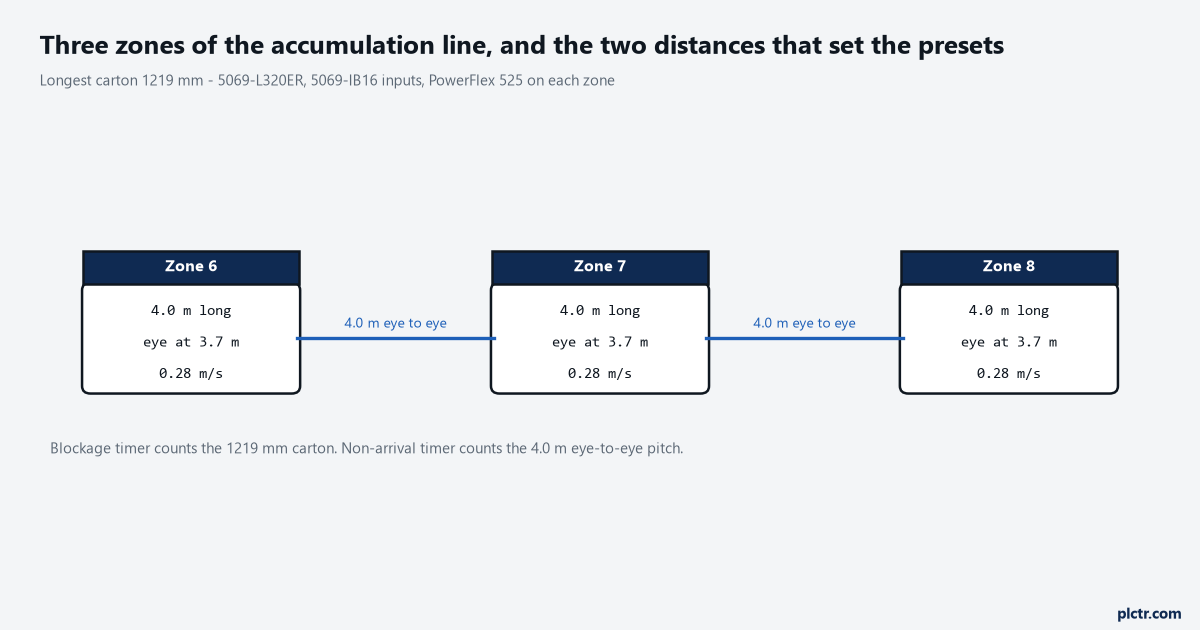
Zone 7 is 4.0 m long with its eye 300 mm back from the discharge. The eye-to-eye pitch is what the non-arrival timer counts; the carton length is what the blockage timer counts. Two distances, two presets.
Two timers, and the habit of merging them
A zone has two ways of failing and most lines only time one of them.
The first is blockage: the zone is commanded to run, the eye is blocked, and it stays blocked, because something is stuck on the eye. The distance that matters there is the length of the product, and nothing else. The second is non-arrival: the zone is commanded to run, product left it, and the next eye downstream never made – something fell off, wedged at the transfer, or is riding the frame rail. The distance that matters there is the eye-to-eye pitch, which on this line is six times longer than the longest carton. Merge the two into a single preset and you get the worst of both, long enough that a blockage sits there scuffing product and short enough that a normal hand-over between long zones reads as a fault.
Two failures, two distances, two numbers – and it is the second one that is usually missing.
Working out the conveyor jam timer preset
Start with the one term that always exists, and that no amount of programming makes smaller.
The eye is blocked from the moment the leading edge breaks the beam until the trailing edge clears it, and in that time the product has travelled exactly its own length – so at 0.280 m/s a 1219 mm carton gives 1.219 / 0.280 = 4.35 seconds, and nothing you write in the program makes that smaller. Then add the ramp, because the belt is not at speed when the run command goes out: a drive ramping linearly from zero to 0.280 m/s over 0.50 seconds covers half the distance a belt already at speed would cover in that time, so the ramp costs you half the ramp time, here 0.25 seconds. That result holds for any linear ramp, which makes it the one term you can write down without measuring anything. Getting the ramp time itself right is where a PowerFlex 525 catches people: P041 Accel Time 1 sets the time to go from 0 Hz to Maximum Frequency, not to the commanded speed, so a drive with P041 at 1.00 s and a 60 Hz maximum reaches a 30 Hz zone command in 0.50 s – and a drive left on its 10.00 s default reaches it in five seconds, which is longer than the carton takes to cross the eye.
The small terms are genuinely small, and they are the ones people spend the afternoon on. One pass of a 50 ms periodic task before the logic sees the input. The 5069-IB16’s input filter, which ships at a 1 ms default and is settable anywhere from 0 to 50 ms in each direction. A 42EF RightSight diffuse sensor, whose data sheet gives a 1 ms response time. Together that is 52 ms, a bit over 1% of the total, and if those are the terms deciding your preset then the preset is already far too tight to survive a Monday morning. Older hardware moves the number without changing the conclusion: a 1769-IQ16 has a fixed 8 ms signal delay on and off, with no filter parameter to adjust, and 8 ms is still nothing next to 4.35 seconds.
| Term | Zone 7, 1219 mm carton |
|---|---|
| Product length / belt speed | 4.35 s |
| Half the belt ramp time | 0.25 s |
| One 50 ms task pass, 1 ms input filter, 1 ms sensor | 0.05 s |
| Legitimate blocked time | 4.65 s |
| × 1.5 margin | 6.98 s |
| Preset | 7000 ms |
The multiplier is where judgement lives and 1.5 is not a magic number, it is what the sensitivity says. Run the same arithmetic with the belt 10% slow and you get 5.09 s; 20% slow gives 5.69 s. A 7000 ms preset therefore tolerates about a third of the belt speed disappearing – into a slipping belt, a heavy run of product, a drive whose accel time somebody lengthened while chasing a different problem – before a healthy carton starts reading as a jam, and taking the margin down to 1.2 means covering 12%, which one hot afternoon will use up. The cost in the other direction is just as real. Seven seconds is seven seconds of a motor pushing product into something that will not move, and on a zone driven through a belt rather than a clutch that is seven seconds of scuffing, so if your product marks easily, buy the margin back with a mechanical change – a shorter zone, a slip clutch, a torque limit in the drive – rather than by shortening the preset and living with the alarms.
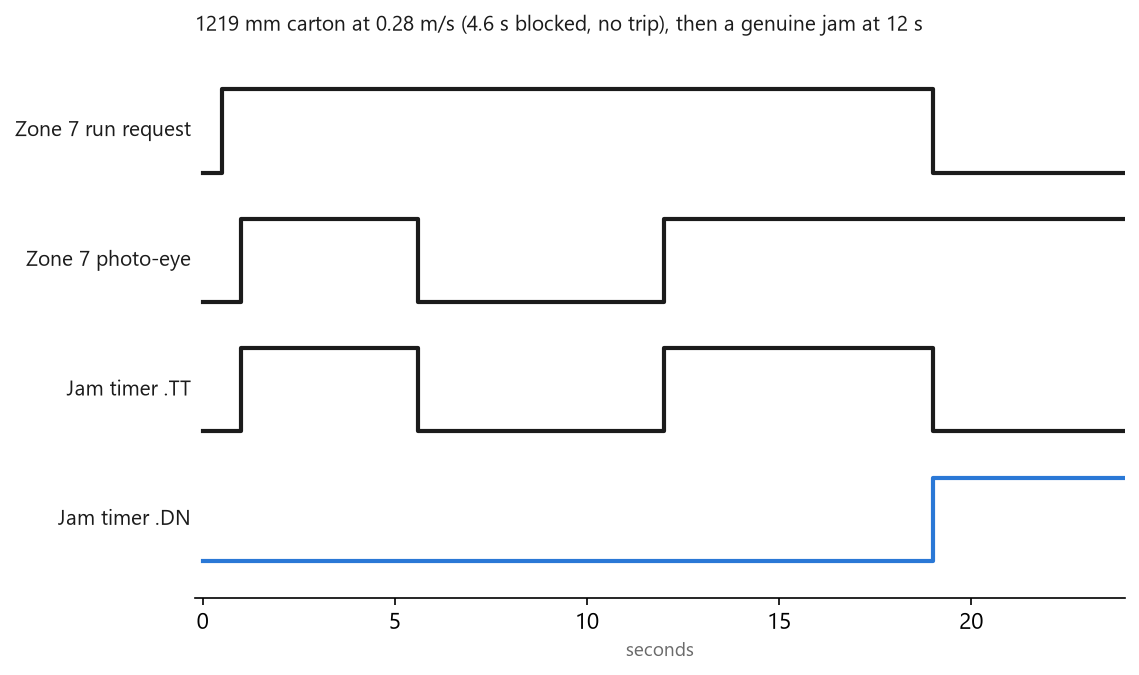
The 1219 mm carton blocks the eye for 4.6 s and the timer resets when the eye clears. The second carton stops on the eye at 12 s, the accumulated time passes 7000 ms at 19 s, and the jam latches.
Working out the non-arrival preset
Same arithmetic as before, and only the distance term changes – but it changes a lot.
Zone 7’s eye to zone 8’s eye is 4.0 m, which at 0.280 m/s is 14.3 seconds, plus the same 0.25 s of ramp and the same small terms: call it 14.6 s, and at the same 1.5 margin the preset is 22 seconds. Anyone who has only ever seen blockage timers will look at 22 and assume it is a typo. It is not a typo, it is a longer conveyor, and if 22 seconds of a missing box feels too long to wait then the honest fix is another eye at the transfer rather than a preset that cannot be met.
What a fixed 2000 ms actually buys
Divide it out and the answer is a maximum product length, per speed.
| Belt speed | Product that fits in 2000 ms | Product that fits in 7000 ms |
|---|---|---|
| 0.20 m/s | 350 mm | 1350 mm |
| 0.28 m/s | 490 mm | 1890 mm |
| 0.50 m/s | 875 mm | 3375 mm |
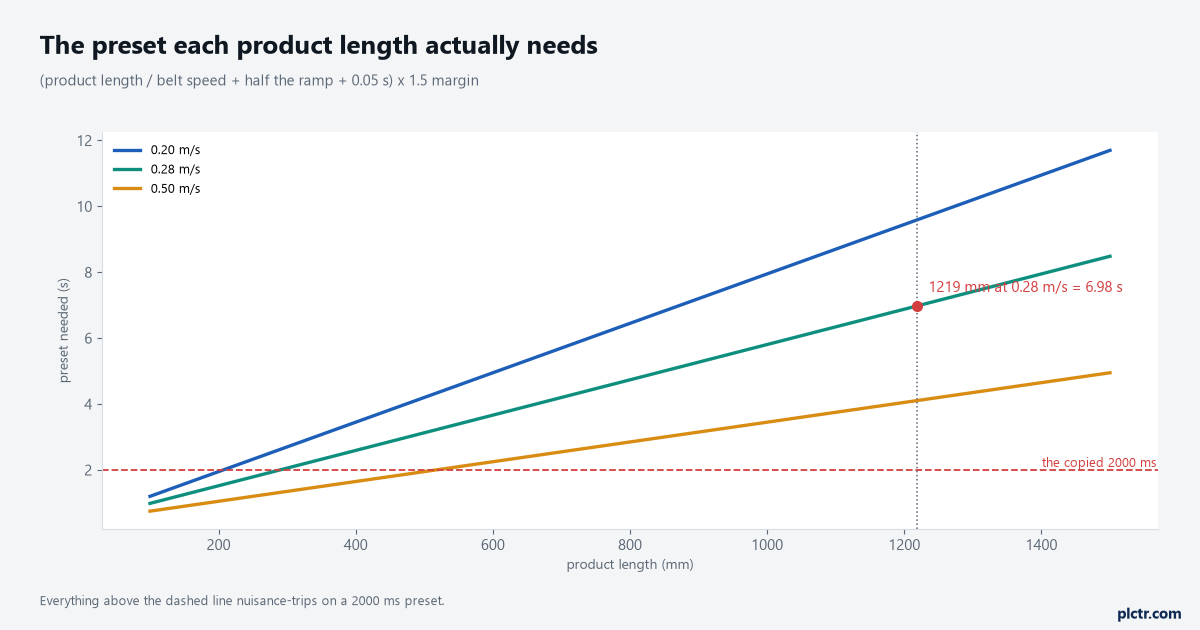
Everything above the dashed line is a product that nuisance-trips a 2000 ms preset. At 0.28 m/s the crossing point is just under 290 mm, which is smaller than almost anything anybody ships.
Those are product lengths after the 0.25 s of ramp has been taken off the preset. At the speed this line runs, 2000 ms is a statement that every carton is under 490 mm, which is a fair description of a tote line and a poor description of anything that also handles 1219 mm cartons. The preset was never wrong for the machine it was written for. It was wrong for this one, and it arrived here because somebody copied a working project, which is the right instinct applied to the one number in the file that does not travel.
Make the timer count the right seconds
Two mistakes get made here, and on a bench with one box they cancel each other out.
The first is timing on the eye alone. A zone holding product because the zone downstream is full has its eye blocked for minutes at a time and that is the conveyor working exactly as designed, so gate the timer on the run request – the way the zone logic on an accumulation conveyor already builds it – and the preset only counts while the zone believes it is moving something. The second is the reset. A TON clears its accumulated value the moment rung-condition-in goes false – the Logix general instructions reference prints that in the execution table, along with the enable and timing bits going with it – so a box slipping on a belt in a zone whose run request flickers as the downstream clears and fills and clears again never accumulates seven continuous seconds and never trips. The fault is real, the timer is behaving exactly as documented, and the alarm never comes. Use a retentive timer instead and clear its accumulated value on the one event that proves the box moved, which is the eye clearing.
(* ConveyorTask, 50 ms periodic - jam detection per zone *)
FOR i := 1 TO 12 DO

    Zone[i].JamTmr.PRE := Zone[i].JamPreset;      (* 7000 for a 4.0 m zone at 0.28 m/s *)
    Zone[i].JamTmr.TimerEnable := Zone[i].RunReq AND Zone[i].PE;
    TONR(Zone[i].JamTmr);

    (* the eye clearing is the proof the product moved - nothing else is *)
    IF NOT Zone[i].PE THEN
        Zone[i].JamTmr.ACC := 0;
    END_IF;

    IF Zone[i].JamTmr.DN THEN
        Zone[i].Jam := 1;
    END_IF;

    (* non-arrival: released, and the next eye never made *)
    Zone[i].XferTmr.PRE := Zone[i].XferPreset;    (* 22000 on a 4.0 m pitch *)
    Zone[i].XferTmr.TimerEnable := Zone[i].Released AND NOT Zone[i+1].PE;
    TONR(Zone[i].XferTmr);
    IF Zone[i+1].PE THEN
        Zone[i].XferTmr.ACC := 0;
        Zone[i].Released := 0;
    END_IF;
    IF Zone[i].XferTmr.DN THEN
        Zone[i].LostProduct := 1;
    END_IF;

END_FOR;
Logix timers work in milliseconds and take their time from the clock rather than from the scan – the reference manual describes a timer as adding the difference between the current time and the time of its last scan to the accumulated value – so 7000 ms is seven seconds whether the task runs at 20 ms or at 100 ms. That is worth knowing, because it means changing the task period does not quietly retune every jam timer on the line – it only changes how late you notice, by one scan – and it means a slow scan is never the explanation for a jam timer that fires early. The instruction behaviour itself, including what the enable and done bits do around a reset, is in timer and counter instructions.
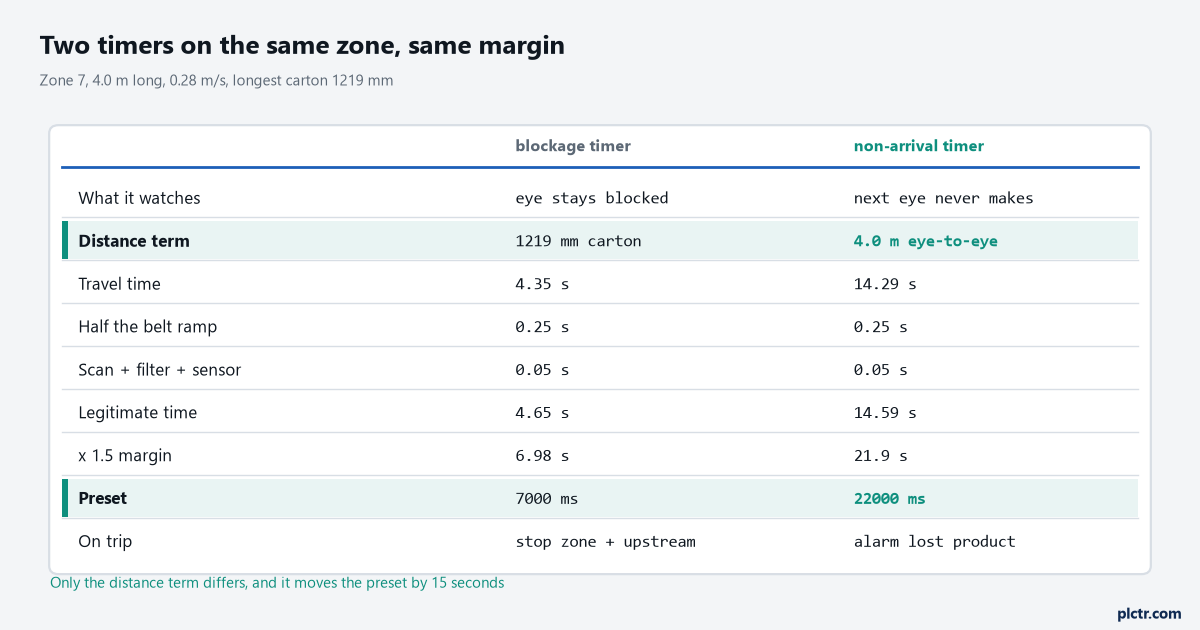
Same margin, same belt, same zone. The distance term is the only thing that differs and it takes the preset from 7 s to 22 s.
What it should do when it trips
Stopping the whole line is the reflex and it is usually wrong.
- Stop the jammed zone and the zones feeding it. Upstream zones that keep running pile product into the jam and turn a one-box problem into a four-box problem.
- Leave the downstream zones running. They clear product away from the jam, which is the direction you want the line emptying in while somebody walks over.
- Latch per zone, with the zone number in the alarm. A line-wide jam bit teaches operators to press reset without looking.
- Do not clear the drive fault as part of the jam reset. They are different faults, and a drive that has overloaded wants a human to know about it.
- Require the eye to be clear before the reset takes, and edge-trigger it. A held or taped reset button on a zone that is still blocked restarts into the same jam, forever.
- Count the trips per zone per shift. A zone that trips four times a shift has a mechanical problem, and a shorter preset will not find it.
That last one is the first thing removed when somebody is saving controller memory, and it is the only item on the list that tells you which zone to fix.
The thing everyone checks first
The photo-eye.
It gets realigned, cleaned, swapped for a spare, and the nuisance trips carry on, because a jam timer trip means the eye was blocked and the eye was telling the truth. Sensors do cause jam alarms – a diffuse eye that has started seeing a sagging return belt will latch a jam on an empty zone, and that one is worth twenty minutes with the indicator LED and a look at the input card’s own filtering, since a filter wound up to 50 ms to kill chatter will also hide a genuine short block. Two other sensor traps are worth knowing before you order the spare. A polarised retroreflective 42EF RightSight is rated to 3 m against a reflector, which covers any belt width you are likely to meet and is the reason that style survives a sagging black belt where a diffuse model does not. And light operate against dark operate is a catalogue-number decision on that family, not a switch on the housing – order the wrong suffix and the spare inverts the zone. But the signature of a sensor fault is different. A sensor problem gives you jams on empty zones, at odd times, on whichever zone has the sagging belt. A preset problem gives you jams on the same zone, always with product on it, always when the long carton runs.
So check the preset against the longest product length before anybody touches the sensor bracket.
Next step
Walk the line with a tape measure and a stopwatch and fill in three columns per zone – zone length, eye-to-eye pitch, and belt speed at the slowest product code. On a twelve-zone line that is a twenty-minute job and it gives you twenty-four presets instead of one guess repeated twelve times. Then look at what the zones do after the jam clears, because if two of them start arguing about which one owns the box that was stuck, the preset was never the problem: the release handshake between zones is where that one lives.