A ControlLogix has no SQL client in it. What it has is a socket object on the Ethernet module, a WriteSocket service that carries 484 bytes at a time on a standard connection, and a MSG instruction whose default timeout is 30 seconds — which is 2500 scans of a 12 ms program.
So a direct write means hand-assembling a database wire protocol into SINT arrays and then waiting on a machine on somebody else’s network. Put a gateway between them instead: it polls the controller, queues the rows on its own disk, and writes them to SQL in batches, and nothing downstream of it can reach a scan. The controller’s whole contribution is to set one bit saying a record is ready.
That is the position, and the rest of this page defends it — including the cases where a direct write is genuinely the right answer, because there are some.
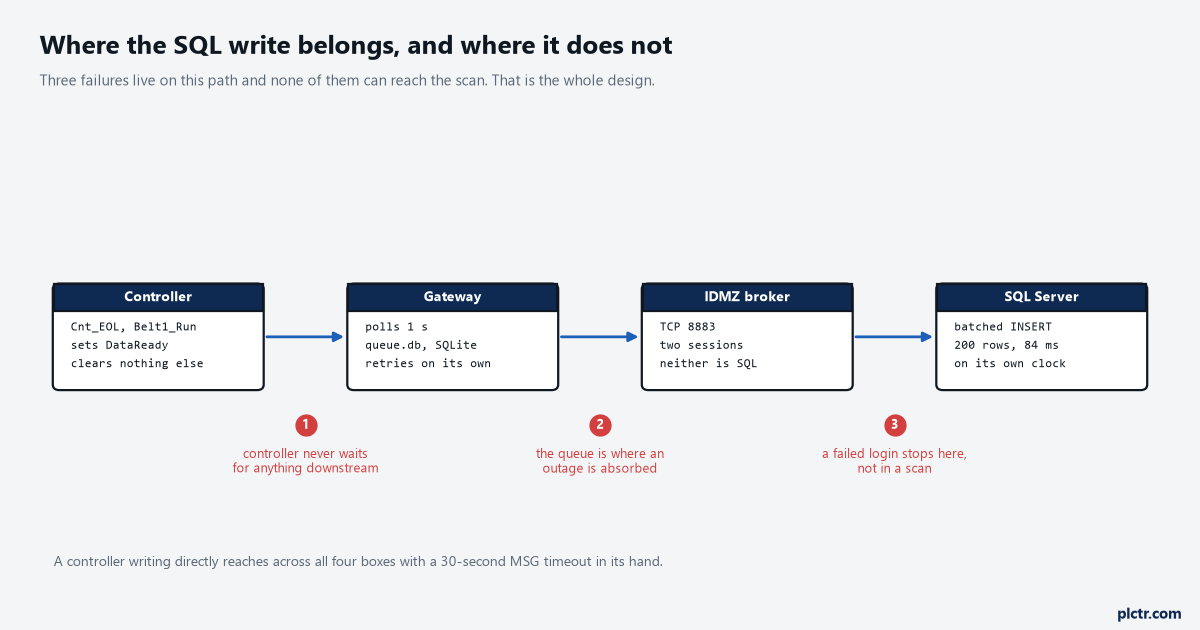
Three failures live on this path. None of them can reach the scan, and that is the only property that matters.
What a direct write actually is
Not a driver. A byte stream you fill in yourself.
ENET-AT002E-EN-P is the manual for it and it is honest about what it is giving you: a TCP connection is a byte stream with no inherent message boundaries, so the application defines how to interpret them. There is no INSERT statement anywhere in that document, because the socket object does not know what a database is. To write a row to SQL Server you build the TDS protocol — a login packet, a pre-login handshake, a batch request — as bytes in a SINT array, send it with WriteSocket, read the reply with ReadSocket, and parse it. The size limit decides how much fun that is: application data on a standard connection cannot exceed SINT[484], and a SQL Server Login7 packet is commonly well over a kilobyte, so the login alone is three WriteSocket services before a single row has moved. A large connection raises the ceiling to SINT[3984] and costs you one of the controller’s cached connections to do it. An S7-1500 is in the same position with TSEND_C and TRCV_C: the block sends the bytes you give it and has no opinion about what protocol they belong to.
There are third-party add-on instructions and libraries that wrap all of this. They are still doing exactly this, on the controller, in the scan.
What blocks, and what does not
The MSG instruction does not block the scan. The sequence written around it usually does, and that distinction is where the argument gets won or lost.
A MSG is asynchronous by design. 1756-PM012L-EN-P describes the path: the instruction goes true, it passes into a throttle that has 16 positions, the system overhead time slice pulls it from the throttle into a message queue that holds 48, and communication happens some time later while the program carries on scanning. Nothing in that sequence stalls a task. What stalls is a rung somebody wrote as XIC Step_240
XIC SQL_MSG.DN OTE Step_Advance, because now the step cannot advance until a database on another network answers, and the default MSG timeout is 30 seconds. On a 12 ms scan that is 2500 scans during which the belt is still running, product is still arriving, and the sequence is sitting at step 240 with no fault, no alarm and nothing in the controller log to say why. Set the timeout to its maximum instead and it is about 35 minutes. This is the failure the title of this page exists for, and it is worth being precise about the mechanism, because “the PLC waits for the database” is loose enough to be argued with. The controller does not wait. The logic you wrote waits, and it waits on a result whose latency is set by a network, a switch, a firewall, a login, a lock on a table and a maintenance window that nobody in controls is told about. Add the resource contention underneath that: those 16 throttle positions and 48 queue slots are shared with every other MSG in the program, and establishing an unconnected message consumes one of the controller’s unconnected buffers, of which there are 10 by default and at most 40, each costing 1.2 kB of memory. The manual’s wording on running out is flat — if all unconnected buffers are in use when an instruction leaves the message queue, an error occurs and data does not transfer. A database that is slow to answer holds buffers open, and the thing that starts failing is not the logging. It is the produced tag to the next cell.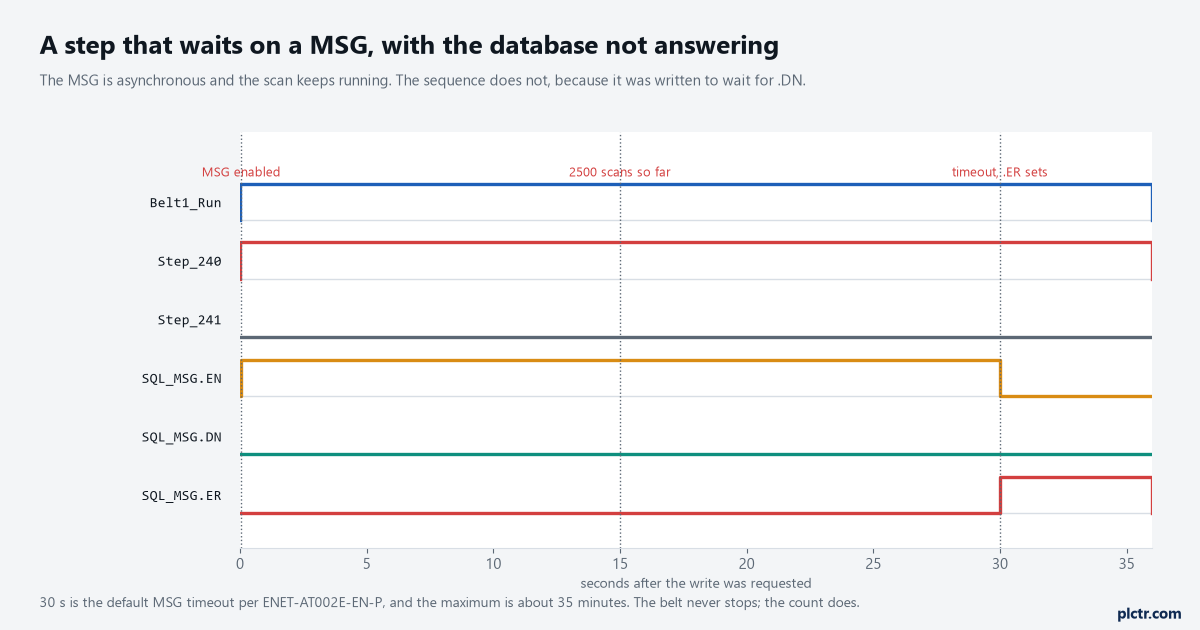
The belt never stops. The count does, for thirty seconds, and there is nothing in the controller that says so.
The failure nobody plans for
You cannot get the controller into Program mode.
ENET-AT002E-EN-P states it in one sentence and it is the strongest argument on this page: if the Logix 5000 controller transitions from Run mode to Program mode while socket requests are active, the transition does not complete until all outstanding MSG requests complete or time out. So a controller with a socket write outstanding against a database that has stopped answering does not go to Program when you ask it to, and the engineer standing at the panel at two in the morning has a controller that is ignoring a mode change with no explanation on the screen. If somebody set the timeout generously — and generous is exactly what you set it to when the database was occasionally slow — that wait is minutes. The manual’s own mitigation is to set the socket service timeouts short and to set the .TO bit on any outstanding socket MSG to force it to error out, which is a thing you have to have written into the program beforehand, in a routine somebody thought about, months before the night it matters.
There is a second-order version of the same trap. Go Run to Program and back to Run, and the previous socket instances still exist on the Ethernet module until their inactivity timeout expires, five minutes by default, so the program’s attempt to create fresh instances can fail for those five minutes. The fix is to call DeleteAllSockets on startup — service code 51 on class 342 — which deletes every socket instance on that module, including ones another controller created.
That is a lot of care to take, and all of it is in service of getting a row into a table.
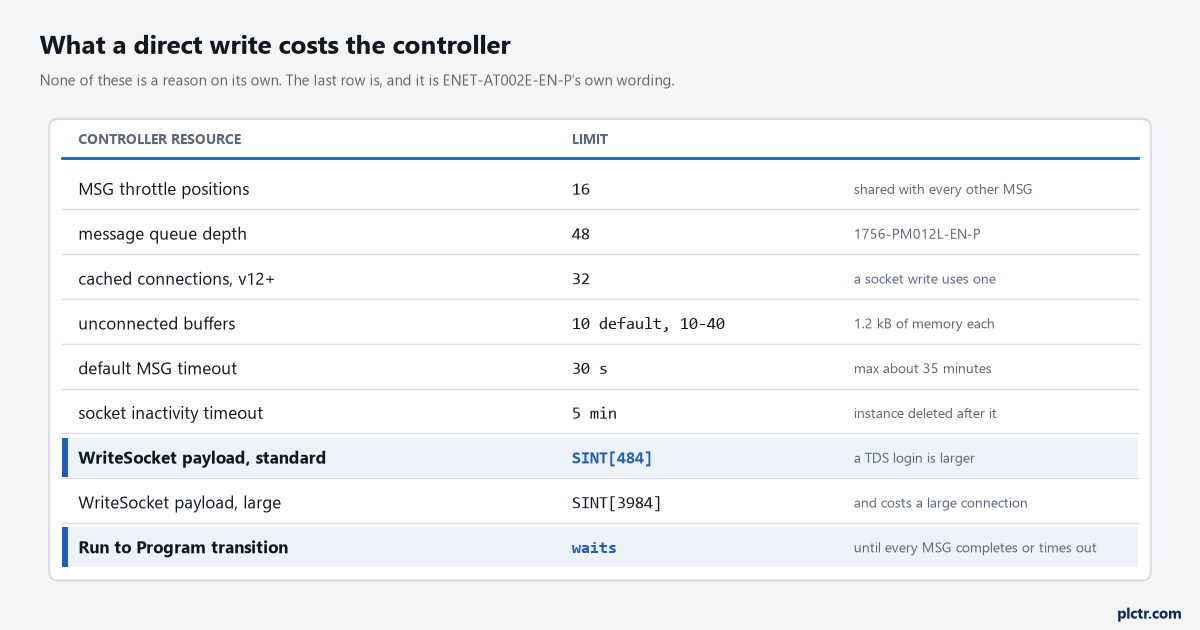
The first eight rows are budgets you can work within. The last one is not a budget, it is a behaviour, and it is the reason the rest of this page exists.
What the gateway does instead
It moves every one of those problems onto a machine where they are ordinary.
The gateway polls the controller on its own schedule — once a second is a good default, and the pycomm3 article covers opening the driver and reading the tags. It stamps each read with its own clock, writes the rows into a local SQLite queue, and drains that queue to SQL in batches. Two hundred rows at about 0.42 ms a row is 84 ms of database work, and not one microsecond of it happens inside a scan. When SQL Server is down, the queue grows and the plant does not notice. When the network is down, the same. When somebody patches the database server on a Sunday, the backlog drains on Monday morning and the only visible effect is that the last row is older than usual, which is a thing you can alarm on properly by watching the queue depth rather than a connection flag. The SQLite queue and backfill article is the implementation, and the rule in it that matters most here is the one that is easiest to get wrong: delete nothing from the queue that the far end has not acknowledged. A drain loop that deletes what it sent rather than what was confirmed is a data-loss bug that only appears during the outage you built the queue for.
The controller’s side of this is one latch.
Set a bit when a record is complete — at the end of a cycle, when a part leaves the machine, when a batch finishes — and let the gateway unlatch it when the row is committed. That single handshake gives the controller everything it needs to know without ever reading a network result, and it gives the gateway a clear signal about which reads matter. If the gateway is down, the bit stays set, and that is the alarm: DataReady latched for more than sixty seconds means nobody is collecting. Where the value going the other way is a setpoint rather than a record, the setpoint handshake article works through the acknowledgement properly, because a write into a running machine needs more than a latch.
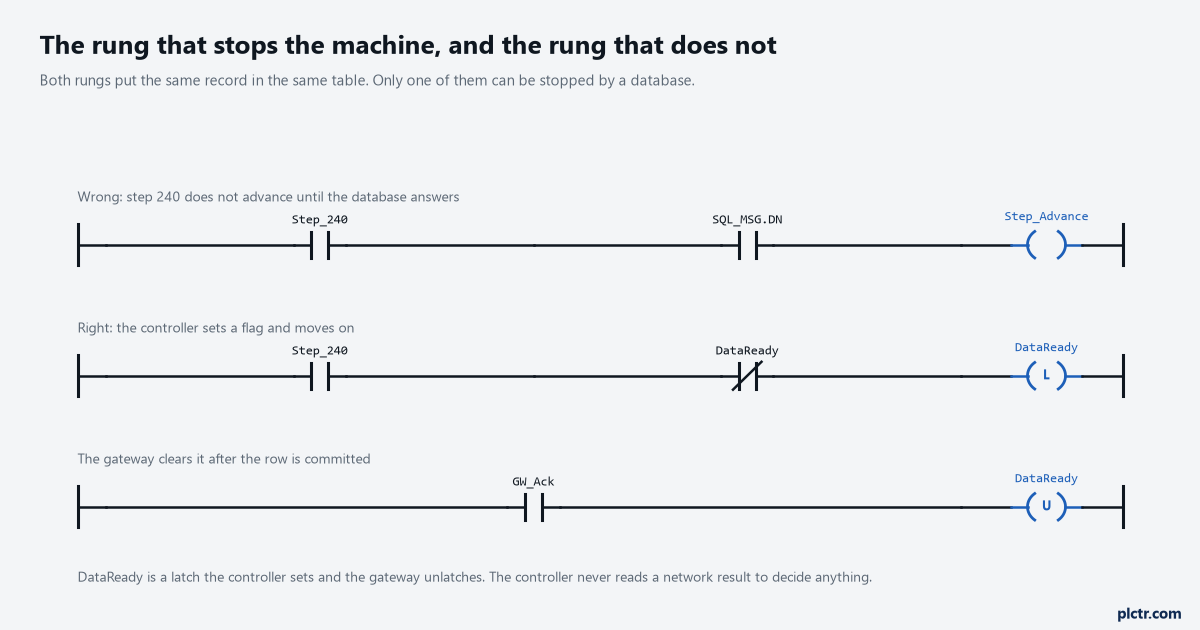
Both versions put the same record in the same table. Only the top one can be stopped by a database, and only the top one is what an integrator writes when the gateway is not in the quote.
When the controller genuinely has to know
Sometimes the sequence really does need confirmation, and the answer is still not a MSG to SQL.
The pattern is a two-bit handshake against the gateway rather than against the database. The controller sets DataReady and starts a timer. The gateway reads it, writes the row, waits for the database’s own commit, and sets GW_Ack. The controller sees GW_Ack, unlatches DataReady, and carries on. If the timer expires — sixty seconds is generous — the controller raises a data-logging alarm and continues running the machine, because a record that did not reach a table is a quality problem and not a safety one. The essential difference from the direct write is that the controller is now waiting on a device on its own network, at its own IP address, on a link it can see the status of, rather than on something four hops and a firewall away.
Make that timeout a tag. Somebody will need to change it and it should not require a download.
When a direct write is fine
Three situations, honestly.
There is no PC anywhere on the site, the database is on the same VLAN as the controller, and the write is one row a shift. That is not a data layer, it is a logbook, and the socket object does it perfectly well. Or the device on the other end is not a database at all but a scale, a printer or a label applicator — that is what the socket object was built for, and the Modbus TCP socket object article walks the same five services for a protocol that actually fits in 484 bytes. Or you are a machine builder shipping one panel to a customer who will never own a gateway, and the alternative is shipping nothing.
What all three have in common is that they stay small. The direct write gets worse as the plant gets busier, which is exactly the wrong direction for something whose job is to keep up with production.
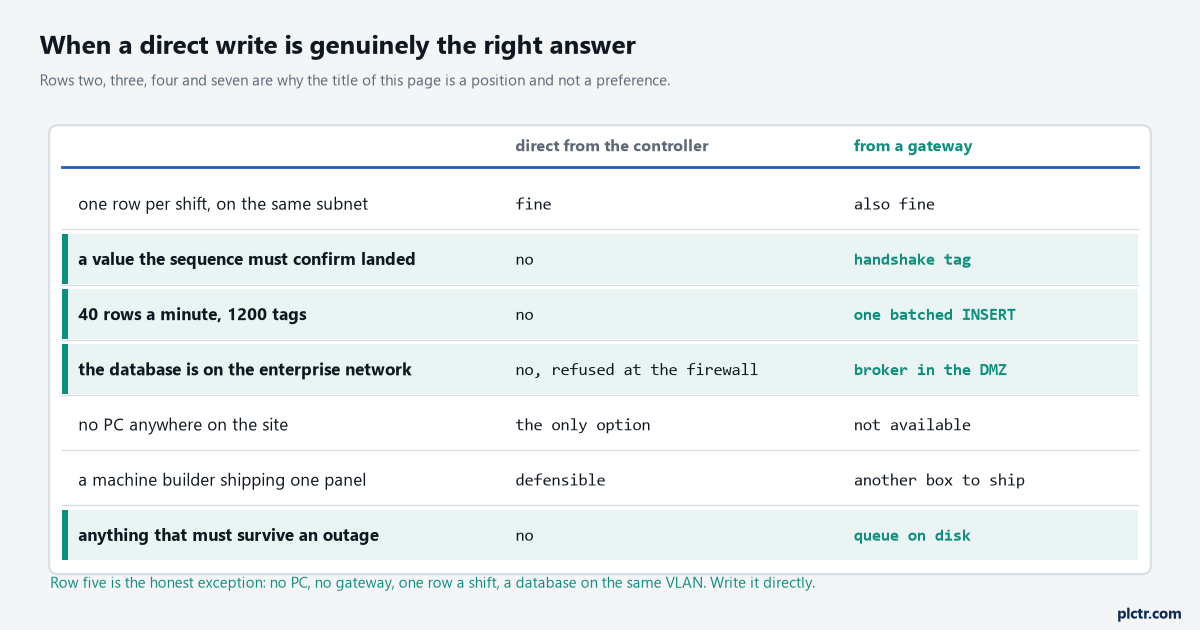
Row five is the honest exception and it is worth stating plainly rather than pretending the gateway always wins.
Next step
Open the program you already have and search for MSG instructions whose .DN or .ER bit appears anywhere in a sequence rung, a permissive, or an interlock. Every one of those is a place where something outside the controller can hold the machine, and the number is usually higher than anybody expects. Then check the timeout on each: read the UnconnectedTimeout member for unconnected messages, or ConnectionRate times the TimeoutMultiplier for connected ones, and work out how many scans that is at your actual scan time. If the answer for any of them is more than a few hundred scans on a path that leaves the cell, move that write behind a latch and let something else carry it. The database logging article covers the table and retention side once the rows are arriving from somewhere sensible.