Rockwell’s execution-time reference, LOGIX-RM002B, prints the FFL instruction on a ControlLogix 5580 as a flat 0.135 µs and the FFU beside it as 0.144 + (x × 0.07) µs. One half of the pair gets slower as the queue gets longer and the other half never does, and the reason sits in a different manual: an FFU unloads position 0 and then shifts everything still in the array down one place.
That asymmetry is the whole instruction pair in one line, so start from it.
Reach for FFL and FFU when parts leave in the order they arrived and nothing can overtake — a paint line on hangers, a single-file accumulation table, an oven with one way in and one way out. Reach for LFL and LFU when the last thing in is the first thing out, which is a magazine, a reject stack, or a buffer you push aside and pick straight back up. The operand-by-operand walkthrough of a barcode FIFO covers the fields themselves.
Both pairs run off one shared CONTROL tag, and that tag, not the array, is where the failures live.
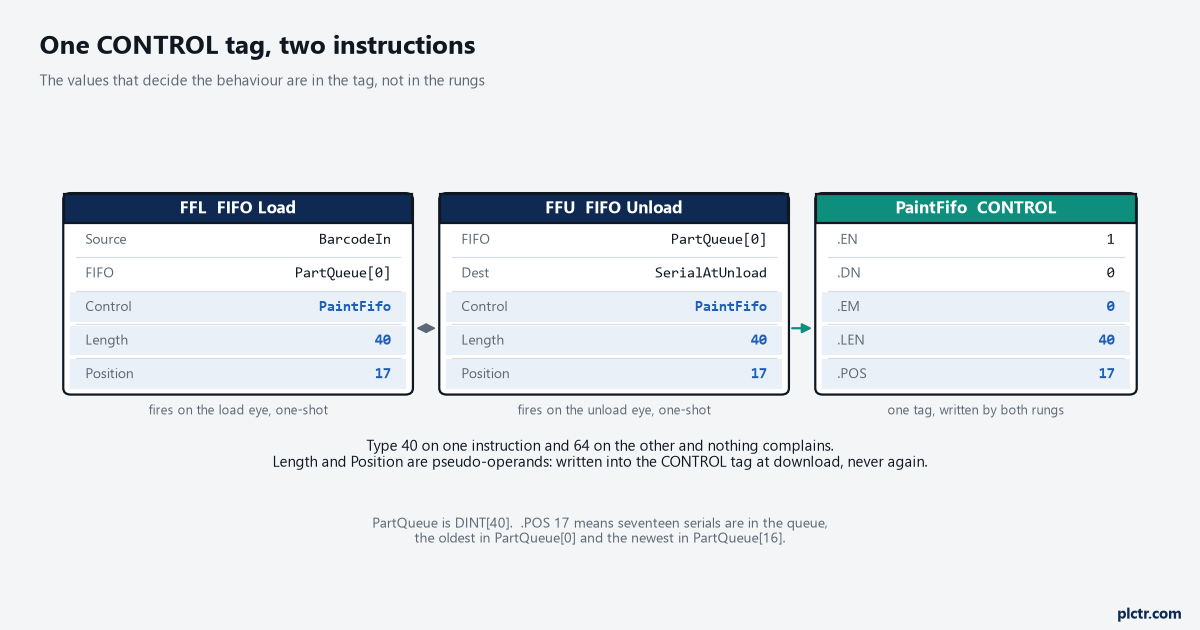
Length 40 and Position 17 live in PaintFifo, not in the rungs. Both instructions read the same copy.
What the pair is actually doing to your array
Take an overhead paint line with 40 hangers between the load station and the unload station, each hanger carrying one part, nothing able to jump the queue. A scanner at load reads a serial into BarcodeIn. The FFL, fired by a one-shot on the load eye, copies that value into PartQueue[PaintFifo.POS] and increments .POS. Forty loads later .POS has reached .LEN, the .DN bit sets, and 1756-RM018A is blunt about what that bit then does: it inhibits loading the FIFO until .POS is less than .LEN again. At the far end the unload eye fires an FFU, which takes PartQueue[0] into SerialAtUnload, slides elements 1 through 39 down into 0 through 38, and decrements .POS. The array is a conveyor of its own, and it moves one place every time the unload fires.
Nothing in this pair tracks where a part physically is on the line.
The FIFO knows only what order things went in, which is a different question from where they are, and the two get confused constantly because both are described as tracking. If you need to know which zone holds the part right now, a shift register driven by the encoder answers that with one bit per position and a FIFO does not. There is also a line in the instruction reference that people skip: both instructions operate on contiguous memory, and the data is constrained by the specified member. Put plainly, if PartQueue is a member of a user-defined type, the FFU is quite capable of shifting bytes it was never meant to touch, and the manual’s own instruction is to test and confirm that it does not.
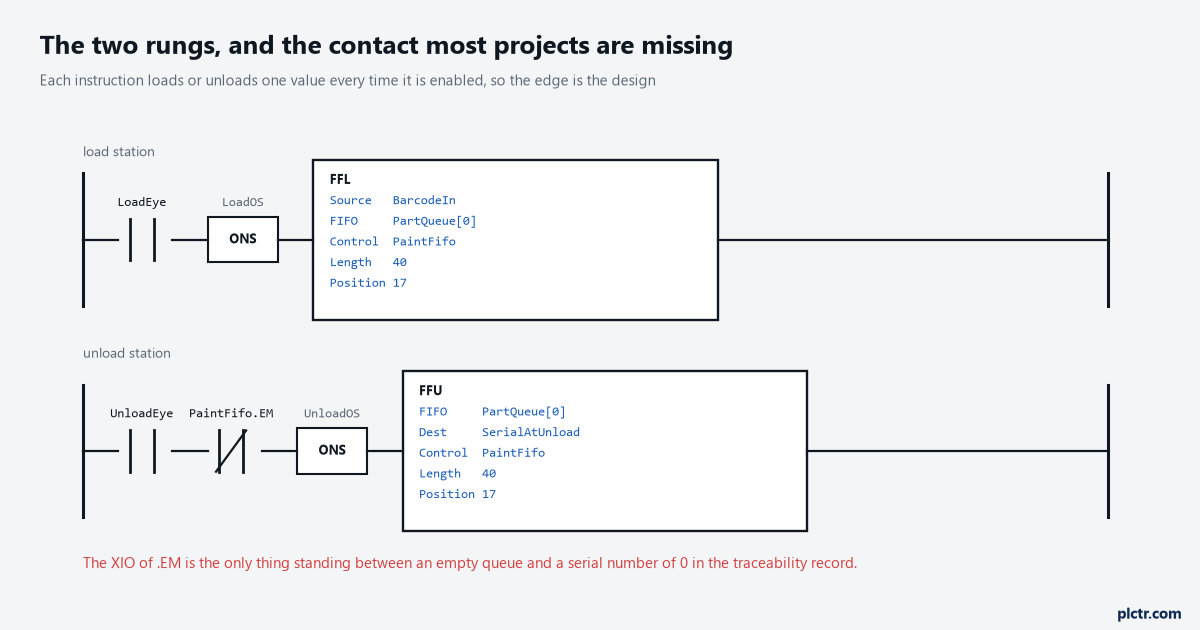
The .EM contact on the lower rung is the one most projects turn out to be missing.
The CONTROL tag is the instruction
Two rungs, two instructions, one CONTROL tag. That is the entire mechanism.
Which brings the part that catches people months later. Length and Position are pseudo-operands — placeholders for members of the backing tag rather than values the instruction owns — and 1756-RM018A is exact about the consequence: pseudo-operands are initialized when the application is downloaded and never again, unless the application modifies them. So the 40 typed into the FFL’s Length field is a download-time write into PaintFifo.LEN, not a property of that rung. Type 40 on the FFL and 64 on the FFU by accident and there is no compile error, no verification warning and no wrong behaviour at all, right up until the next download, when the second write wins and the pair works to a length nobody chose. A year later somebody resizes the array from DINT[64] to DINT[40], .LEN is still sitting at 64, and the FFU walks off the end of it.
Search the project for the CONTROL tag name before you trust either number.
If cross-referencing that tag turns up a MOV writing PaintFifo.POS in some recovery routine, that MOV is now part of the instruction pair whether its author understood that or not. Initialize .POS deliberately rather than by luck, too: a FIFO that comes out of a download with 17 stale serials in the array and .POS at 0 will hand those serials back out at the unload station, in order, as though they were real product.
That is what the first scan bit is for, and a CLR on S:FS costs 0.006 µs.
Type 4, Code 20, and the two different sentences behind it
Both instructions fault the same way for different reasons, which matters at three in the morning with the controller in Faulted mode and the Major Faults tab reading Type 4, Code 20. For the FFL, 1756-RM018A gives the condition as the starting element plus .POS being past the end of the FIFO array. For the FFU, the same table reads differently: the specified Length is past the end of the FIFO array. The FFL faults on where it is about to write, the FFU on how far the shift has been told to reach, and that is why an FFU can fault on its first execution after a download while the FFL that filled the same array ran for a week without complaint. The FFL only ever touched elements 0 through 39. The FFU was handed a length of 64 and asked to shift 64 elements of a 40-element array.
Same code, same type, opposite ends of the problem.
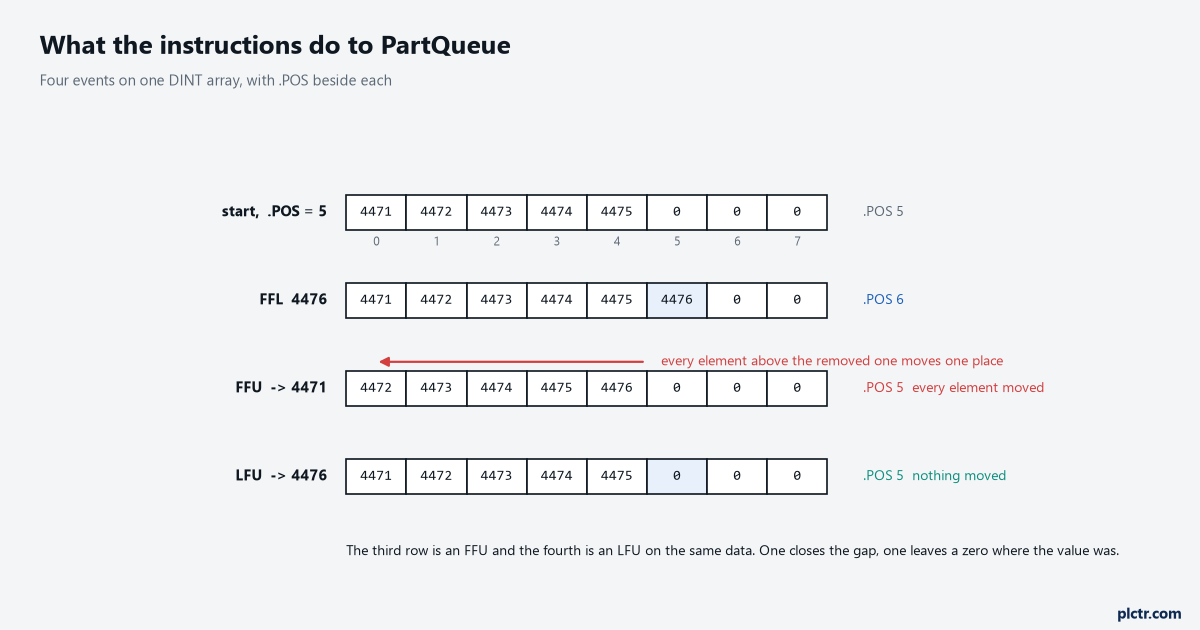
The FFU row is the expensive one: every element above the removed one moves.
The zero that looks like a part number
An FFU on an empty FIFO does not fault and does not refuse. It returns 0.
That sentence is printed plainly in the instruction reference and it is the quietest trap here. If serials are DINTs and a missing part hands back 0, then 0 is a serial number travelling through the traceability logic, arriving at the database write and being recorded against a real pallet. The .EM bit exists to stop exactly this, and its condition is worth reading closely: .EM and .DN are both set when .LEN is less than or equal to 0, or .POS is less than 0. Check .EM before trusting the Destination, or gate the unload with an XIO of it.
The phantom part then stops existing, at a cost of one contact on one rung.
Then there is the dead end, and it is the first thing everyone checks.
Parts start arriving at unload one serial behind reality and the scanner gets the blame — comms to the reader, a trigger firing early, a decode that missed. The scanner is almost never it. Put PaintFifo.POS on a trend rather than in a watch window and read the shape of the steps, because the instruction loads and unloads one value each time it is enabled, so a .POS that drops by two for one part is a rung that went false and true twice — a bouncing eye, or a second rung nobody remembered sharing the control tag. The array is fine and the scanner is fine.
The rung condition is the fault, and it hides from a tag monitor that refreshes slower than the scan.
When it is a LIFO, and why the unload is cheaper
Swap the pair for LFL and LFU and exactly one thing changes, but that one thing decides the design. The LFU unloads the value at .POS, the top of the stack, and stores 0 in that location, and nothing else in the array moves. The execution-time table shows what that saves: LFL lands between 0.130 and 0.141 µs and LFU between 0.167 and 0.175 µs, both flat, with no length term at all, against an FFU carrying 0.07 µs for every element in the queue.
A stack never has to close the gap, so a stack never pays for its length.
Use it where the physics really is last in, first out.
A part magazine that feeds from the top, a stack of rejected blanks that gets re-fed in reverse, a nested sequence where the step you interrupted is the step you resume first. Use the FIFO for anything shaped like a queue of product, which is most of a plant. And know what neither pair will do: you cannot take an element out of the middle, because the FFU always takes position 0 and the LFU always takes .POS. A reject station halfway down the line that removes a part without removing its entry leaves the queue permanently one out of step, and no amount of tuning the rung condition fixes it — either you unload at the reject station as well, or the job needed a different data structure from the start.
What the queue costs you per scan
Work the numbers, because a formula on its own tells nobody whether to worry.
A 40-element DINT FIFO on a 5580 costs 0.144 + (40 × 0.07), so 2.9 µs for the unload against 0.135 µs for the load. At 200 elements the unload is 14 µs. At 1000 it is 70 µs, still under a tenth of a millisecond, and nowhere near the 500 ms default task watchdog that 1756-PM005M documents. For a queue of product the honest answer is that this cost does not matter, and saying so is more useful than a warning nobody needs. It starts to matter in two places. One is a fast periodic task, where 70 µs inside a 1 ms period is 7% of everything you have, and a task triggered again before it finishes produces an overlap rather than a fault: the controller disregards the trigger, logs a minor fault as bit 6 of MinorFaultBits in the FAULTLOG object, and the execution you needed simply did not happen. The other is twenty FIFOs, where one unload of 1000 elements is nothing and twenty of them in the same scan is 1.4 ms of shifting, repeated every scan whether or not a single part moved.
That second one is how scan time climbs a millisecond with nobody able to say why.
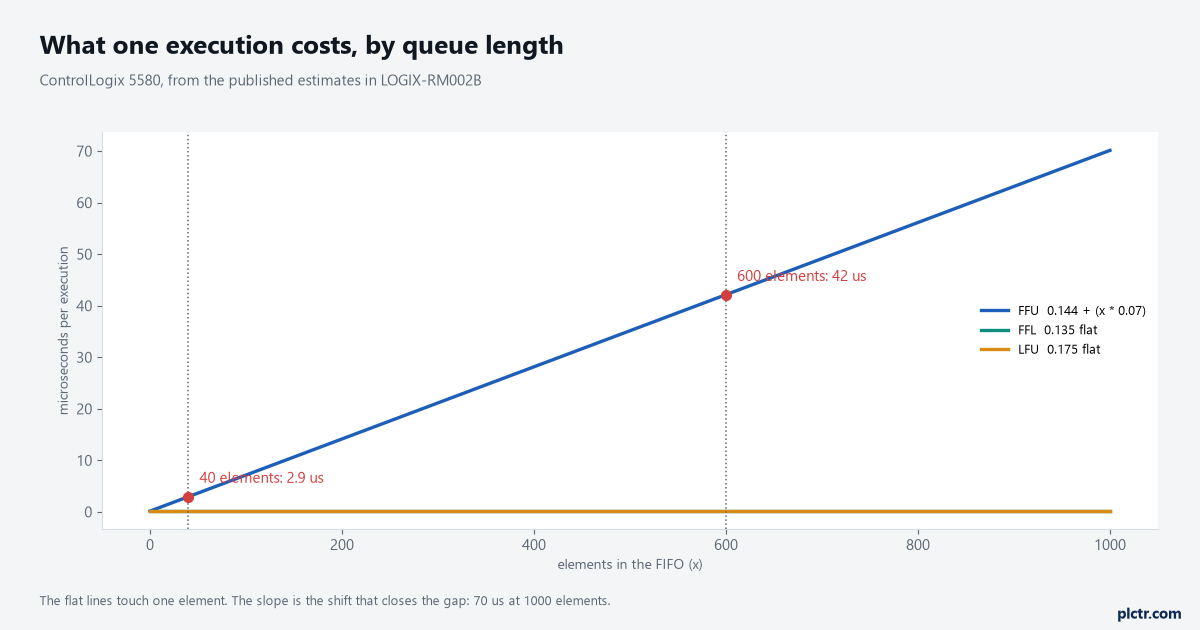
Both flat lines are instructions that touch one element. The slope is the shift.
Measure rather than estimate. Right-click the program, open Properties, and the Monitor tab gives Max and Last execution times for everything inside it, which is where LOGIX-RM002B points you itself — its own introduction calls its numbers approximations that vary with project configuration and programming technique.
What to check next
Put .POS on a trend for one shift before changing any logic, because a drifting queue shows itself in the step pattern and a healthy one draws a clean sawtooth. Then check the three things this pair fails on, in this order: whether the FFL and the FFU genuinely share one CONTROL tag, what .LEN contains online as against what is typed in the rungs, and whether anything leaves the line at a reject or takeout station partway down. If product can leave early and nothing unloads the queue when it does, stop tuning the FIFO — the job was position tracking rather than order tracking, and counting product at the end of the line will tell you how far out of step the queue already is.