read_holding_registers(40011, count=2) comes back with exception code 02, read_holding_registers(11, count=2) decodes to -2.4e-41, and the 230.5 V the meter shows on its own display is sitting at address 10. That is the Modbus TCP register offset, and it is the fault everybody hits on their first evening with pymodbus 3.15.0 and a power meter on the bench: the manual prints 40011, the wire carries a sixteen-bit address that starts at zero, and the number you type into the call is the second of those, not the first.
Subtract 40001. Not 40000. If the register is printed as 3xxxx it is an input register, read with read_input_registers and 30001 subtracted. If the manual’s table already has a column headed “address” or “offset” that starts at 0, subtract nothing. Everything below is what the bytes actually say, so that the next time a value is one out you can tell that from the two other faults that look identical.
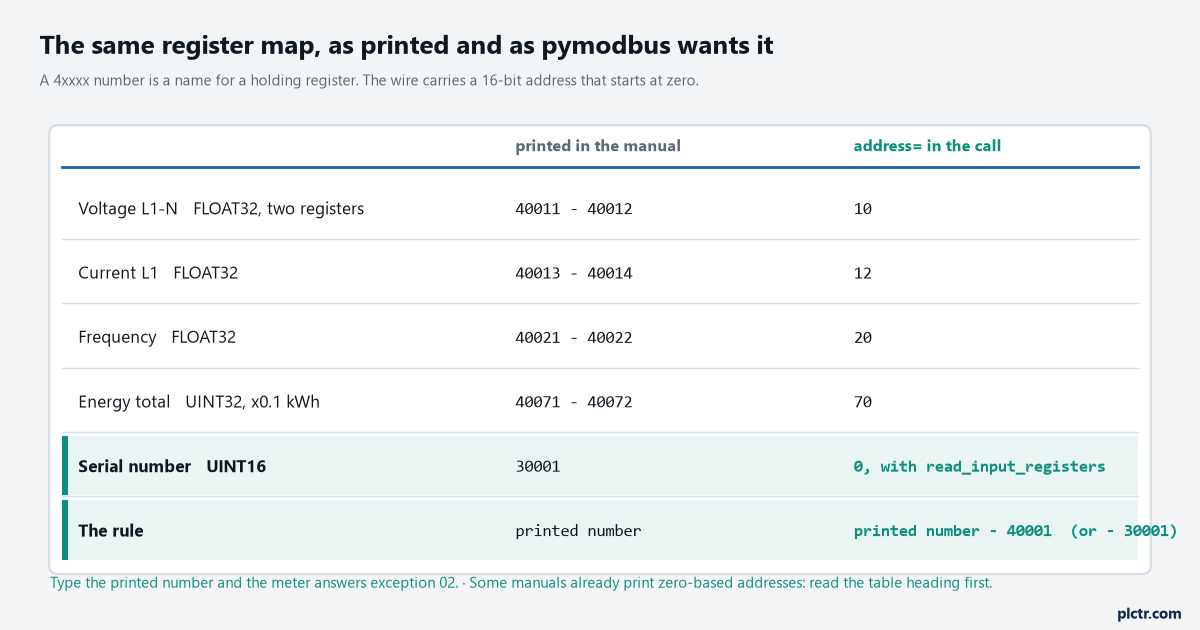
The left column is a naming convention inherited from the memory map of the original Modicon controllers; the right column is what the protocol carries. The serial-number row is the other half of the trap: a 3xxxx number is a different function code, not a different offset.
What one read puts on the wire
Twelve bytes leave the Pi for a two-register read, and none of them is a 4.
from pymodbus.client import ModbusTcpClient

client = ModbusTcpClient('192.168.0.50', port=502, timeout=3, retries=3)
client.connect()
rr = client.read_holding_registers(10, count=2, device_id=1)   # printed 40011 -> address 10
if rr.isError():
    print(rr)                                                  # ExceptionResponse(..., exception_code=2)
else:
    volts = client.convert_from_registers(rr.registers, client.DATATYPE.FLOAT32, word_order='big')
    print(volts)                                               # 230.5
client.close()
Run that with trace_packet set on the client and the request is 00 01 00 00 00 06 01 03 00 0a 00 02. The first six bytes are the MBAP header that only exists on TCP – a transaction id the library increments, a protocol id of zero, and a length of six. Then the unit id, which is device_id. Then function code 03, read holding registers. Then the starting address, 00 0a, which is 10, and the quantity, 2. The reply is 00 01 00 00 00 07 01 03 04 43 66 80 00: the same header, function code 03, a byte count of four, and two registers, 0x4366 and 0x8000, which the library hands you as rr.registers == [17254, 32768]. The 40011 in the manual was never on the wire. The 4 is a label that means “holding register, function 03”, and the 0011 is a count that starts at one because the people who wrote the first Modicon manuals counted from one. The protocol counts from zero. Both facts are old and neither is going away, so the subtraction lives in your code, in one place, with a comment. The Modbus RTU meter article works the same offset from the PLC side, on a serial line; over TCP the PDU after the unit id is byte-for-byte the same, which is why a TCP-to-RTU gateway can forward it without understanding it.
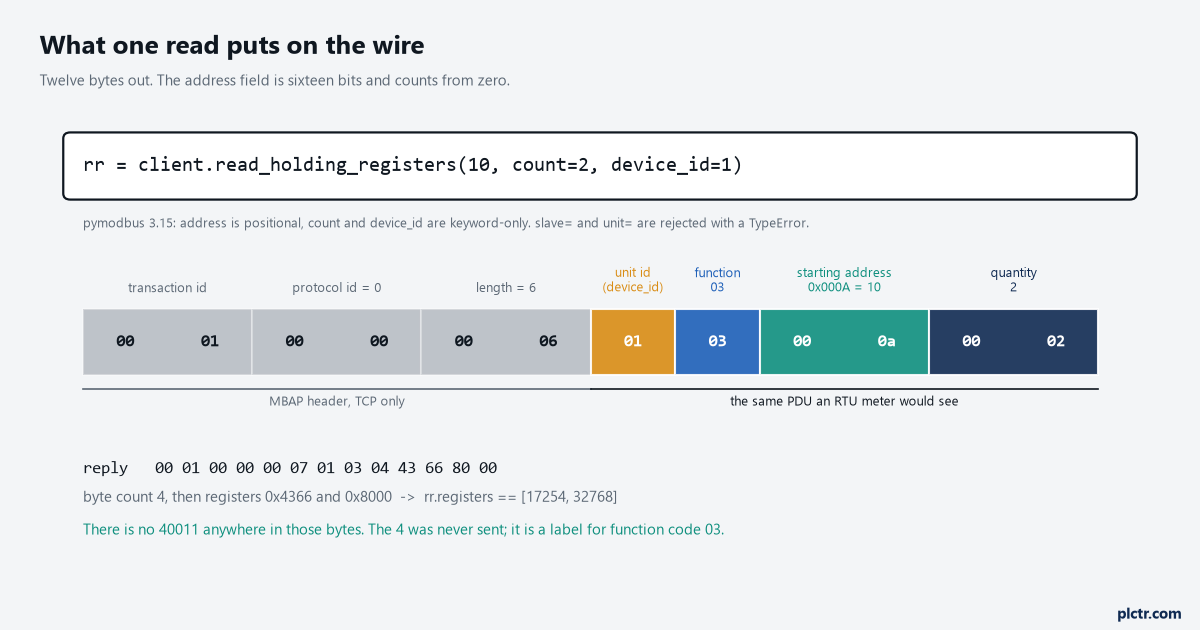
Every byte from the unit id onward is what an RTU meter would see after its slave address. The MBAP header is the only thing TCP adds, and it carries no register number either.
One more thing about that call. In pymodbus 3.15 the address is positional and count and device_id are keyword-only, and the two older spellings, slave= and unit=, are rejected with a TypeError: got an unexpected keyword argument. A script copied from a three-year-old forum answer fails on that line before it ever reaches the meter, and the error is honest about it.
The three reads, side by side
The address that is one out is the one that succeeds.
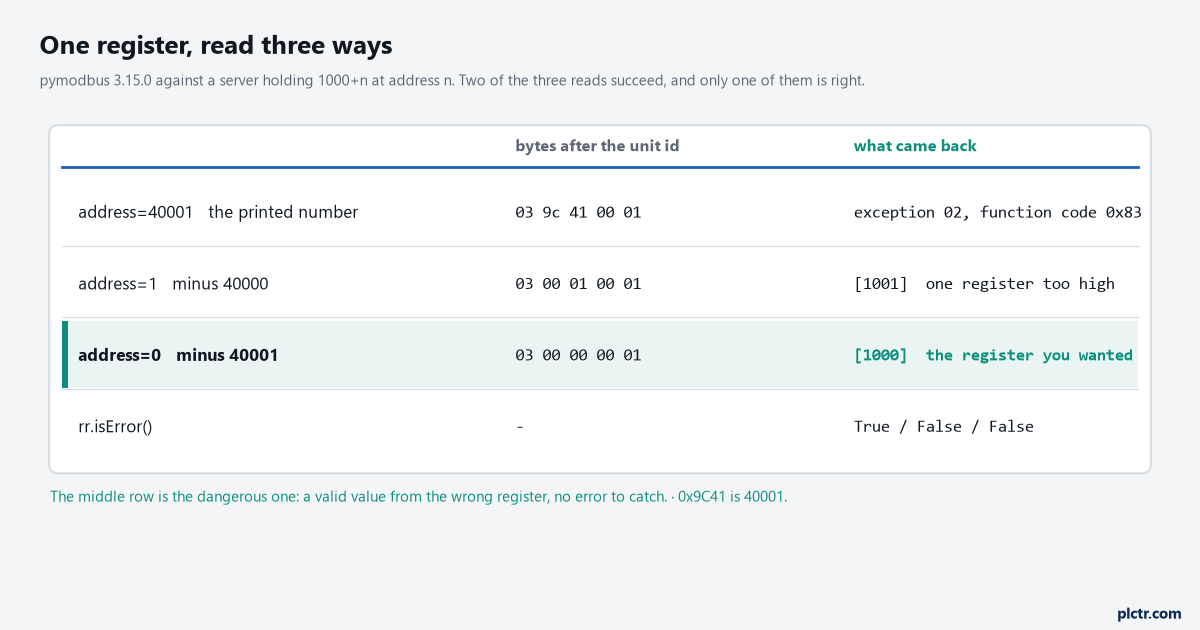
Measured with pymodbus 3.15.0 against a server holding 1000+n at address n. The middle row is the one that costs a week, because there is nothing to catch.
Type the printed 40001 and the client encodes it faithfully as 9c 41
83 – and exception code 02, illegal data address. rr.isError() is True, the script logs it, and you know within a minute. Subtract 40000 instead of 40001 and every read succeeds. The voltage register gives you the current register, the current register gives you the next one, the float that spans two registers gives you the low word of one value and the high word of the next, and the numbers are plausible enough – 1001 where 1000 was wanted – that the wrong scale factor gets blamed first. Subtract 40001 and address 0 is the first holding register, which is what the manual meant by 40001. Two of three reads succeed. One of them is correct. The library cannot tell you which, because both were well-formed requests for registers that exist.The row to remember is the middle one. An exception is a gift.
The float that lies, and the dead end it sends you down
A denormal float says word order. A float near 1e-36 says the address is one out.
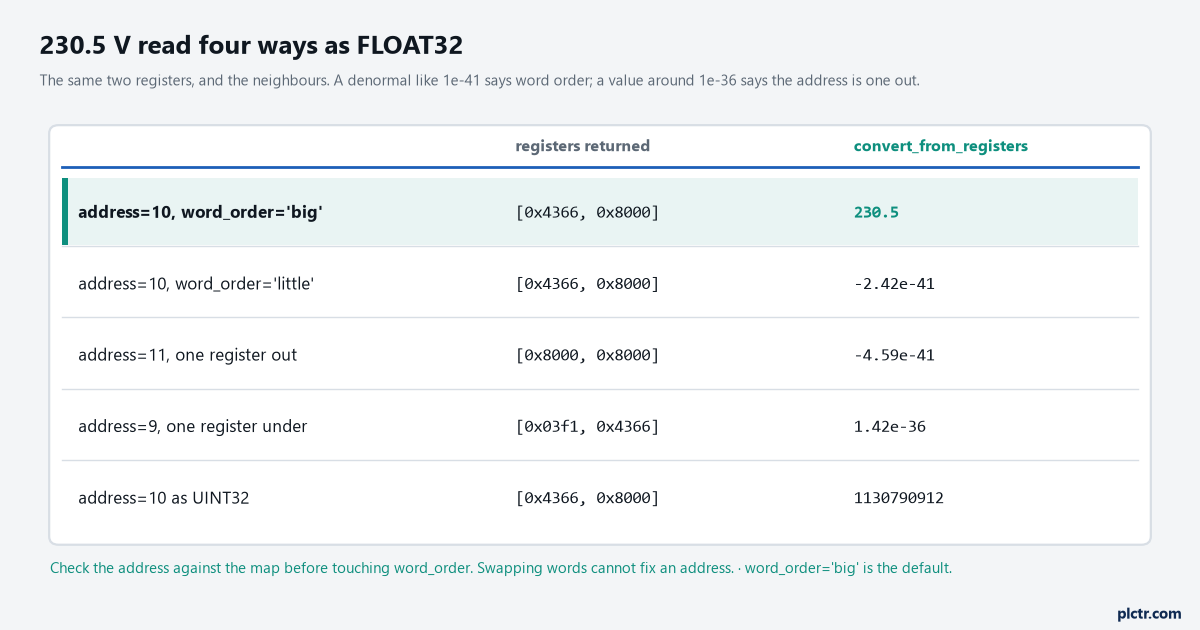
Same two registers and their neighbours. Two of the wrong answers look alike from the outside, and one of them is fixed by word_order while the other is fixed by the address.
The dead end goes like this. The value is nonsense, somebody remembers that Modbus floats have a word-order problem, word_order='little' goes into the call, the nonsense changes shape, and an hour goes on trying 'big' again with the bytes swapped inside each register, which is not a thing convert_from_registers offers because no meter does it. The address was one out the whole time. Look at the shape of the wrong number before touching anything. 230.5 as a big-word FLOAT32 is [0x4366, 0x8000], and reading it with the words swapped puts 0x8000 in the high word, which is a sign bit and an exponent of zero: a denormal, -2.4e-41. That specific ugliness – a tiny negative number or a tiny positive one – is word order, and one keyword fixes it. Read one register too high and you get [0x8000, 0x8000], another denormal, which is why the two get confused. Read one register too low and you get [0x03f1, 0x4366], which decodes to 1.4e-36, a different kind of wrong: an exponent that is small but not zero. Neither is fixed by the other’s fix. So the order of checks is the address against the map first, with the subtraction written out; then count against the data type, two registers for a FLOAT32 or UINT32, four for a FLOAT64; then word order, and only then anything else. convert_from_registers raises ModbusException: Registers illegal size (3) expected multiple of 2! if you hand it an odd count for a two-register type, which catches the count mistake for free.
The map redrawn with the Modbus TCP register offset taken out
Redraw the meter’s table into a Python dictionary before you read anything, and put the subtraction in the dictionary, not in the calls.
REGS = {                     # printed 4xxxx -> (address, count, datatype, scale)
    'V_L1':    (40011 - 40001, 2, 'FLOAT32', 1.0),
    'I_L1':    (40013 - 40001, 2, 'FLOAT32', 1.0),
    'Hz':      (40021 - 40001, 2, 'FLOAT32', 1.0),
    'kWh':     (40071 - 40001, 2, 'UINT32',  0.1),
}
Writing 40011 - 40001 rather than 10 is deliberate: the next person can check it against the manual in one glance, and the day the meter is swapped for one whose manual prints zero-based addresses, the edit is obvious. Three more things belong in that dictionary and the figure above has them. The function code, because a meter that puts its measurements in input registers wants read_input_registers and 30001 off the printed number, and reading the same offset as a holding register either gets exception 02 or, worse, a valid unrelated value. The scale, because a UINT32 energy counter is often in tenths of a kWh, and a float is often not scaled at all, and the manual says which per row. And the word order per block, because one meter can carry its floats big-word and its 32-bit integers little-word, and the only place that is written down is the manual’s byte-order note, usually one line, usually on page two.
Then read contiguous blocks, not registers. count is limited to 125 for function 03 – the library raises ValueError: 1 <= count 126 <= 125 ! before sending – so a map that spans 40011 to 40072 is one read of 62 registers, sliced in Python, instead of four reads of two. On a bench that saves nothing you can feel. Over a site VPN, or on a gateway with six RTU meters hanging off it at 9600 baud, it is the difference between a one-second poll and one that never catches up, and the pycomm3 article makes the same argument about grouping tags for a Logix controller.
The unit id, and the meter that answers anyway
device_id is the unit id byte, and on a native TCP meter it is often ignored.
The pymodbus server used for the figures was configured as a single device, and it answered device_id=7 with the same 1000 it gave device_id=1, which is what a lot of real TCP meters do too: the byte is there because the PDU needs it, and a device that is not a gateway has no reason to check it. Which is fine until the meter is behind a TCP-to-RTU gateway, where the unit id is forwarded as the RTU slave address and a wrong one gets either silence and a timeout, or a reply from a different meter. device_id=1 when the meter on the serial line is address 3 gives you meter 1’s readings, correctly framed, with no error. The meter’s own manual says what it expects; the gateway’s manual says what it does with the byte; if the answer is “255” or “0” or “anything”, that is not the reader being careless, it is how the device was built. Write the value down next to the IP address, because the next person will assume 1.
And when nothing answers at all, pymodbus raises rather than returning: ConnectionException: Modbus Error: [Connection] Failed to connect after timeout seconds and retries attempts. That is a different class from an ExceptionResponse with isError() true. Catch both, log them differently, and the log will tell you whether the cable is out or the address is wrong without anybody walking to the panel.
Next step
Read one register you already know the value of – the meter’s display shows the line voltage, so read that one – with trace_packet on, and look at the bytes. If the starting address in the request is what you meant, and the reply carries the two registers you expected, decode them and compare against the display. Then build the dictionary from the manual with the subtraction written out, read the whole block once, and put the values somewhere: the data logging article covers where they go, and the snap7 article is the same job against an S7-1200, where the offset problem is bytes rather than registers and the failure looks exactly the same.