PLC Tag Naming, and the Data Model Your MES Will Ask For
A Logix tag name gets 40 characters, letters, digits and single underscores, has to start with a letter or an underscore, and is not case sensitive. Those are all the rules the controller enforces, which is why a project that decided nothing about naming compiles, downloads and runs for four years — and then an MES integrator asks for the tag list and gets 1606 nodes back.
The answer is not to rename anything. Renaming a working machine’s tags is a download and a revalidation, for a benefit no operator will ever see. What you build instead is a publication structure: one user-defined type per machine, a dozen or two members, copied into from the existing tags once per period, and it is the only thing the MES, the historian and the broker ever see. Transfer TR-14 keeps Belt1_Run exactly where it is. TR14_Pub.Belt1_Run is the name that leaves the building.
Sixteen nodes instead of 1606. The rest of this is how you choose the sixteen.
The four rules Logix actually enforces, and the one that bites
Publication 1756-PM004L-EN-P prints them as a short list and they take ten seconds to read: alphabetic, numeric and underscore characters only; must start with a letter or an underscore; no more than 40 characters; no consecutive or trailing underscores. Then the fifth line, which is not a restriction and causes more trouble than the four that are.
Tag names are not case sensitive.
Belt1_Run and belt1_run are the same tag in the controller. They are not the same string in an OPC UA client, where Part 3 of the specification says plainly that the string part of a BrowseName is case sensitive and that clients must treat it that way. They are not the same column in a database that was created with a case-sensitive collation, which most Linux-hosted ones are. So the spelling that leaves your controller is whichever one the person who created the tag happened to type, forever, and every system downstream inherits it. That is worth thirty seconds of thought before the first tag exists and an afternoon of find-and-replace afterwards. The manual’s own guidance is mixed case for readability — Tank_1 rather than TANK_1 — and there is a second guideline next to it that reads like housekeeping and is really data modelling: Logix Designer lists tags of a scope in alphabetical order, so starting every tag belonging to one unit with the same prefix keeps them together, and scattering them means nobody can ever see a machine’s tags in one place.
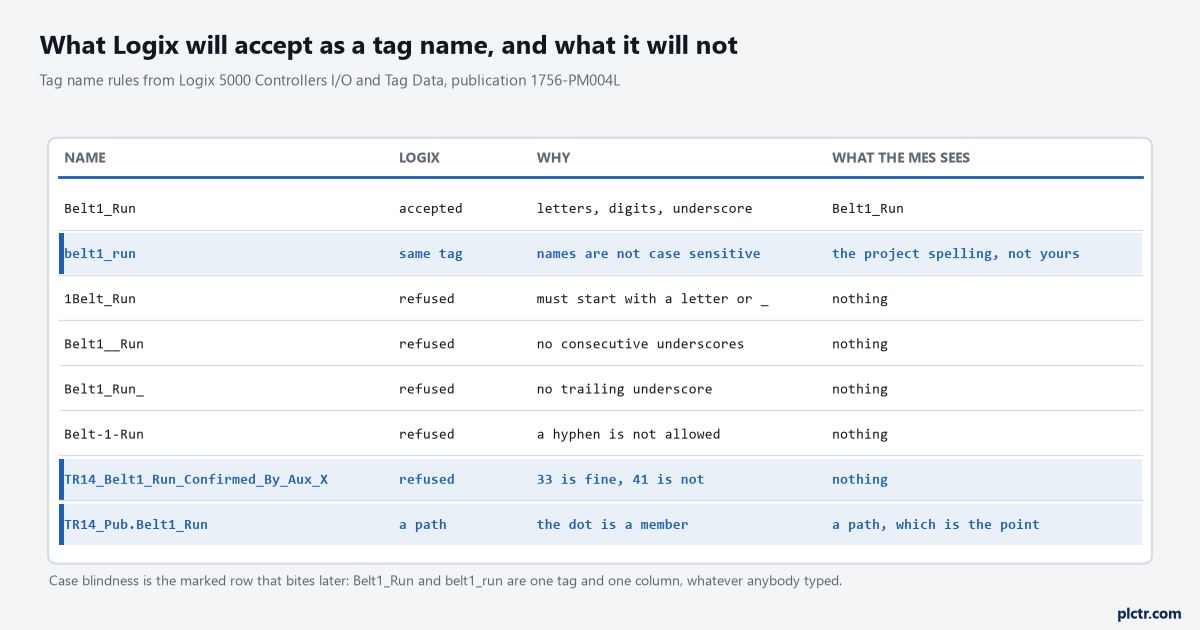
The marked rows are the three that do not announce themselves. A refused name is a dialog box you deal with in five seconds; a name that is accepted and means something different downstream is a meeting in eight months.
Why the publication structure beats renaming
TR-14 has 46 published nodes if you expose its program whole, and it needs 16.
The difference is everything the machine needs to work and nothing anybody outside needs to know: the seal-in bits, the four command bits from the PanelView, the timer accumulators, the one-shot storage, the reset. A publication type strips those out by simply not containing them. TR14_Pub has fifteen members — the two run commands, the two mirror contacts, the two confirmed-running bits, a blocked bit, the guard contactor’s mirror, the two fault latches, the end-of-line eye, the carton counter, a line state, a publish sequence number and a timestamp — and a CPS copies into it from a 500 ms periodic task. The structure gets the OPC UA Access setting, once, instead of every tag in the program getting one. Any member that stops being useful is deleted from one place. And when somebody rebuilds the machine’s internals next year, renames Belt1_Req to something clearer or moves the routine to a different program, the copy rung changes and nothing outside the controller notices, which is the actual point: the publication type is an interface, and an interface that nobody can break by accident is worth the three rungs it costs. Our page on user-defined types in a Logix project covers building one; the server supports nesting up to twenty levels deep, and you want about one.
One caveat that catches people, from the data access chapter. An alias cannot carry its own access setting: the External Access list is greyed out for an alias and reports whatever the base tag has, and OPC UA Access behaves the same way. So aliasing a module point into the publication type does not give you a place to set Read Only — you set it on the base. Alias tags in Studio 5000 is the wider version of that trap.
Copy into the structure. Never alias into it.
The same bit, under four different naming systems
Belt1_Run leaves the controller once and arrives with four different names, and the map between them is a document somebody has to own.
In the controller it is TR14_Pub.Belt1_Run, a BOOL, and the dot is a structure member. In the OPC UA address space it is a node whose BrowseName is the pair 4:Belt1_Run — a namespace index and a string, which is what Part 3 calls a QualifiedName. The index matters more than it looks: it is a position in the server’s NamespaceArray, and a client that hard-codes 4 rather than reading the array and resolving the namespace URI will point at the wrong thing the day the server rebuilds its address space with one more namespace in it. Part 3 also says two things people assume the opposite of: a BrowseName does not uniquely identify a node, because different nodes may have the same one, and it should never be used to display a name to a user — that is what DisplayName is for, which is localised and capped at 512 characters. On the broker it becomes a Sparkplug metric named Belt1/Run, where the slash is a character inside the metric name and not a topic level, because the topic levels are already spent: the Sparkplug topic namespace is namespace, group, message type, edge node and device, with spBv1.0 as the first element, and your metric name lives in the payload underneath all of that. In the historian it is TR14.Belt1.Run because that product uses dots for its own hierarchy and knows nothing about Logix. In the database behind the MES it is belt1_run, lower case, because that is the house style and no database administrator is going to change it for you.
Four naming systems and one bit. None of them is wrong.
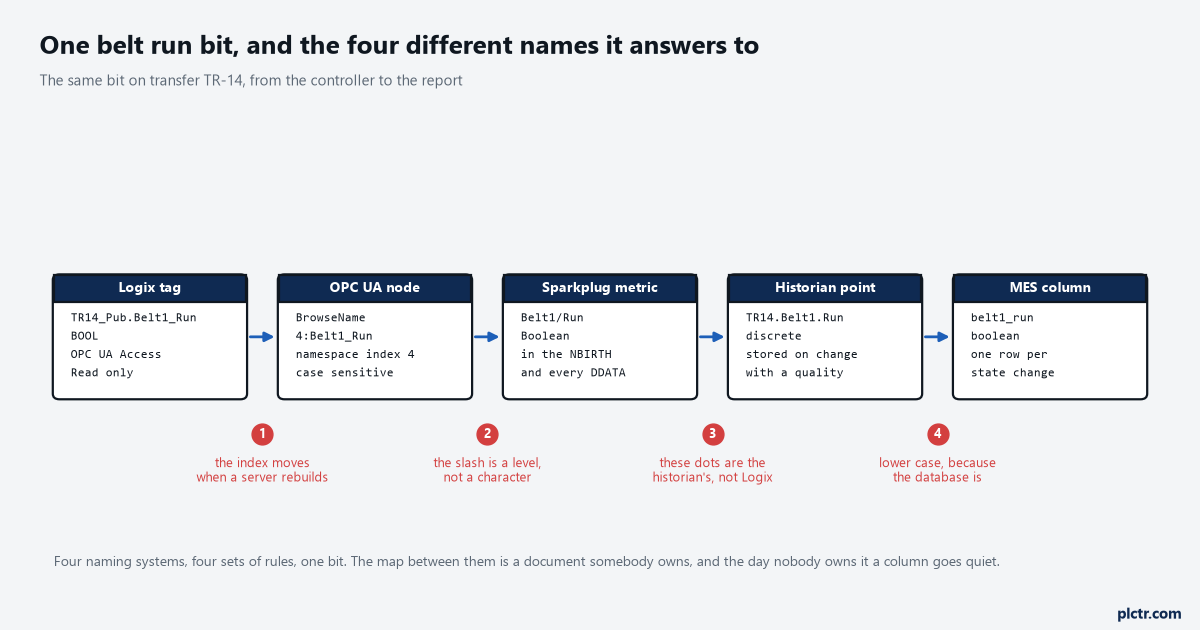
The namespace index at the second stage is the one that moves without telling anybody. Resolve the namespace URI once at connect and look the index up; never write a 4 into a configuration file.
Counting nodes before you publish, not afterwards
Node counting on a Logix controller has one rule and it is in publication 1756-UM023B-EN-P: every member of a data structure, and the structure itself, is one node.
The manual works an example — four DINT tags, one user-defined type with three members, and an array of 100 DINTs, total 109 — and that arithmetic is the whole of capacity planning here. A 1756-L83E serves 1200 nodes. An L82E serves 600. An L84E serves 10000 and an L85E 15000. A 1756-L81E serves none at all, which is worth knowing before somebody specifies one for a machine that will need a data layer. TR14_Pub is 16 nodes, so it uses 1.3 per cent of the L83E’s budget. Left unmanaged, the same controller comes to 1606: 46 for the transfer, 383 for the case packer, 611 for the palletiser, 204 for the wrapper, 244 for four I/O module structures and 118 of task and program housekeeping that exists only so the controller can tell you about itself. That is 406 over the limit on a controller that has four small machines in it. The default that saves you is a good one — OPC UA Access starts at None for controller and program scoped tags, so nothing is published until somebody publishes it — and the correct move is to leave it at None everywhere and turn on exactly one structure per machine.
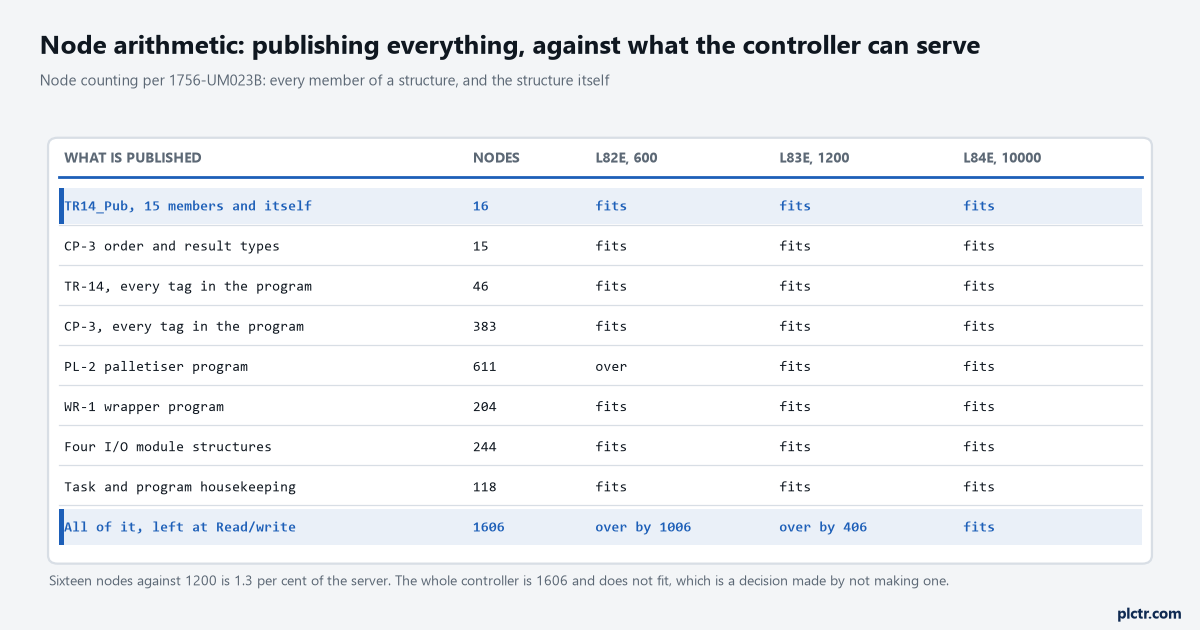
The bottom row is the same controller with nothing decided. It is 406 nodes over an L83E and comfortably inside an L84E, which is how a naming decision turns into a hardware decision.
There is a wrinkle worth knowing if your server is not the one in the controller. The same chapter notes that OPC UA access is fully independent of External Access for the embedded server in a Logix controller, but that for the OPC UA server in FactoryTalk Linx Gateway the OPC UA access depends on External Access instead. Two attributes, two behaviours, and which one applies is decided by where the server runs rather than by anything in your project. Check which you have before you spend an afternoon setting the wrong column.
Where your names hang off a hierarchy that already exists
The MES has a model and it is not yours to invent.
IEC 62264 gives it as levels — enterprise, site, area, work centre, work unit — and by the time anybody asks you for a tag list, the first four already have rows in somebody’s database with somebody else’s naming convention on them. Packaging and Carton line 4 are facts somebody else already wrote down. What you own is the bottom level, one work unit per machine, and the useful consequence is that your job is much smaller than it looks: one publication structure per work unit, named after the machine as the plant already labels it, and the hierarchy above it is somebody else’s problem. TR-14 is called TR-14 on the layout drawing and on the operator’s radio, so it is TR-14 in the tag name too. A machine called something different in the controller than on the plant is a machine that will be reported on wrongly.
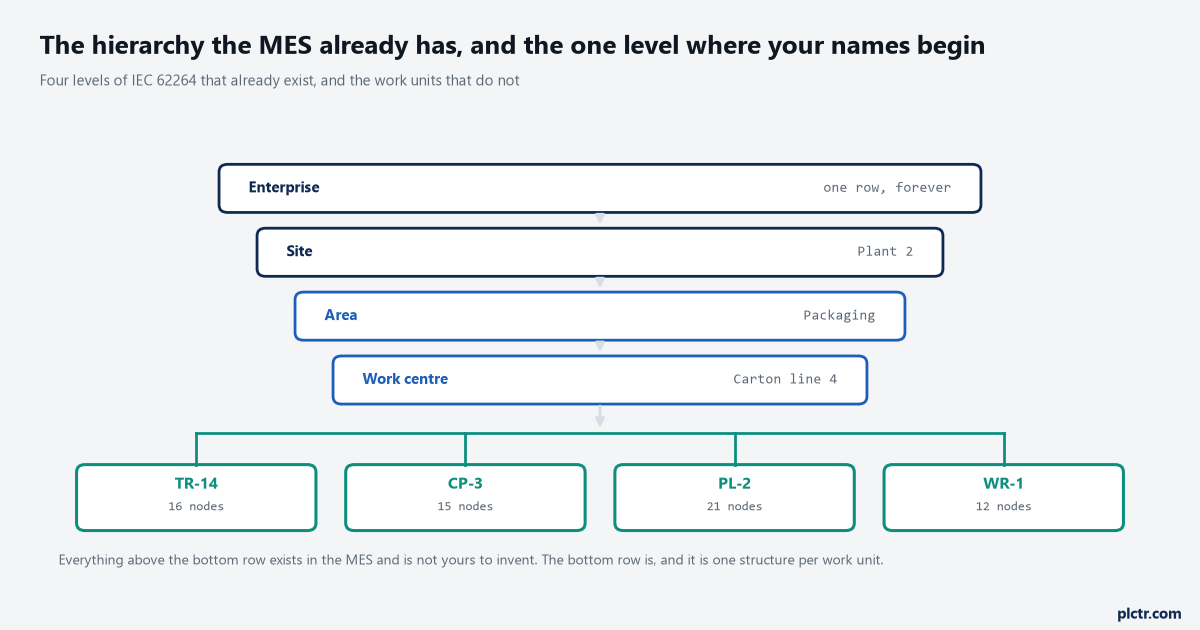
Only the bottom row is yours. Everything above it has a row in a database already, and inventing a second naming convention for it is the most common way this work goes wrong.
The five columns you will be asked for on day one
Tag, type, units, meaning, and who writes it.
Everybody supplies the first two because the export gives them to you free. Units and meaning are the ones that come back blank, and they are precisely the two that nobody can reconstruct six months later from the tag name alone: Cnt_EOL counts cartons rather than cases, and it counts since the last shift reset rather than since the controller was powered up. Line_State is a SINT where 0 is idle, 1 ready, 2 running, 3 blocked and 4 faulted, and if that mapping lives only in a rung comment then the dashboard will be built by guessing. Logix has somewhere to put some of this, which almost nobody uses: extended properties let you attach Min, Max and Engineering Units to a numeric member, and State 0 and State 1 strings to a BOOL, and other Rockwell HMIs can then read them. The list is unavailable for other types of member, so it will not carry everything, but engineering units on a numeric tag beat a column in a spreadsheet that goes stale.
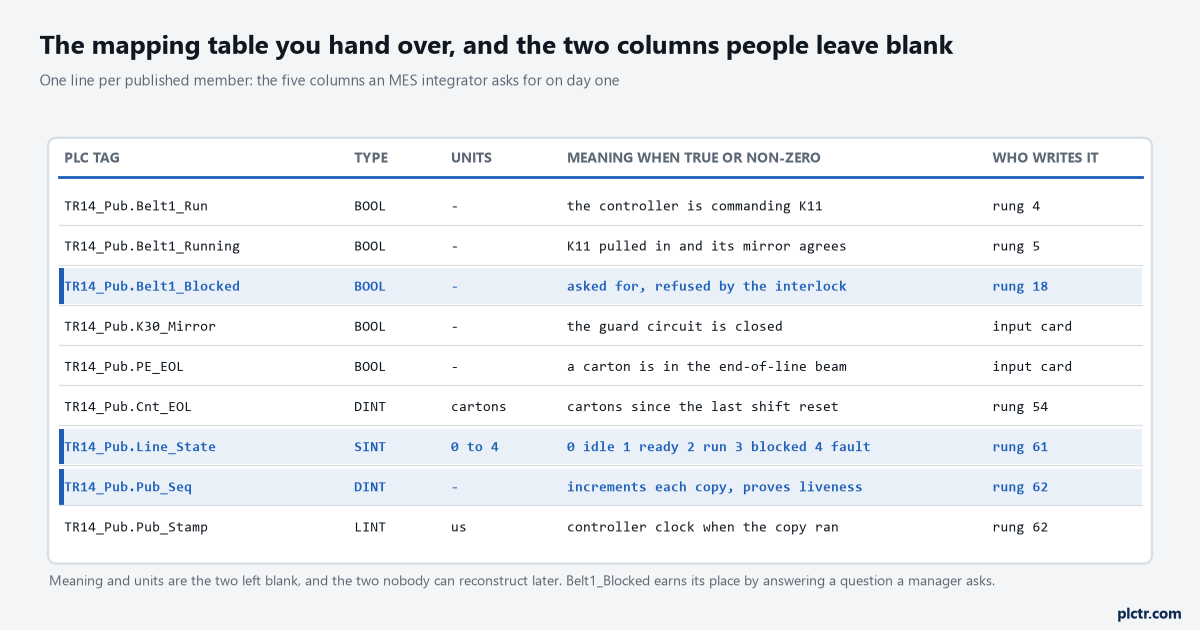
Belt1_Blocked earns its row by answering a question a line manager asks and a controls engineer never does: was the belt stopped, or was it asking to run and being refused?
What everyone sends first
The whole tag database, exported to CSV, in ninety seconds.
It is the wrong artefact and it is wrong in a way that takes a year to show up. Nobody on the receiving end can tell Belt1_Req from Belt1_Run, so they pick whichever sounds right; nobody knows that Belt1_Fault is latched and needs a reset while Belt2_OL_OK is a live contact, so the dashboard shows a fault that cleared eight hours ago; and nobody knows that four of those tags are written by a PanelView and mean an operator’s intention rather than the machine’s state. The export is a list of names, and what was asked for was a model. Thirty rows written by hand, with units and meaning filled in, is a better deliverable than four thousand rows generated, and it takes an afternoon. If you want to know which rungs actually write a tag before you describe it, cross-referencing a tag in Studio 5000 is the thirty-second version of that check.
The OPC UA path from a controller tag to a client picks up where this leaves off, and the MQTT and Sparkplug side covers what happens to these names once a broker is involved.
What to do next
Open your controller’s tag list and count how many tags have a name you would be happy for somebody in an office to read on a report. If it is under thirty, you already have the shape of a publication structure and the job is an afternoon. Then set OPC UA Access to None on everything, build one type per machine, name it after what the plant calls that machine rather than what the project calls it, and fill in the units and meaning columns yourself before anybody asks — because the version you write while you still remember the machine is the only version that will ever be correct.