An MQTT Broker for Plant Data: Topics, QoS, Retained Messages and Last Will
The topic string plant2/pack/carton1/tr14/belt1/amps is 42 bytes. The float it carries is four. Every publish of the motor current on one belt of the carton transfer therefore spends ten times as much on saying where the number came from as on the number, and at 12 changes a minute across 68 analogue points that is the whole of the traffic bill.
That ratio is the first thing to understand about running an mqtt broker plant data project.
It decides the shape of the topic tree, and that tree is the only schema plain MQTT has.
Four decisions come before the first publish and all four are hard to change afterwards. The shape of the topic string, which is your data model whether you meant it to be or not. The quality of service on each class of message, which is an argument about packets per value rather than about reliability in the abstract. Where the retain flag belongs, which is a much shorter list than people expect. And what each client registers as its last will.
That last one is how a subscriber finds out a publisher has stopped existing rather than gone quiet.
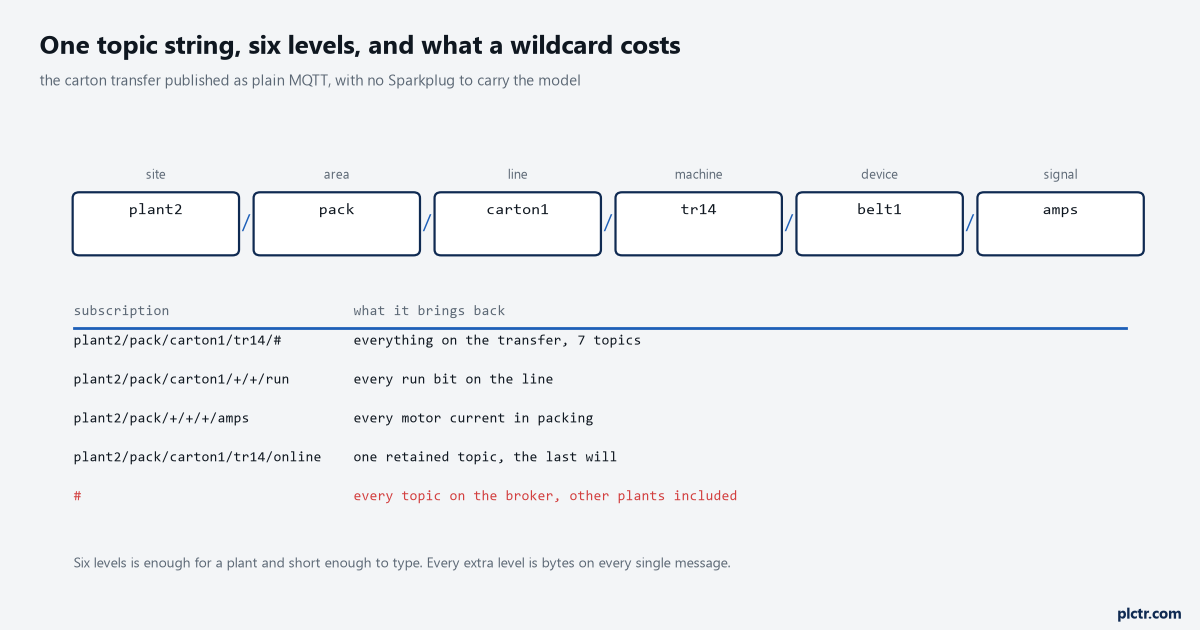
Read the last row. A bare hash subscribes to every topic on the broker, which on a shared broker means every other plant as well, and it is what a test client gets left on by accident.
The topic is the schema
Six levels, from site down to signal, and the discipline is that every level answers a question somebody will want to filter on. Site and area exist so that one broker can carry more than one plant without the subscriptions becoming guesswork. Line and machine exist because that is how a plant is talked about and how an alarm is routed. Device and signal are the leaf. What you must not do is put a value in the topic, which sounds obvious and is what everybody does the first time: a topic of plant2/pack/carton1/tr14/belt1/running/true is a topic the broker treats as unrelated to the one ending in false, so a subscriber sees two topics that never update each other and a retained pair that contradict each other forever. The other thing not to do is encode anything that changes. Batch numbers, shift codes and operator names in a topic level mean the tree grows without limit, the broker’s memory grows with it, and a wildcard subscription that worked in commissioning quietly stops matching in March.
Topics are case sensitive, and a leading or trailing slash makes a different topic.
Both of those are in clause 4.7 of the MQTT specification, and both of them bite. TR14 and tr14 are two machines as far as the broker is concerned, and there is no warning, no error and no log entry when a gateway publishes to one and a dashboard subscribes to the other. Pick lower case, write it in the standard, and check it with a subscription to the level above rather than to the topic you think you configured. The wildcard rules themselves are short: a plus sign occupies exactly one level and matches anything in it, a hash matches the rest of the string and must be the last character, and a hash on its own is legal and matches everything that does not start with a dollar sign. The dollar exception is worth knowing because it is how the broker’s own statistics stay out of your subscription, and it is why a client subscribed to hash never sees the broker health topics that would have told it something was wrong.
plant2/pack/carton1/tr14/belt1/run        1                retain 0
plant2/pack/carton1/tr14/belt1/amps       4.82             retain 0
plant2/pack/carton1/tr14/eol/count        184213           retain 0
plant2/pack/carton1/tr14/state            {"s":4,"t":...}  retain 1
plant2/pack/carton1/tr14/online           1                retain 1, the will topic
What a quality of service actually buys
The three levels are not three grades of reliability on one scale. They are three different numbers of packets, and the cost is per message on every message for the life of the installation.
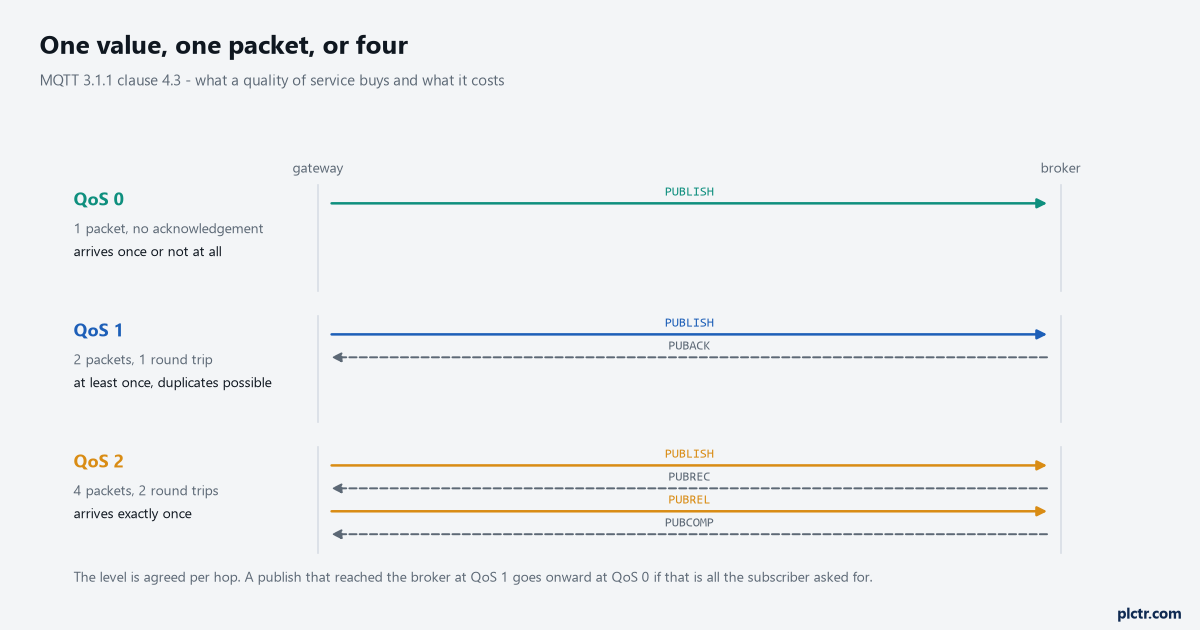
Count the arrows rather than reading the labels. QoS 2 is four packets and two round trips for one number, which on a cellular link with a 600 ms round trip is over a second of latency per value.
QoS 0 is one PUBLISH and nothing comes back. The message arrives once or it does not arrive, and the sender never learns which. QoS 1 adds a PUBACK, so the sender knows the receiver took ownership, and the price of that knowledge is that a retransmission after a lost PUBACK delivers the message twice; the specification is explicit that a receiver which has already sent a PUBACK must treat a repeat of the same packet identifier as a new publication. QoS 2 runs a four-part handshake, PUBLISH then PUBREC then PUBREL then PUBCOMP, and delivers exactly once. For a counter that only ever increases, duplicates are harmless and QoS 1 is right. For an event that triggers something at the far end, duplicates are not harmless at all, and the honest answer is usually to make the far end idempotent rather than to buy QoS 2, because the far end has to be idempotent anyway the first time somebody replays a backlog by hand. What decides it for most plant data is that a changed analogue value is superseded within seconds, so losing one is invisible and paying two round trips for it is not.
There is a detail in clause 4.3 that trips people up in a way that looks like a broker bug.
The quality of service is agreed per hop, not end to end. A gateway publishes at QoS 1 to the broker, and the broker delivers onward at whatever level each subscriber asked for in its own subscription. So a historian that subscribed at QoS 0 gets QoS 0 delivery no matter how carefully the gateway published, and the PUBACK the gateway received says only that the broker has the message. It says nothing about the historian. If the guarantee you actually need is that the historian has the row, the acknowledgement has to come from the historian, which is the same conclusion the Raspberry Pi queue and backfill article reaches by a different route.
Retain, and the value with no age
The retain flag tells the broker to keep the last message on a topic and hand it to any client that subscribes later. That is the whole of it.
It is more useful than it sounds on a slow topic and more dangerous than it sounds on a fast one.
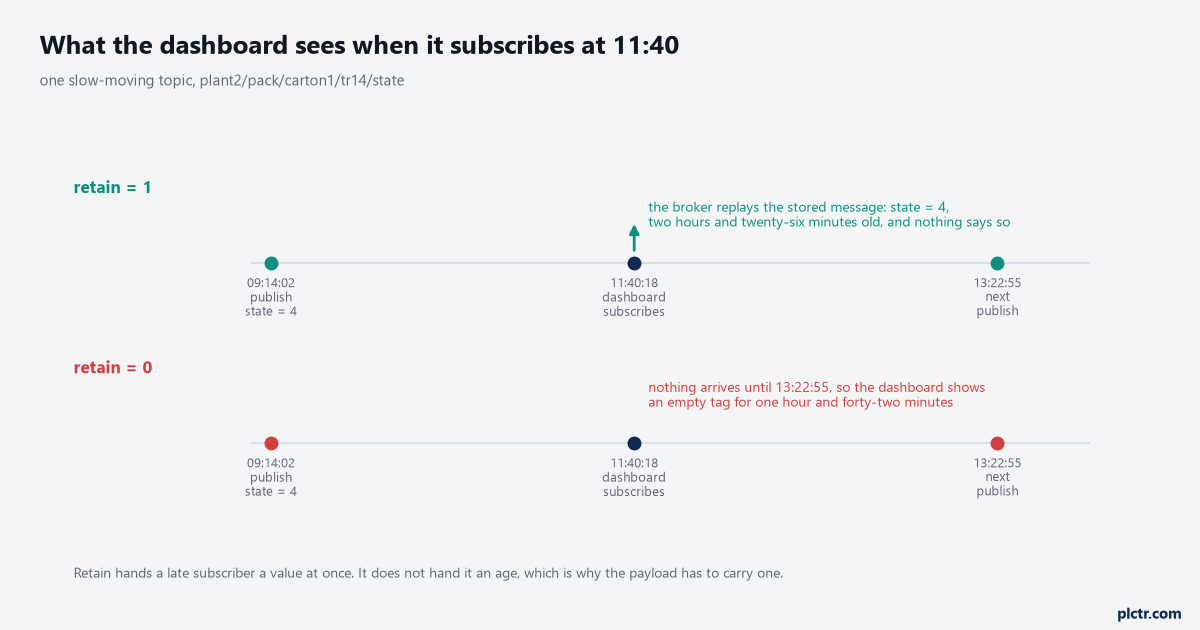
The upper timeline is the one that causes arguments. The value is correct, the delivery is correct, and the dashboard has no way to know it is looking at something two and a half hours old.
Retain belongs on topics that describe a condition rather than an event. Machine state, current recipe, the online flag, a setpoint: all of these have a correct answer at every instant, and a subscriber that joins at eleven o’clock genuinely wants the answer that was true at nine. A counter does not work that way, and neither does an alarm transition, and retaining those produces a dashboard that shows last Tuesday’s value with total confidence. The cure for the age problem is that the payload carries its own timestamp, always, in UTC, taken at the moment of the read rather than at the moment of publication. A bare number on a retained topic is a value with no provenance, and the dashboard that renders it cannot do better than the data it was given. Clearing a retained topic is done by publishing a zero-length payload to it with the retain flag set, which the specification says removes the stored message and is not itself stored; that is the only way to get rid of one, and it is the thing to reach for when a machine is decommissioned and its topics are still answering.
One more retain rule that catches people: a retained message published at QoS 0 may be discarded by the broker at any time.
The specification says the server should store it and may choose to throw it away, which means a retained state topic published at QoS 0 is a state topic that sometimes is not there after a broker restart.
Publish anything you intend the broker to retain at QoS 1, and check it survives a restart.
The last will, and the ninety seconds before it
Every client registers its will in the CONNECT packet, before it has published anything. Topic, payload, QoS and retain flag, all decided at connect time, and the broker holds it and publishes it when the network connection closes without a clean DISCONNECT. The list of triggering situations is in clause 3.1.2.5 and it is the list you would expect: an I/O error or network failure the server detects, the client failing to communicate within the keep alive time, the client closing the connection without a DISCONNECT, or the server closing it on a protocol error. What is not on the list is a clean shutdown, because a DISCONNECT packet deletes the stored will, which is exactly the behaviour you want and exactly why a gateway that wants its absence noticed on a planned restart has to publish its own offline message before disconnecting.
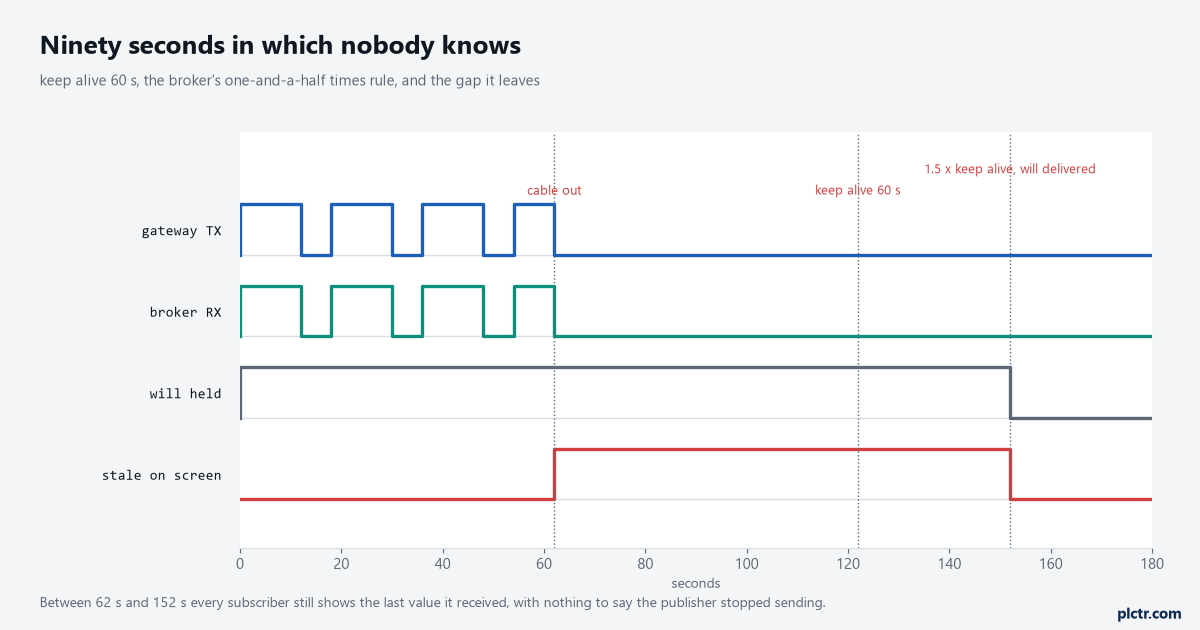
The red trace is the answer to how long the plant does not know. Ninety seconds on a keep alive of sixty, and that is the fast case where the broker notices at all.
Now the arithmetic that nobody does in advance. The broker must disconnect a client from which it has not received any control packet within one and a half times the keep alive interval, which on a keep alive of 60 seconds means the will goes out 90 seconds after the last packet at the earliest. Set the keep alive to 300 seconds to be kind to a metered SIM and you have signed up to seven and a half minutes of every subscriber believing a dead gateway is fine. Set it to 10 seconds and you get a PINGREQ every ten seconds from every client whether or not there is data, which on forty gateways is a packet every quarter second on a link you were trying to keep quiet. Thirty to sixty seconds is where most plant installations land, and the number to write on the drawing is not the keep alive but the one-and-a-half multiple of it, because that is the figure an operations person will be held to. The maximum the field can express is 18 hours, 12 minutes and 15 seconds, which is there for battery-powered sensors and has no business on a plant network.
MQTT 5 adds one property that is worth the upgrade on a flapping link.
The Will Delay Interval, property 0x18 in the will properties, tells the broker to wait before publishing the will, and to cancel it entirely if a new network connection for the same client identifier turns up first. On a cellular gateway that drops and reconnects every few minutes, that single setting is the difference between an alarm list full of offline and online pairs and an alarm list worth reading. Set it a little longer than the worst reconnect you are willing to tolerate silently.
The broker is not your buffer
A subscriber that goes away has a queue on the broker, if it asked for one, and that queue has a size.
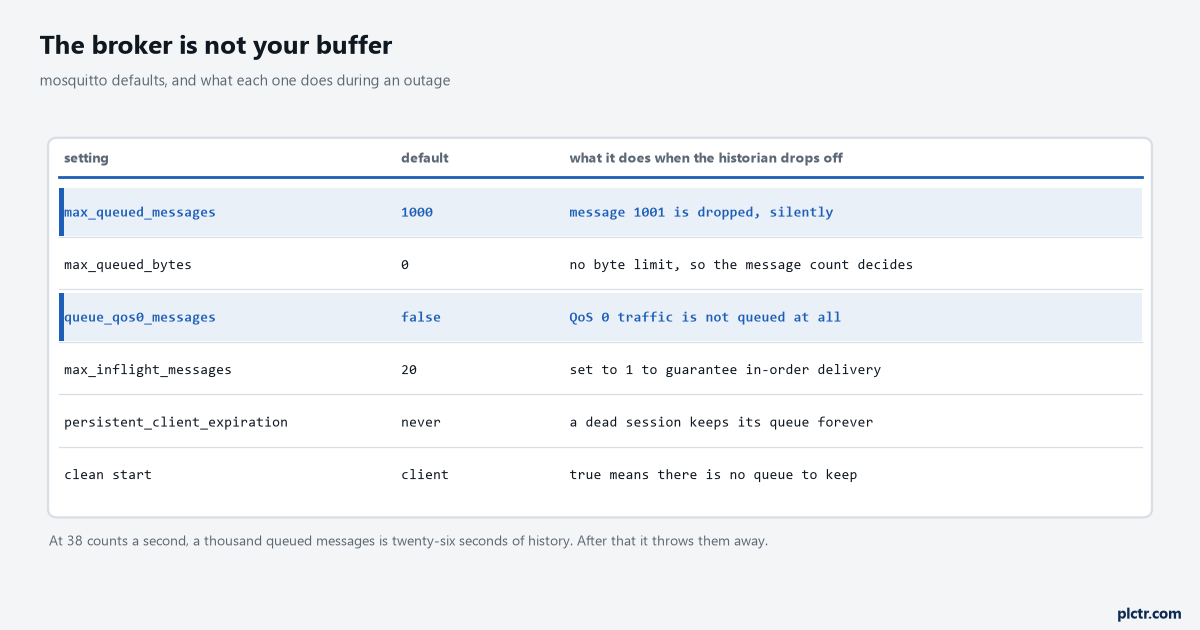
Two rows are highlighted because they are the two that decide whether there is any queue at all. The default answer for QoS 0 traffic is that there is not.
Mosquitto queues at most 1000 messages per client above those in flight, and above that limit messages are silently dropped. Not rejected, not logged as an error, dropped. At the end-of-line eye’s 38 counts a second that is twenty-six seconds of history, which is not an outage, it is a network hiccup. Turning queue_qos0_messages on is a non-standard option that the documentation itself flags as outside what the 3.1.1 specification says should be saved, and it counts against the same 1000. The conclusion is not to tune those numbers upward until they look comfortable. It is that store and forward belongs at the edge, in the gateway, on disk, sized against a real outage, and the broker’s queue is a convenience for a subscriber that restarted, not a substitute. What that sizing actually looks like is six hours of arithmetic done properly rather than a setting somebody ticked.
A second default that matters: persistent sessions never expire unless you tell them to.
A test client that connected once with clean session false and a random identifier holds a queue on that broker until somebody notices, and thirty of them is a memory leak with a configuration file for a cause.
Set persistent_client_expiration to something like 14d and the problem manages itself.
Who may publish what
The access control list is the part that gets deferred and then never done, and it is six lines.
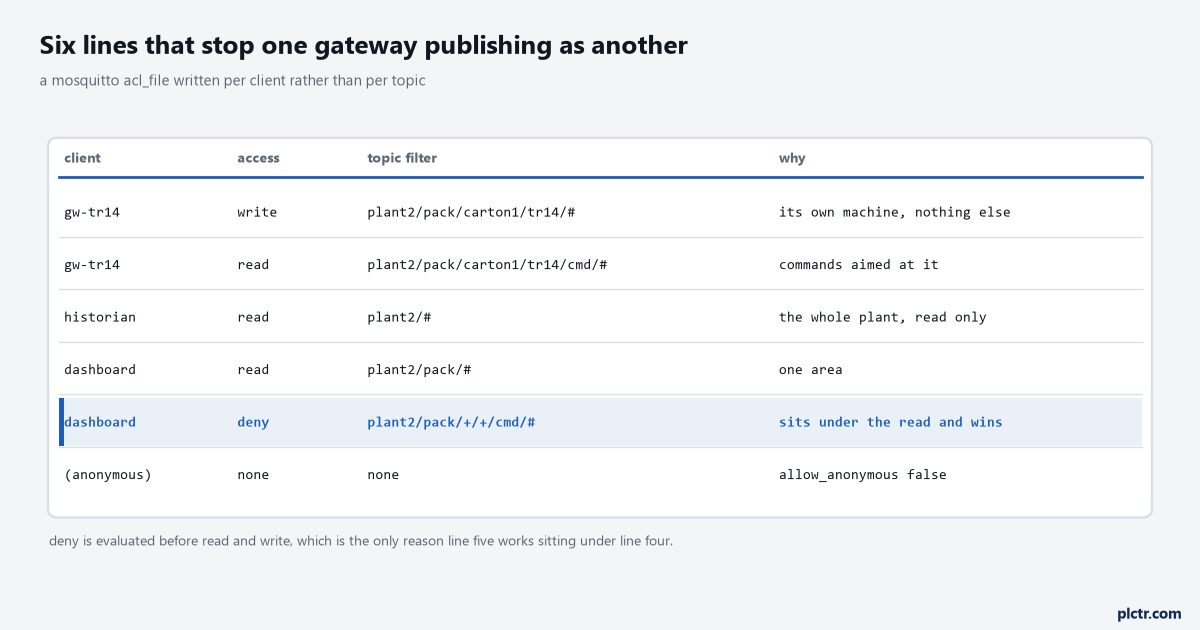
The highlighted row is the one worth copying. A deny line is evaluated before every read and write line, so it can sit underneath a broad grant and still win.
# /etc/mosquitto/aclfile
user gw-tr14
topic write plant2/pack/carton1/tr14/#
topic read  plant2/pack/carton1/tr14/cmd/#

user historian
topic read  plant2/#

user dashboard
topic read  plant2/pack/#
topic deny  plant2/pack/+/+/cmd/#

pattern write plant2/+/+/%u/#
The username in an access control list is the one from the password file, not the client identifier, which is the single most common reason a carefully written list has no effect at all. Mosquitto also supports pattern lines with %u for the username and %c for the client identifier, so one line can grant every gateway write access to its own subtree and nothing else, and the substitution has to be the whole of one topic level rather than part of it. Deny lines are handled before anything that grants access, which is what lets a broad read on an area sit above a narrow deny on the command topics underneath it. Put allow_anonymous false in the configuration on day one, because the default on a fresh install is a broker that will take anything from anyone on the plant network, and that is a finding on the first audit. Certificates and the rest of the hardening conversation belong with the wider cybersecurity measures for PLC systems, but the list above is the part specific to the broker and it costs an hour.
Next step
Stand up a broker on a spare box, point one gateway at it with a real machine behind it, and subscribe with a command-line client to the level above what you configured rather than to the exact topic. Then do three things in order: pull the gateway’s network cable and time how long it takes for the online topic to change, publish a zero-byte retained message to a topic you no longer want and confirm it disappears for a new subscriber, and leave a subscriber disconnected for a minute at full rate and count what it gets when it comes back. The third one is the one that ends the argument about whether the broker is a buffer.
The gateway side of the same link, where the store and forward actually lives, is the buffering queue on a Raspberry Pi, and the tag-reading end of it is reading CompactLogix tags with pycomm3.
If the broker will share a box with everything else, Docker on the plant floor covers the restart policy and the log rotation.