OPC DA to OPC UA: What Changed, and the Tunneller You No Longer Need
KB5004442 stopped being optional on 14 March 2023, and with it went the last registry value that could keep an OPC DA link alive between two Windows machines. RequireIntegrityActivationAuthenticationLevel is still sitting under HKEY_LOCAL_MACHINE\SOFTWARE\Microsoft\Ole\AppCompat on every machine somebody set it on, and setting it to 0 today does nothing whatsoever. That is the deadline this article is written after, not before.
So the short answer, because you probably came here with a decision rather than a curiosity. If the DA client and the DA server are both yours, put them on the same machine and let DCOM stay inside the box. If the DA server is the only thing that talks to the equipment, put an OPC UA server in front of it. If both ends are frozen third-party software, a tunneller is still the answer and it is the only case left where it is. And if you are specifying anything new, there is no remaining reason to put OPC DA in it.
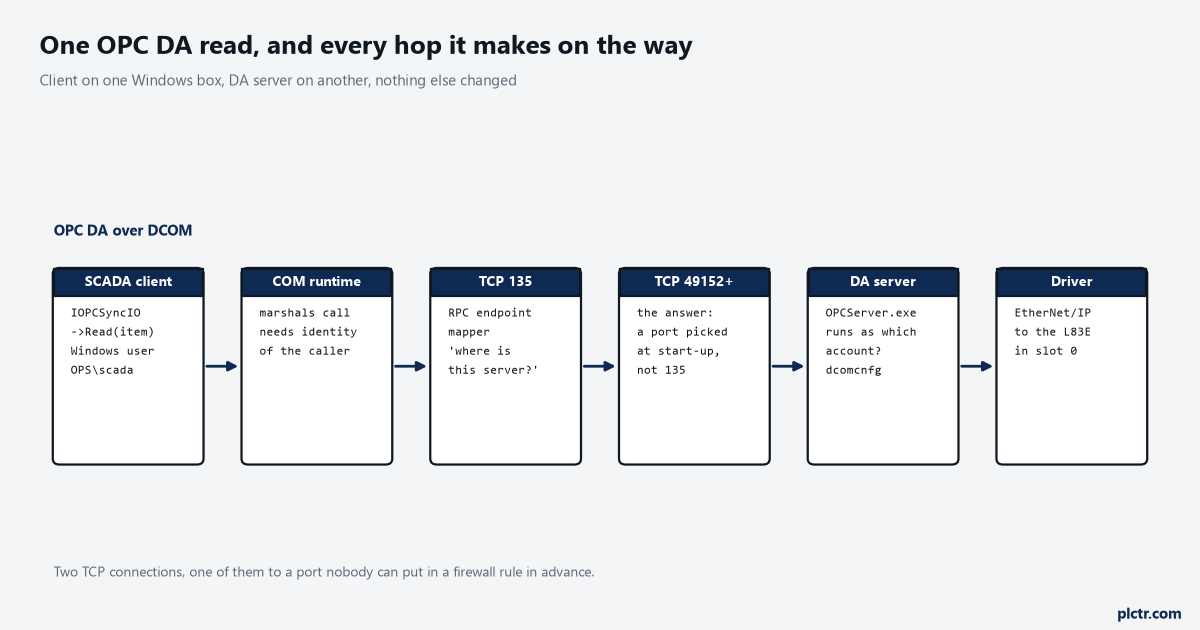
Count the TCP connections, not the boxes. There are two, and the port for the second one is decided when the server process starts.
What the tunneller was actually for
One thing. It replaced the DCOM leg between two machines with a connection somebody could write a firewall rule for.
A tunneller is a pair of agents. One sits on the machine with the DA server and is a local DA client; one sits on the machine with the DA client and presents itself as a local DA server; and between them runs a single TCP connection on a port the vendor chose and you can change. Neither DA application knows anything has happened, because on each machine the COM call never leaves that machine. That is the whole product, and it was worth real money for twenty years because the alternative was the picture above.
Everything else a tunneller sold itself on came from the same trick. Store and forward while the link is down, because there is a process at each end that can hold data. Bandwidth limiting, because there is a process at each end that can throttle. Working across a NAT router, because the connection is ordinary TCP in one direction. Surviving the remote machine being switched off, because the local agent answers immediately instead of the client’s thread sitting inside a DCOM call waiting for an RPC layer that has not yet decided the peer is gone.
The last one is the one people remember. A DA client blocked on a server that vanished does not come back in a second.
Why DCOM specifically, and not just Windows
Four properties of DCOM caused the trouble, and only one of them is the port range that everybody names.
The port range is real enough. An OPC DA client first connects to the RPC endpoint mapper on TCP 135, which IANA still lists as epmap, DCE endpoint resolution, and asks where the server it wants is listening. The answer is a port the server process was given when it started, from the dynamic range, which has been 49152 to 65535 since Windows Vista and Server 2008 and was 1025 to 5000 before that. You can see the current range with netsh int ipv4 show dynamicport tcp
netsh int ipv4 set dynamicport tcp start=50000 num=500, and plenty of plants did exactly that so the firewall rule was five hundred ports instead of sixteen thousand. It is still five hundred ports more than one, and the minimum range the command will accept is 255. Opening 135 alone and expecting it to work is the dead end that eats the first afternoon, every time, because 135 gets you the answer to a question and not the data. The second property is identity. Every DCOM call carries the Windows identity of the caller, and the server machine has to be able to resolve and authenticate that identity, which on a domain is invisible and on two workgroup machines means creating the same local account with the same password on both boxes and keeping them in step forever. The third is configuration surface: dcomcnfg has launch permissions, access permissions, and an identity setting per application, plus machine-wide defaults, and the OPCEnum service that lets a client list the servers on a remote box is a separate application with its own set. The fourth is the callback, and it gets its own section because it is the one that does not have a workaround.Then Microsoft changed the floor underneath all of it.
CVE-2021-26414 was addressed by raising the authentication level of non-anonymous DCOM activation requests to RPC_C_AUTHN_LEVEL_PKT_INTEGRITY. It shipped disabled on 8 June 2021, became the default on 14 June 2022, and on 14 March 2023 the registry key stopped being read. If you are troubleshooting a DA link that died after a patch, the event to search for on the server machine is 10036, which names the client address that was refused; 10037 and 10038 appear on the client and name the application that asked for too low a level.
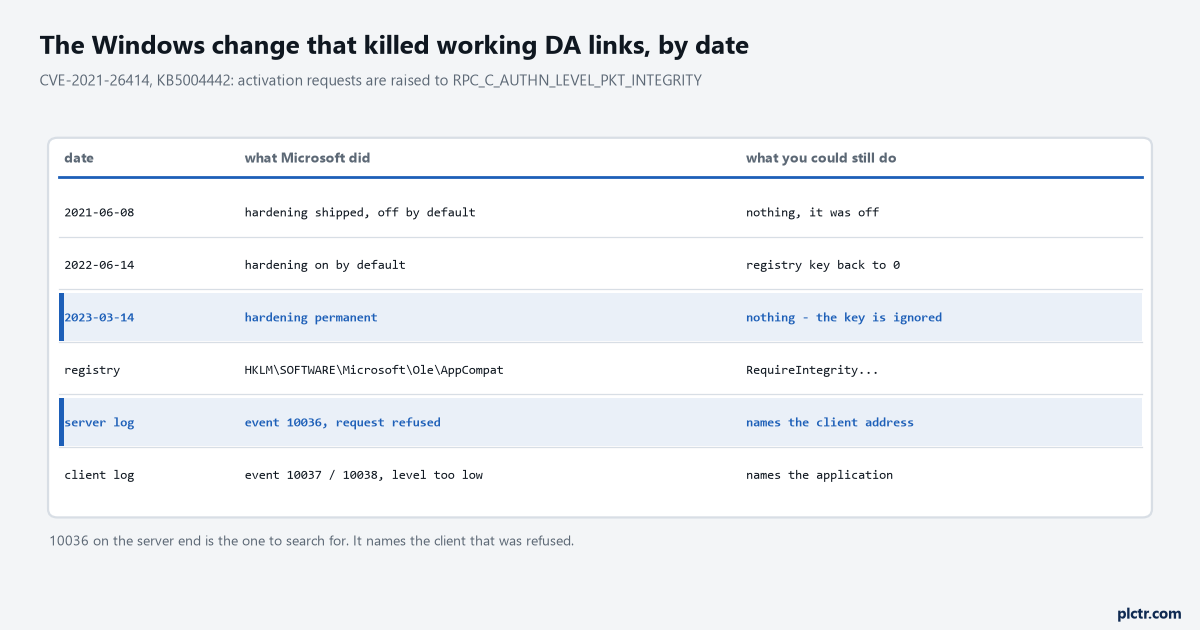
The middle row is the one people remember and the bottom rows are the ones that diagnose it. 10036 is on the server, not on the machine that is complaining.
The callback is the part that mattered
Polling an OPC DA server for a thousand items on a one-second update rate is not how anyone ran it.
The normal arrangement was an advise: the client hands the server a pointer to its own IOPCDataCallback interface, and the server calls the client back when a value changes. In DCOM terms that is a second connection, in the opposite direction, from the server machine to the client machine, subject to the same endpoint mapper, the same dynamic port range and the same identity resolution — only now it is the client that has to be reachable and authenticable. A firewall rule that lets the client reach the server is not enough. NAT between them is fatal. A client on DHCP whose address changed is fatal. This is why a link could pass every connectivity test and still deliver no data: the connection was fine, the callback was not.
OPC UA solves this by never connecting backwards.
The Publish service in Part 4 is a client request that the server holds. The client issues Publish requests and leaves several of them outstanding — pipelining, in the specification’s own word, which it recommends explicitly when network latency is longer than the publishing interval — and the server answers one of them when a notification is ready or when a keep-alive is due. The response travels back down the socket the client opened. A server that runs out of queued Publish requests returns Bad_TooManyPublishRequests and the client backs off. There is no inbound connection anywhere in that description, which is why an OPC UA link works through a firewall that permits exactly one direction and one port, and why you can put the client on a laptop with an address that changes every morning.
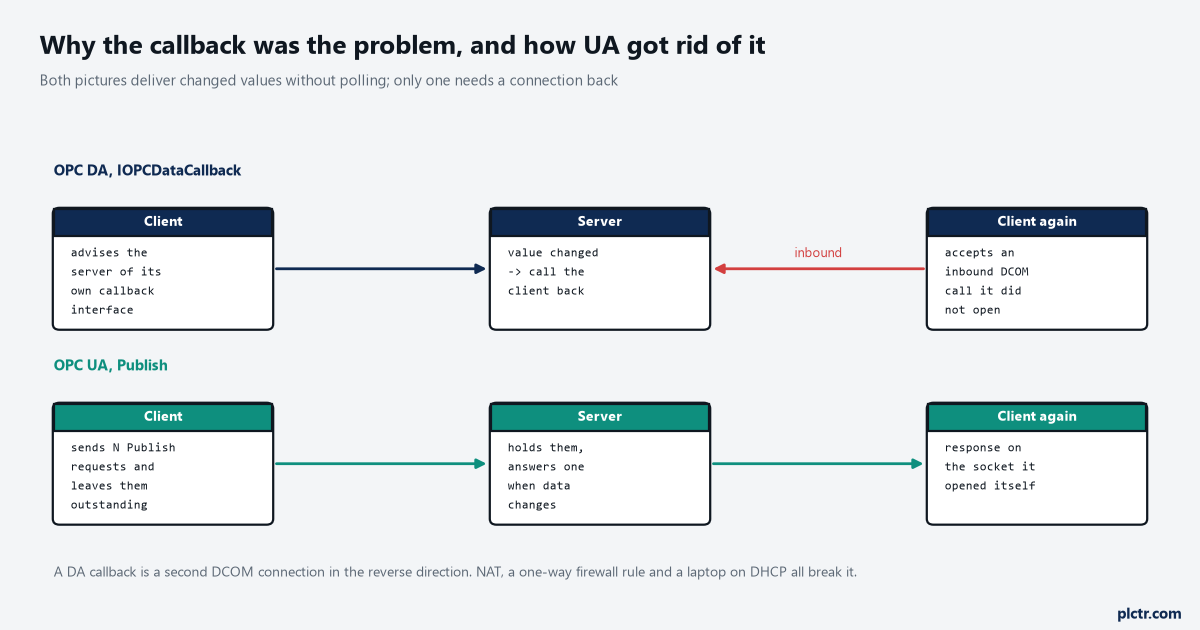
The red arrow is the whole difference. Everything a tunneller was sold to fix is on the row that contains it.
What UA put in its place
One registered port, one direction, one certificate exchange, and no operating system account anywhere in the path.
IANA has 4840/tcp assigned to the OPC Foundation as opcua-tcp, and 4840/udp as opcua-udp for the multicast discovery side, with 4843/tcp for the TLS variant. The URL scheme is opc.tcp, and a connection begins with a HEL message and an ACK that negotiate nothing but buffer sizes — at least 8192 bytes each way, sent once per connection, and a second HEL on the same socket is an error. Authentication then happens twice and neither half involves Windows: the two applications exchange X.509 certificates to establish the channel, and then a user identity token, which may be a user name and password held by the server itself, establishes who is asking. A Linux gateway, a controller with a server built into its firmware and a Windows box all do this identically, which is the part that actually ended the argument.
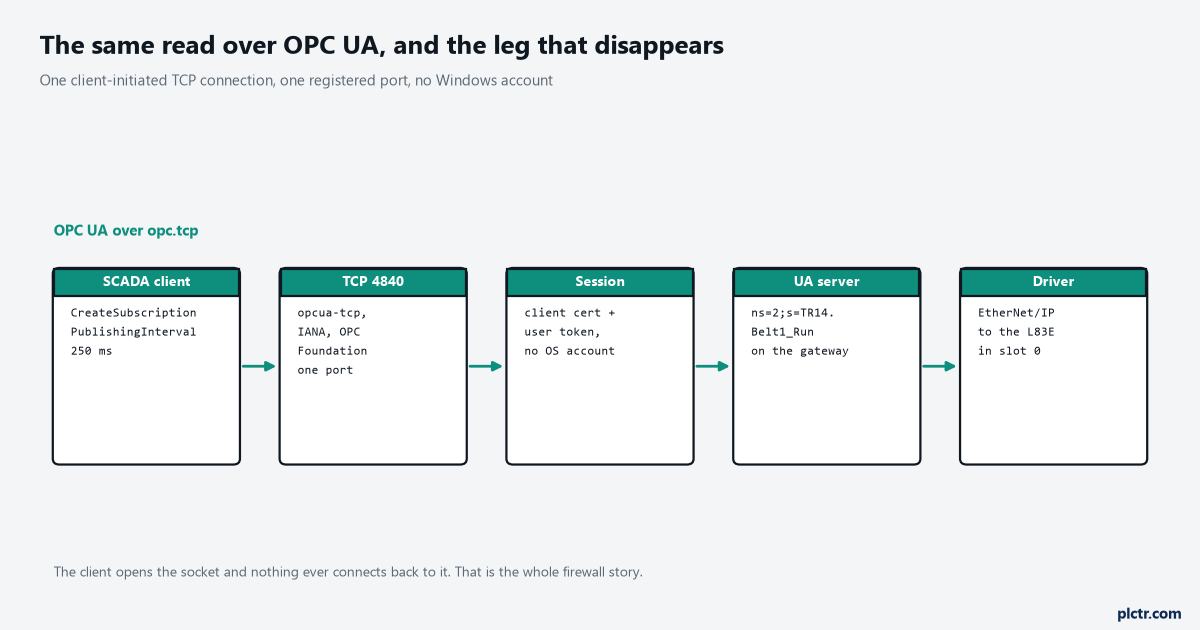
Five boxes and one connection, against six boxes and two. The missing box is the one that held the Windows account.
Setting the two ends up is its own job, and the walkthrough for it is OPC UA PLC integration from a PLC tag to a SCADA client, which builds a Kepware gateway in front of a Logix controller and turns on the server inside an S7-1500. The certificate exchange that everybody’s first connection fails on is worth reading before you start, because it fails the same way for everyone.
A DA server you cannot replace this year
Now the practical part, in the order you should actually consider it.
The first option is the one people skip because it feels like a cheat, and it is the best one: move the DA client onto the same machine as the DA server. DCOM on a single machine uses local RPC, no endpoint mapper over the network, no dynamic port, no remote identity resolution and no callback across a firewall. Every problem in this article is a remote DCOM problem. If the DA client is a historian collector, a SCADA data server, or a script, it very often can live on the DA server’s box, and then you bring the data off that box by whatever modern route you like — an OPC UA server on the same machine reading the DA server locally, an MQTT publisher, a database writer. Second option, when the client cannot move: a UA server that fronts the DA server. Mechanically it is the tunneller’s server-side agent with a different north face — a DA client on the DA machine, an opc.tcp listener on the network, and a mapping from DA item IDs to node identifiers. Several products do this and I am not going to print names and version numbers I cannot open the documentation for today; what you are looking for in a datasheet is the phrase “OPC DA client” on the input side and “OPC UA server” on the output side, in one product, installed on the DA server’s machine. Third, the tunneller, and only when both ends are third-party software you cannot alter: a DA client that will not move and a DA server that cannot be fronted. Fourth is the registry key, and the fourth option no longer exists.
Check which one you are in before you buy anything. The answer is usually the first.
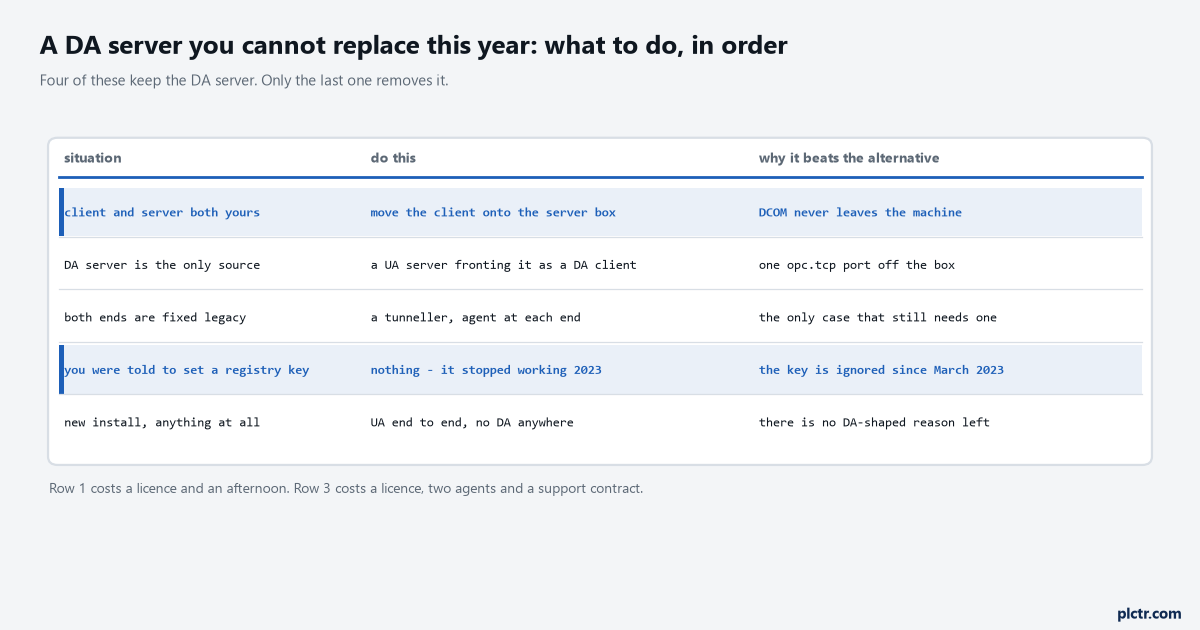
Four of the five rows keep the DA server running. Only the last one removes it, and that is a project rather than an afternoon.
What does not change
Almost everything above the protocol, which is why this migration is less frightening than it sounds.
The tag names are the same, because they were the driver’s names before they were DA item IDs and they are the driver’s names after they become UA node identifiers. The update rate you argued about is a publishing interval instead of a group update rate, and it means the same thing. The deadband that halved your network traffic is still a deadband. Quality is still good, uncertain or bad, carried now as a StatusCode with rather more detail in it, which is a subject of its own since a link can return good quality on a value that has not moved for six hours. The scan rates on the driver side do not move at all.
What does change is where the security argument happens. It used to be a Windows domain conversation with IT about accounts and firewall ranges; it is now a certificate conversation you can have entirely inside the plant. That is not less work on day one. It is much less work on the day somebody patches a server.
Next step
Find out which of the four situations you are actually in, and the way to find out is one command on the DA server’s machine rather than a meeting. Open Event Viewer on the machine running the DA server, filter the System log for source DistributedCOM and event 10036, and see whether anything is being refused and from which address. If 10036 is there, the link is dying for the reason in this article and the registry is not going to save it. If it is not there, and the link still fails, the problem is the callback or the identity rather than the hardening, and the test for that is to put a DA client on the server’s own machine and see whether it works — because if it does, option one is available and you are an afternoon away from finished. When you get to the UA side, the connection will fail the first time for certificate reasons, and the Python OPC UA client walkthrough against an S7-1500 has the four refusals in the order you will meet them. What to do with the data once it arrives is PLC data logging and remote monitoring.