Automatic tag generation against one 1756-L83E produced 5537 server tags in about ninety seconds, and the clients on that site reference 684 of them. The other 4853 are array elements nobody reads, structure members nobody reads, and a full PID_ENHANCED nobody has looked at since commissioning. They cost project load time, they cost browse time in every client, and if a client ever activates them they cost the controller.
So the short version: import, then delete. The import is the fast part and trimming it is the job.
Five thousand tags is not a boast about the controller. It is a bill.
Which route you import by decides what you get, and neither route gives you everything. From the device is fast and complete and brings in the I/O module tags, and it brings no descriptions at all. From an L5K or L5X file brings descriptions and needs no controller, and it does not import I/O module tags, and it does not import the Timer and Counter CTL bits. Add-On Instruction In and Out parameters are not generated by either route, which is the one that catches people, because the AOI is usually the part somebody wanted on the screen.
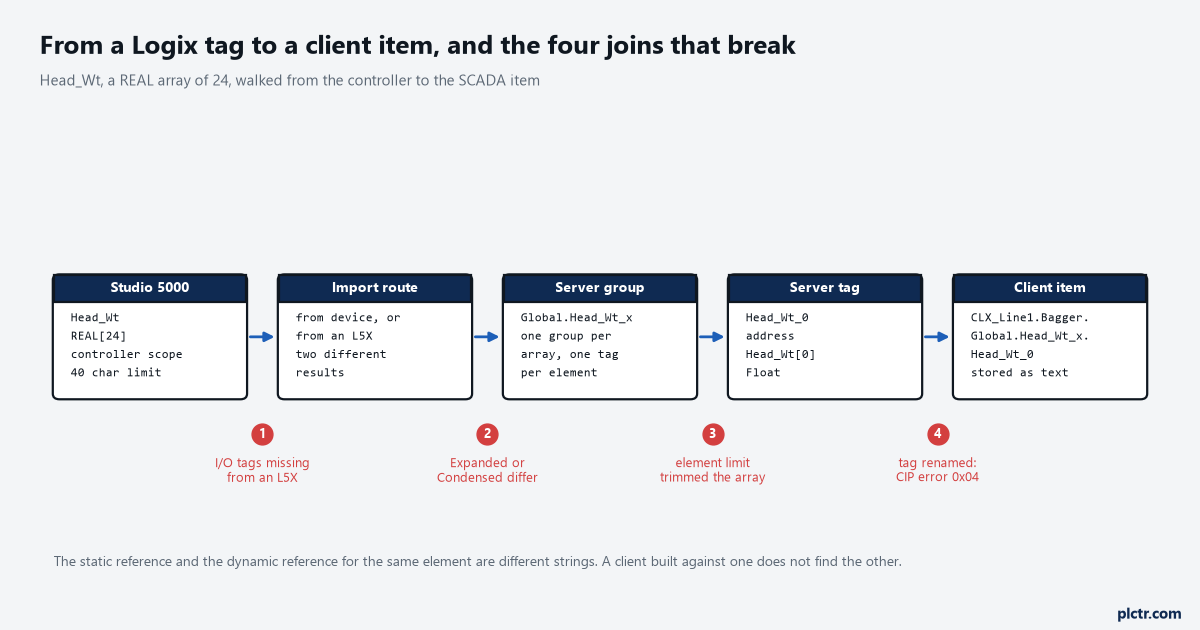
Head_Wt, a REAL array of 24, walked from the controller to the SCADA item. The static reference and the dynamic reference for the same element are different strings, which is break point 4 in disguise.
Getting the device ID right before anything else
The device ID for this driver is not an IP address. It is a route, and it is written in the same shape as the Communication Path in a MSG instruction’s configuration dialog: an IP address, then a port number, then a link address, with any intermediate hops in square brackets.
Port 1 is the backplane. On this driver it is always the backplane.
For the Bagger that is 192.168.10.21,1,0. Port 1 is that backplane, every time — the driver help is explicit that the last port ID in the path must be 1 — and 0 is the slot the 1756-L83E sits in. For a CompactLogix such as the 5069-L330ER on the Palletiser the same shape applies with the virtual backplane standing in: 192.168.10.32,1,0.
Two things here are worth writing on the back of your hand.
The first is that a wrong slot number is indistinguishable from a switched-off controller. You get “Device is not responding” and the manual’s list of causes for that message is the cabling, the port, the IP address and the Request Timeout — none of which is your problem. Count the slots in the rack before you count anything else.
The second is the Inactivity Watchdog, which defaults to 32 seconds. It is the time a connection may sit idle, without a read or a write, before the controller closes it, and the driver help ties one specific symptom to it: if the Event Log error about a CIP connection timing out while uploading project information appears often, increase it. A tag upload from a large controller takes longer than you think, and on a busy CPU with the system overhead time slice set low it takes a great deal longer.
The two import routes, in order
The online route needs the controller and it is the one to use first, because it is the only one that brings the I/O module tags across. Setting it up is four clicks and one decision.
- Open Device Properties and choose Database Settings, then Create tag database from device.
- Go to Options and decide the hierarchy — Expanded or Condensed — before you generate anything, because changing it afterwards renames every tag.
- Go to Filtering and set Impose Array Element Count Limit. This is the setting that decides whether you get 5537 tags or 1737.
- Go to Database Creation and generate.
The driver help adds one instruction to that list which is easy to skip: set the project offline in Studio 5000 first, and stop other communications to the CPU while the database is being created. A tag upload competing with a program download is a slow tag upload.
The offline route uses an L5K or L5X export and it is worth running afterwards, not instead, for one reason: descriptions. It imports them for non-structure, non-array tags, which is most of the tags anyone looks at. What it will not do is I/O module tags, and the driver help’s own advice is the right one — create aliases in Studio 5000 for the I/O module tags you care about, because aliases do import.
Neither route generates Add-On Instruction In and Out parameters. Plan for that and alias them too.
Descriptions matter far more than people expect when somebody else is building the screens.
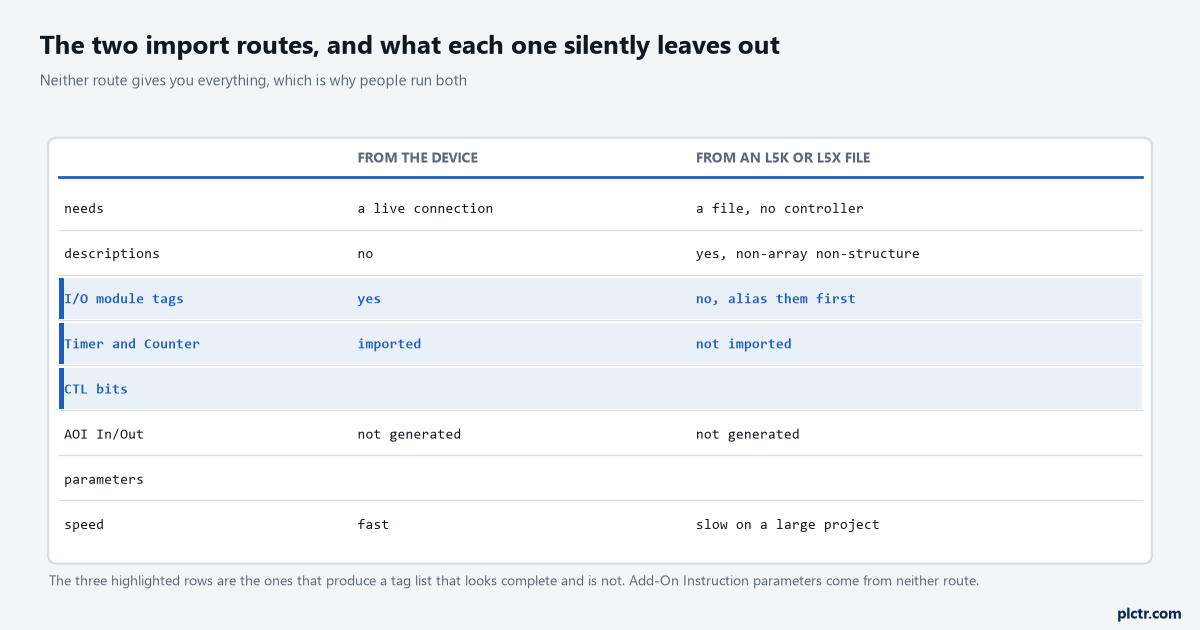
Neither route is complete, which is why people run both. The three highlighted rows are the ones that produce a tag list that looks finished and is not.
What the import does to an array
A controller that a programmer thinks of as a few hundred tags is not a few hundred tags once it is expanded. An atomic Logix tag becomes one server tag, a structure becomes many, and an array becomes one tag per element — and those two multiply together, which is where the number comes from. On the Bagger the arithmetic is: Recipe_Qty is a DINT array of 4000 and becomes 4000 tags; Head is an array of 24 of a UDT with 18 atomic members and becomes 432; Seal_PID is a single PID_ENHANCED and becomes 165, because a PID_ENHANCED has 165 members whether or not you use them; Head_Wt is a REAL array of 24 and becomes 24; Lane_Count adds 16; and the eight hundred-odd atomics and small structures that make up the rest of the program add 900. Total 5537. The Impose Array Element Count Limit checkbox on the Filtering tab, with the element count limit at 200, brings Recipe_Qty down to 200 elements and the whole import down to 1737. That single checkbox removes 3800 tags and it is off by default, because by default arrays are completely expanded during the tag generation process, which the driver help itself notes becomes time consuming for large arrays. You will still have 1053 tags more than anybody reads. Delete them, or leave them and accept a slower browse in every client that ever opens this server.
The naming the import produces is worth a minute of study before you let a SCADA integrator loose on it.
In Expanded mode, which is the default, the groups follow the hierarchy you see in Studio 5000: a Global group for controller scope, a Prgm_ group per program, a group per structure and a group per array. An array called Head_Wt with one dimension gets a subgroup named Head_Wt_x, where the x signifies that dimension 1 exists; a two-dimensional array gets _x_y. The elements inside it are named with the subscript flattened into the tag name, so Head_Wt[7] becomes a tag called Head_Wt_7 inside the group Global.Head_Wt_x.
That means the static reference and the dynamic reference for the same value are different strings. CLX_Line1.Bagger.Global.Head_Wt_x.Head_Wt_7 is the browsable one; CLX_Line1.Bagger.Head_Wt[7] is the direct one. Both work. A client built against one does not find the other, and the two teams building the SCADA screens will each have picked one without telling you.
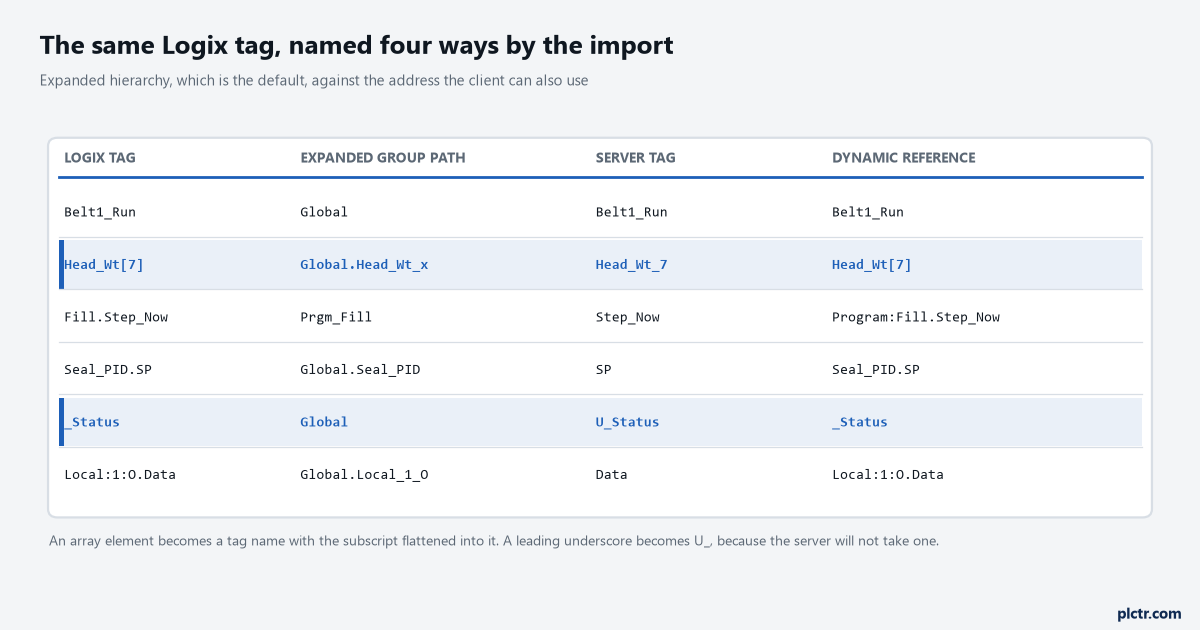
Six tags, four names each. The array row is where the subscript disappears into the tag name, and the underscore row is where a controller convention stops matching the server.
Protocol mode, and the one-third rule
This is the setting people change without understanding and the one that actually moves the needle on a large project. Protocol Type decides how Logix tag data is read, and there are three choices.
Symbolic Mode puts each tag’s ASCII name into the request packet. It is there for backward compatibility. It also means tag name length is bandwidth: the shorter the name, the more tags fit in a transaction, and the driver help asks you to keep client/server tag addresses under 400 characters because a packet holds 500 data bytes and the overhead eats into that.
Physical Non-Blocking Mode represents each tag by its physical memory address in the controller. It is the default and it is the right answer for atomic tags, arrays of atomics, and any structure of which you read a small part.
Physical Blocking Mode reads the whole Logix tag as one chunk and updates every client tag from that cached block. For a structure you read most of, it is one transaction instead of forty.
The crossover is roughly one third, and the driver help gives the worked number: a PID_ENHANCED has 165 members, so if more than 55 of them are referenced, that tag belongs on a blocking device. Fewer than 55 and it belongs on a non-blocking one.
Two devices, one controller, two protocol modes. That is the whole trick.
Which brings up why that works at all. You cannot set the protocol mode per tag — it is a device property — so you define two devices pointing at the same controller, one blocking and one non-blocking, and put each tag on the device that suits it. The driver help calls this tag division and recommends it outright.
It also warns you off the obvious mistake: the same Logix tag should not be referenced from two different devices, because then both are reading it.
Structures, strings and the write that fails quietly
Only atomic members of a structure are addressable. A tag whose address is MyTimer has no data type the driver can offer and is refused; MyTimer.ACC is a DWord and works. Nest a structure inside a structure and you expand both to reach the atomic member at the bottom.
Strings are the odd one. A Logix STRING is a structure of DATA, an array of SINT, and LEN, a DINT, and they are referenced separately: MYSTRING.DATA/82 for the value and MYSTRING.LEN for the length. On a read, the string is terminated at the first null, or at LEN, or at the maximum length, whichever comes first — so a LEN of 5 over a DATA containing “Hello World” returns “Hello”, and nothing anywhere reports a problem. Writes are where it gets genuinely interesting. Write a value to DATA and the driver also writes the length to LEN, and if the write to LEN fails the whole write is reported as failed even though DATA reached the controller intact. Now the trap, and it is a real one on any site that has ever written its own string type: if you have rolled a string into a UDT with a member called DATA and a DINT called LEN that means something else entirely — a lane number, a recipe index, a batch size — the driver will overwrite your LEN with a character count on every write to DATA, and it is behaving exactly as documented while it does it. If your UDT has a DATA but no LEN at all, the write to LEN fails silently with no consequence to DATA, which is the better of the two outcomes and still not something to discover by reading back a corrupted recipe. There is a performance setting attached to all of this. Automatically Read String Length is checked by default, and it costs a second transaction per string tag in a physical mode, because the LEN read is done symbolically. On a project with a few hundred string tags, unchecking it noticeably cuts the time to read everything.
Array Block Size, and the setting that reads 3840 elements to get 28
Block size specifies the maximum number of array elements read in one request. The range is 30 to 3840 and the default is 120. For Boolean arrays a single element is a 32-bit word in the protocol, so a block size of 30 is 960 bits and 3840 is 122,880.
The instinct is to set it to the maximum. The driver help’s own counter-example is the one to remember, and it maps exactly onto Recipe_Qty: if the tags being read are elements 0 to 26 and element 3839, a block size of 3840 reads every element between them on each request — 3840 elements moved to deliver 28 values. Drop the block size to 30 and you get two requests: one for the run of elements at the bottom, one for the far element on its own.
Size the block for the elements you read, not for the length of the array.
The default of 120 is usually right, and it is usually right by accident.
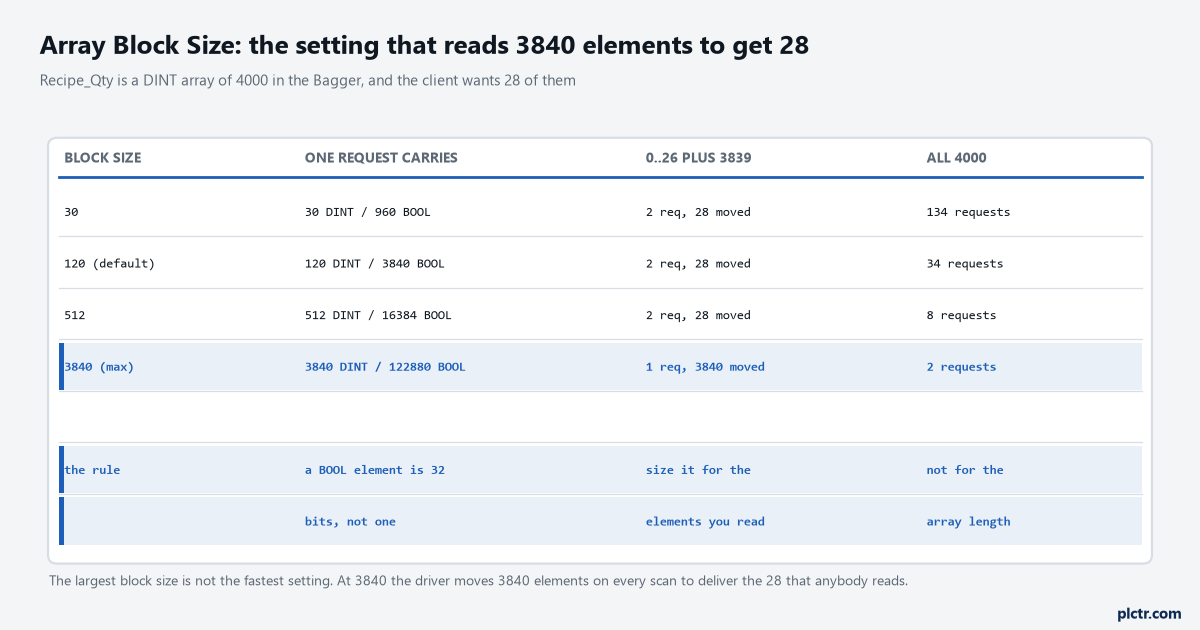
The same array read two ways. At 3840 the driver moves 3840 elements every scan to deliver the 28 that anybody looks at, and reading the whole array is where the large block earns its keep instead.
The five errors, and the phrase to search the log for
The phrase is Tag deactivated, and it matters because of what follows it: the driver stops processing that tag and does not try again. The client keeps whatever value it had at the last successful read, with whatever quality that server hands out, and the Event Log line that explains it scrolled off the screen two shifts ago.
Nothing in the Event Log ever says that the tag is gone for good.
CIP error 0x04 is the common one and its wording is worth knowing exactly — the IOI could not be deciphered or the tag does not exist. In practice, on a running plant, that means somebody downloaded a program that renamed a tag. It is not a network fault and the four hours people spend on switches and cables looking for it are four hours wasted.
Error 0x00FF with extended error 0x2105 is the array version of the same thing: an attempt to access beyond the end of the data object, which is what happens when an array got shorter and the block size did not.
And the dead end, since everybody tries it: re-running the tag import does not revive a deactivated tag. The import builds the server’s tag database; activation is a client-side state. The client has to release the item and re-acquire it, or the runtime has to be reinitialised. I have watched two people re-import four times before anyone said this out loud.
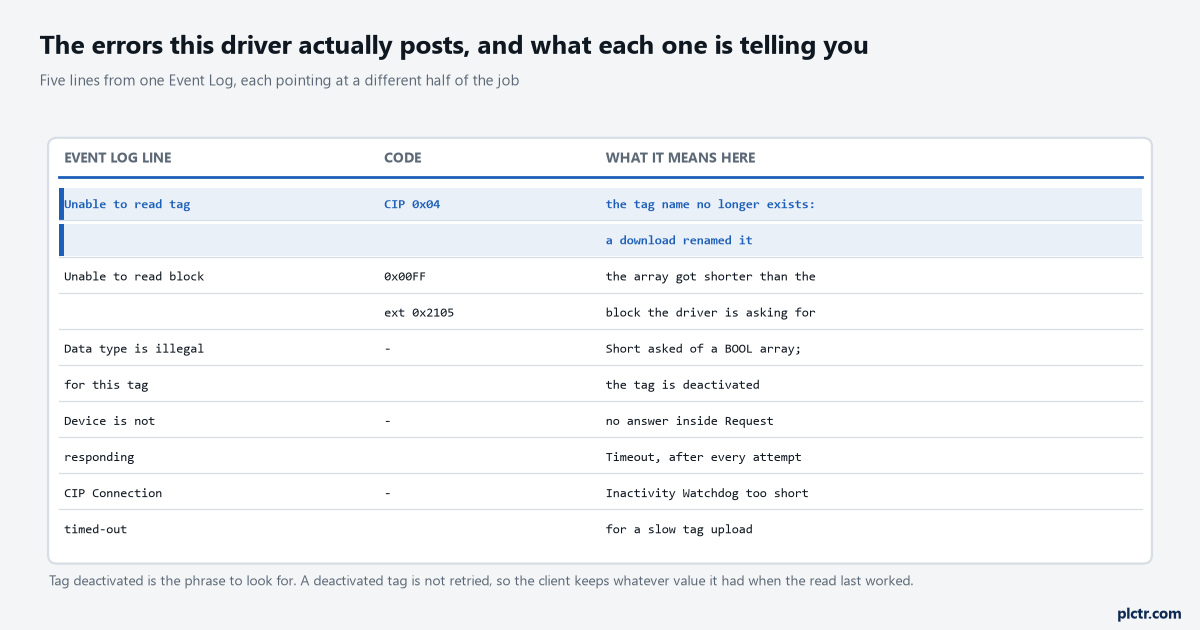
Five lines from one Event Log. The top two are program changes wearing network-fault clothing, and the bottom one is a timeout setting rather than a fault at all.
One more thing the controller does that the server cannot fix
The controller runs its communication task asynchronously to the application code, and the 5380 user manual says plainly what that costs: if an HMI or an OPC server writes a large block of data, the application can start executing on that data before the write has finished, leaving half the current recipe and half the last one in the same structure. The controllers hold 32-bit data integrity, so it only bites on anything wider than a DWord — which is every UDT and every array you are about to expose.
The manual’s own answer is a pattern worth copying: two unique words at the start and end of the structure, Start Data and End Data, written by whoever fills it, and validated as a matched pair before anything acts on the contents. It is the same discipline as the handshake that makes a setpoint write safe, and for the same reason.
What to do with your own project this afternoon
Open the server, look at the tag count on the device, and compare it with the number of tags your clients actually reference. If the first number is more than twice the second, the Filtering tab is where you start, and the recipe array you built in the controller is almost certainly the reason.
Check that now, before the SCADA integrator has built anything on top of it.
Then check one thing that takes ten seconds and saves an argument later: whether your SCADA is using static references or dynamic ones. Browse the server from the client and look at what the item strings contain. If they carry Global and a group name, they are static and a re-import with a different hierarchy setting will break them all.
The next article is the one that decides what all of this costs at runtime: scan rates, scan groups, and what a deadband does and does not remove.