A SCADA client stores one string for every value it reads, and on the line I am about to describe that string is CLX_Line1.Bagger.Infeed.Belt1_Run. Four names, each chosen by a different person on a different day, and 684 more strings on that one device built the same way. Rename the tag group on a Friday and all 685 of them resolve to nothing on Monday, with no error anywhere that says which name moved.
The answer, before the detail: a channel is one driver and one path of execution, a device is one controller, a tag group is a folder whose name is part of every client reference underneath it, and only the last of those four is cheap to change afterwards.
That is the whole of the structure. What makes it worth an article is that every one of those decisions is made in the first twenty minutes of a project, by someone clicking through a wizard, and then lives for fifteen years.
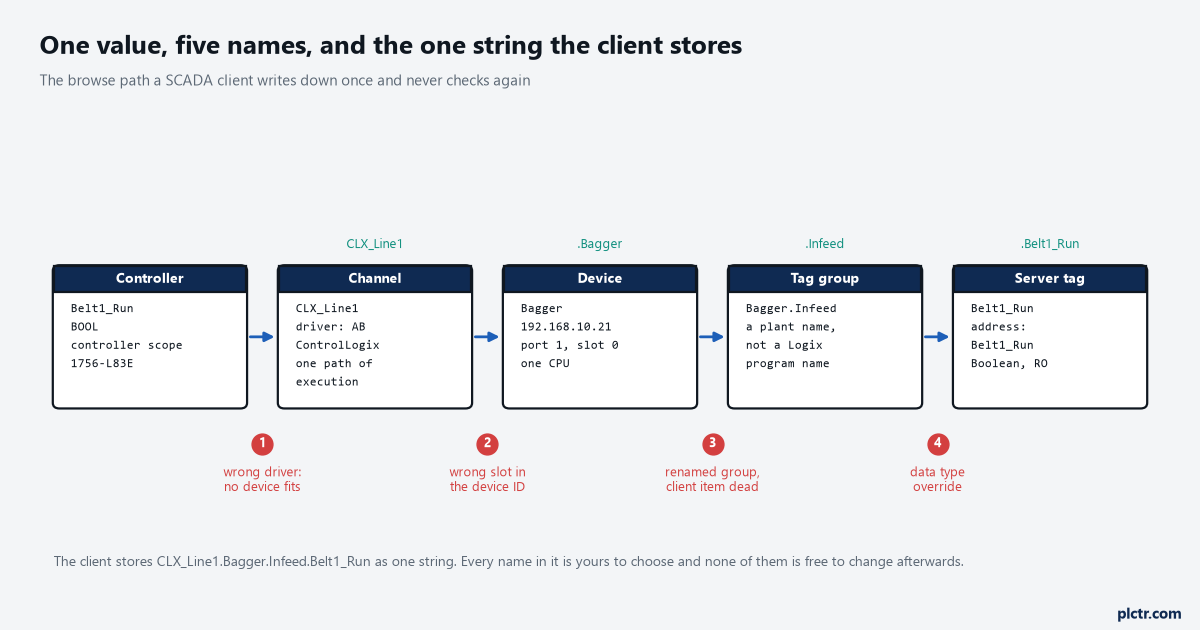
The browse path a client writes down once. Points 1 to 4 are the joins, and the third one is the expensive mistake: a tag group carries its name into every reference beneath it.
What a Kepware channel actually is
The server manual’s definition is one sentence and it is worth reading slowly: a channel represents a communication medium from the PC to one or more external devices, and can be used to represent a serial port, a card installed in the PC, or an Ethernet socket. Two consequences follow, and neither is obvious from the wizard.
The first is that a channel and a driver are married at creation. After you create a channel, only devices the selected driver supports can be added to it, and the Driver property sits greyed out in the channel properties for the rest of the project’s life. Choose the wrong one and you do not change it later; you delete the channel and build another, which means rebuilding every device and every tag underneath it. The second consequence is the one that decides whether your project is fast, and it is the reason this article exists. Each channel defined in the application represents a separate path of execution in the server, and the manual’s own optimisation page is blunt about what that means: with all devices under a single channel the driver must move from one device to the next as quickly as possible, and as more devices are added or more information is requested from a single device, the overall update rate begins to suffer. Using multiple channels distributes the data collection workload by issuing multiple requests to the network at the same time, and the manual’s own diagram of the improved case is one device per channel. Nearly every driver supports at least 100 channels, so on a line with three controllers there is no argument for putting them on one. Even where you have more devices than you want channels, spreading the load still helps, because the server is moving between far fewer devices on each path.
One device per channel is the target. Any other layout is a compromise you should be able to explain.
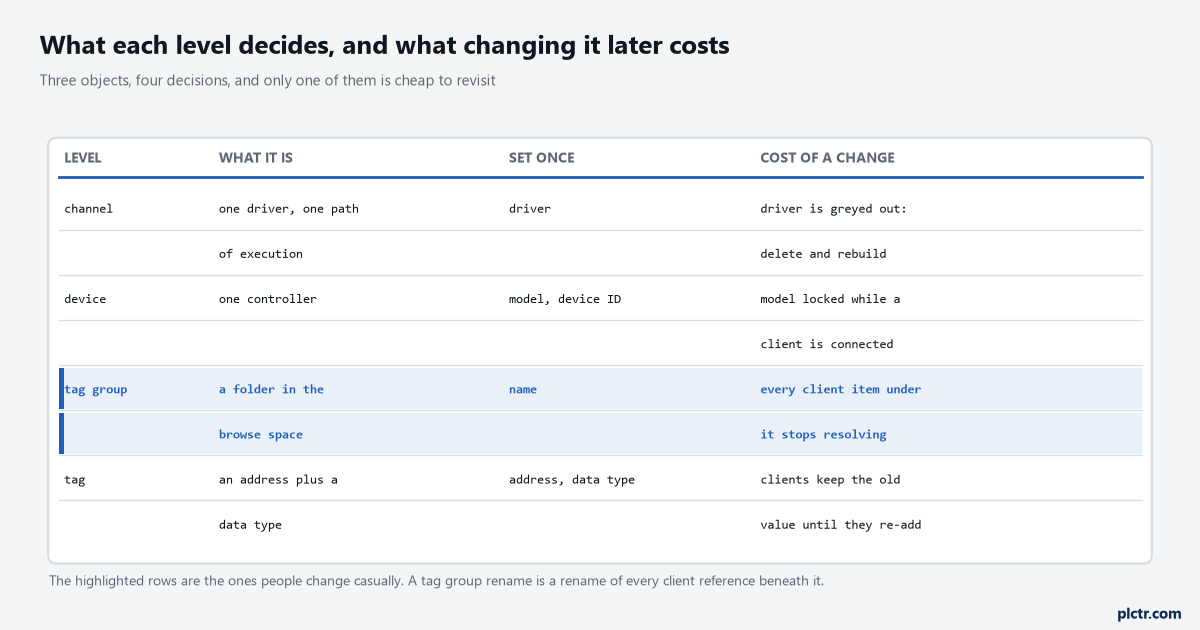
What each level decides. The highlighted rows are the ones people change casually, and a tag group rename is a rename of every client reference beneath it.
The device is one controller, and the ID is the route to it
A device represents a single target on a communications channel, and for the Logix drivers that target is one CPU. The ID field is where the route lives, and for the ControlLogix Ethernet driver it is not just an IP address: it is the IP address, then the port out of the interface module, then the link address. On the Bagger that reads 192.168.10.21,1,0 — the 1756-EN2T at that address, port 1 for the backplane, slot 0 for the 1756-L83E. The Wrapper next to it is 192.168.10.22,1,0 and the Palletiser is a 5069-L330ER at 192.168.10.32,1,0, where port 1 is the virtual backplane and slot 0 is the only slot there is. TCP port 44818 underneath all three, which is the driver’s default and the one your firewall rule has to name.
Get the slot wrong and you do not get an error that says “wrong slot”. You get a device that does not respond, which looks exactly like a device that is switched off.
Two device properties are worth knowing before you need them, because both of them produce symptoms that look like something else entirely. Data Collection controls the device’s active state, and with it disabled communications are simply not attempted, the data is marked invalid to a client and write operations are not accepted. That one at least announces itself, because the client sees bad data and somebody complains within the hour. Simulated is stranger and considerably more dangerous. The driver stops talking to the physical device but the server continues to return valid OPC data, treating all device data as reflective, so whatever is written to the simulated device is read back and each item is treated individually. A device left in Simulation Mode after a factory acceptance test therefore hands a client a full set of plausible, well-formed, entirely fictional values with good quality on every one of them, and the only sign anywhere is a read-only _Simulated system tag that nobody is looking at. The manual is not coy about this: Simulation Mode is for test and simulation purposes only and should never be used in a production environment. There is a second oddity worth knowing while you are here, because it catches people benchmarking a server. In Simulation Mode the item’s memory map is based on the client update rate, so two clients referencing the same item at different rates get different data back, and the _RxBytes statistic is not updated at all. Put _Simulated on a diagnostics screen the day the server goes in. The day you need it is not the day you will think of it.
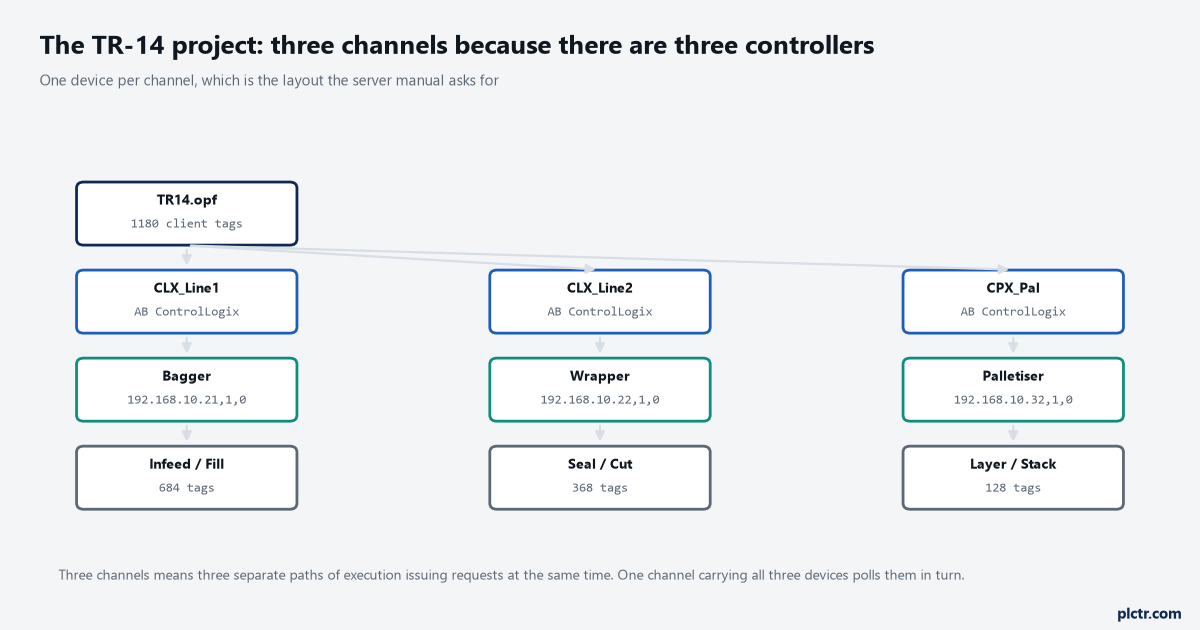
Three controllers, three channels, three devices. Three separate paths of execution issuing requests at the same time rather than one queue polling all three in turn.
A tag in the server, or no tag at all
There are two kinds of tag and the difference is not cosmetic. A static tag, which the manual calls a user-defined tag, is created and stored in the server, functions as a pointer to a device address, and can be browsed from clients that support browsing. A dynamic tag is created and stored in the client: instead of building a tag in the server and pointing the client at it, the client writes the driver’s address directly, and on connect the server creates a virtual tag for that location and starts scanning it automatically.
Both work. Both are common. One of them can hold a scale and the other cannot.
That single line in the manual — static tags must be used to scale data in the server — is the whole of the decision for most projects, because sooner or later somebody wants raw counts turned into engineering units at the server rather than in four different clients. The other half of the decision is browsing. If your client browses the server’s tag space to build its own database, dynamic addressing gives it nothing to browse, and the operator building the screens is left typing addresses by hand out of a spreadsheet.
Dynamic tags do have one honest use: a quick check. Type CLX_Line1.Bagger.Weigher_Wt into a test client and you have a reading in ten seconds with nothing added to the project.
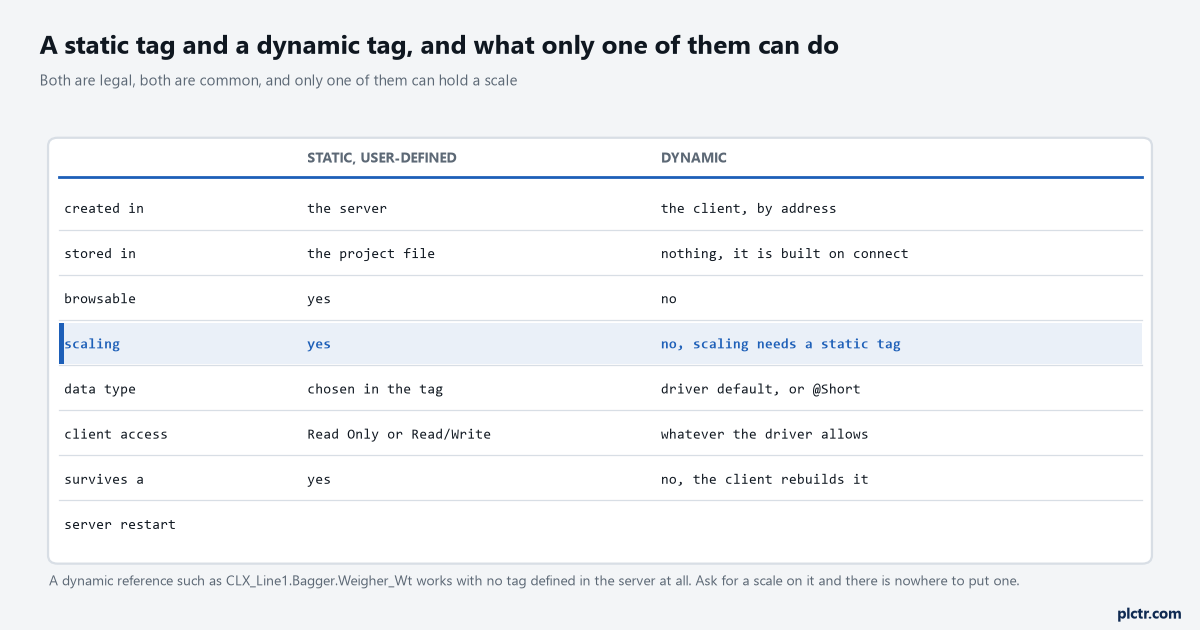
Both are legal and both are common. The scaling row is the one that decides the project, because a scale has nowhere to live on a dynamic reference.
Naming, and the two rules that cost real money
Names look like the trivial part and they are where the rework hides, because every name becomes part of a string that something else has stored.
Channel names must be unique among all channels and devices in the project. Names can run to 256 characters, and the manual warns in the same breath that some client applications have a limited display window when browsing the server’s tag space, which is a polite way of saying a 60-character device name will be unreadable in the client that has to use it. The reserved characters are a short list and the server refuses them on entry, so they cost you nothing but a second attempt: a period, a closing or opening square bracket, a percent sign, a forward slash. The underscore rule is the one nobody expects and it is not refused on entry, because it does not arrive by hand. A server tag or group name cannot begin with an underscore, and automatic tag generation therefore converts a leading underscore to U_ on the way in. A controller full of _Status, _Cmd and _Alarm tags — a naming convention I have seen on three sites and argued about on two — arrives in the server as U_Status, U_Cmd and U_Alarm, and every reference anyone writes from memory afterwards is wrong by one character. The second rule that costs money is depth. Automatic tag generation creates at most seven group levels, not counting the group you nominate to hold the generated tags, and when a controller’s own hierarchy needs more than seven the tags are placed in that seventh group and the hierarchy plateaus there. A deeply nested arrangement of programs, structures and arrays comes out of the import flatter than it went in, and the names collide in ways you only find by reading the Event Log afterwards.
There is a shock absorber for all of this and hardly anybody fits it. The Alias Map assigns a short alias name to a complex tag reference and the client uses the alias instead of the path.
Point the alias somewhere else after a rename and no client notices anything at all.
Five minutes at the start of a project. The difference between a controller rename costing an afternoon and costing a fortnight.
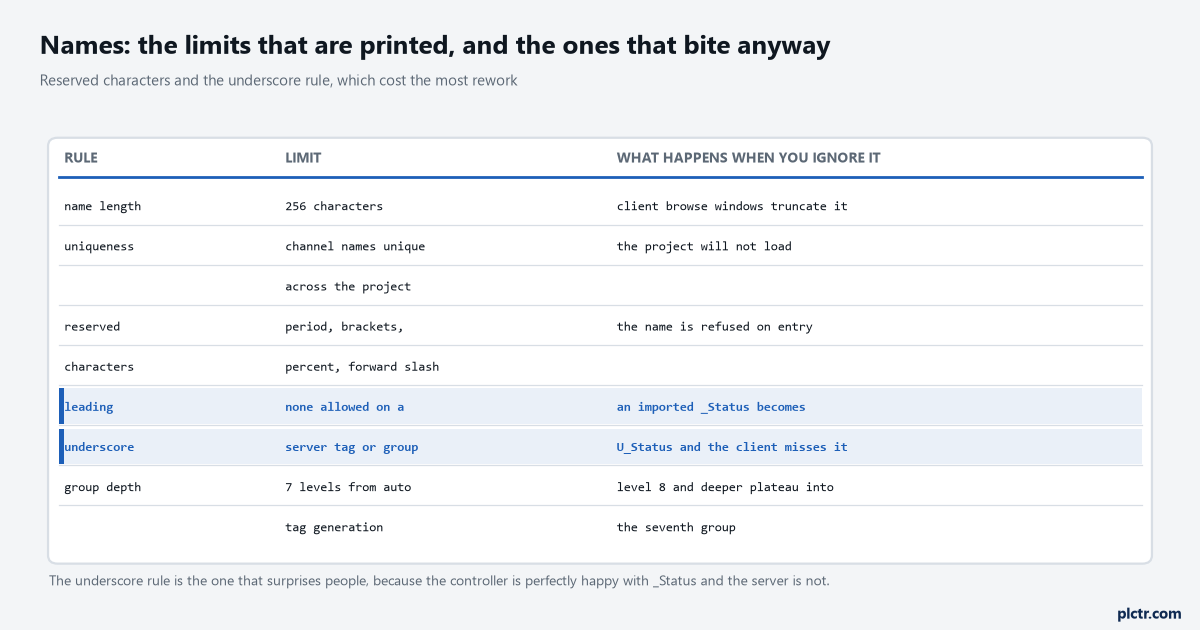
The printed limits and the two that actually bite. A controller is perfectly happy with a leading underscore and the server is not, so the browse name changes under you.
Where the structure meets the controller
None of this exists in isolation from the CPU at the other end. Every channel that opens a socket to a Logix controller consumes a connection there, and the controller’s own limits are printed in its specifications rather than in the OPC server’s — the 5380 user manual’s own table runs from 16 nodes on a 5069-L306ER to 180 on a 5069-L3100ERM, and that is a separate budget from the one your channels are spending. Worth reading before you split one channel into six on a controller already carrying two HMIs, a historian and a MSG instruction that never releases its connection.
The manual is also explicit that the controller runs communication asynchronously to the application. Nothing you do in the server changes that.
The other half of the meeting point is naming on the controller side. Logix tag names follow the IEC 1131-3 identifier rules and can have as many as 40 characters, and the driver help adds an instruction that most people ignore: keep them short, because in Symbolic Mode each tag’s ASCII name goes into the request packet and the smaller the name, the more tags fit in one transaction. A naming standard written for readability in Studio 5000’s tag editor has a cost on the wire that nobody measured when it was written.
What to do before you add the first tag
Open a text file and write down four lines for the project you are about to build: the channel name and its driver, the device name and its full ID with the port and slot spelled out, the tag group names in the words the plant uses, and whether the clients on this site browse or are handed a list. That is the structure, and it takes ten minutes to argue about now against a fortnight later.
Then decide the one thing that is genuinely irreversible: how many channels. If the answer is anything other than one per controller, write down why.
If the controller already exists and somebody else owns its tag names, put an alias in front of every reference the clients will use before the clients exist — the same reasoning that makes an alias in the controller the cheapest place to absorb a rename. And if you have not yet chosen what the clients read at all, the path from a PLC tag to a SCADA client is the piece to read first, because the structure here only makes sense once you know what is standing at the far end of it.
The next article takes this structure and points it at a real ControlLogix: the tag import, the arrays it turns into thousands of tags, and the four things that break on the way.