A snap7 S7-1200 read – plc.db_read(12, 0, 12) against a CPU 1214C – returns twelve bytes on the bench and an exception on the machine, and the difference is two checkboxes in TIA Portal, neither of them on the Pi. python-snap7 3.1.2 talks the S7 protocol to TCP port 102 in pure Python, so there is no C library to build for the ARM board any more, and it reads any standard data block on an S7-1200 or S7-1500 the moment the CPU has been told to permit it. The rest of this page is those two settings, the byte offsets a standard DB gives you to read against, and which name the library puts on the error when one of the settings is wrong.
The short version. Tick “Permit access with PUT/GET communication from remote partner” under the CPU’s Protection & security, untick “Optimized block access” in the properties of the DB you want to read, download both, and read the DB by its number and the byte offsets in the editor’s Offset column. Everything past that paragraph is why, and what it costs.
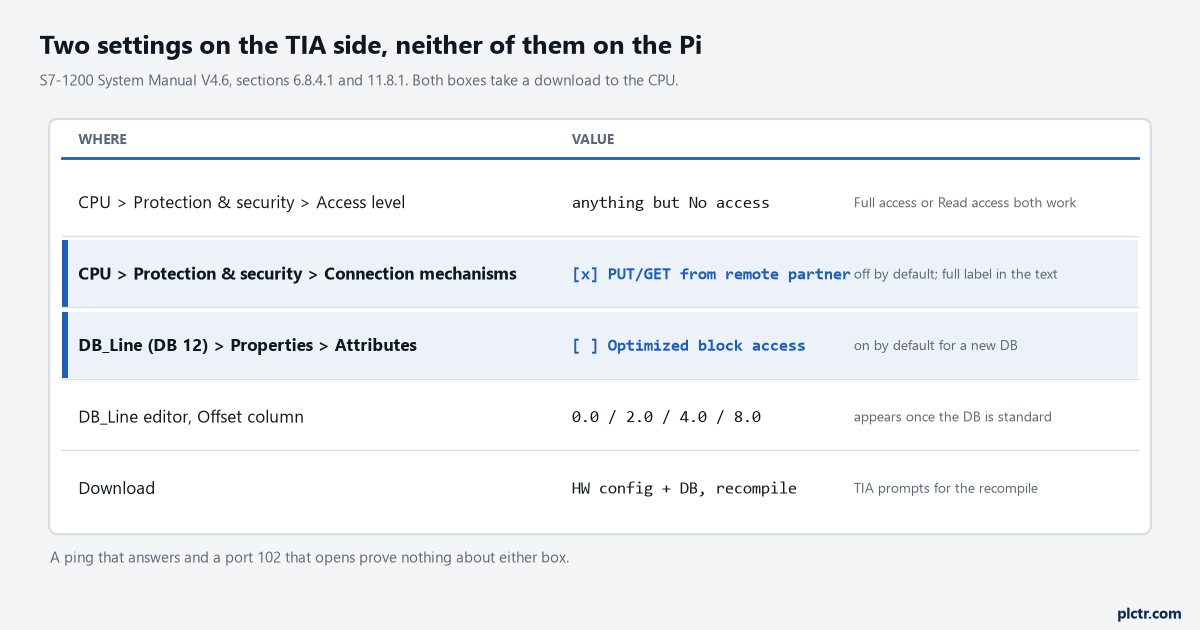
The two highlighted rows are the whole fault, most days. The manual’s own wording is that with PUT/GET permission off, connections where the CPU is only a server “are not possible during operation of the CPU” – and an external Python client is exactly that kind of connection.
The two checkboxes, and where the manual puts them
The first one is a CPU property. The S7-1200 System Manual V4.6, section 6.8.4.1, says the “Permit access with PUT/GET communication” option is not enabled by default, and that in that state read and write access is only possible for connections that were configured or programmed at both ends. It then lists what that rules out: PUT/GET, FETCH/WRITE or FTP through communication modules, PUT/GET from other S7 CPUs, and HMI access through PUT/GET communication. A snap7 client is a PUT/GET partner the CPU has never heard of, so it lands on that list. The manual gives two steps to open it: set the protection access level to anything other than “No access (complete protection)”, and tick the box. In TIA Portal both live under the CPU’s Properties, Protection & security – the access level table at the top, the box under Connection mechanisms – and the change takes a hardware configuration download to the CPU. The Pi cannot do any of this. If the person with TIA Portal is not you, this is the sentence to send them. The second one is a property of the block, not the CPU. Every new DB in TIA Portal is created with “Optimized block access” ticked, and the manual’s line on it is short: optimized is the default for new data blocks, and deselecting it makes the block use standard access. Optimized blocks allow symbolic access only. That is the whole reason a byte offset means nothing in one: the CPU is free to put the tags wherever it likes, and it does not tell you. Standard access is described as compatible with S7-300/400 classic configurations, allowing symbolic and direct access – direct meaning DB12.DBW2 and DB12.DBD4, which is what a db_read is. The setting is in the DB’s Properties under Attributes, and TIA asks for a recompile as soon as you untick it, because every offset in the block has just become real.
Section 11.8.1 says the same in one bullet, written for a PUT in another S7 CPU: an optimized DB of a remote S7-1200 cannot be accessed, and a standard one only by absolute address.
So: a standard DB, read by number and offset, on a CPU that permits it. Three things, and the Pi controls none of them.
The four lines of snap7 S7-1200 code on the Pi
from snap7.client import Client
from snap7.util import get_bool, get_int, get_real, get_dint

plc = Client()
plc.connect('192.168.0.20', 0, 1)          # address, rack, slot; tcp_port=102 is the default
data = plc.db_read(12, 0, 12)              # db_number, start byte, size in bytes
print(get_real(data, 4))                   # Temp_PV, Real at offset 4.0
plc.disconnect()
pip install python-snap7 on a current Raspberry Pi OS is the whole install, and that is new. Up to 2.x the package wrapped the snap7 C library, and whether a wheel carrying libsnap7.so existed for your Pi’s architecture decided whether the install was one line or an evening; the readthedocs introduction for 3.x says the C library is no longer used and the entire protocol stack is in Python. The installed 3.1.2 wheel has no .so in it at all, and it wants Python 3.10 or newer. If you have an old pip install "python-snap7<3" line in a provisioning script, it is doing something different now. Three arguments to connect. The address, a rack, a slot, and the library’s own README example uses 0, 1 for the pair, which is what I would type first for a 1200. db_read takes the DB number as printed in the block’s properties – the number, never the name – then a start byte and a count of bytes, and returns a bytearray of exactly that length. The snap7.util decoders take that bytearray and a byte index: get_int(data, 2), get_real(data, 4), get_dint(data, 8), and get_bool(data, 0, 1) with a bit index as the third argument. S7 stores everything big-endian and the decoders assume that, so a Real that arrives as 42 15 00 00 comes back as 37.25 without you touching the byte order.
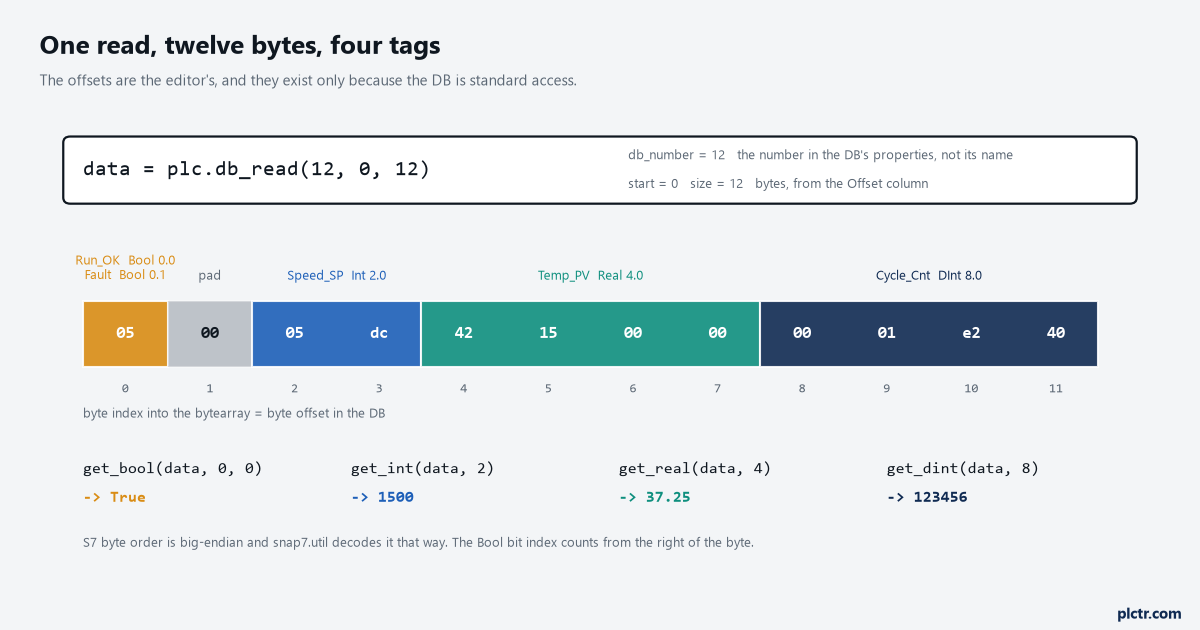
The byte index you pass to get_real is the byte offset the editor prints for that tag. The pad byte at 1 is why the Int starts at 2 and not 1: a word after a Bool begins on the next even byte.
Reading the DB the way the editor laid it out
The Offset column is the contract, and it only exists once the block is standard.
Open the DB in TIA after unticking the attribute and a column appears beside each tag: 0.0 for the first Bool, 0.1 for the second, 2.0 for the Int, 4.0 for the Real, 8.0 for the DInt in the block this article reads. Those are the numbers to type into the decoders, and the order the tags were declared in decides them. The alignment rule you can see in the figure is the one that catches people: a Bool costs a bit, but the next Int or Real starts at the next even byte, so a single Bool at the top of a DB pushes everything after it to offset 2 and leaves byte 1 as padding. Eight Bools cost the same as one. Nine cost the same again, because the ninth spills into byte 1 and the word after it was going to start at 2 either way. Declaring the Bools together at the end of the block, or in their own DB, keeps the offsets flat and the arithmetic in your head.
The thing that makes offsets dangerous is that a wrong one does not fail.
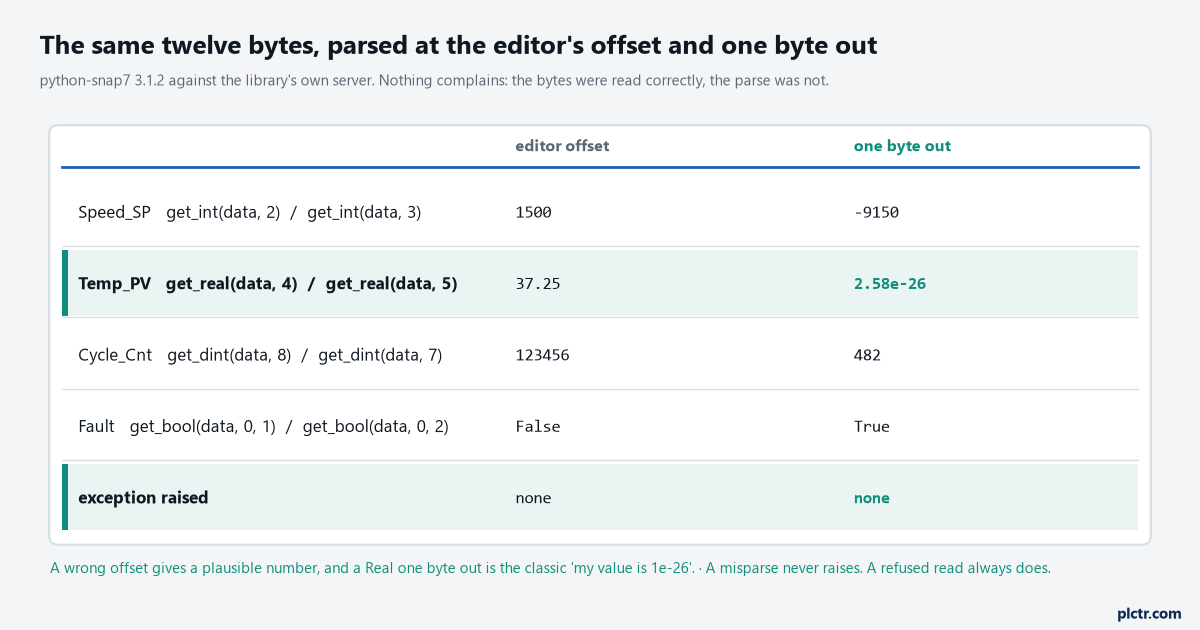
Measured with python-snap7 3.1.2 reading its own server. A misparse produces a number, and a Real one byte out is the exact shape of the “my temperature reads 1e-26” question.
get_real(data, 5) on those twelve bytes is 2.58e-26. get_int(data, 3) is -9150. get_dint(data, 7) is 482, which is the kind of number somebody will log for a week before noticing the cycle counter never moves the way the HMI says it does. Nothing raises. The read was correct – the CPU sent exactly the bytes asked for – and the interpretation was one byte wrong, which the library has no way to know. The other version of the same fault is the DB that was edited after the Pi script was written: somebody inserts a Real above Temp_PV
What the library says when the CPU says no
Every failure that is a setting rather than an offset arrives as an exception, and 3.x names them.
snap7.error defines S7ConnectionError for a connection that could not be made, S7ProtocolError for a protocol exchange that failed – which is where a refused request lands – and S7TimeoutError for one the CPU did not answer, all under a base S7Error that carries an error_code. Under those the module keeps the same client-side code table the C library used, and three entries in it are the ones you will meet: errCliItemNotAvailable (0x00C00000), errCliAddressOutOfRange (0x00900000) and errCliFunctionRefused (0x02300000). Which one a given CPU produces for a given mistake I cannot tell you from a manual, because the manual describes the CPU and the codes belong to the library, and I have not stood every combination up against a 1214C. What I can say is the shape: a read of a DB number that does not exist, or a start + size past the end of the block, is an address problem and the CPU answers; a read of an optimized DB by offset is an item the CPU will not serve by that address; and PUT/GET permission off, or a “No access” protection level, is refused at a level where the read never really starts. Catch S7Error, print e.error_code in hex, and match it against the table in snap7/error.py. That tells you which of the three settings to go and look at before you touch the network. The dead end is the network, and it eats an afternoon. ping answers, nc -zv 192.168.0.20 102 says the port is open, Wireshark shows the COTP connect and the S7 setup exchange going through, and the read still fails. All of that is consistent with a CPU that is reachable and configured to refuse you. Port 102 being open is the CPU’s S7 service listening, and it listens whether or not the PUT/GET box is ticked. If the 1200 cannot even be found on the network, that is a different article and a different afternoon; if it can be found and still refuses, stop looking at cables.
One more that looks like the network and is not: the wrong DB number. DB_Line in the project tree is a name, and db_read wants the number in brackets after it. Read DB 1 when the tags are in DB 12 and the CPU will happily give you twelve bytes of whatever DB 1 holds, all of them plausible.
Polling it without hurting it
Keep the connection open and read the block in one go. A connect is a TCP handshake, a COTP connect and an S7 communication setup, and doing all three every second for the sake of a “clean” script is work the CPU repeats for no reason on every cycle of your loop. Client() in 3.x takes keyword arguments for exactly this – auto_reconnect=True, max_retries, retry_delay, backoff_factor, and a heartbeat_interval in seconds that keeps the session alive on a quiet link – so the reconnect loop that every 2.x script carried can now be one constructor line. One db_read of 12 bytes moves four tags; one db_read of 200 bytes moves fifty, in one telegram, as long as it fits inside the PDU the two ends negotiated. get_pdu_length() tells you what that PDU is after connect, and a read larger than it is split by the library into more than one exchange, which is not a fault but is not free either. Group the tags the Pi needs into one standard DB, in a sensible order, and read it once per cycle. Fifty small reads of fifty DBs is the design that gets the Pi blamed for scan time. How fast you can go is a measurement, not a number I can give you. Read the CPU’s cycle time in the online diagnostics with the Pi polling at 1 s, then at 200 ms, and watch whether it moves. On a 1214C with a light program it usually does not, at either rate. The pycomm3 article does the same test against a CompactLogix, and the method is the same: trend the controller, not the Pi.
What it costs on the TIA side
Both settings are honest costs and both should be written down somewhere the next engineer will read.
Unticking optimized access changes more than the offsets. The manual’s section on retentive memory says that in a standard DB all of the tags have the same retentive state – all retentive or all non-retentive – where an optimized DB lets you set it per tag. If the DB you are opening up for the Pi also holds a setpoint somebody wanted to survive a power cycle and a counter somebody wanted to reset, that per-tag choice is gone, and retentive memory on Logix and on S7 is the longer read on what that means. The clean answer is a separate DB for the Pi, standard access, holding copies of the values it needs and nothing else, written by the program with a MOVE each scan. Then the working DBs stay optimized and nothing about the machine’s own logic changed to feed a logger. Ticking PUT/GET opens the CPU to every S7 client on the subnet, not to your Pi. There is no per-client list; the box is global, and the manual’s access level table is the only other gate. Any level except “No access (complete protection)” will do for PUT/GET, the manual says, and the tightest of those is the one to choose for a data collector: leave the full-access password set so a download still needs it while the Pi reads. If the CPU already has PUT/GET open for an S7-1500 talking to it, the setting is already made and the Pi is riding on it, which is worth knowing before anybody turns it off during a security review and takes the 1500 link down with the logger.
Next step
Untick the attribute on one DB, download, and read the Offset column before writing a line of Python. Then read the block once with db_read, print data.hex(), and match the bytes to the offsets by hand – twelve bytes takes a minute and proves the layout before the decoders are trusted. When that works, decide where the values go, because buffering them on the Pi when the uplink drops is the next problem, and it arrives the first time somebody reboots the switch.