What is Devicenet IDLE Mode?
When DeviceNet scanner shows IDLE, it means the scanner card isn’t executing the outputs. But still continue to read the inputs.
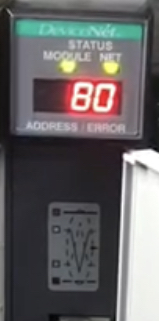
Devicenet Scanner Status Code : 80
Description of Status: Scanner is in Idle mode
Recommended Actions
- Put the controller in Run or Remote Run mode using the key switch on the controller, or through RSLogix5000 software.

2. Turn on the bit O.CommandRegister.Run for the scanner.
If the devicenet scanner card installed on slot 3, O:3/0 should be 1.
If the devicenet scanner card installed on slot 2, O:2/0 should be 1.
If the zeroth bit of the slot in which the card is installed is set to 1 and still does not work. First reload the configuration on the scanner card, if the situation does not change, replace the DeviceNet scanner card.
Download the DeviceNet configuration on your card.