Position Error and Following Error on a Kinetix Axis: What a Trend Says That FLT S54 Does Not
A 2198-D020-ERS3 threw FLT S54 – POSN ERROR at 14:02 and again at 14:19, and the fault-code spreadsheet describes it in one sentence: the position error of the position control loop exceeded Position Error Tolerance for longer than Position Error Tolerance Time. Which is true, and which you could have worked out from the words on the display.
The code is a statement about two configured numbers. It is not a diagnosis.
What tells you anything is the shape of the error across one move, and for that you trend one tag: PositionError, CIP attribute 436, the output of the position loop summing junction. An error that rises with speed and returns to zero at rest is a tuning question. An error that steps up at the same machine position every cycle is a mechanical one. Same fault code, different jobs, and the trend separates them in about four minutes.
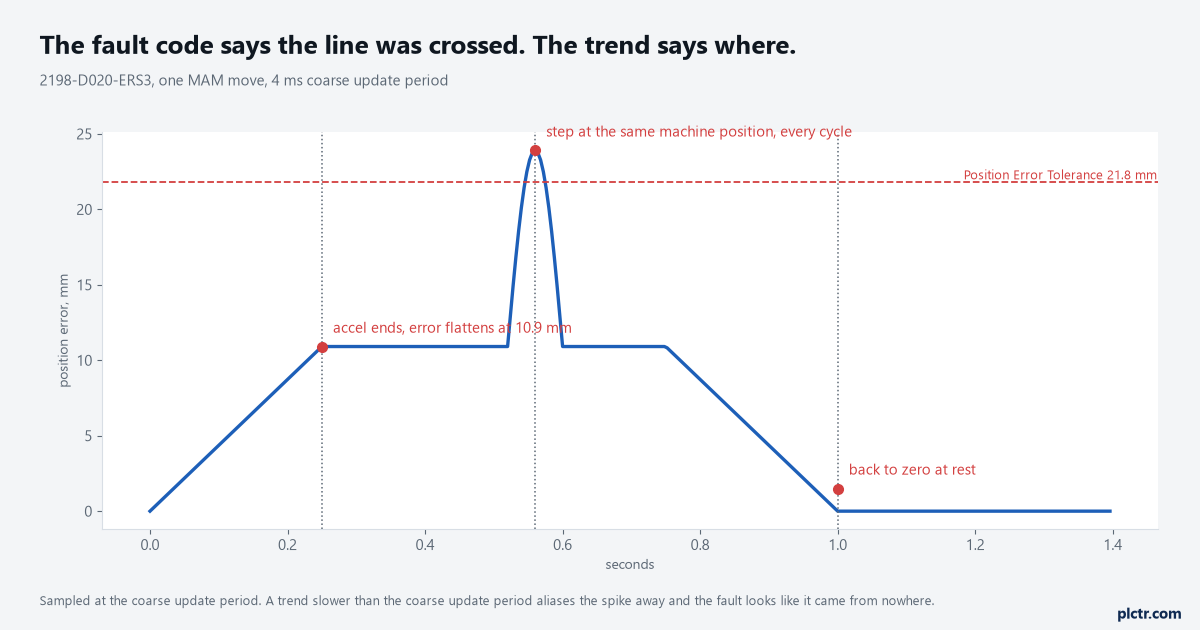
One move, one trace. The fault happened at 0.56 s and the machine is always at the same place when it does, which is the whole answer and is invisible in the fault code.
Position error is not a fault, it is how the loop works
A position loop makes torque out of error, so an axis that is moving always has some. The PositionError attribute is exactly that: the difference between the command going into the summing junction and the feedback coming back, and it is the signal that drives the motor to catch up. At a steady speed the error settles at roughly the commanded velocity divided by the position loop bandwidth, so an axis running 600 mm/s with a 55 rad/s position loop sits at about 10.9 mm of following error and is behaving perfectly. Nothing is wrong with the machine. The number just looks alarming to anyone who expected a servo to be at the position it was told.
That is why a tolerance exists at all, and why it is not zero.
Position Lock Tolerance is the other side of the same coin, and worth not confusing with it: that one is a window around the command position, and the Position Lock status bit sets when the actual position is inside it.
Where the tolerance number came from
Nobody types 21.8 mm into a dialog. The tune does, and it derives the number from the bandwidth it just set. For an axis configured for position loop operation the reference manual gives the arithmetic plainly: Position Error Tolerance is two times Max Speed divided by Position Loop Bandwidth in radians per second, which is exactly twice the steady following error at top speed. So the tolerance is not an independent safety limit, it is a multiple of the tuning. The consequence catches people out on a machine that has been slowed down for a product change. Halve the position loop bandwidth by hand, without a retune, and the expected following error doubles while the tolerance stays where the last tune left it — the axis has not got worse, the margin has just gone. Position Error Tolerance Time is the second half, and its default is zero, which means the fault is raised on the first sample that crosses the line rather than after any window.
Both have to be exceeded. With the time at zero, one sample is enough.
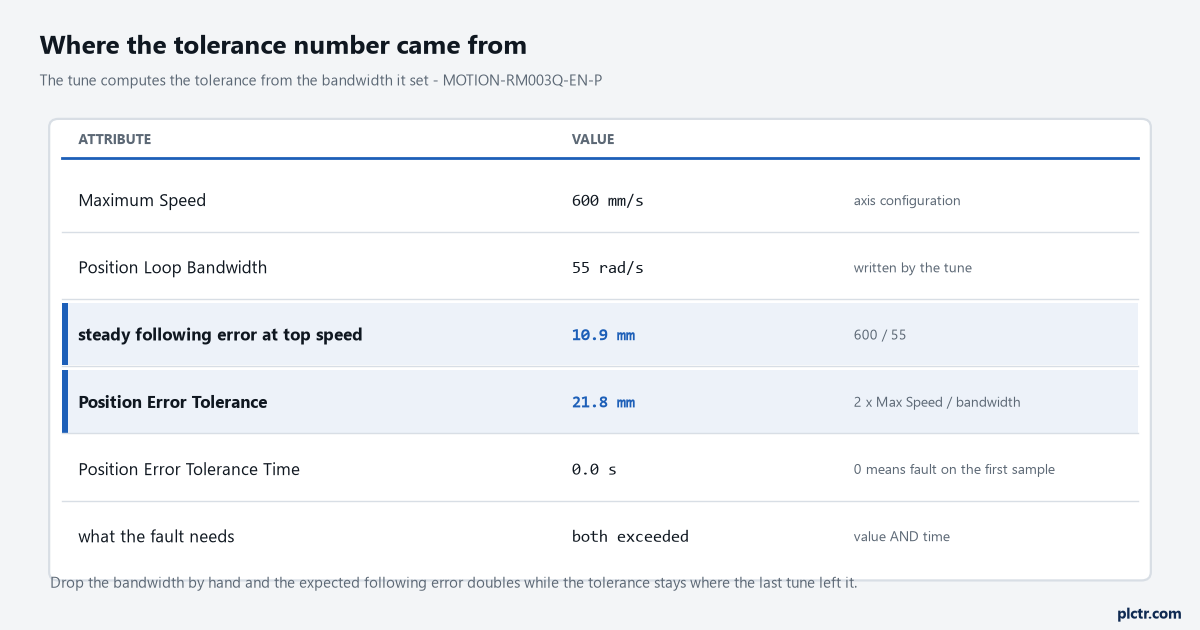
Two times Max Speed over Position Loop Bandwidth. The tolerance is a fact about the tune, not a fact about the machine.
Trend the right tag, or you will trend an artefact
This is the part that wastes a shift, and it is in the reference manual in two sentences most people have never read. Actual Position in the controller is the position of the axis one coarse update period ago, because the data arrives through an ongoing synchronous transfer that costs a period. Command Position in the controller is the command that the axis will act on one coarse update period from now, for the same reason in the other direction. Subtract one from the other and you have not measured following error, you have measured following error plus two coarse update periods of travel — on an axis running 600 mm/s with a 4 ms period that is 4.8 mm of pure bookkeeping, sitting on top of a real error of about 11 mm and moving with the velocity profile so that it looks convincingly like part of it. There is a second trap underneath it. Axis tag access is only valid when Auto Tag Update is enabled on the Motion Group object, so an axis whose group has it switched off will trend a flat line and a straight face.
Read PositionError. It is computed where the loop closes, not where the tags are copied.
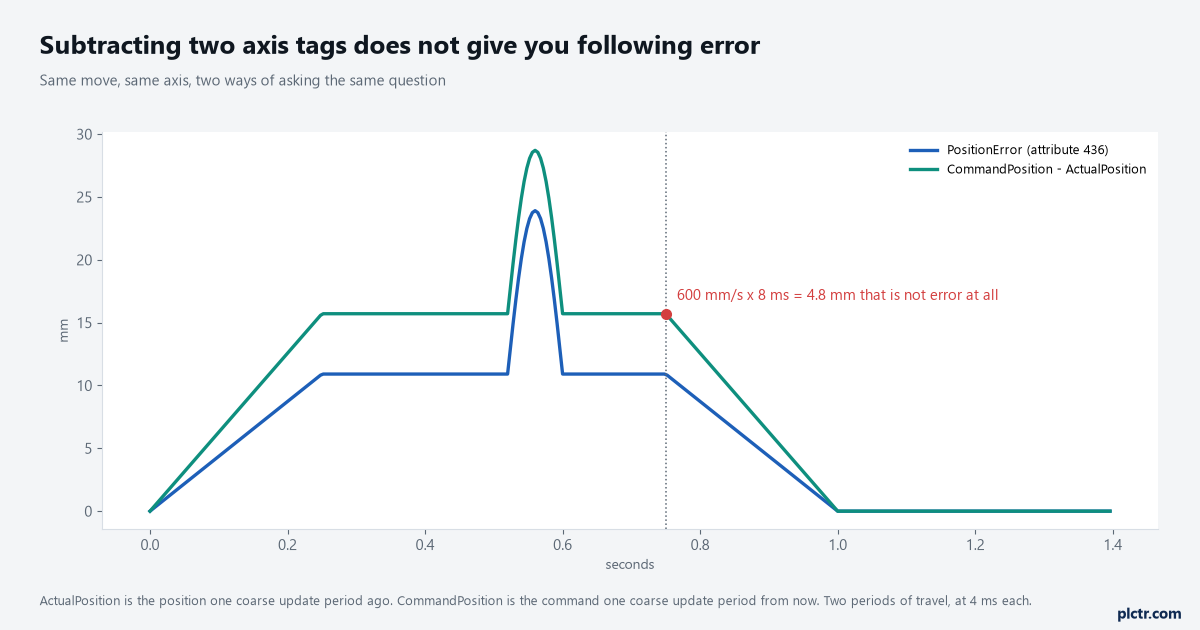
The green trace is what a subtraction rung produces. Nothing is wrong with the axis in that gap; the two tags were never describing the same instant.
Four shapes, four different jobs
Once the trend is honest the shape does the work. An error that climbs with velocity, goes flat through the slew and drops to zero at rest is ordinary following error, and if it is faulting you are looking at a tolerance set too tight or velocity feedforward left at a default. An error that peaks only on the acceleration ramp and settles once the axis is at speed is a torque problem — the axis is being asked for more acceleration than the motor and drive can deliver into that inertia, and the fault-code spreadsheet’s first two suggestions, check the tuning and increase the feedforward gain, are aimed here. An error that steps at the same machine position on every cycle is mechanical, and the useful move is to note the position rather than the time: a ballscrew with a tight spot, a linear rail with swarf on it, a cable carrier pulling at one end of the stroke. An error that grows through the whole move and never recovers is a load the motor cannot hold — a brake that is not fully releasing, or a motor phase that is not there, which is why check motor power wiring sits on the same list.
Noise riding on top of any of those four is a feedback problem wearing a tuning problem’s clothes.
Read the drive’s own encoder link quality before you touch a single gain: a feedback link that is losing packets puts noise straight into the position loop, and no amount of retuning will take it out again.
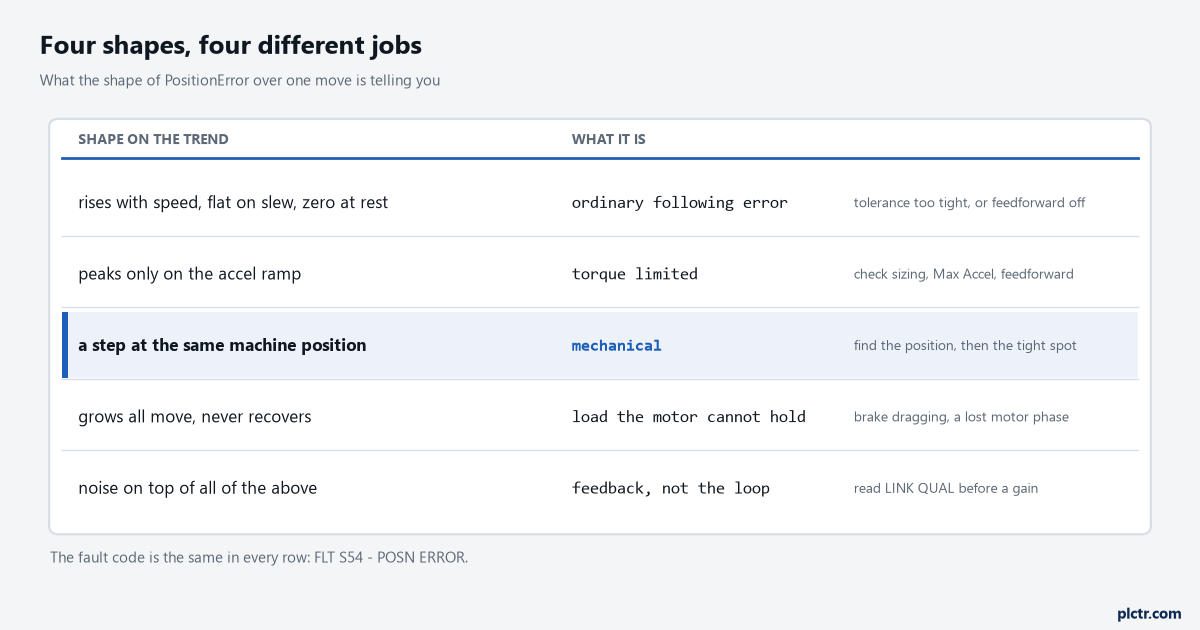
Four shapes, one fault code. FLT S54 is the same in every row, which is the reason the trend exists.
Setting up the trend so it captures the fault
A Logix trend that samples slower than the coarse update period will alias the spike away and leave you with a smooth trace and a fault that came from nowhere. Sample at the coarse update period and no slower. Put three pens on the chart — PositionError, VelocityFeedback and torque feedback — because the combination separates the four shapes above faster than position error alone: a mechanical step shows as error and torque rising together with velocity dipping, while a tuning problem shows error and velocity moving together with torque already at its limit. Trigger it rather than watching it, since the fault happens once every twenty minutes and nobody can sit there. The pattern for that, including the latch that keeps the buffer after the event, is in catching an intermittent fault with a trend in the controller, and the chart settings themselves are covered in trend chart settings and monitoring.
Twenty minutes between faults is an argument for a trigger, not for patience.
What everybody does first, and what it costs
The first move is to raise Position Error Tolerance until the fault stops. It works immediately, it is listed in the manufacturer’s own solutions for FLT S54, and it is listed last out of five for a reason. The tolerance is the only thing standing between a servo that has lost the plot and a machine that finds out mechanically, and the stopping action tells you how serious that is: on an ERS3 series A inverter the best available stopping action for an excessive position error fault is disable and coast, and on an ERS4 it is disable and coast too unless the axis is configured for vertical load control, in which case it is a current decel into a disable. A coasting axis with a real following error of 40 mm is already moving somewhere nobody planned. Raise the tolerance only after you know which of the four shapes you have, and raise the tolerance time instead when what you actually have is one sample of noise on an otherwise clean trace.
FLT S55 – VEL ERROR is the same argument in velocity: Velocity Error Tolerance comes out of the tune as two times the larger of Max Accel and Max Decel divided by the velocity loop bandwidth, and the listed solutions swap “check position loop tuning” for “check velocity loop tuning” and add “reduce acceleration”. If the fault is arriving as a pair, treat the velocity one as the earlier symptom.
Next time it faults, capture one move at the coarse update period with PositionError on the chart, and write down the axis position where the error peaked rather than the time. If that position is the same on three consecutive faults, stop tuning and go and feel the machine at that point in the stroke. The controller-side reading of the same event — which bit of AxisFault is set and why AxisState is the one to interlock on — is in AxisFault and MotionFault on a Logix motion axis, and the drive’s own record of it is in reading a Kinetix 5700 fault at the drive.