The infeed conveyor’s GuardLogix 5580 consumes one safety tag from the case packer’s 5580, CP_Safe, and at 02:04 every night for a week CP_Safe.ConnStatus.ConnectionFaulted went to 1 for between two and nine seconds, the consumed data went to zero, the conveyor’s CROUT dropped its contactors, and the shift lead reset it and wrote “network” on the sheet. It was the network, and it was not a fault in it. The consumed tag’s Safety tab showed a Max Network Delay of 130 ms against a Connection Reaction Time Limit of 80 ms – 20 ms RPI times a timeout multiplier of 2 plus a network delay multiplier of 200% – and the 02:00 job was the HMI’s nightly backup going through the same unmanaged switch as the two safety controllers. CIP Safety tags are not a wire that is either on or off. It carries a promise about the age of the data, the promise is a number you configured, and this one was being broken by a file copy. Everything below is two GuardLogix 5580 controllers over EtherNet/IP, one produced safety tag from A and one consumed tag in B, with the safety network number, the RPI rule, the timeout arithmetic and the status bits the consumer’s logic has to read, from the GuardLogix safety reference and user manuals.
The producer’s SNN, the RPI equal to the producer’s safety task, and the two status bits in the rung. Miss any one and it either never connects or connects and lies.
What CIP Safety tags are, and what they are not
A produced safety tag is a standard produced tag with three extra conditions on it, and the manuals state all three as steps rather than warnings.
The first is the data type: a user-defined type whose first member is CONNECTION_STATUS, the two-bit structure that carries RunMode and ConnectionFaulted, and the user manual’s produce procedure says to make sure it is the first data member – the consumer’s copy of the UDT has to be identical, and the tip is to copy it from the producer’s project and paste. Behind it go the bits and words the other controller needs: Door1_OK, EStop_OK, Zone_Stopped, a heartbeat DINT if you want one. The second is the class, Safety, set on the New Tag dialog alongside Type Produced, and a safety tag can only be produced from a controller with a safety task. The third is the connection: the number of consumers, and on a GuardLogix 5580 the unicast box is not a choice, because 1756-UM543T says the 5580 produces safety tags as unicast only, and a consumer of a 5580 or 5380 producer has to be configured unicast to match; a 5570 or 5370 producer can be consumed either way. Two version traps live in the same pages. A remote GuardLogix at firmware earlier than 28 cannot consume from a 5580 at all, per 1756-RM012J, and a 5570 at revision 30 or earlier in the same chassis cannot consume from a 5580 because it cannot configure a consumed tag as unicast and the backplane offers nothing else – the same pair over EtherNet/IP works. And a produced tag cannot bridge two networks: the producer and the consumer are attached to the same network, or it is a MSG, which is not safety.
What it is not is a way to share a safety input. The reference manual is specific that one controller owns each safety I/O device and that safety input data can be consumed by several controllers – that sharing is done by adding the device to the second controller’s tree with the owner’s SNN pasted in, not by producing the input tag. Produce the decision, not the wire.
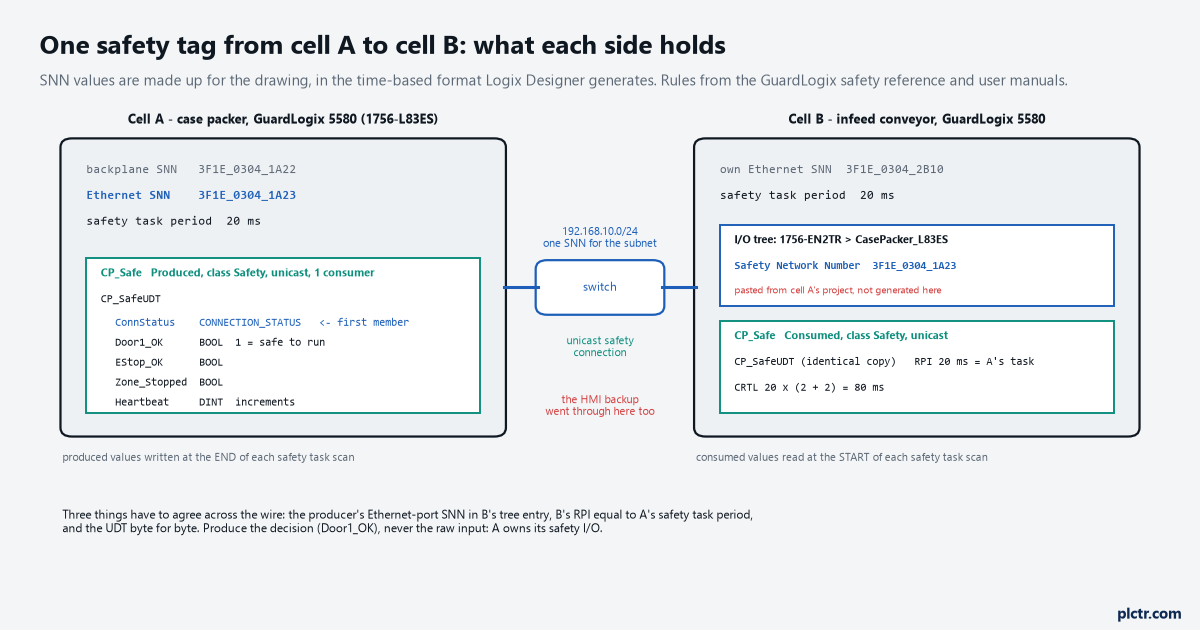
The consumer’s I/O tree holds a copy of the producer with the producer’s SNN in it. That number is how the consumer knows the tag came from the controller that was validated, and not from a copy of the project running on a bench.
The producer has to be in the consumer’s tree, with the producer’s SNN
The consumed tag’s Connection dialog lets you pick the producer from a list, and the list is built from the I/O Configuration tree and from nowhere else – the standard version of that trap is in the produced and consumed tags article. The safety version has one more field. When the producing controller is added under the consumer’s Ethernet bridge, its module properties carry a safety network number, and 1756-RM099H says the SNN of the producing controller must be entered there, copied from the producing controller’s own project and pasted in. Logix Designer will happily generate a time-based SNN for the entry if you let it, and that entry then names a controller that does not exist; the connection never opens and nothing in the consumer says why beyond a status of not connected. Which SNN is the one to copy is the second thing to get right: a 5580 has two, one for the backplane and one for the Ethernet port, and the consumer talks to the port. The same manual’s attention note about copying a safety project applies here in reverse – if cell B’s project was cloned from cell A’s, every SNN in it has to be changed, because two controllers on one routable safety system with the same SNN are the condition CIP Safety exists to prevent. What identifies a safety device, and why the number lives on the subnet rather than in the device, is the SNN and signature article.
Paste the producer’s Ethernet-port SNN into the consumer’s tree entry. Never let the software invent one for a controller that already has one.
The RPI rule, and the arithmetic behind the timeout
The consumed safety tag’s Safety tab has one field that is a rule rather than a setting.
The RPI, entered in 1 ms increments with a default of 20 ms, must match the safety task period of the producing project – 1756-UM020I says it in one line and gives no latitude. The producer writes its safety produced values at the end of each safety task scan and the consumer reads consumed values at the start of its own, so the RPI is the producer’s task period by construction, and a consumer left at the 20 ms default against a producer running a 10 ms safety task is the first thing to check when everything else is right and the connection will not come up. The RM099H range for safety consumed tags is 6 to 500 ms. From the RPI the software computes the Connection Reaction Time Limit, the maximum age of a safety packet before the connection faults, with the input equation from the same manual: RPI × (Timeout Multiplier + Network Delay Multiplier). At the defaults – timeout multiplier 2, network delay multiplier 200% – a 20 ms RPI gives 80 ms, and the reference manual’s IMPORTANT for the 10 ms I/O default applies unchanged here: if you leave the defaults, the CRTL they produce is the number that goes into the safety reaction time calculation. The Advanced button opens the two multipliers. The timeout multiplier is the number of RPIs to wait for a packet before declaring a timeout, so 2 means one lost packet is tolerated, and the reference manual’s own warning is never to set it below 2. The network delay multiplier is the round-trip transport time the protocol enforces, producer to consumer and acknowledge back, as a percentage of the RPI. The Safety tab also shows Max Network Delay, the largest round trip observed since it was last reset, with a Reset Max button next to it, and one sentence from the 5570 user manual is worth carrying around: the actual one-way delay is roughly half the displayed value.
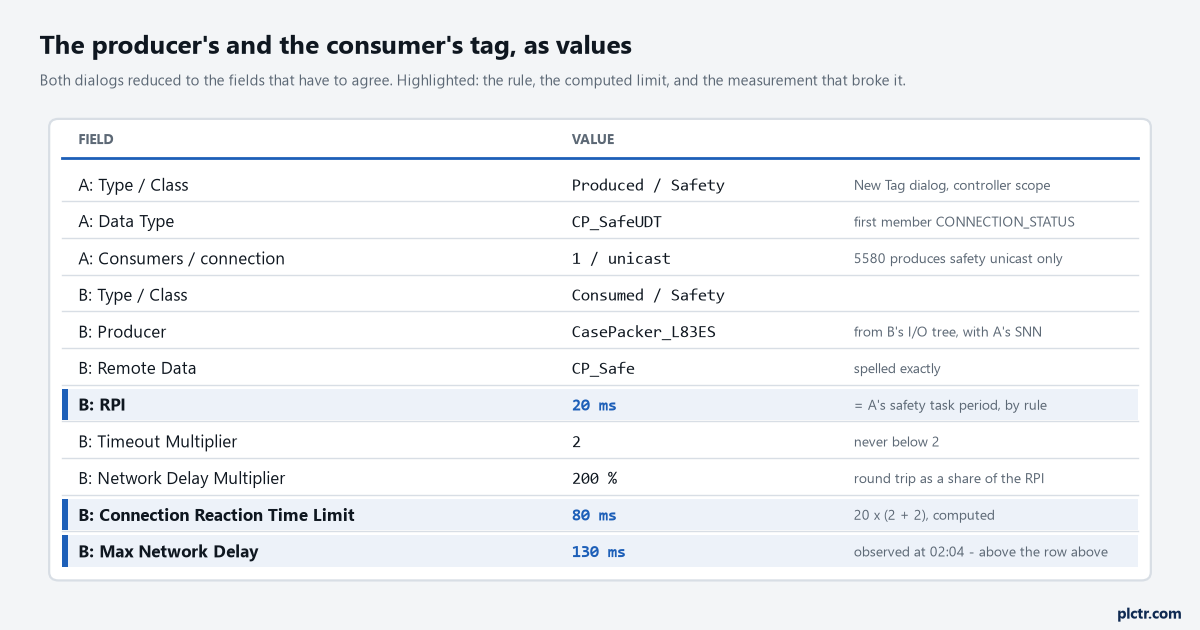
RPI equals the producer’s safety task period, and the CRTL is computed from it. The 130 ms in the last row is what the backup did, and it is bigger than the row above it.
So the 02:04 fault was arithmetic. The connection allowed 80 ms, the observed round trip during the backup reached 130, and CIP Safety did what it is for: the consumer faulted the connection, set the consumed data to zero and RunMode to 0, and the conveyor stopped. There are two honest fixes and one dishonest one. The dishonest one is to raise the timeout multiplier until the fault goes away. The first honest fix is the network: a managed switch with the HMI’s backup traffic off the safety controllers’ segment, which is what this line got, and the Max Network Delay has read 46 ms since. The second is to size the network delay multiplier from the measurement, using the user manual’s method: run through the worst-case loading, read the Max Network Delay, add a margin, divide by the RPI – (130 + 10) ÷ 20 is 700%, a CRTL of 180 ms – and then put 180 ms into the reaction time chain, where it is the fourth of seven components in RM012J’s input-to-controller-A-to-controller-B-to-output list, and re-check the distance the conveyor’s guard was set against. The dishonest fix and the second honest fix set the same number; the difference is whether the 180 goes into the safety calculation.
The CRTL is a design input. Raising it without redoing the reaction time is raising it without knowing what you gave away.
What the consumer’s rung has to read
The consumed data arriving is not the same as the consumed data being valid, and the two bits at the top of the UDT are the difference.
ConnectionFaulted is 1 when the safety connection has faulted for any reason, and the reference manual says that when it is, the safety data is reset to zero and RunMode goes to 0. RunMode is 1 when the producer is actively updating the data from Run mode, and 0 when the connection is closed, the producer’s safety task is faulted, or the producer is in Program or Test mode. So a consumed Door1_OK reading 1 is only meaningful when RunMode is 1 and ConnectionFaulted is 0, and the rung that uses it says so: an XIC of CP_Safe.ConnStatus.RunMode, an XIO of CP_Safe.ConnStatus.ConnectionFaulted, then the bit. Because the faulted case zeros the data, a bit-only rung fails safe by accident – the door reads not OK when the connection dies – and fails unsafe the other way if anyone ever produces an inverted bit, Door1_Open, which reads clear when the data zeros. Produce bits that are 1 for the safe-to-run state, and still qualify them with the two status bits, because a producer in Program mode is not zero data, it is stale data with RunMode at 0. The same three contacts, in the standard task, are the alarm that told the shift lead something the sheet did not: which connection, at what time, for how long.
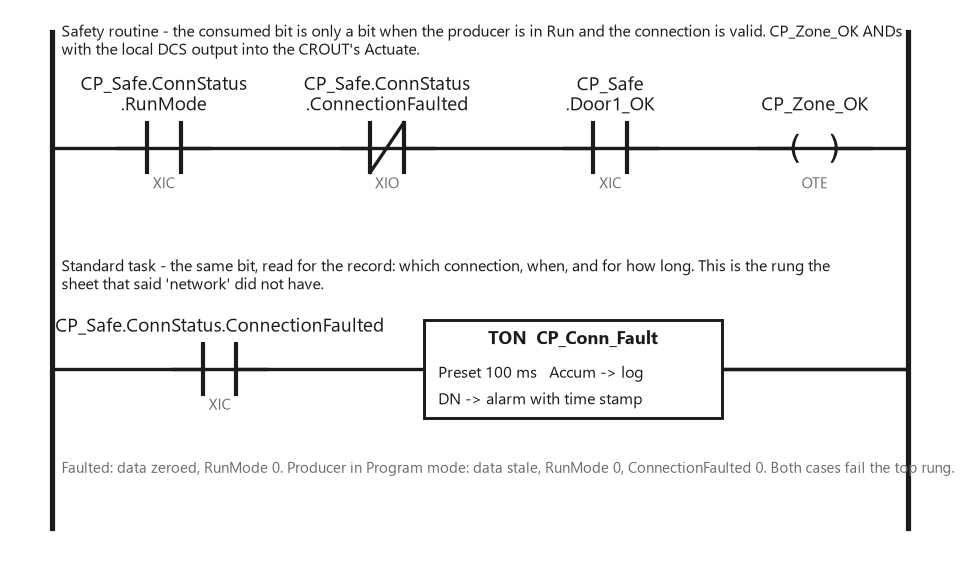
Three contacts, always in that order. The bit alone is right by accident when the connection dies and wrong the day somebody produces an inverted one.
Consumed safety tags are updated only at the start of the safety task, so a produced bit that pulses for less than the consumer’s task period is not guaranteed to be seen; a stop is a level, not a pulse, and the heartbeat, if you want one, is a DINT that increments, not a bit that toggles.
The thing everyone checks first
The cable, then the switch, then the other controller’s firmware, and the answer was on the Safety tab of the consumed tag the whole time.
Open the consumed tag’s properties online and read Max Network Delay before touching anything: a number above the CRTL says the connection is being asked to carry data older than it promised, and the time it last faulted is in the controller’s fault log. Press Reset Max, run the machine through the worst thing the network does – the backup, the report, the engineer downloading to the HMI – and read it again. If the delay is small and the connection still will not open, it is one of the identity checks: the producer entry’s SNN against the producer’s own Ethernet-port SNN, the consumer’s RPI against the producer’s safety task period, unicast on both sides, the UDT byte-for-byte identical. A safety signature on either project means every one of those changes is a safety edit, with the removal and re-validation that implies.
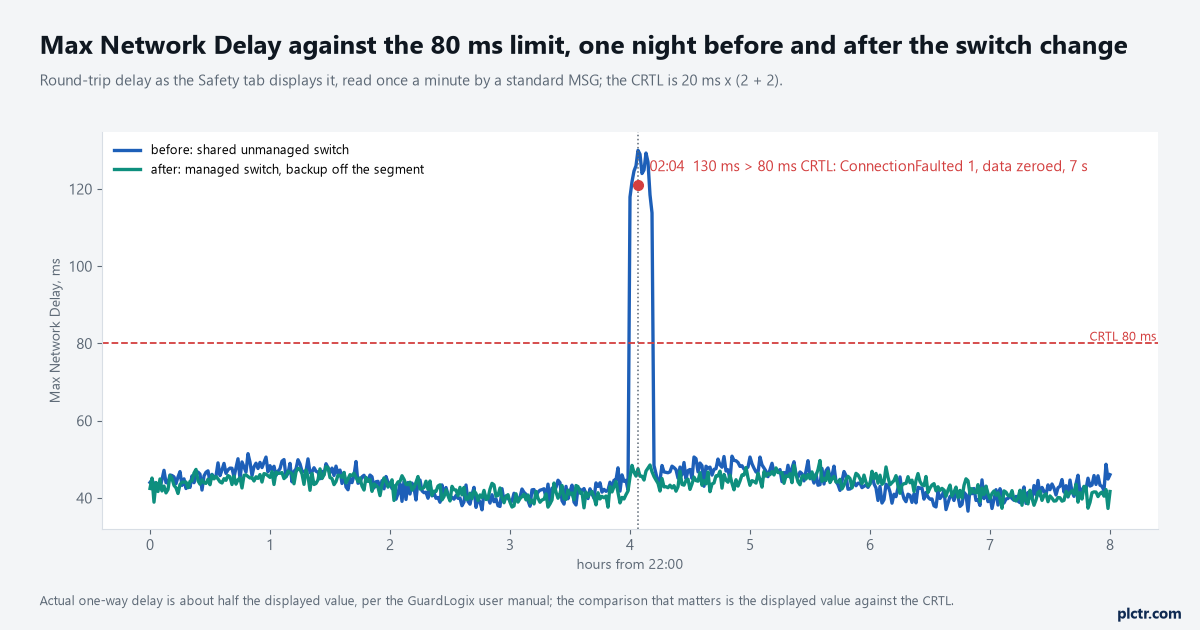
The connection did exactly what it was configured to do. The number it was configured to was never compared with what the network actually does at 02:00.
Read Max Network Delay against the CRTL first. The cable comes after, and only if the number is small.
Next step
Write the three numbers on the drawing next to the consumed tag: the producer’s Ethernet-port SNN, the producer’s safety task period which is the consumer’s RPI, and the CRTL the two multipliers produce, and put that CRTL into the seven-term reaction time sum for the function that crosses the wire. Then go online at the worst time of the network’s day, Reset Max, and read the Max Network Delay against the CRTL; if it is within a factor of two, the network needs the work, not the multiplier. The function on either end – a guard on a DCS, contactors on a CROUT – is the one worked through in the relay-to-GuardLogix article, and whether that function ever needed to cross a network at all is the question the relay-or-controller article asks first. The switch and VLAN side of keeping a backup off a safety segment is its own job.
One SNN, one RPI, one CRTL, and two status bits in every rung that reads the tag.