A UDT holding a STRING, eight REALs, four DINTs and four BOOLs is 140 bytes, and the Data Type Editor in Studio 5000 prints that number under Data Type Size before you have written a rung. Fifty of them in a PLC recipe UDT array is 7000 bytes and one base tag, and that last phrase is the one that decides whether a COP with the wrong Length ruins your afternoon or does nothing at all.
The short answer for anyone who has thirty products’ worth of setpoints scattered across tags: build one UDT for a recipe, make an array of it, keep a single working copy the logic actually reads, and move data between the two with one COP whose Length is 1. The HMI never touches the array. Everything else on this page is what happens when one of those four decisions gets skipped.
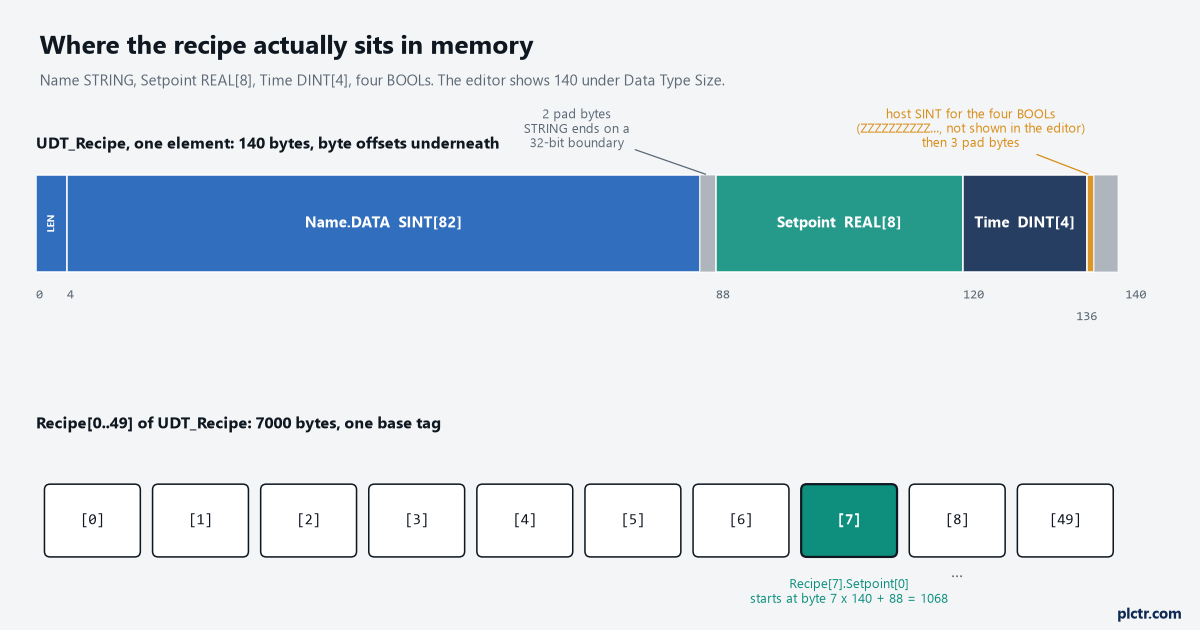
Two things to notice: the grey pad bytes that the editor never shows you, and the fact that Recipe[7].Setpoint[0] is just byte 1068 of a 7000-byte tag. COP sees the second fact and nothing else.
What the PLC recipe UDT array looks like in memory
UDT_Recipe in the figure has a Name of type STRING, Setpoint as REAL[8], Time as DINT[4] and four BOOLs — Enabled, UseSteam, TwoStage, Verified. The Data Access manual spells out how a Logix controller lays that down: SINTs on 8-bit boundaries, INTs on 16-bit, DINTs, REALs and every array on 32-bit, and the structure itself begins and ends on a 32-bit boundary. BOOLs do not get a byte each. They are mapped into a host SINT the editor hides from you, its name beginning with ten Zs, and up to eight consecutive BOOLs share one. Run the arithmetic and the 140 falls out. A default STRING is a DINT LEN plus DATA as SINT[82], which is 86 bytes, padded to 88 so the next member can start on a 32-bit boundary. Eight REALs are 32. Four DINTs are 16. The four BOOLs cost one host byte plus three of padding to bring the structure to a multiple of four. 88 + 32 + 16 + 4, and the editor shows you the total for free.
That number is worth knowing for two reasons, and only one of them is size.
Size first: 63% of this recipe is the name, and if the array is going to be 2000 deep rather than 50, a custom string type of 20 characters — 4 + 20, exactly 24 bytes — takes the recipe from 140 bytes to 76. The less obvious reason is that the I/O and Tag Data manual’s guidance about ordering members is not cosmetic. Put BOOL, DINT, BOOL, DINT, BOOL, DINT, BOOL in that order and each BOOL gets its own host byte and its own three pad bytes: 28 bytes for what is 16 bytes if the four BOOLs sit together. The manual says to place members of the same type in sequence and shows exactly that comparison. Nobody does it on the first UDT. Everyone wishes they had on the fiftieth. One more thing the same manual rules out: a member array inside a UDT must be one-dimensional. Setpoint as REAL[8] is fine; REAL[2,4] is refused by the editor.
So the type is 140 bytes, the array is 7000, and neither number is negotiable.
Where the recipes live, and where the HMI is allowed to write
Three tags, and only one of them is an array.
Recipe is UDT_Recipe[50]
Active is one UDT_Recipe, and it is the only recipe the machine logic reads: every setpoint in every rung comes from Active.Setpoint[n], never from the array. Edit is a second single UDT_Recipe, and it is the only recipe the HMI writes. Why not let the HMI write straight into Recipe[HMI.Sel]? Because most HMI packages address a tag by a fixed name and cannot re-point at a different array element at runtime without tricks, and because even the ones that can leave you with an operator changing a value in the recipe the machine is currently running. Putting the indexing in the controller fixes both. The HMI writes Edit, presses Save, and the controller decides which element Edit goes into. If the general idea of indexing by a tag value is new, PLC indirect addressing is the shorter read.![Three ladder rungs: a LIM range check on HMI.Sel gating a one-shot, a COP from Recipe[HMI.Sel] into Active with Length 1, and a COP from Edit into Recipe[HMI.Sel] with Length 1](https://plctr.com/wp-content/uploads/recipe-udt-array-cop-2.png)
The whole recipe system is two COPs. The LIM in front of them is not decoration: an index of 50 on a 50-element array is a major fault, type 4 code 20, and the HMI will send you one eventually.
The Load rung is COP Recipe[HMI.Sel] Active 1. The Save rung is COP Edit Recipe[HMI.Sel] 1. Length is 1 in both, and the reference manual’s definition of Length is the sentence to memorise: the number of destination elements to copy. The destination in the Load rung is Active, a single UDT_Recipe, so one destination element is 140 bytes and the whole recipe moves. The manual’s own example does the same thing with a TIMER, twelve bytes, Length 1.
The copy that breaks, in three shapes
COP and CPS, the manual says, operate on contiguous memory and perform a straight byte-to-byte memory copy. No type checking, no member matching. That is what makes them fast and it is what makes each of the following possible.
Length typed as bytes
Somebody reads that a recipe is 140 bytes and types 140 into Length. On the Load rung the destination is Active, so the instruction requests 140 x 140 = 19,600 bytes and the controller clamps that at the end of the destination tag — 140 bytes, the whole of Active, nothing else. It works. It looks correct. It gets copied to the Save rung, and now the destination is Recipe[HMI.Sel], which changes what the end of the tag means. The manual’s rule about where a copy stops is the one that matters: the end of the destination or source tag is defined as the last byte of the base tag. The base tag is Recipe, all 7000 bytes of it. With HMI.Sel at 7, 19,600 bytes requested, 6020 bytes available between Recipe[7] and the end of the array, so 6020 bytes are written: Edit copied 43 times over, into Recipe[7] through Recipe[49]. Every recipe from the one being saved to the end of the array is now the same recipe. And nothing faults, because the instruction never left the base tag. Here is the part that turns a mistake into a mystery. The manual lists a third clamp for CompactLogix 5380, ControlLogix 5580 and the GuardLogix versions of both: the number of bytes in the source tag. Edit is 140 bytes, so on a 1756-L83E or a 5069-L320ER the same rung with the same Length writes 140 bytes and stops. Somebody proves the rung on the bench with a 5380, ships the program to a plant full of 1756-L72s, and the first Save on site flattens the recipe table.
Nobody suspects the COP, because it was tested. On the one family that forgives it.
![Table comparing what COP(Edit, Recipe[7], 140) writes on a 5570 or 5370 against a 5580 or 5380: 6020 bytes and 43 recipes overwritten against 140 bytes and one](https://plctr.com/wp-content/uploads/recipe-udt-array-cop-3.png)
The reference manual lists a third limit that only the 5580 and 5380 families apply, the size of the source tag. That is the whole difference between the two columns.
Source and destination of different types
The second shape is a COP whose Source and Dest are not the same kind of thing. COP Recipe[HMI.Sel].Setpoint[0] Active 8 reads like “copy the eight setpoints into Active”. Length counts destination elements, and the destination element is a whole UDT_Recipe. Eight of them is 1120 bytes requested, clamped to the 140 bytes of Active. So 140 bytes are read starting at Recipe[7].Setpoint[0] — byte 1068 of the array — and written starting at Active.Name.LEN. Trace the bytes and it is worse than a wrong value. Active.Name.LEN receives the four bytes of Recipe[7].Setpoint[0], so a setpoint of 65.5 becomes a string length of 1115881472. Active.Name.DATA fills with the rest of the setpoints and the four times, unprintable. Active.Setpoint[0..7] receives bytes 36 to 67 of Recipe[8].Name — the next recipe’s name, and for any name shorter than 36 characters, whatever was left in those bytes, which is usually zeros. Active.Time gets the tail of the same name. And should a long name reach that far, the four letters “Pale” read as a REAL are 6.98e+22.
Eight setpoints of 0.0 and a name nobody can read.
Nobody diagnoses that from the faceplate. What usually happens instead is the dead end, and it costs a day: someone decides that COP cannot handle STRINGs, replaces the one instruction with a MOV per member and a separate string copy, and the machine runs. The COP was never the fault. The Length was, and the MOV-per-member version now has to be edited every time a member is added to the UDT.
A member added in the middle
The third shape does not involve the COP instruction at all until it does. Six months in, somebody adds Temperature as REAL[4] between Setpoint and Time. Every offset from byte 120 onward moves by 16. Inside the controller that is fine: Recipe, Active and Edit are all the same type and the editor re-lays all three.
Every copy that lives outside the type is now sixteen bytes wrong, and none will say so.
A SINT[140] buffer that the recipe gets COPied into for a MSG to the packaging line’s controller, whose own UDT_Recipe was not updated. A byte image saved by a data logger. The other controller reads Time[0] at byte 120 and gets Temperature[0]. None of it faults and all of it is 16 bytes out. Two habits prevent this. New members go on the end of the UDT, never in the middle, and the first member of the UDT is a DINT called Version that the receiving side checks before it copies anything. The habit of keeping a real backup of the array before touching the type is covered in backing up a ControlLogix properly, and it is the one that saves you when the first two were skipped.
When it has to be CPS
COP can be interrupted. A higher-priority task, an I/O update, the HMI’s write, any of them can land between the first byte and the last, and the copy delivers a recipe that is half old and half new. The reference manual’s table says to use CPS when the source or destination is a produced or consumed tag, I/O data, data another task can overwrite, or a non-atomic tag that a remote device writes to. Tasks that try to interrupt a CPS are delayed until it finishes, which is exactly what you want on a Load. It is also not the whole answer, and the manual says so in the next row: use interlock application code to ensure a remote client is not updating the source while the CPS instruction is executing. CPS holds off tasks on the controller. It cannot hold off the HMI. That is the second reason Edit exists: the HMI writes Edit and then sets HMI.Save, the controller copies Edit on the one-shot and clears the bit, and the HMI is told not to write Edit again until it sees Save_Done. A handshake of three bits, and the recipe is never copied while it is being typed. The same rule applies with more force when the array itself is a produced tag going to another controller, which has its own size limits described in produced and consumed tags on ControlLogix.
CPS stops the controller interrupting itself. The handshake stops the operator.
Sizing it without guessing
SIZE is the instruction to use instead of the number 49. SIZE(Recipe, 0, RecipeCount) returns the element count of dimension 0 into RecipeCount, and the LIM rung compares against RecipeCount - 1. Resize the array to 100 later and nothing else changes. The instruction takes arrays, arrays inside a structure and string tags, and it returns elements, not bytes, so it will not tempt anyone into typing a byte count into a Length again. Test it the way the manual tells you to, in a sentence that reads like it was written after somebody’s bad day: test and confirm that the instruction does not change data that it should not change. On a bench controller, fill Recipe[0..49] with fifty different names, save into Recipe[7], and then look at Recipe[8] and Recipe[49]. If either has changed, the Length is wrong, and you have found it on a bench rather than on a line.
Fifty different names is the whole test rig, and it takes ten minutes.
What to check next
Open the Data Type Editor on your recipe UDT and read the Data Type Size. If it is more than the members add up to, the BOOLs are scattered and the order is costing you padding — harmless at 50 recipes, worth fixing at 2000. Then find every COP and CPS in the project whose Source or Dest is inside that array, and check that Length is 1 and that Source and Dest are the same type. Anything else, work the byte arithmetic above before deciding it is fine. If the UDT itself is new to you, the older walkthrough on creating a user-defined data type in RSLogix 5000 covers the editor itself.