The scanner delivers LHR3402\PAX\0000241 to a ControlLogix 5580, 19 characters, and the routine that splits it has worked for eleven months. This morning one bag arrives with a label printed without separators, and the minor fault log picks up type 4, code 56. The routine keeps running. The message tag holds whatever it held last time, and the divert decision downstream is made on a flight number from the previous bag.
One instruction returned 0 and the next one would not accept it.
FIND reports the position of one string inside another and, in 1756-RM018A’s words, otherwise the Result is zero. MID takes a Start operand that must be a number between 1 and the DATA size of the Source. Zero is not in that range, so a FIND feeding a MID without a check in between raises a minor fault on every message that does not match — and because it is minor, nothing stops. That is the single most useful thing to know about the string set, and everything below is the shape of the three instructions that lets you avoid it.
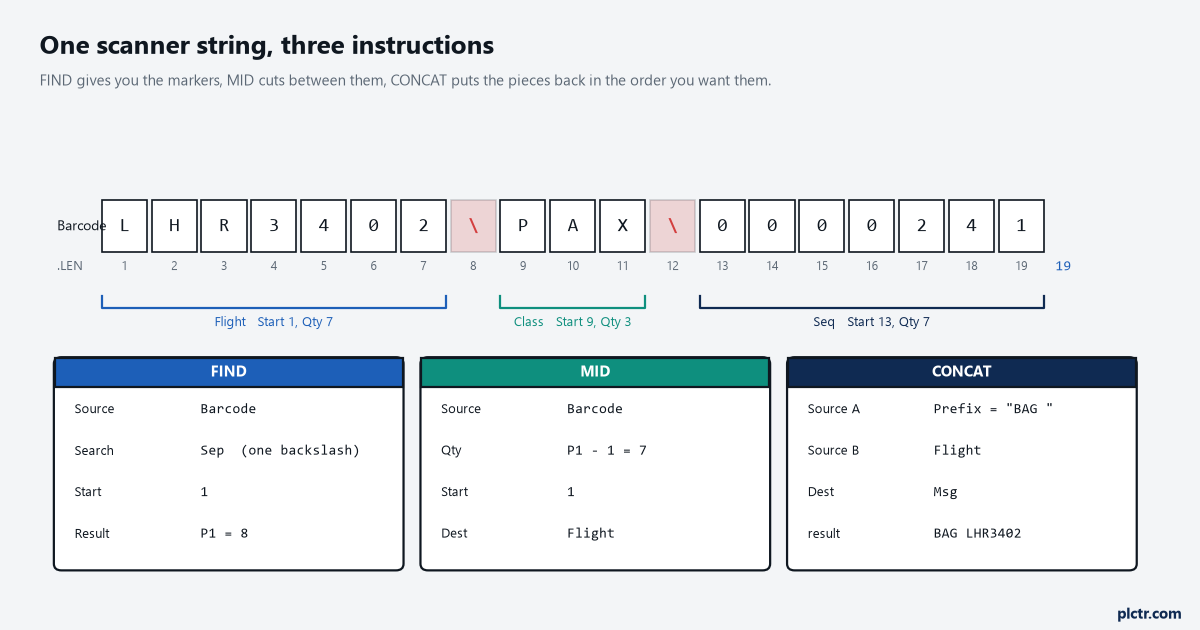
Every position in the string set is 1-based. The L is character 1, the first separator is character 8, and the Start operands below are all counted the same way.
A STRING is two members, and only one of them holds text
.LEN is a DINT. .DATA is an array of SINT.
The default STRING data type carries a maximum of 82 characters and you can create your own string types with a configurable length, which is why the operand tables in the reference say ANY_STRING rather than naming one type. The part worth internalising is that .LEN is a separate number from the characters themselves: nothing in the data type enforces that .LEN matches how much of .DATA is meaningful, and every one of the string instructions trusts it. That is why the same fault shows up at the top of three different instruction tables — a minor fault, type 4 code 51, when the LEN value of the string tag is greater than the DATA size of the string tag. The recovery advice printed beside it says what causes it: check that no instruction is writing to the LEN member of the string type tag, then enter the number of characters the string contains. That recovery reads like boilerplate until you notice what it implies: the controller cannot work out the real length for you, because a .DATA element holding 16#00 is a legitimate character and a SINT array full of them is a legitimate string. .LEN is the only statement anywhere in the tag about how much of the array means anything, and every instruction takes it at face value.
Three things write .LEN behind your back.
A COP or a CPS that lands across a string tag copies the whole structure including .LEN, which is the same class of problem as a COP into a recipe UDT and has the same cure — know what the instruction is counting. An HMI object bound to .LEN for a character-count display can write it back if the object is not read-only. And a raw serial or socket read that fills .DATA and leaves .LEN at whatever it was leaves a string tag that looks perfect in the tag monitor and faults every instruction that touches it.
The tag monitor shows you .DATA. The instructions read .LEN, and nothing reconciles the two.
Three instructions, one line of scanner data
The barcode in the opening is a flight, a class and a sequence number separated by backslashes, which is close enough to the reference’s own MessageView example to use the same method.
That example searches for a backslash and records its position. So does this one.
FIND(Source, Search, Start, Result) locates the starting position of a specified string within another string, searching from Start. MID(Source, Qty, Start, Dest) copies Qty characters beginning at Start. CONCAT(SourceA, SourceB, Dest) puts the characters of Source A first, followed by the characters of Source B. Unless the Source and the Destination are the same tag, the Source is unchanged — which is the permission you need to concatenate into a tag that is also an input, and the reason the assembly below works without a scratch tag for every step.
Three instructions, three jobs: find the marker, cut the field, glue the result.
Here is the whole job in structured text:
FIND(Barcode, Sep, 1, P1);              (* P1 = 8  *)
IF P1 > 0 THEN
    FIND(Barcode, Sep, P1 + 1, P2);     (* P2 = 12 *)
END_IF;
IF P1 > 0 AND P2 > P1 THEN
    MID(Barcode, P1 - 1, 1, Flight);              (* Qty 7, Start 1  -> LHR3402 *)
    MID(Barcode, P2 - P1 - 1, P1 + 1, Class);     (* Qty 3, Start 9  -> PAX     *)
    MID(Barcode, Barcode.LEN - P2, P2 + 1, Seq);  (* Qty 7, Start 13 -> 0000241 *)
    CONCAT(Prefix, Flight, Msg);        (* BAG LHR3402             *)
    CONCAT(Msg, SeqLabel, Msg);         (* BAG LHR3402 SEQ         *)
    CONCAT(Msg, Seq, Msg);              (* BAG LHR3402 SEQ 0000241 *)
END_IF;
Two IF guards, and they are the entire difference between eleven months of working and a fault.
The first guard stops the second FIND being handed a Start of 1 on a string where the first search already failed, which would be harmless but pointless. The second stops all three MID instructions receiving a negative or zero Quantity, which is what P1 - 1 becomes when P1 came back as 0. Without them the routine raises type 4 code 56 twice — and the third MID does not fault at all, which is the worse half. With P2 at 0 its Quantity becomes Barcode.LEN and its Start becomes 1, so it copies the entire 17-character label into Seq and passes every validity rule doing it. Flight and Class still hold the previous bag, Seq holds something that is not a sequence number, and the message assembled from the three is well-formed and 33 characters long. The reference’s own MID example — characters 9 through 17 of a baggage bar code are the flight number and destination airport — has exactly the same exposure, and the manual does not write the guard for you.
MID is available in ladder and structured text. It is not available in function block, and neither is FIND or CONCAT.
If the parsing has to live on an FBD sheet, it lives in a called ST routine instead, which is one more reason ladder people end up writing structured text.
The 1-based arithmetic, written out once
Three rules, all from the operand tables, and getting them wrong is what produces code 56.
Start on a FIND is a number between 1 and the DATA size of the Source. Start on a MID is the same range. And the one people derive wrongly: on a MID, the Start plus the Quantity must be less than or equal to the length size of the Source plus 1. Check the last field of the barcode against that rule — Start
Qty is 7, the source length is 19, and 13 plus 7 is 20, which is 19 plus 1. It fits exactly, which is what you want, and if you had written Barcode.LEN - P2 + 1 for the quantity out of an off-by-one worry it would not.| Field | expression | Start | Qty | Start+Qty | LEN+1 |
|---|---|---|---|---|---|
| Flight | P1 - 1 at 1 | 1 | 7 | 8 | 20 |
| Class | P2 - P1 - 1 at P1 + 1 | 9 | 3 | 12 | 20 |
| Seq | Barcode.LEN - P2 at P2 + 1 | 13 | 7 | 20 | 20 |
The separator positions are what make the expressions readable.
Once you have P1 and P2 as numbers, each field is “the gap between two markers” and the arithmetic writes itself: the length of the field between markers a and b is b - a - 1, the field before the first marker is P1 - 1 characters long starting at 1, and the field after the last marker runs to Barcode.LEN. That generalises to any number of fields, and it is why FIND in a loop with a moving Start beats trying to remember which fixed columns a supplier used — especially when the supplier changes the label format and the fields move but the separators do not.
Fixed columns are a promise somebody else made and can withdraw without telling you.
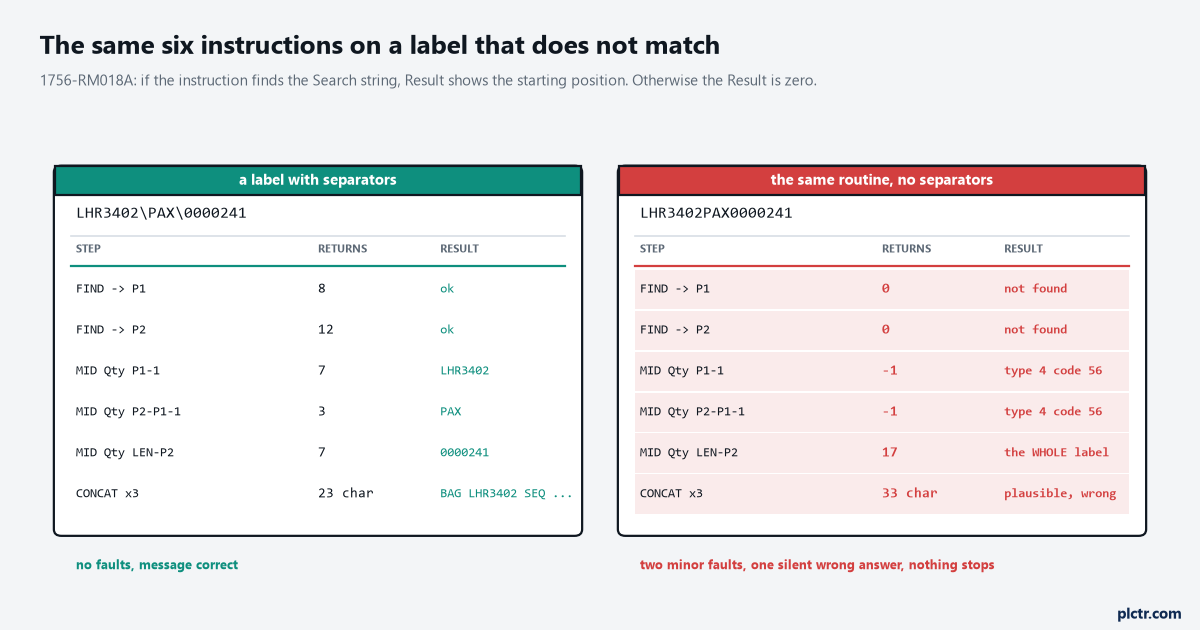
Two rows fault and one does not, which is the row to worry about. MID with a Quantity of 17 starting at 1 is a legal instruction on a 17-character source, so Seq gets the whole label and nothing anywhere says so.
The three fault codes, and why they do not stop anything
All of these are minor faults, which means the controller logs them and carries on.
Type 4 code 51 is the .LEN problem, and on CONCAT it has a second cause worth separating out: the sum length of Source A and Source B being greater than the DATA size of the string tag. So a message assembled from six fragments into an 82-character STRING faults silently the first time an operator types a long enough comment into one of the fragments, and the string you get is whatever the instruction managed. Type 4 code 52 belongs to MID and INSERT and means the output string is larger than the destination; the recovery the manual gives is to create a new string type large enough for the output and use it as the destination data type, which is the right answer and a download to apply. Type 4 code 56 is the Start or Quantity being invalid, and on FIND it also covers the Source string being empty.
Empty source, code 56. Not a zero Result — a fault.
That distinction is worth holding because it means FIND has two failure modes and only one of them is quiet. A search that runs and finds nothing gives you Result = 0 and no fault. A search on a string whose .LEN is 0 gives you a minor fault instead, so a routine that runs before the scanner has delivered anything faults on the first scan after a download and then works perfectly. That is a fault in the log that nobody can reproduce, and the fix is one comparison: do not call FIND unless Barcode.LEN > 0. The minor fault codes list is where these surface, and a routine that parses scanner data is worth wiring to a counter so the count of bad labels is visible rather than buried.
What it costs to build a long message
Per character, which is the thing to design around.
LOGIX-RM002B gives CONCAT on a ControlLogix 5580 or CompactLogix 5380 as 0.143 µs plus 0.10 µs for each character, where the character count is the number in Source A plus the number in Source B. MID is 0.130 µs plus 0.11 µs per destination character; INSERT is 0.156 plus 0.10; DELETE is 0.132 plus 0.11. The 23-character message above costs about 5 µs for all three concatenations and under 3 µs for the three MID instructions, which is nothing. Build the same message by appending one field at a time in a loop over 40 fragments and the per-character term is paid on the whole accumulated string every time — appending to a 200-character message costs 20 µs for that one CONCAT, and forty of those is 800 µs in a task you probably wanted to keep under a millisecond.
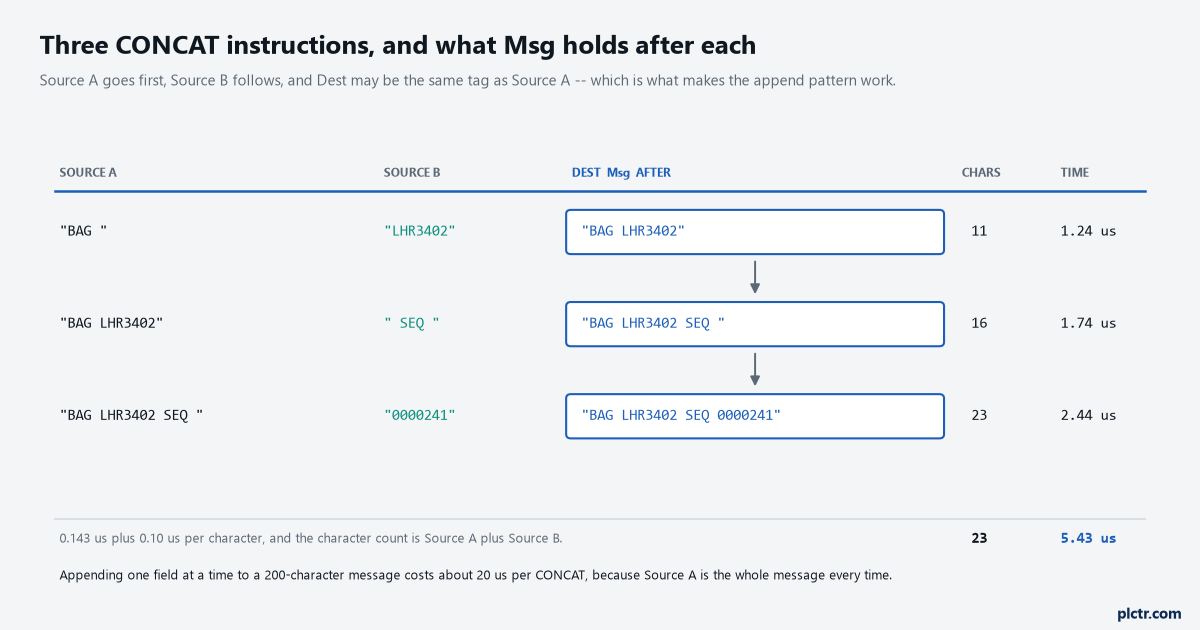
The per-character term is charged on Source A plus Source B, so every append pays for the whole message so far. Three steps is 5.4 µs; the same 23 characters assembled one field at a time is not.
Two concatenations of long pieces beat twenty of short ones.
Getting a number into the message is a different instruction and a different subject — DTOS and RTOS convert a value to a string of ASCII characters, and STOD and STOR go back the other way. They belong with the serial read and write instructions rather than with the three here, and they have their own fault conditions. If the message is going somewhere rather than to a screen, the destination usually decides the format before the instructions do, and a line that is already tracking parts through zones with a shift register generally wants the sequence number rather than the whole label.
Send the field you need, not the label you were given, and the downstream parsing disappears.
What to check first
Put Result from every FIND on a watch window alongside the string it searched, and look at what happens on a label the line has never seen. Zero is the value to design for, not the value to treat as impossible, and a single IF Result > 0 between the FIND and the MID removes the whole failure class. Then check .LEN on each string tag against how many characters .DATA really holds — if a COP, an HMI object or a raw read has been near that tag, they will not agree.
One comparison, in front of one instruction, and the bad-label case stops being a fault.
If the fields are still going into the wrong variables after that, write the Start and Qty for each MID into two DINTs and watch them rather than reading the expressions. Start plus Quantity against Source.LEN + 1 is a comparison you can make on screen in five seconds, and it settles which of the three instructions is wrong. Where the parsed result feeds a divert or a reject, the counting side of that is in sortation verification and the mis-sort counter.