The MSG Control Tag on a Logix Controller: What Each Tab Writes Into It
Line_Msg.DN came true on rung 13 of a 1756-L71 and the forty DINTs the rung was guarding still held last shift’s numbers. The bit had been set by a different message — a four-element write to a capper down on rung 40 — and the two rungs had been given the same control tag.
A MSG instruction stores nothing of its own. Every field you fill in on the Message Configuration dialog is written into the MESSAGE tag named on the rung, which is why the messages programming manual, publication 1756-PM012L-EN-P, states flatly that each MSG instruction gets its own control tag, of data type MESSAGE, at controller scope, and not inside an array or a UDT. Understand that the tag is the message and the rest of this follows without having to be memorised.
Nothing on that dialog belongs to the rung. The rung only names the tag.
Where each field is stored
Two tabs carry the settings and Rockwell writes its procedures against both of them by name.
The Configuration tab holds what the message is: Message Type first, because the rest of the tab changes shape depending on it, then Source Element, Number Of Elements, Destination Element, and for a CIP Generic message the Service Code, Class, Instance and Attribute. Several of those land in members you can see in the tag editor — Number Of Elements is .REQ_LEN, the far-end tag name is .RemoteElement, and the Class, Instance and Attribute boxes are .Class, .Instance and .Attribute. The Communication tab holds where it goes: the Path, whether the message is Connected, whether to Cache Connections, and the Large Connection option for CIP Generic transfers above 480 bytes. Cache Connections is the .EN_CC bit and nothing else. And the third tab, the one no procedure in either manual is written against, is where the tag itself gets its Name, its Description and its Scope.
That third tab is the one this article is about.
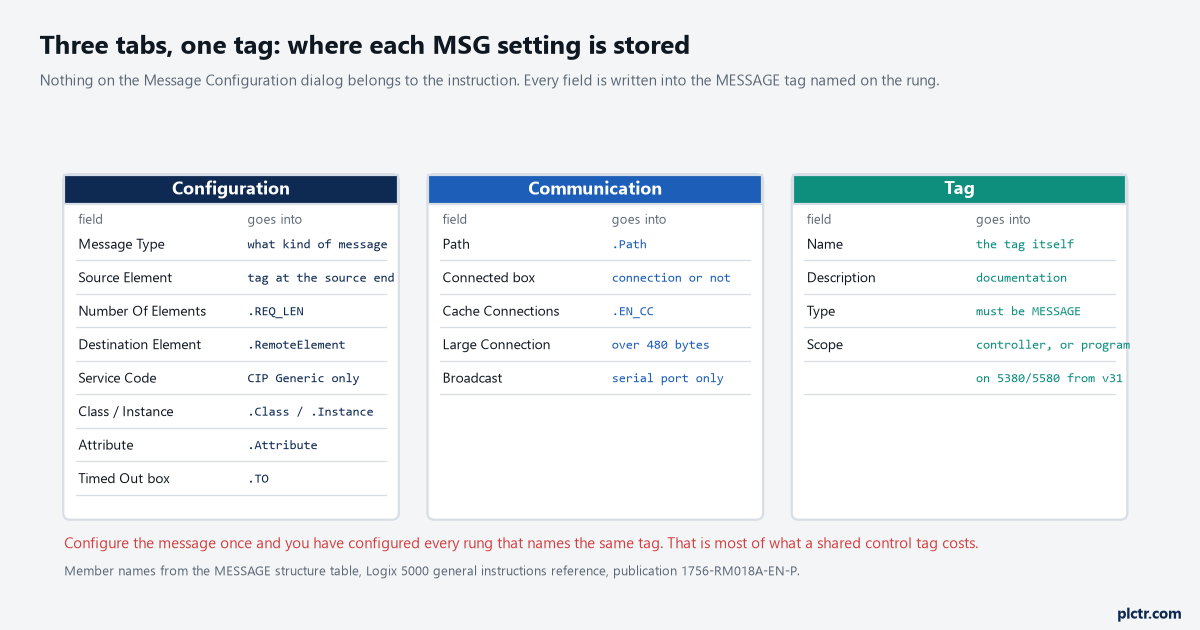
Left and middle are the settings; right is the tag they are stored in. The arrow only goes one way, and that is the whole idea.
Four rules for the control tag, and one reason behind all four
The messages manual gives them as a short list, and they look arbitrary until you know where the configuration lives.
Data type MESSAGE, because the structure has to have somewhere to put the path, the remote element and the status bits. Scope controller, with one exception added at version 31.00 — on a CompactLogix 5380, ControlLogix 5580 or 5590 and the GuardLogix equivalents, the source and destination tags may be program-local, though a tag named in the remote controller must still be controller scoped. Not part of an array, so no Msg_Ctl[4]. Not a member of a user-defined data type, so no Station.Msg however much you want your station UDT to be self-contained. The last two are the ones people argue with, and the answer to the argument is that the controller needs to find that structure at a fixed place and reach into it from the messaging subsystem, not from your rung.
None of those four is a style preference. All four sit in the guidelines table together.
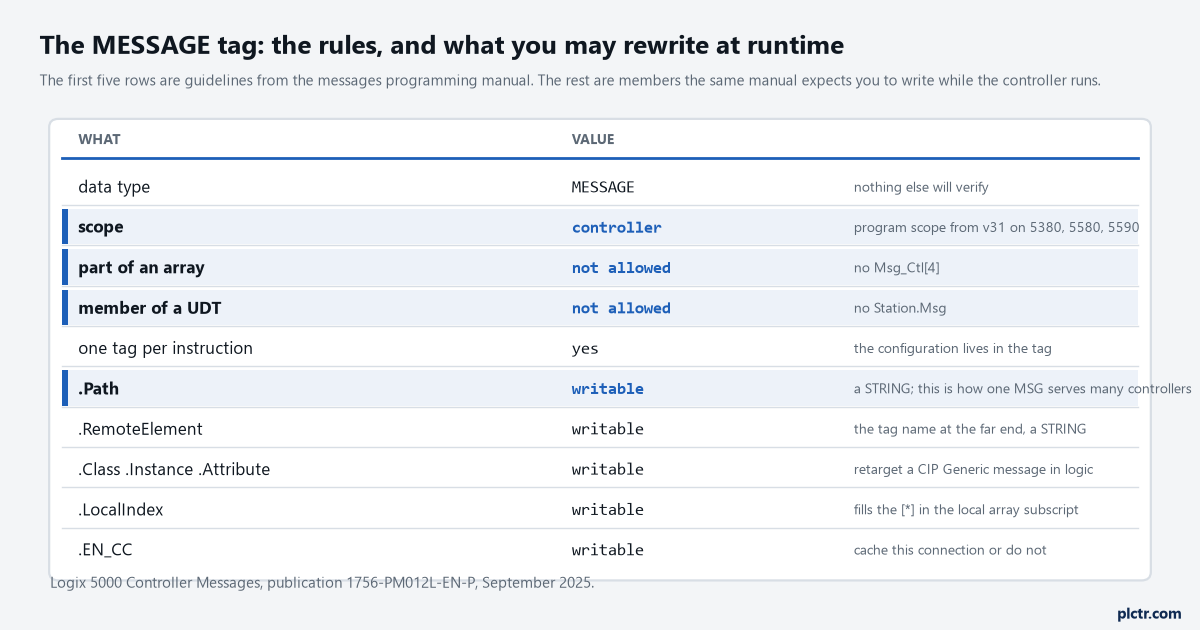
The top half is what you may not do. The bottom half is what the same manual expects you to do deliberately, and it is only possible because of the top half.
What sharing one costs
Four things, and they arrive in roughly this order.
The first one costs you an afternoon before you have noticed anything is wrong: open the dialog from either rung and you are editing one configuration, so the moment you set rung 40 to CIP Data Table Write you have also set rung 12 to it, and rung 12 now writes forty DINTs into a tag it was supposed to read. The second is the one at the top of this page — there is one set of status bits, so .DN tested anywhere in the project is whichever message finished last. The third is that .ERR and .EXERR hold the most recent failure from either rung, so the MSG error code you sit down to decode may belong to the message you were not looking at. The fourth is the one that makes the other three take so long to find: cross-referencing the tag returns two rungs and nothing in the cross-reference tells you which of them produced the state you are looking at.
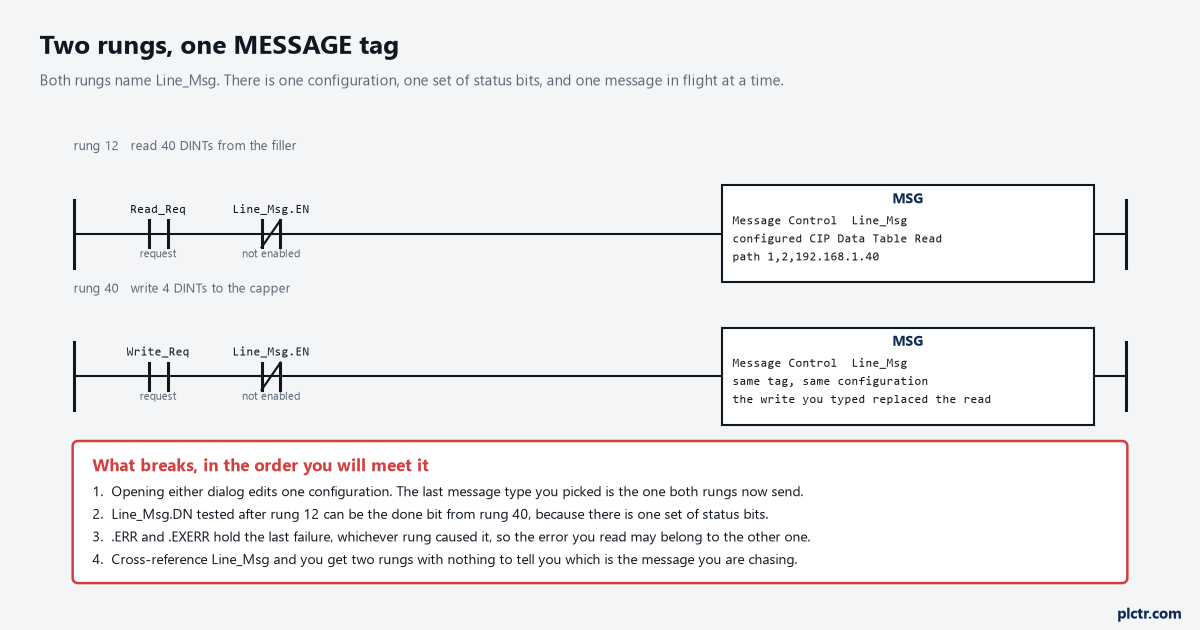
Neither rung is wrong on its own. The defect is in the tag name they have in common.
There is no verification error for this. The project downloads, both rungs run, and the machine works until the day the two requests overlap.
Copy .FLAGS before you test a bit twice
The reference manual gives this as an instruction rather than as advice, and it is the least-known sentence in the MSG documentation: if you check the status bits in more than one place in your logic, use a copy of the bits, because the bits may change during the scan.
.FLAGS is an INT holding all of them at once — .EW at bit 2, .ER at 4, .DN at 5, .ST at 6, .EN at 7, .TO at 8 and .EN_CC at 9 — so one MOV into a spare INT gives you a snapshot that will not move under you. The reason it moves is worth understanding rather than just working around: a MSG is asynchronous, it runs in the system overhead time slice and not on your rung, and the .EN bit stays set from the moment the rung goes true until both the rung is false again and either .DN or .ER has set. Test .DN on rung 20 and again on rung 90 and the message can genuinely have completed in between. On a long routine that is not a corner case, it is Tuesday.
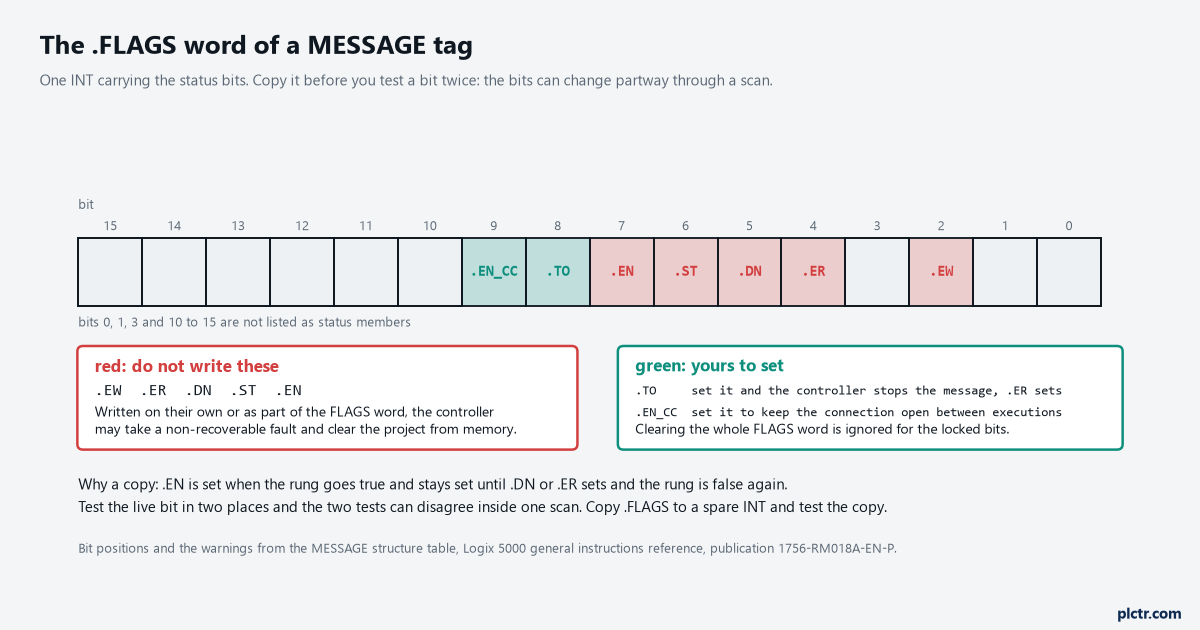
Five of the seven named bits are read-only in the strongest sense available. The manual says writing them may take a non-recoverable fault, and a non-recoverable fault clears the project out of the controller.
Two of those bits are yours. Setting .TO stops the controller processing the message and sets .ER, which is how you abandon a message that is not coming back; setting .EN_CC caches the connection. The other five belong to the controller, and the warning against writing them covers writing the whole .FLAGS word as a way of clearing them.
Do not clear .FLAGS to reset a message. Toggle the rung instead — .DN and .ER are reset the next time the rung goes false to true.
The upside of all this
Because the configuration lives in the tag, you can change it while the machine runs, and the messages manual builds a whole chapter on that.
One MSG instruction, a user-defined type with a Path member and a RemoteElement member, an array of those, and a COP that loads element n into the instruction’s members before each execution: that is one rung talking to a different controller every time it fires. .LocalIndex does the same job on the local side, filling in the [*] you left in the Source or Destination Element subscript. .Class, .Instance and .Attribute are writable for the same reason, so a single CIP Generic message can walk a list of attributes rather than needing one rung each.
Note the shape of that. It is deliberate reconfiguration of one tag by one instruction — not two instructions quietly reconfiguring each other.
A few more numbers belong in the same conversation, because they decide how many of these you can have in flight. The throttle in front of the message queue holds 16, the queue itself holds 48, and a seventeenth simultaneous message sits with .EN set and .EW clear until a position opens. A message that is neither connected nor cached also borrows one of the controller’s unconnected buffers for the duration — there are 10 of them by default on a 5570 or 5370, each costing 1.2 KB of controller memory, and up to 40 if you go and ask for more. Caching is the other lever, and from firmware revision 12 the controller will hold 32 cached connections open. None of that logs anything when it runs out of room, which is why a message that “sometimes takes two seconds” is usually queueing rather than networking.
Sixteen is the number to remember. The forty-eight behind it rarely fills.
If you are moving a steady block of data between two controllers on every scan, the honest answer is often not a message at all: produced and consumed tags do that job without touching the queue.
What to do with the messages already in the project
Open the controller tags, filter on data type MESSAGE, and count them. Then count the MSG instructions in the cross-reference. If the two numbers do not match, the difference is the number of shared control tags in the project, and every one of them is a rung whose status bits belong to somebody else.
Fix the duplicates before anything else, because every other message problem you go on to diagnose will lie to you while they are there. After that, go and find the rungs that test .DN twice and give them a copy of .FLAGS to test instead. Neither change alters what the machine does on a good day, which is exactly why they never get made.