AFI, NOP and TND: Changing a Routine Temporarily Without Deleting Anything
An exhaust fan had been running since 06:14 with the temperature 9 °C below its setpoint, and the rung that should have dropped it looked perfectly healthy in Studio 5000. Four rungs above it sat XIC Commissioning_Mode and a TND. Commissioning_Mode had been set true by somebody testing a purge sequence three weeks earlier, and everything below that rung had not executed since.
Three instructions do this job and they work at three different sizes: AFI kills the one rung it sits on, TND ends the routine from wherever it is true, and NOP does nothing at all but hold a rung open so the rung number and its comment survive. None of them deletes anything, which is the point, and all three are invisible enough that they need a note in the project when you use them.
Ladder on a 1756-L83E, v34. AFI and NOP are ladder-only; TND also exists in structured text as TND();.
What each of the three actually does
Start with the one that has no operands and no effect.
NOP is a placeholder. You can put it anywhere on a rung, it performs no operation whether the rung is true or false, and its whole value is that a rung carrying nothing but a NOP is still a rung: it keeps its number, it keeps its comment, and it shows up in a printout as a deliberate gap rather than as an absence. AFI is the same shape with teeth — no operands either, but it sets its EnableOut to false, which means every instruction to the right of it on that rung executes as though the rung were false. The manual’s own description of the use case is “temporarily disable a rung while you are debugging a program”, and the execution table shows EnableOut cleared on prescan as well as on a false rung, so there is no window where an AFI’d rung does something. TND is the different one: it conditionally ends the routine. When it is true in a subroutine, control returns to the calling routine; when it is true in a main routine, control passes to the next program in the current task, which is the wording on page 694 of 1756-RM018A-EN-P — not to the end of the task, and not back to the start.
That last distinction is the one people get wrong. A TND in a main routine does not stop the task; the next program runs normally.
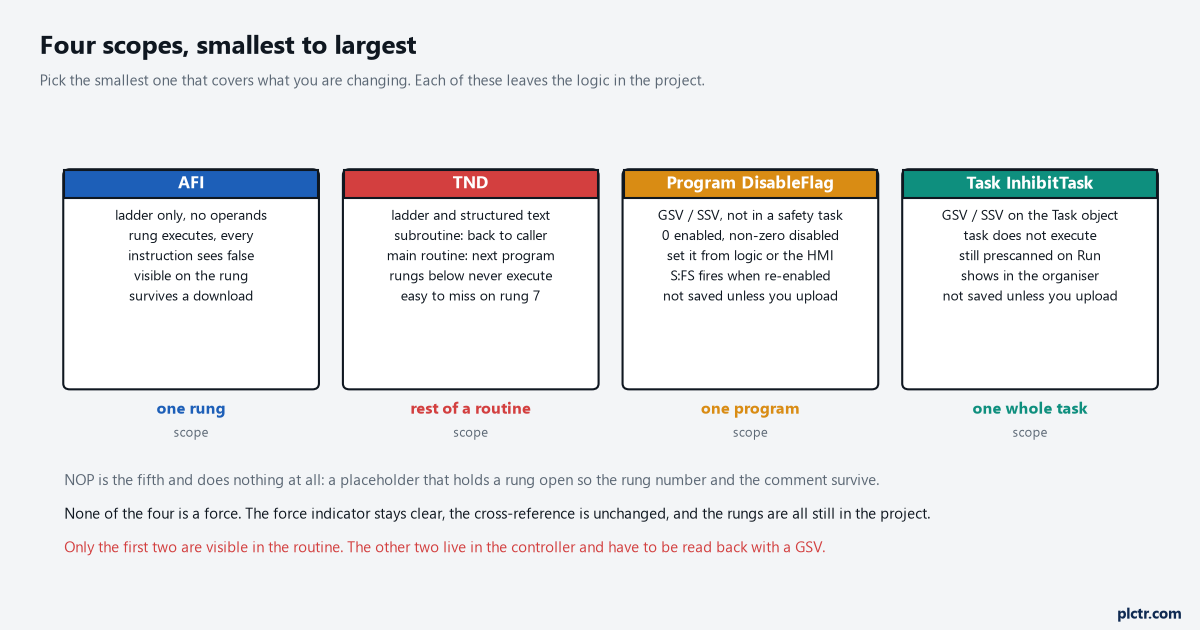
Pick the smallest scope that covers what you are changing. Everything here leaves the logic in the project and none of it needs a download to reverse.
The TND that outlived commissioning
Here is why this one is hard to find, and it has nothing to do with the instruction being obscure.
Every tool you would normally reach for still shows the rung as healthy. The cross-reference lists rung 8 as a writer of Exhaust_Fan, because it is one; the rung is in the routine, the instruction is not disabled, and monitoring the tag shows exactly the value that was last written to it. The OTE simply never executes, so the bit it wrote at 06:14 stands, the TON below it keeps its .ACC frozen at 8 420 of a 30 000 ms preset, and an OTU below the TND can never clear its latch — which means an alarm the operator is pressing reset on is not going to clear no matter how hard anyone presses. The one measurable clue is that the program got faster: read the Program object’s LastScanTime with a GSV, in microseconds, and it will be markedly lower than it used to be — 640 µs against the 1 180 µs it used to take — because half the routine is not being executed. Cross-referencing a tag to find every rung that writes it will tell you who the writer is; it will not tell you the writer is unreachable.
Scroll up. That is the whole technique, and it is embarrassing how often it is the answer.
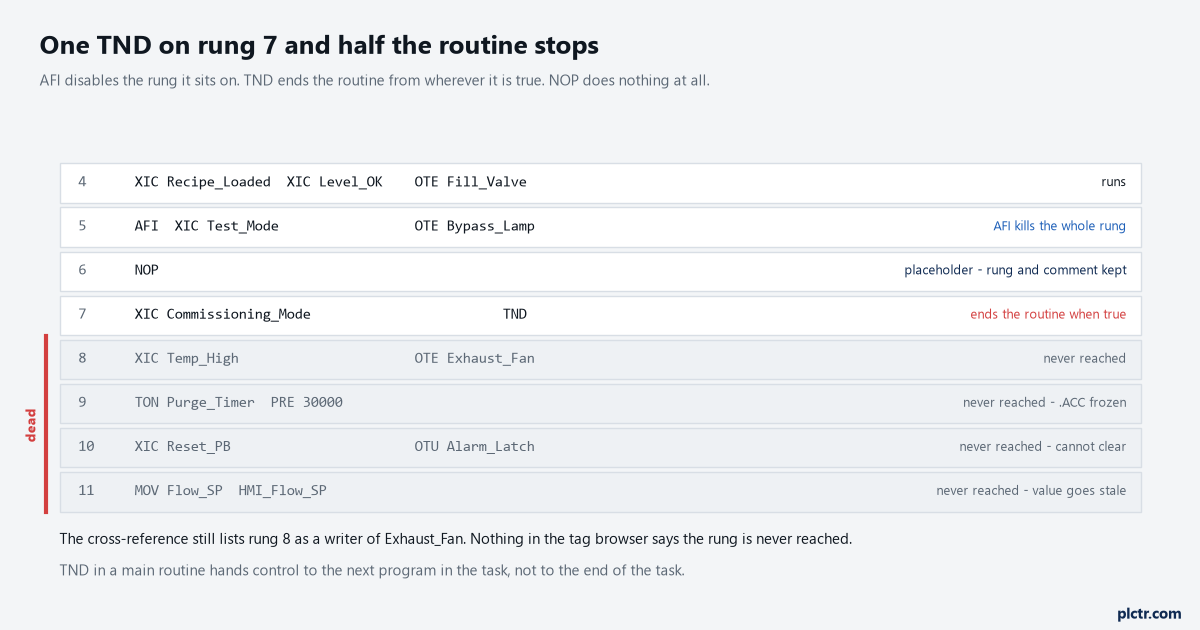
Rungs 8 to 11 are shaded because they are never executed, not because they are disabled. In the editor they look identical to rung 4.
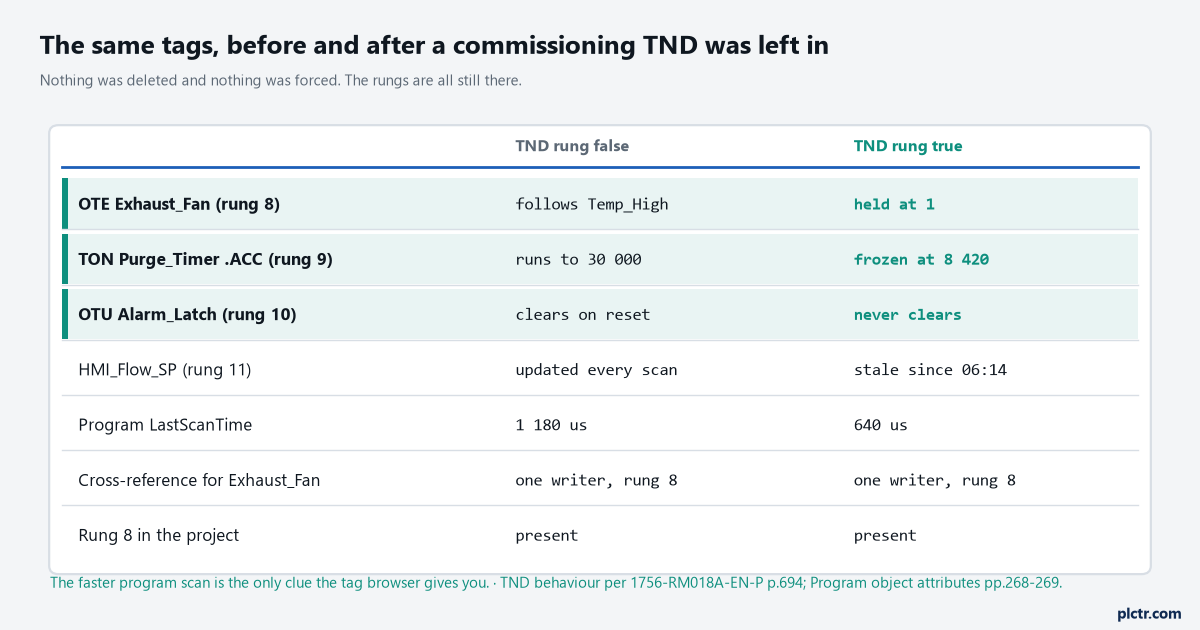
The last two rows are the diagnostic. The cross-reference is unchanged and the rung is still in the project, but the program scan halved.
AFI is not only for debugging
There is a sanctioned use for AFI that has nothing to do with switching a rung off, and it is genuinely useful.
An Add-On Instruction’s prescan routine runs when the instruction is prescanned, which happens on the transition to Run before any logic executes at all. The Design Considerations manual builds a tag-initialisation pattern out of that: create an AOI with an empty main logic routine, give it an InOut parameter for each tag you want initialised, put the initialisation in its prescan routine, and then invoke it from a rung that is always false — literally AFI( ) PrescanInit( ). Because the invocation is false and the AOI has no false routine, the instruction is skipped in normal scanning and costs almost nothing, but the prescan routine still runs. The manual points out the advantages over a first-scan rung: the invocation can live anywhere, including a fault handler, and the InOut parameters keep the backing tag down to about four bytes. It also notes the problem it is solving, which is that S:FS turns up in places people do not expect — on an SFC step, and when a program is uninhibited. The first scan bit and what it must never do covers that side of it; building an Add-On Instruction covers the parameters.
An always-false rung that does real work at prescan. It reads like a bug and it is in the manual.
When the rung is not the right unit
Two bigger switches, both of them written from logic rather than from the editor.
The Program object has a DisableFlag attribute: zero means execution enabled, anything non-zero means disabled, and you can read it with a GSV or set it with an SSV from anywhere with access to that class — so an HMI button writing 1 to a DINT can take a whole program out of service without anyone opening Studio 5000. The Task object has InhibitTask, which does the same job one level up, and it carries a detail worth knowing: an inhibited task is still prescanned when the controller goes from Program mode to Run or Test. Neither of these survives on its own. The manual is explicit that SSV changes have to be uploaded to be saved into the project, so a program somebody disabled from the HMI in March is still disabled in the controller and enabled in the file on the laptop, and the next download quietly re-enables it. Write down which ones you use, in the project, where the next person will look — program documentation that survives a night call is the argument for doing it properly.
The dead end: hunting for a force
The reflex when logic is not doing what the rungs say is to check for forces, and forces are almost never it.
They are worth ruling out because it takes half a minute and because a force does show in the editor with an indicator you cannot miss, so the check is cheap and conclusive. What it will not find is any of the four scopes on this page, because none of them is a force: the rung is not overridden, the tag is not held, and the controller is doing exactly what the program says. The ordering that works is to check the force indicator, then look for a TND above the rung you care about, then GSV the Program object’s DisableFlag, then GSV the Task object’s InhibitTask. Four checks, thirty seconds each, and they cover a class of fault that otherwise eats an afternoon.
Before you leave site after using any of these, search the routine for TND and AFI and decide whether each one is meant to still be there. Then read the Program object’s LastScanTime and write the number in the commissioning notes, because a program scan time that has halved since last week is the cheapest evidence you will ever get that somebody switched something off.